Single sign-on (SSO) software lets people sign in once, with one set of credentials and one multi-factor prompt, and then open every assigned work app without separate passwords. For an IT team, the product behind that login is an identity provider (IdP): it holds the users, checks the password and second factor, and hands each app a signed assertion over SAML or OpenID Connect. This page compares six options for IT teams of roughly 3 to 100 people and MSPs: Microsoft Entra ID, Okta, JumpCloud, Google Cloud Identity, OneLogin and Keycloak.
The six differ less in the login screen than in what sits around it. Entra ID and Google Cloud Identity start from a directory you may already have, Okta and OneLogin sell the identity provider as a standalone product, JumpCloud adds device management in the same console, and Keycloak is software you run yourself. The real question for a small team isn't the login screen but which tier of each product unlocks the controls you need, so this page names the gate for every tool and gives every price with its unit.
- single sign-on products compared
- 6
- with a $0 starting option (Entra ID, Google Cloud Identity, Keycloak)
- 3
- Okta annual contract minimum for Workforce Identity
- $1,500
- pre-built integrations Okta lists
- 8,000+
Best single sign-on software at a glance
The short answer: if you run Microsoft 365, start with what Entra ID already includes, and if you run Google Workspace, start with Google Cloud Identity. Choose Okta when the identity layer should stay independent of both, JumpCloud when you also want to manage laptops from the same console, OneLogin for the lowest published per-user entry price among the standalone providers, and Keycloak only if someone on the team will own a server.
 Best if you already pay for Microsoft 365Microsoft Entra IDSSO is listed as unlimited on the Free plan. Conditional Access starts at P1, $7 per user per month, paid yearly.
 Best free start on Google WorkspaceGoogle Cloud IdentitySAML SSO, 2-Step Verification and groups on the Free edition. Automated provisioning and context-aware access need Premium at $8.40 per user per month.
 Best standalone identity providerOkta Workforce IdentityStarter is $6 per user per month with SSO, MFA and Universal Directory, with a $1,500 annual minimum and 8,000+ listed integrations.
 Best when SSO and device management share a consoleJumpCloudThe SSO package is $11 per user per month billed annually. Device Management is $9 and the combined Device Identity Management package is $13.
 Lowest standalone entry priceOneLoginBasic is $3 per user per month with SSO, MFA and Active Directory sync, and the catalog lists 6,000+ pre-integrated apps.
 Best if you can host it yourselfKeycloakFree under the Apache 2.0 license, with OpenID Connect, OAuth 2.0 and SAML 2.0. You pay in hosting and admin time instead of licenses.
| Tool | Type | Price (as listed) | App catalog | What the entry tier leaves out | G2 rating |
|---|---|---|---|---|---|
| Microsoft Entra ID | Workforce identity and access management | Free; P1 $7 and P2 $10 per user per month, paid yearly | Gallery apps plus custom SAML and OpenID Connect | Conditional Access (P1 and up) | 4.5 (915) |
| Google Cloud Identity | Workforce identity and access management | Free (50-user start); Premium $8.40 per user per month | Pre-integrated SAML apps plus custom SAML apps | Automated provisioning, context-aware access, Secure LDAP | 4.3 (34) |
| Okta Workforce Identity | Workforce identity and access management | Starter $6, Core Essentials $14, Essentials $17 per user per month, annual; $1,500 minimum | 8,000+ pre-built integrations | Adaptive MFA, Lifecycle Management, Access Governance | 4.5 (1,429) |
| JumpCloud | Directory-led device management | SSO $11 per user per month annual ($13 monthly) | Connector count not stated on the pricing page | Device management is a separate package | 4.5 (4,121) |
| OneLogin | Workforce identity and access management | Basic $3, Essentials $6, Business $10 per user per month | 6,000+ pre-integrated apps | Unlimited provisioning rules (Essentials), adaptive MFA and HR sync (Business) | 4.4 (291) |
| Keycloak | Open source identity and access management (self-hosted) | Free license; hosting and admin time are yours | Any app that speaks SAML 2.0, OpenID Connect or OAuth 2.0 | Vendor support and managed hosting | No reviews yet |
 The IT Lead Our product | Service account ownership reviews | Team $49/month (up to 250 service accounts), MSP $129/month (up to 1,000), per workspace | No reviews yet |
Prices are US list prices as shown on vendor pages on November 6, 2026. Enterprise tiers are quote-only.
Entra ID, Okta, JumpCloud, Google Cloud Identity and OneLogin all bill per user per month. The table below shows the annual list price for a team of 25 on the entry tier that includes SSO, and Keycloak's license is free but its upkeep isn't.
| Tool | Entry tier used | 25 users for a year | What that tier covers |
|---|---|---|---|
| Entra ID Free | $0 | $0 | SSO and MFA through security defaults; no Conditional Access |
| Google Cloud Identity Free | $0 | $0 | SAML SSO, 2-Step Verification, groups; 50-user starting cap |
| OneLogin Basic | $3 per user per month | $900 | SSO, MFA, Active Directory sync, 5 provisioning rules |
| Okta Starter | $6 per user per month | $1,800 | SSO, MFA, Universal Directory; above the $1,500 minimum |
| Entra ID P1 | $7 per user per month | $2,100 | Adds Conditional Access |
| Google Cloud Identity Premium | $8.40 per user per month | $2,520 | Adds automated provisioning and context-aware access |
| JumpCloud SSO | $11 per user per month | $3,300 | SSO and MFA plus password manager |
The list arithmetic above leaves out discounts and taxes and isn't a quote, and the rows don't buy the same thing. Keycloak is missing because its license is free and its cost is the server and the person who runs it.
What single sign-on software does, and what it doesn't
SSO is one function inside identity and access management, yet vendors sell it in four layers that are easy to blur together.
- The identity provider. The system that authenticates the person and issues the assertion. All six products here can be one.
- The directory. The list of users and groups the IdP reads. Entra ID and Google Cloud Identity are their own directories, Okta has Universal Directory, JumpCloud and Keycloak can be the directory or sit in front of Active Directory or LDAP.
- Multi-factor authentication (MFA). A second proof at sign-in. Every product here includes it. A layer such as
 Cisco Duo can add MFA and SSO on top of a directory you already run, free for up to 10 users and from $3 per user per month beyond that.
- Provisioning. Creating and removing the account inside each app when someone joins or leaves. This is usually the part that moves to a higher tier.
SSO covers people who sign in through a browser, not scripts. Service accounts, API tokens and scripts don't go through the IdP, so a team can have clean SSO yet still have a long list of non-human credentials that nobody owns. The last section returns to that.
Still, apps matter as much as the IdP: some SaaS products put SAML sign-in on a higher plan of their own, so check each app's pricing page before you assume the IdP can reach it.
How we compared the tools
The sources are each vendor's US pricing page, one product or documentation page on its SSO method and, where available, the G2 listing. We didn't run these products, so nothing here is a hands-on test, and we didn't review Ping Identity, Auth0, WorkOS or Rippling.
- Price and unit. Per user per month, the billing period and any contract minimum.
- Tier gate. Which plan unlocks Conditional Access, provisioning and device checks.
- Catalog. How many apps are pre-integrated and whether custom SAML or OpenID Connect apps are possible.
- Directory model. Whether the tool is its own directory or reads one you have.
- Who runs it. A vendor cloud or your own server.
- What users report. Rating and review count from G2 where available.
Directory-first: Entra ID and Google Cloud Identity
Microsoft Entra ID and Google Cloud Identity are the two options where the directory comes first and SSO is a feature of it. If your people already have a Microsoft 365 or Google Workspace account, the identity provider is already running, so you're not starting from zero. The work isn't setup but deciding whether the included tier is enough.
Microsoft Entra ID
Microsoft Entra ID
Pricing page and SSO documentation, November 6, 2026
A team that already holds Microsoft 365 licenses and wants one sign-in policy for Microsoft and third-party apps.
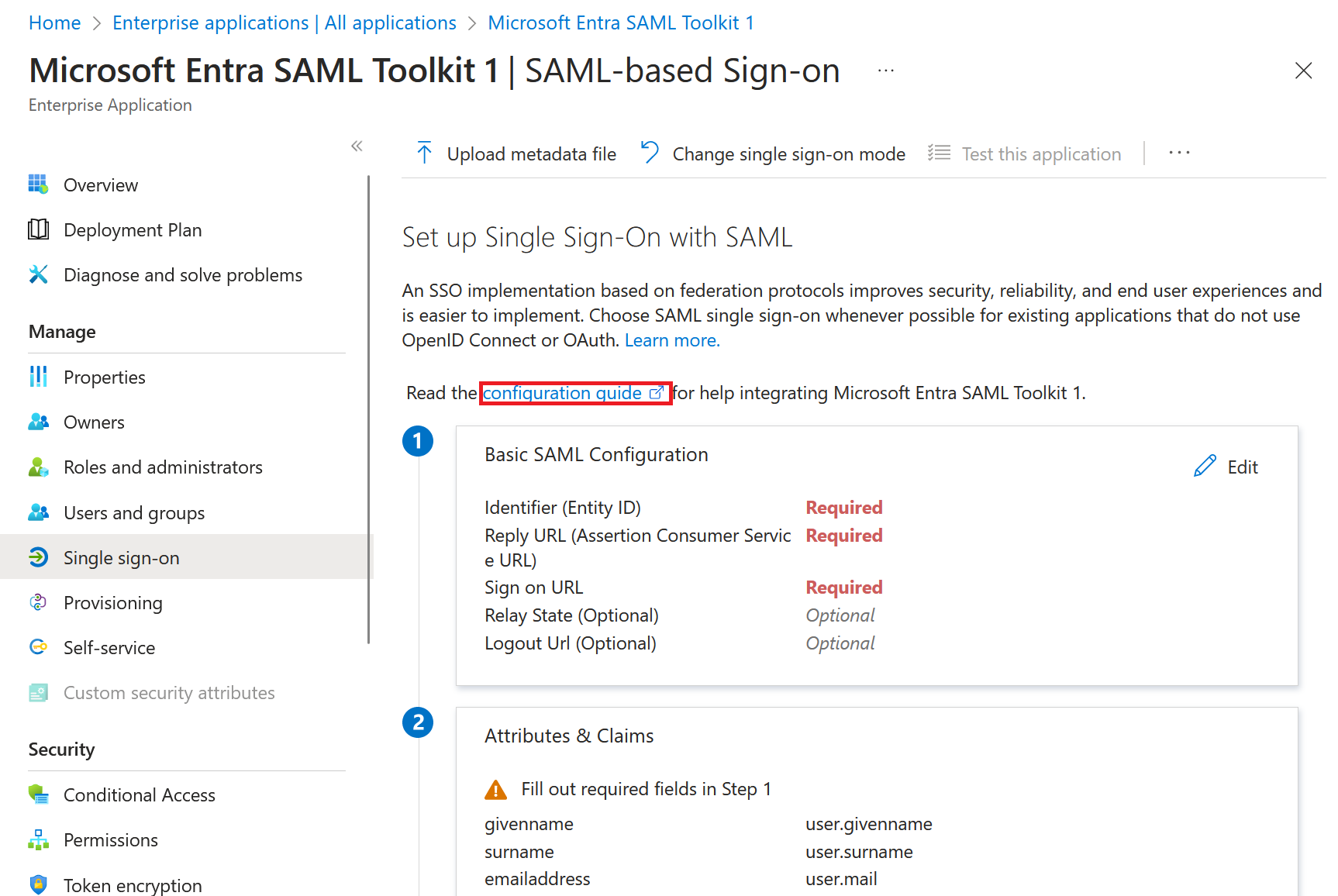
How the job gets done. Microsoft's SSO documentation lists four methods: federation with SAML 2.0 or OpenID Connect, password-based SSO that stores credentials and replays them to apps without federation support, linked SSO that only adds a tile in the portal, and disabled SSO. Password-based SSO is how on-premises apps published through Application Proxy are reached. Users open their assigned apps from the My Apps portal. Microsoft's pricing page lists SSO as unlimited on the Free plan.
Where the money starts. Free covers the sign-in itself, but not the policies around it. Conditional Access, which allows or blocks a sign-in by user, device, location or risk, starts at P1, $7 per user per month paid yearly, and risk-based Conditional Access starts at P2, $10. Some Microsoft 365 plans include P1, so check the licenses you already hold before buying anything.
- Microsoft 365 identity and access policies are already the operating foundation
- existing E3, E5 or Business Premium licenses cover the required tier
- an independent identity control plane is a formal architecture requirement
- the required governance workflow is not included in current entitlements and no upgrade is budgeted
- Users like
- MFA, single sign-on and an intuitive layout, per G2's summary of reviewer themes
- Users dislike
- configuration complexity, a complex licensing structure and a single point of failure for Microsoft 365 access, per Capterra reviewers
- Source: G2, 915 reviews
How it works in practice
What that team misses. Entra ID is strongest for Microsoft workloads. Reviewers on Capterra point to configuration complexity, a complex licensing structure and the single point of failure that sign-in for Microsoft 365 creates. G2 shows 4.5 from 915 reviews. If you want an identity layer that stays independent of the Microsoft tenant, the comparison with Okta is in Okta vs Microsoft Entra ID, and the plans are broken down in Microsoft Entra ID pricing.
- Starting price
- P1 $7 per user per month and P2 $10 per user per month, paid yearly; included in certain Microsoft 365 plans
- Free
- SSO and MFA
- P1
- Conditional Access
- P2
- Risk-based Conditional Access and PIM
- Governance
- Check separate entitlement and per-user coverage
Google Cloud Identity
Google Cloud Identity
Documentation and edition pages, November 6, 2026
A team on Google Workspace, or one that wants a free cloud directory with SAML sign-in for a small user count.
How the job gets done. Admins connect apps from a catalog of pre-integrated SAML apps or add a custom SAML app. Google's documentation says Workspace supports both SAML and OpenID Connect for SSO with a third-party identity provider, and recommends SSO profiles assigned to groups or organizational units, which allows more than one IdP and lets you test a configuration. Directory Sync supports Active Directory and Entra ID.
Where the money starts. The Free edition covers SAML SSO, 2-Step Verification, groups and basic device management, starting with a 50-user cap. Premium at $8.40 per user per month on the flexible plan adds automated provisioning, context-aware access, Secure LDAP and Windows device management.
- your team already lives in Google Workspace or you want a free directory with SAML SSO and 2-Step Verification for up to 50 users
- you can stay on the Free edition and only pay for Premium when automated provisioning or context-aware access becomes the gap
- you run mainly Microsoft 365 and Windows, where Entra ID gives you Conditional Access and device compliance in one place
- you need automated provisioning to many SaaS apps but have more than 50 users and no Workspace or Premium licenses
- Users like
- the admin console, Google integration, and SSO and MFA, per G2's summary of reviewer themes
- Users dislike
- confusing setup for small teams, advanced policies that need technical skill, and limited native reporting, per G2's summary of reviewer themes
- Source: G2, 34 reviews
How it works in practice
What that team misses. A custom SAML app is limited to 75 groups, per Google's limits. Google's documentation also notes that Secure LDAP requires a Google password and is incompatible with SSO. G2 shows 4.3 from 34 reviews, a small sample, and reviewers describe a confusing setup for small teams and limited native reporting.
- Starting price
- Free edition $0 (starts with a 50-user cap); Premium $8.40 per user per month on the flexible plan, billed through Google Workspace
- Free edition
- SAML SSO, 2-Step Verification, groups, basic device management
- Premium adds
- Automated provisioning, Context-Aware Access, Secure LDAP, Windows device management
- User cap
- Free starts at 50 users
- Custom SAML app limit
- 75 groups per app
Standalone identity providers: Okta and OneLogin
Okta and OneLogin sell the identity provider as its own product. Both read an existing directory such as Active Directory, Entra ID or Google Workspace, or can be the directory, and both charge per user. The difference for a small team is how the tiers are cut.
Okta Workforce Identity
Okta Workforce Identity
Pricing and SSO pages, November 6, 2026
A team that wants the identity layer to stay independent of its productivity suite and expects a long list of apps.
How the job gets done. Okta's SSO page cites 8,000+ pre-built integrations through the Okta Integration Network, a single dashboard for access, a customizable end-user dashboard and a kill switch that revokes access to integrated SSO apps when a user is deactivated. It reads directories including Active Directory, LDAP and HR systems.
Where the money starts. Starter is $6 per user per month and includes SSO, MFA, Universal Directory and 5 Workflows. Core Essentials is $14. Essentials is $17 and adds Adaptive MFA, Privileged Access, Lifecycle Management, Access Governance and 50 Workflows. Professional and Enterprise are by quote. Everything is billed annually, there's a 30-day free trial, and Workforce Identity has a $1,500 annual contract minimum.
- identity administration should remain independent of the Microsoft productivity tenant
- a mixed app portfolio needs explicit directory and lifecycle ownership
- existing Microsoft licenses already cover the necessary access controls and a second IdP adds no tested value
- the team cannot support federation and provisioning ownership across systems
- Users like
- reliable SSO and MFA and quick implementation, per G2's summary of reviewer themes
- Users dislike
- onboarding time, occasional configuration issues and pricing, per G2 reviewers' themes
- Source: G2, 1,429 reviews
How it works in practice
What that team misses. The minimum means a very small team pays more than the per-user math suggests, since at $6 per user, the minimum is the price until you reach roughly 21 users. Automated provisioning and deprovisioning sit in Lifecycle Management on Essentials, so Starter alone gives you sign-in but not leaver automation. G2 shows 4.5 from 1,429 reviews, with reviewers citing onboarding time, configuration issues and pricing. See Okta pricing for the full tier breakdown and Okta alternatives if the minimum is a problem.
- Starting price
- Starter from $6 per user per month, annual billing; $1,500 annual contract minimum
- Starter
- SSO, MFA, Universal Directory
- Essentials
- Adaptive MFA, Lifecycle Management, Access Governance
- Workforce contract minimum
- $1,500 annually
OneLogin
OneLogin
Pricing and catalog pages, November 6, 2026
A team that wants a standalone identity provider at a low published per-user price and has directory sync from Active Directory, Entra ID or Google Workspace.
How the job gets done. OneLogin's app catalog page describes more than 6,000 pre-integrated applications for SSO and user provisioning. Apps outside the catalog need a connector request, which OneLogin's developer documentation says can take several days or weeks. The company is owned by One Identity (Quest) since 2021.
Where the money starts. Basic is $3 per user per month with SSO, MFA, Active Directory sync and 5 provisioning rules. Essentials is $6 and adds unlimited provisioning rules plus Entra ID and Google sync. Business is $10 and adds SmartFactor adaptive MFA, Desktop MFA, HR sync and role-based access control. A Workflows add-on is $2 per user per month, and Enterprise is by quote.
- you want a standalone identity provider with published per-user prices and directory sync from Active Directory, Entra ID, Google Workspace or an HR system
- you need RADIUS or virtual LDAP for Wi-Fi, VPN and legacy apps on the Business pack
- you want identity and device management in one product, because nothing on OneLogin's pages shows MDM
- you need delegated administration, LDAP sync or API access management for multi-tenant MSP use, which are Enterprise-only with no public price
- Users like
- MFA and password vaulting, and one access point for many apps, per G2's summary of reviewer themes
- Users dislike
- limited advanced IAM features, occasional login issues and slow support during outages, per G2's summary of reviewer themes
- Source: G2, 291 reviews
How it works in practice
What that team misses. Nothing on OneLogin's pages shows device management, so laptops need another tool, though that's a gap only if you manage devices. Delegated administration and API access management are Enterprise-only with no public price. G2 shows 4.4 from 291 reviews, with reviewers citing limited advanced IAM features, occasional login issues and slow support during outages.
- Starting price
- Basic $3, Essentials $6, Business $10 per user per month; Enterprise by quote; Workflows add-on $2
- Basic ($3)
- SSO, MFA, AD sync, 5 provisioning rules
- Essentials ($6)
- Unlimited provisioning rules, Entra ID and Google sync
- Business ($10)
- SmartFactor adaptive MFA, Desktop MFA, HR sync, RBAC
- Workflows
- $2 per user per month add-on
When laptops and sign-in share a console: JumpCloud
JumpCloud
JumpCloud
Pricing page, November 6, 2026
A small IT team that runs Mac, Windows and Linux and wants the directory, SSO and device management in one place with a public per-user price.
How the job gets done. JumpCloud sells the directory, SSO and device management as packages. Its pricing page describes the SSO package as SSO and MFA access to resources plus a password manager, at $11 per user per month billed annually or $13 monthly. Device Management is $9 and Device Identity Management, which combines the two, is $13. Platform packages are quote-only. There's a 30-day trial, and invoicing is available for accounts billing more than $2,000 per month.
Where the money starts. Among the entry tiers that include SSO, $11 is the highest public per-user price on this page, but the value is in not buying a second tool for devices. The pricing page doesn't state a number of pre-built SSO connectors, so ask for the list of the apps you use before you commit.
- you want directory, SSO and device management from one vendor with a public per-user price
- you run Mac, Windows and Linux and want MDM for phones as an add-on
- you need the deepest mobile controls, which reviewers say are still evolving
- you only need mobile management and have no use for the directory layer
- Users like
- easy onboarding and unified management of identity and devices, per G2's summary of reviewer themes
- Users dislike
- Windows group policy gaps, MFA gaps with LDAP and a learning curve, per G2's summary of reviewer themes
- Source: G2, 4,121 reviews
How it works in practice
What that team misses. G2 shows 4.5 from 4,121 reviews, with reviewers praising easy onboarding and unified management of identity and devices, and citing Windows group policy gaps, MFA gaps with LDAP and a learning curve. Accounts created before February 2024 may still hold a legacy free tier, but new accounts don't get one. For head-to-head detail see JumpCloud vs Microsoft Entra ID, Okta vs JumpCloud and JumpCloud pricing.
- Starting price
- Device Management $9/user/mo; SSO $11/user/mo; Device Identity Management $13/user/mo, billed annually; Platform packages quote-only
- Entry price
- $9 per user per month, annual
- MDM add-on
- $5 per user per month, annual
- Trial
- 30 days
- Public Device Management
- $9/user/mo annual
- Public SSO
- $11/user/mo annual
- Public Device Identity Management
- $13/user/mo annual
- Platform packages
- Contact Sales
- Legacy free
- Only eligible pre-February 2024 accounts
If you can run the server yourself: Keycloak
Keycloak
Keycloak
Admin guide and release notes, November 6, 2026
A team with someone who can run a Java service, a database and TLS, and that wants no per-user license fee.
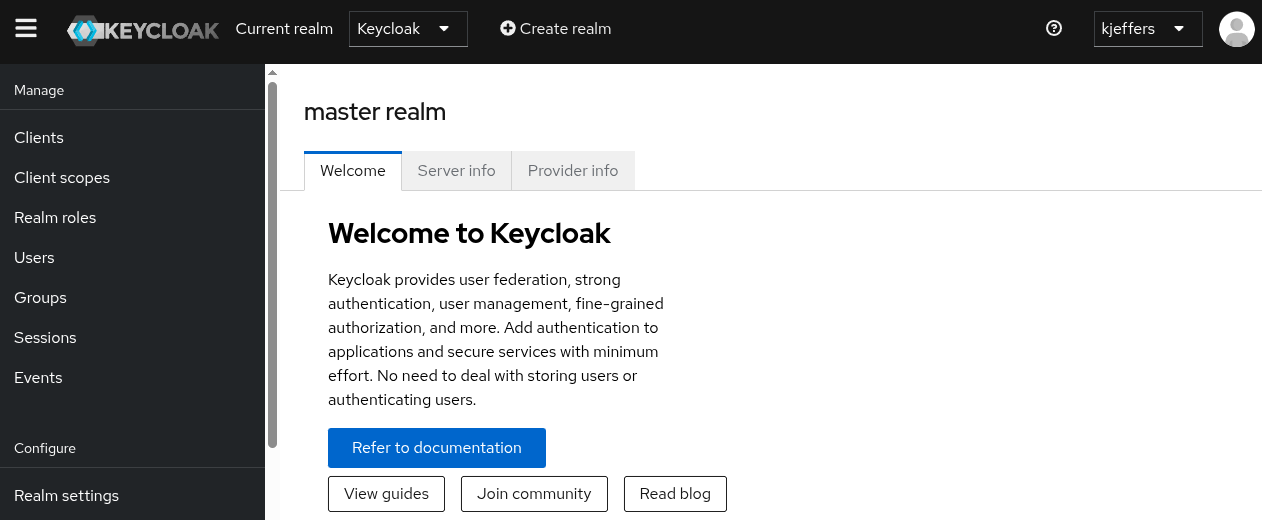
How the job gets done. Keycloak is an open source identity provider licensed under Apache 2.0. It supports OpenID Connect, OAuth 2.0 and SAML 2.0, federates users from LDAP and Active Directory, and can broker sign-in from an external SAML or OpenID Connect provider by importing its entity descriptor or .well-known/openid-configuration document. You add applications as clients in an admin console. The current release is 26.8.1, published October 13, 2026.
Where the money starts. There's no license price. The cost is the server, the database, backups, upgrades and the person who owns them.
- you have someone who can run a Java service, a database and TLS, and you want no per-user licence fee
- you need a standards-based identity provider (OpenID Connect, OAuth 2.0, SAML 2.0) for internal or custom applications
- nobody on the team can own upgrades, backups and high availability, because Keycloak's own guides put that on the deployer
- you want a vendor to answer the phone: the project is community supported, and Red Hat sells a separate supported build
How it works in practice
What that team misses. Keycloak's admin guide describes it as a separate server that you manage on your network, and the project is community supported. Red Hat sells a separate supported build. There's no G2 rating on the public page. Pick it for custom or internal applications that need a standards-based identity provider, rather than because the license is free.
- Starting price
- Free under the Apache 2.0 license; you pay for hosting, a database and the admin time to run it
- License
- Apache 2.0
- Latest release
- 26.8.1, published 2026-10-13
- Protocols
- OpenID Connect, OAuth 2.0, SAML 2.0
- User federation
- LDAP and Active Directory built in
- Hosting
- Self-hosted: server, Docker, Podman, Kubernetes or OpenShift
What the entry tier leaves out
The entry price answers whether people can sign in. The next tier decides what happens when someone leaves or when a laptop is lost. Okta shows the pattern clearly.
Okta Workforce Identity- Starter, $6SSO, MFA, Universal Directory and 5 Workflows
- Core Essentials, $14Lower-priced option without the advanced security and compliance features of Essentials
- Essentials, $17Adds Adaptive MFA, Privileged Access, Lifecycle Management, Access Governance and 50 Workflows
- ProfessionalQuote only; adds Device Access, Identity Threat Protection and Sandbox
- EnterpriseQuote only; adds API Access Management, Access Gateway and machine-to-machine tokens
The same cut exists elsewhere in different words. Entra ID moves Conditional Access to P1, Google moves provisioning and context-aware access to Premium, and OneLogin moves unlimited provisioning rules to Essentials and adaptive MFA to Business. Before you pick, write down the three controls you can't live without and find the cheapest tier of each product that includes all three.
A 30-day SSO rollout
SSO rollouts don't fail on the first five apps; they fail on the long tail. This sequence puts the easy wins first and leaves a record of what is left.
- IT leadList every app people sign in to, and note which ones support SAML or OpenID Connect on your current plan week 1
- IT leadPick the IdP tier that includes the three controls you can't drop, and start the trial or the free tier week 1
- SysadminConnect the directory, turn on MFA for admins first, then connect 3 to 5 low-risk apps as a pilot week 2
- SysadminMove the remaining SAML and OpenID Connect apps in batches, keeping a break-glass admin account outside SSO week 3
- IT leadRecord the apps that can't use SSO and who owns the local accounts week 4
- IT leadRun a leaver test: deactivate a test user and check that every connected app loses access week 4
Which tool for which team
- You already pay for Microsoft 365 and want one sign-in policyMicrosoft Entra ID
- You run Google Workspace and have up to 50 usersGoogle Cloud Identity
- You want an identity provider independent of your productivity suiteOkta Workforce Identity
- You manage Mac, Windows and Linux laptops and want sign-in in the same consoleJumpCloud
- You want the lowest published per-user price for a standalone providerOneLogin
- You have a server owner and internal apps that need a standards-based identity providerKeycloak
What single sign-on doesn't cover
SSO answers who is signing in. It doesn't answer who owns the credentials that never sign in through a browser: service accounts, API tokens, bot users and integration keys that apps use to talk to each other. Those accounts usually sit outside the IdP, and after a few years a team has a long list of them that nobody remembers creating. That's the gap The IT Lead fills: it records an owner for each service account and keeps a review trail. It doesn't provide sign-in, and it's not a replacement for any tool on this page.
For the neighboring jobs, see our guides to identity and access management software, privileged access management software and the user access review checklist. They cover the wider identity stack that SSO is one part of.
FAQ
What is single sign-on software?
Single sign-on software is an identity provider that authenticates a person once and then signs them in to many apps without separate passwords. It issues a signed assertion over a standard such as SAML 2.0 or OpenID Connect, and it usually adds multi-factor authentication and a portal where users launch their apps.
Do I need SSO software if I already use Microsoft 365 or Google Workspace?
Often you don't need a separate product. Entra ID includes SSO, listed as unlimited on its Free plan, and Google Cloud Identity Free includes SAML SSO for a small user count. A separate provider such as Okta makes sense when you want the identity layer independent of the suite or need a larger catalog of pre-built integrations.
What is the difference between SAML and OpenID Connect?
SAML 2.0 is an older XML-based standard widely used in enterprise apps. OpenID Connect is built on OAuth 2.0, uses JSON tokens and is usually simpler for modern web and mobile apps. Microsoft's documentation notes both work with its identity platform, and most business SaaS apps support at least one.
Is there free single sign-on software for a small team?
Yes, free single sign-on software exists. Entra ID Free lists unlimited SSO, Google Cloud Identity Free offers SAML SSO starting with a 50-user cap, Keycloak is free under Apache 2.0 if you host it, and Cisco Duo has a free tier for up to 10 users that's limited to MFA. Free tiers usually leave out automated provisioning and the stronger access policies.
Why does SSO cost more on some apps?
Some SaaS vendors put SAML sign-in on a higher plan of their own product, so the identity provider can be free while the app's plan isn't. Check each app's pricing page for the plan that includes SAML or OpenID Connect before you count the app as connected.
Does SSO cover service accounts and API keys?
No, SSO doesn't cover service accounts or API keys. SSO governs interactive sign-in by people. Service accounts, API tokens and scripts authenticate separately, so they need their own inventory, owners and review cycle.