JumpCloud vs Microsoft Entra ID is a choice between a combined identity and device operations platform and a cloud identity control plane centered on Microsoft 365 and Azure. JumpCloud is a stronger starting point when the same IT team manages local accounts, endpoint policies and app access across Windows, macOS and Linux. Microsoft Entra ID is the stronger starting point when Conditional Access, Microsoft tenant identity and formal access governance define the job.
The entry prices aren't directly comparable. JumpCloud lists Device Management at $9 per user per month on annual billing, while Microsoft Entra ID P1 lists at $7 on an annual commitment. Entra ID doesn't itself replace Intune for endpoint management, and JumpCloud's wider Platform packages require a quote.
JumpCloud vs Microsoft Entra ID: Which should you choose?
JumpCloud is a practical choice for a lean team that owns employee identities and a mixed operating-system fleet. Microsoft Entra ID fits an organization already invested in Microsoft 365, Azure and policies that use tenant identity signals. Neither option proves who owns a service account or whether a revoked permission was actually removed.
Start by naming the system of record for a new employee, the tool that grants business app access and the platform that enforces a laptop policy. If you can't name all three, you've found your first problem. If the answers are different systems, you'll want to price and test the handoffs as part of the evaluation.
 Choose JumpCloud for mixed-device operations
- One IT team manages directory users and local device accounts.
- macOS, Windows and Linux policies are daily work.
- You want to test identity and endpoint operations together.
 Choose Entra for Microsoft-centered identity
- Microsoft 365 and Azure are the primary identity consumers.
- Conditional Access and privileged roles shape security policy.
- Access reviews and identity governance need formal controls.
Here's the distinction that matters: operational scope. JumpCloud combines directory, authentication and device work in one platform. Entra's an identity service that can operate alongside Intune or another endpoint tool. Compare the vendors without naming those surrounding systems and you'll hide the cost and the risk.
| Tool | Core scope | Mixed OS devices | Microsoft 365 users | Risk-based access | Formal access reviews | Entry list price |
|---|---|---|---|---|---|---|
| JumpCloud | Directory, device and application operations | Agent and MDM workflows | Directory sync and optional federation | Confirm package and conditions | Check workflow and evidence scope | Device Management $9/user/mo annually |
| Microsoft Entra ID | Cloud identity and access policies | Separate endpoint platform such as Intune | Native tenant identity | P2 identity protection | Governance licensing and reviews | P1 $7/user/mo annually |
How do JumpCloud and Microsoft Entra ID prices compare?
JumpCloud publishes Device Management at $9, SSO at $11 and Device Identity Management at $13 per user per month with annual billing. Microsoft Entra ID P1 lists at $7 and P2 at $10 per user per month, paid yearly. The products don't include the same capabilities, so an accurate quote has to include the endpoint, access and governance work you actually need.
| Plan | List price (USD per user per month) | Billing | Scope or caveat |
|---|---|---|---|
| JumpCloud Device Management | $9 | Annually | Device management and MDM |
| JumpCloud SSO | $11 | Annually | App access, MFA and password management |
| JumpCloud Device Identity Management | $13 | Annually | Device and identity functions |
| JumpCloud Platform Essentials, Platform, Prime | Quote | Ask sales | Feature mapping required |
| Microsoft Entra ID P1 | $7 | Annually | Identity and Conditional Access |
| Microsoft Entra ID P2 | $10 | Annually | Identity risk and privileged roles |
| Microsoft Intune Plan 1 | $8 | Annually | Separate endpoint SKU |
| Microsoft Entra ID Governance | $7 | Annually | Governance entitlement and prerequisites |
All figures are US vendor list prices checked October 28, 2026. JumpCloud also advertises monthly billing at $11 for Device Management, $13 for SSO and $15 for Device Identity Management. Its pricing FAQ says suspended users remain billable. Offboarding therefore needs a license reconciliation step, not just a disabled login.
Microsoft says Entra ID P1's included in Microsoft 365 E3 and Business Premium, and P2's included in Microsoft 365 E5. Audit existing entitlements before buying standalone seats. The incremental cost of a capability can be different from its published standalone list price, particularly when a Microsoft bundle already covers it.
What would 100 users cost on entry plans?
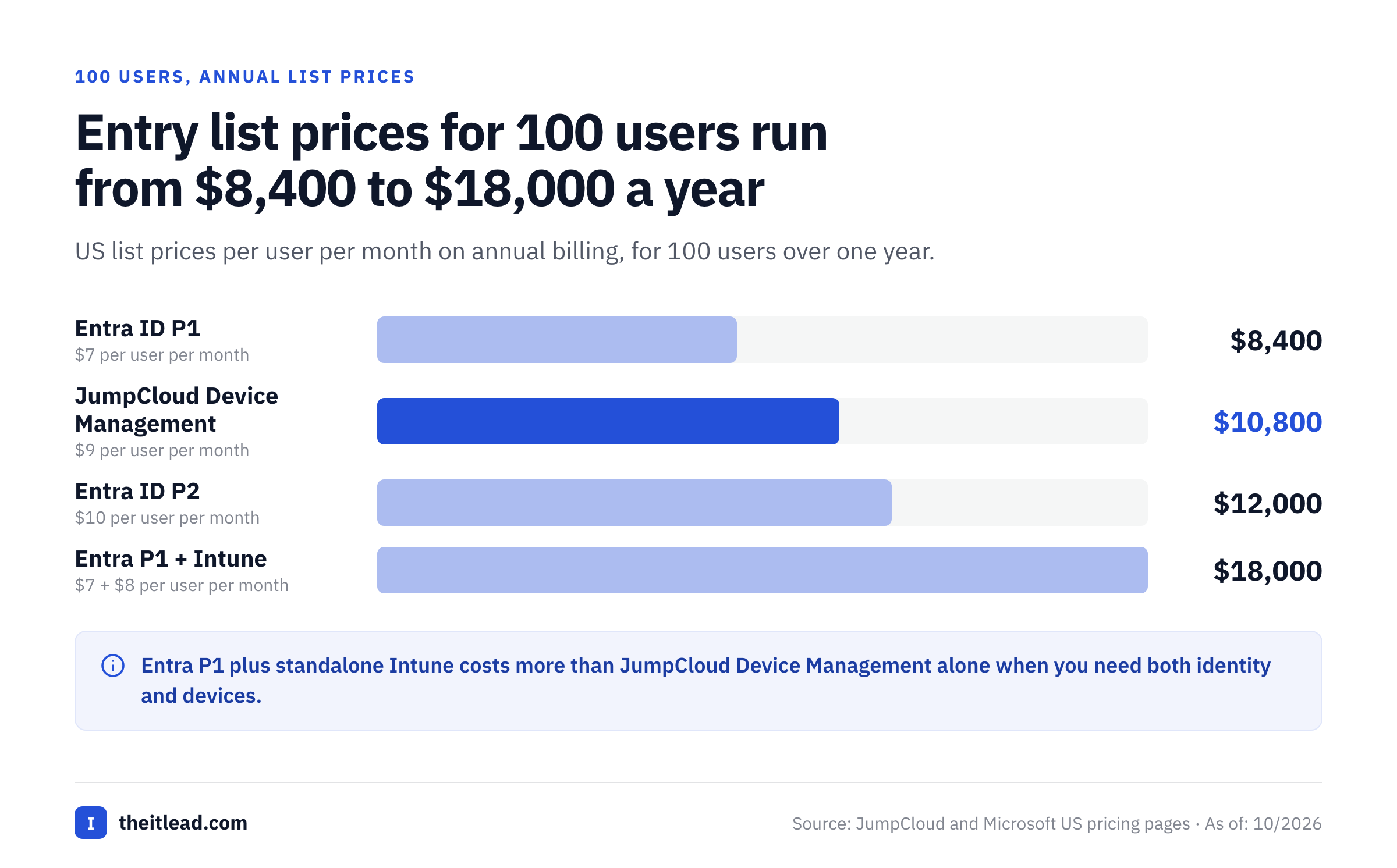
At published annual list rates, 100 JumpCloud Device Management users cost $10,800 per year, while 100 standalone Entra ID P1 users cost $8,400 per year. Adding standalone Intune Plan 1 at $8 per user per month would cost another $9,600 annually for 100 eligible users, which brings the Entra P1 and Intune pairing to $18,000. Entra ID P2 alone comes to $12,000.
They're arithmetic examples, not comparable implementation quotes.
The calculation changes when Microsoft 365 already includes a relevant license or when JumpCloud needs SSO, directory integration or a quote-only package. Ask each seller to map your use cases to purchasable entitlements and document who's billable. Don't multiply a headline price by headcount before you've checked which people, devices and administrators actually need the feature.
Which platform is better for directory users and provisioning?
JumpCloud approaches directory provisioning as part of identity and device administration, while Microsoft Entra ID manages identities and app access within a Microsoft tenant. The important control is authority: which system creates the identity, which one can change it and which applications receive the update. You'll need that answer before you test anything else.
How does JumpCloud provision Microsoft 365 users?
JumpCloud documents Microsoft 365 and Entra ID cloud directory synchronization. The integration can provision users, synchronize selected attributes, manage security groups and import users from Entra. Admins authorize a directory integration and associate the appropriate users or groups with the directory instance.
That's easy to say until two systems both believe they own the same record. JumpCloud warns against authorizing one Microsoft domain in multiple directory sync instances. Its documentation also notes that initial password synchronization can sign users out of Microsoft 365 apps. Put those behaviors in the migration test plan and assign a rollback owner.
A good onboarding test starts with the authoritative identity, then follows the user through group membership, application assignment and a real sign-in. If an account exists but isn't active or assigned to the right group, the employee still can't work. A green synchronization status isn't sufficient evidence of access.
How does Microsoft Entra ID assign application access?
Microsoft Entra ID supports enterprise application configuration, SAML single sign-on and assignment of test users. Its SAML setup guide specifies administrative roles and recommends testing in a nonproduction environment. That's why a directory account, a valid app assignment and a successful sign-in count as separate control points, and each one has its own owner.
For each critical application, record who maintains the federation configuration, who approves access and where failures appear. A user may exist but won't have the app assignment. A policy may block an otherwise valid user. One misconfigured SAML value can break login for everyone.. The right troubleshooting owner depends on which control failed.
Build a provisioning map with HR source, directory, Microsoft 365, business applications, local device accounts and privileged credentials. Mark each handoff as automated, manual or approval-gated. The map's more useful than a generic checklist of supported integrations.
How do SSO, MFA and Conditional Access differ?
Both products support SSO and MFA, but their Conditional Access scope and licensing differ. JumpCloud documents access policies for its User Portal, SSO applications and LDAP applications. Microsoft Entra ID P1 includes Conditional Access, while P2 adds identity protection and risk-based access capabilities.
Which JumpCloud plan enables conditional policies?
JumpCloud's documentation says adding conditions to the User Portal or SSO applications is a premium feature in Platform Prime. Buyers shouldn't assume the separately advertised SSO package unlocks every location, device or authentication condition they want. Ask for a demonstration using the precise policy and resource you intend to protect.
Test an employee on a managed laptop and then on an unmanaged device, since that's where policy gaps show up. Record whether the policy requires MFA, denies access or permits the session, so you've got evidence to compare against later. Repeat with a user outside the approved group. The failure path matters as much as the successful login, especially when the help desk has to explain a blocked sign-in.
Which Microsoft Entra license enables Conditional Access?
Microsoft's licensing documentation requires Entra ID P1 for Conditional Access and identifies Business Premium as another eligible route. P2 adds risk-based capabilities. The policy design should specify whether a decision uses device compliance, user risk, sign-in risk or application sensitivity before the team chooses a plan.
Entra ID isn't an endpoint management product. A policy that depends on a compliant device needs signals from Intune or another supported endpoint platform. That's a separate owner for device policy and a separate investigation path when sign-in fails. If the help desk sees an authentication error, the root cause may be device compliance rather than the password, and that's not obvious from the error.
Which platform handles Windows, macOS and Linux devices better?
JumpCloud is clearly a stronger starting point when IT directly administers local device accounts and policies across Windows, macOS and Linux. Microsoft Entra ID is the identity layer, while Intune or another tool manages endpoints. A fair comparison therefore uses JumpCloud against the complete Microsoft identity and device stack.
JumpCloud's device documentation describes installing an agent on Mac, Windows and Linux, creating device groups, assigning policies and running commands. System Insights adds device inventory and telemetry. An IT lead can follow a user from the directory to a managed device and inspect the resulting policy state.
Microsoft Intune Plan 1 lists at $8 per user per month on annual billing. Microsoft describes endpoint management across Windows, macOS, iOS and Android. Intune may already be part of a Microsoft subscription you've got, so the standalone rate isn't always an extra charge. Check what you've actually got: the entitlement, enrollment method and operating systems in use.
What should a mixed-device pilot include?
A mixed-device pilot should test account creation, first login, enrollment, policy enforcement, recovery and removal on representative operating systems. Don't treat a successful Windows walkthrough as proof of the same result on a Mac or Linux laptop. Record the supported OS version, deployment method and any user interaction required.
The most useful output is a table of expected versus observed results. Keep a screenshot or log for each case, since you'll need them when someone disputes a result, note who fixed the exception and rerun the test after changing a policy. That's repeatable operational evidence rather than a demo score.
- Name the authoritative directory and who's accountable for changes.
- Enroll representative Windows, macOS and Linux devices where supported.
- Verify local account binding and first sign-in.
- Apply a security policy and record its device result.
- Test SSO from managed and unmanaged devices.
- Remove access and confirm application and local account outcomes.
- Export evidence needed by the IT owner and auditor.
- Record license, support and remediation owners.
Which platform is better for governance and audit evidence?
Microsoft Entra ID offers a documented path for access reviews, privileged identity management and governance, but licensing varies by feature. JumpCloud can provide directory, device and access administration evidence. You'll want to verify whether a formal certification workflow exists in your JumpCloud package or whether you'll need a separate process.
Microsoft's access review documentation covers group memberships, enterprise app assignments and role assignments. The licensing guidance distinguishes broader Governance subscriptions from some basic P2 capabilities. A P2 label doesn't prove that every access certification workflow is included. It isn't. Confirm the review type, reviewer population and prerequisite licenses.
For an audit, a list of users isn't enough. The evidence should identify the account, business owner, reviewer, review date, decision, justification and completed remediation. A reviewer may deny access while the application still permits it. Keep the attestation and the technical enforcement result as separate records.
Service accounts need a named human owner, a purpose and a lifecycle trigger. Neither product's feature list proves that a person accepted responsibility for every nonhuman identity. An ownership matrix can capture business accountability while the identity platform supplies technical records.
Inventory the objects
Export users, groups, privileged roles, service accounts and app assignments. Flag missing owners before the review.
Assign the reviewer
Use a business owner who can justify access. Avoid asking admins to approve their own privileged access.
Record a decision
Capture keep, remove or investigate, with reason and timestamp. An unanswered item remains open.
Verify remediation
Check the actual directory, app or endpoint state after a removal decision and attach evidence.
Close the package
Retain scope, reviewers, exceptions and completion proof together for later inspection.
Can JumpCloud and Microsoft Entra ID work together?
JumpCloud and Microsoft Entra ID can coexist. JumpCloud documents Microsoft 365 directory synchronization and SSO federation, but a coexistence design needs one clear authority for user changes, a tested sign-in path and an emergency way to reach the Microsoft tenant.
The federation guide says users have to be associated with the Microsoft cloud directory integration before enabling SSO. It also warns that users may receive two MFA prompts if both environments enforce MFA. They're practical design issues, not reasons to assume the integration's unusable.
You'll need a coexistence plan that names the owner of directory write direction, group mapping, tokens, federation configuration and incident response. Test a disabled synchronization connector, a terminated employee and a failed federation login before you've migrated anyone. Keep a documented emergency administrator account that isn't dependent on the new federation path. If federation breaks, it's your only way back in.
Coexistence may be appropriate when Microsoft 365 remains the productivity system while JumpCloud handles mixed-device operations. The benefit has to outweigh an extra identity dependency. Record how the team will detect a failed sync and how quickly it can confirm access was removed from both systems. If you can't measure that, you haven't finished the design.
How should IT compare total cost and migration risk?
Compare JumpCloud and Microsoft Entra ID by licensed capability, existing entitlements, deployment effort and operational ownership. The entry prices don't reveal the cost of device tooling, governance, support or synchronization dependencies.
You'll definitely want to count employees, contractors, privileged admins, service accounts and endpoints separately. List the capabilities each population needs and ask vendors which identities are billable. Check whether existing Microsoft subscriptions cover P1, P2 or Intune before adding standalone charges. For JumpCloud, obtain written package scope for SSO, directory integration and premium conditions.
| Cost or risk item | JumpCloud evaluation | Microsoft Entra ID evaluation |
|---|---|---|
| JumpCloud vs Microsoft Entra ID baseline | Map Device Management, SSO and Device Identity | Map P1/P2 and existing Microsoft 365 rights |
| Endpoint administration | Check agent, MDM and patch scope | Include Intune or existing endpoint tooling |
| Governance | Verify certification workflow and evidence | Check P2 versus Governance license |
| Migration | Test sync, local accounts and federation | Test tenant app assignments and policy recovery |
| Ownership | Assign directory, device and app administrators | Assign identity, endpoint and governance owners |
| Offboarding | Reconcile suspended and deleted users | Confirm removal across apps and devices |
A safer migration starts with a small reversible group. Baseline its current access, test the new identity path, verify emergency login and capture app and device outcomes before moving more users. Don't change directory authority, federation and endpoint enrollment in one unobserved cutover, because you'll lose track of which change caused a failure. The rollback plan should name the responsible engineer and the evidence that proves restoration.
The best choice isn't always a single-vendor architecture, and that's fine. If you're keeping the Microsoft tenant because it's essential but JumpCloud reduces endpoint administration burden, evaluate them together. If governance is the main unmet requirement, start with the exact Entra license and review workflow rather than replacing a working device platform.
- One IT team owns mixed-OS identity and endpointsJumpCloud
- Microsoft 365 tenant is the identity anchorMicrosoft Entra ID
- Risk-based access and privileged identity matter mostMicrosoft Entra ID
- Local device accounts and directory share an ownerJumpCloud
- Formal identity access reviews drive the purchaseMicrosoft Entra ID
What do users report about JumpCloud and Microsoft Entra ID?
Capterra reviews describe JumpCloud's consolidated identity and device administration as a strength, with setup complexity and reporting depth appearing as concerns. Microsoft Entra ID reviewers value Microsoft integration and access controls, while some describe complex licensing and advanced configuration. They're customer reports, not results of our own product testing.
Review pools differ in size and in the kind of buyer they come from, so don't pick a vendor on a star rating. Read recent reviews from administrators who manage a similar fleet, and verify any recurring issue in a pilot you've scoped yourself.
If you're talking to references, ask JumpCloud customers about enrollment, policy propagation, directory sync and evidence export. Then ask Microsoft customers about Conditional Access troubleshooting, licensing boundaries, app provisioning and access review administration. The strongest demo often shows a successful login. A production IT team also needs an explainable failure and a reliable audit trail, and it is the failure that tests the vendor.
Frequently asked questions about JumpCloud vs Microsoft Entra ID
JumpCloud and Microsoft Entra ID overlap in identity management, but their product boundaries differ. These answers address the purchasing questions that most often change an implementation plan.
Is JumpCloud a replacement for Microsoft Entra ID?
JumpCloud can manage identity and devices, but it isn't automatically a replacement for every Entra capability. Microsoft 365 organizations may keep Entra as tenant identity and use JumpCloud for selected directory or endpoint workflows.
Does Microsoft Entra ID manage laptops like JumpCloud?
Microsoft Entra ID's an identity and access service. Intune or another endpoint platform handles device administration, so compare the complete Microsoft stack with JumpCloud.
Is JumpCloud cheaper than Microsoft Entra ID?
JumpCloud isn't necessarily cheaper. Device Management lists at $9 per user per month annually and Entra ID P1 at $7, but the included capabilities and existing licenses change the total.
Can JumpCloud synchronize users with Microsoft 365?
JumpCloud documents Microsoft 365 and Entra directory sync for users and selected attributes. Test authority, group mapping, password behavior and recovery before deployment.
Does Entra ID P2 include all access reviews?
Entra ID P2 includes some basic access review capabilities, but broader Governance features may need Entra ID Governance or Entra Suite. Check the specific workflow and eligible users.
Which platform fits Macs and Linux?
JumpCloud is a practical starting point for managing mixed Windows, macOS and Linux endpoints. Entra can remain the identity anchor while endpoint administration is evaluated separately.