Identity and access management (IAM) software decides who can sign in to which systems, with which factors, and which accounts get created or removed when people join, move or leave. For a small IT team the right pick depends less on the feature list than on three questions: which ecosystem do you already pay for (Microsoft 365 or Google Workspace), who will own provisioning rules once they exist, and whether an auditor will ask for formal access reviews. This page compares nine tools on published price, the plan that unlocks each feature, free tier limits and fit for teams of 5 to 300 people.
Seven of the nine publish a per-user price on their own site. Rippling IT and SailPoint are quote only, so the tables below say "quote only" instead of guessing. Our earlier posts go deeper on Okta pricing, JumpCloud pricing and Okta vs Microsoft Entra ID.
- IAM tools compared
- 9
- publish a per-user price
- 7
- have a free tier with a user cap
- 4
- lowest published paid price per user per month (Zoho Directory Standard)
- $2
Our picks by situation
 Best if you already pay for Microsoft 365 Business PremiumMicrosoft Entra IDP1 with Conditional Access is already in that license, so the identity layer costs nothing extra.
 Best free start on Google WorkspaceGoogle Cloud IdentitySAML single sign-on and 2-Step Verification are free for the first 50 users.
 Best for mixed Mac, Windows and Linux fleetsJumpCloudDirectory, SSO, MFA and device management at a public per-user price, with hosted LDAP and RADIUS.
 Best for many third-party SaaS appsOkta Workforce IdentityLifecycle automation and access governance start at the $17 Essentials plan, with a $1,500 annual minimum.
 Best standalone identity provider with public pricesOneLoginThree packs at $3, $6 and $10 per user per month, with provisioning rules unlocked at $6.
 Best if HR data should drive accessRippling ITA hire, role change or exit changes app accounts, groups and devices without a ticket, but the price is a quote.
 Cheapest credible all-in-oneZoho DirectoryFree for 10 users and $2 to $7 per user per month after that, with only 2 reviews on G2 to back it up.
 Best MFA layer on top of a directoryCisco DuoFree for 10 users and $3 for single sign-on and trusted device checks, but it doesn't host your directory.
 Best when auditors demand access certificationsSailPointFormal certification campaigns and separation-of-duties checks, sold to enterprises on a quote.
 Our product · for the gaps between toolsThe IT LeadRecords who owns each service account and when it was last reviewed, from a CSV import.
Identity and access management software compared
| Tool | Type | What it hands over | Price as published (USD) | G2 rating |
|---|---|---|---|---|
| Microsoft Entra ID | Workforce identity and access management | Microsoft tenant identities to app access, Conditional Access and provisioning | P1 $7 per user per month and P2 $10 per user per month, paid yearly; included in certain Microsoft 365 plans | 4.5 (915) |
| Google Cloud Identity | Workforce identity and access management | Google directory to SAML sign-in, 2-Step Verification and basic device control | Free edition $0 (starts with a 50-user cap); Premium $8.40 per user per month on the flexible plan, billed through Google Workspace | 4.3 (34) |
| Okta Workforce Identity | Workforce identity and access management | HR and directory profile to app assignment, authentication and provisioning | Starter from $6 per user per month, annual billing; $1,500 annual contract minimum | 4.5 (1,429) |
| JumpCloud | Directory-led device management | Directory, SSO and MDM for Apple, Android, Windows and Linux in one console | Device Management $9, SSO $11, Device Identity Management $13 per user per month, billed annually | 4.5 (4,121) |
| OneLogin | Workforce identity and access management | Directory or HR source to role-based app access, MFA and provisioning | Basic $3, Essentials $6, Business $10 per user per month; Enterprise by quote; Workflows add-on $2 | 4.4 (291) |
| Rippling IT | HR-driven identity and device management | HR record to app accounts, groups, licenses and managed devices | No published IT price; plans start at $8 per employee per month with a monthly base fee, per Rippling's pricing page | 4.7 (1,204) |
| Zoho Directory | Workforce identity and access management | Cloud directory to SSO, MFA, device login and hosted LDAP or RADIUS | Free for 10 users; Standard $2, Professional $7 per user per month billed monthly; 15% off billed yearly | 4.0 (2) |
| Cisco Duo | MFA and single sign-on layer | Your directory or identity provider to MFA, SSO and device trust checks at every login | Free up to 10 users; Essentials $3, Advantage $6, Premier $9 per user per month | 4.5 (590) |
| SailPoint | Identity governance and administration | Identity sources to access requests, certification campaigns and lifecycle changes | Quote only; no public price list or minimum | 4.6 (258) |
| The IT Lead Our product | Service account ownership reviews | Collects owner attestations for service accounts and keeps the review trail | Access code | No reviews yet |
Prices come from each vendor's own pages, read on October 23, 2026. Ratings are G2 with the number of reviews in brackets, read the same day. The SailPoint rating covers all SailPoint products, and Zoho Directory has only 2 reviews.
What identity and access management software does
Identity and access management software controls who can sign in to which systems and what they can do there. It does that through four jobs: authentication (proving who someone is), authorization (deciding what they may reach), provisioning (creating, changing and removing accounts in each app) and governance (checking that the access people hold is still needed).
- Authentication. Single sign-on (SSO) lets one login open many apps, and multi-factor authentication (MFA) adds a second proof such as an authenticator app or a security key.
- Authorization. Rules decide who gets what: role-based access control (RBAC), group membership, and conditions such as device state or location.
- Provisioning. When someone joins, changes role or leaves, accounts and licenses in connected apps are created, updated or disabled, usually over SCIM.
- Governance. Access requests, approvals and periodic reviews that prove access is still needed.
Most small teams need the first three and can postpone the fourth. The tools differ most in how much of provisioning is automatic and in which plan it sits.
IAM vs IGA vs PAM
| Term | What it controls | Typical question it answers |
|---|---|---|
| Identity and access management (IAM) | Sign-in, MFA, app access and account provisioning | Who can open this app, and is it really them? |
| Identity governance and administration (IGA) | Access requests, approvals and certification campaigns | Does this person still need this access, and who signed off? |
| Privileged access management (PAM) | Admin and break-glass accounts, session limits and recording | Who used the domain admin account, for how long, and what did they do? |
Our privileged access management comparison covers the third row in depth. The governance row has its own section further down.
How we chose these tools
The list is built for small IT teams and MSPs, so each tool is judged on six points:
- Published price. Whether a per-user list price exists on the vendor's own site, and which plan it belongs to.
- Plan gates. Which plan unlocks automated provisioning, conditional access and governance.
- Free tier. Whether a free plan exists and where its user cap sits.
- Directory or layer. Whether the tool hosts the user directory or sits on top of one.
- Effort to run. Who has to own rules, sync and offboarding tests.
- Evidence. G2 rating and review count, read on October 23, 2026.
Tools are grouped by the layer they occupy, because a small team usually picks one directory and then decides whether it needs an MFA layer or a governance layer on top.
IAM that comes with your stack
If the company already runs Microsoft 365 or Google Workspace, the first thing to check is what the identity layer in that license already does.
Microsoft Entra ID
Microsoft Entra ID
Microsoft identity platform for tenant administration, SSO, Conditional Access and app provisioning. P2 and separate governance licensing determine advanced coverage.
If the company already pays for Microsoft 365 Business Premium, E3 or E5, the identity layer is largely paid for: Entra ID P1 with Conditional Access is included.
Entra ID is the directory behind Microsoft 365 and Azure. The Free tier covers single sign-on and MFA through security defaults, which are all or nothing: users can register only the Authenticator app, and you can't exclude accounts. P1 at $7 per user per month, paid yearly, adds Conditional Access, passwordless and phishing-resistant sign-in, group provisioning and provisioning logs. P2 at $10 adds risk-based Conditional Access and Privileged Identity Management.
Governance is licensed separately. Microsoft lists Entra ID Governance at $7 per user per month and the Entra Suite at $12, and the suite needs P1 underneath. Microsoft's pricing page says Entra ID Free is included with a Microsoft 365 or Azure subscription.
- Microsoft 365 identity and access policies are already the operating foundation
- existing E3, E5 or Business Premium licenses cover the required tier
- an independent identity control plane is a formal architecture requirement
- the required governance workflow is not included in current entitlements and no upgrade is budgeted
- Users like
- MFA, single sign-on and an intuitive layout, per G2's summary of reviewer themes
- Users dislike
- complex licensing across Free, P1, P2, Governance and Suite, and a single point of failure for Microsoft 365 sign-in, per Capterra reviewers
- Source: G2, 915 reviews

How it works in practice
A Conditional Access policy is built in the Entra admin center under Entra ID, Conditional Access: pick users or groups, the apps, and conditions such as location, device state or risk, then choose block or require MFA. Report-only mode shows what a policy would have done before it is enforced, which is the safest way to avoid locking out admins.
App provisioning connects to an application's SCIM 2.0 endpoint. The first cycle queries all in-scope users and creates matching accounts, and later cycles use delta queries. A user who leaves scope or is disabled in Entra is disabled in the target app, and the hard delete is sent 30 days after a soft delete. Nested groups can't define scope, and dynamic groups slow provisioning because membership must be evaluated first.
- Starting price
- P1 $7 per user per month and P2 $10 per user per month, paid yearly; included in certain Microsoft 365 plans
- Free
- SSO and MFA
- P1
- Conditional Access
- P2
- Risk-based Conditional Access and PIM
- Governance
- $7 per user per month add-on
- Included in
- Microsoft 365 Business Premium, E3 and E5 (P1)
- Entra Suite
- $12 per user per month, needs P1
Microsoft Entra ID- FreeSSO and security defaults MFA with the Authenticator app only
- P1, $7Conditional Access, passwordless sign-in, group and on-premises app provisioning, provisioning logs
- P2, $10Risk-based Conditional Access, Privileged Identity Management, basic access reviews and entitlement management
- ID Governance, $7 add-onLifecycle Workflows (up to 50 per tenant), expanded access reviews, account discovery
Google Cloud Identity
Google Cloud Identity
Google's standalone identity layer: a cloud directory with SAML single sign-on, 2-Step Verification, groups and basic device management for free, with automated app provisioning, context-aware access and Secure LDAP on Premium.
For a team on Google Workspace, or one that wants a free directory with SAML SSO, Cloud Identity Free covers more than most people expect.
Cloud Identity Free costs $0 and starts with a cap of 50 user licenses. It includes SAML single sign-on for pre-built and custom apps, 2-Step Verification, security keys, groups, organizational units, Google Cloud Directory Sync for Active Directory and basic device management. Premium is billed through a Google Workspace subscription at $8.40 per user per month on the flexible plan; Google's help pages don't show an annual Premium price. It adds automated user provisioning to third-party apps, Context-Aware Access, Secure LDAP, Windows device management and log export to BigQuery.
The plan gate to remember is provisioning: sign-in is free, but creating and removing accounts in other SaaS apps automatically needs Premium.
- your team already lives in Google Workspace or you want a free directory with SAML SSO and 2-Step Verification for up to 50 users
- you can stay on the Free edition and only pay for Premium when automated provisioning or context-aware access becomes the gap
- you run mainly Microsoft 365 and Windows, where Entra ID gives you Conditional Access and device compliance in one place
- you need automated provisioning to many SaaS apps but have more than 50 users and no Workspace or Premium licenses
- Users like
- the admin console, Google integration, and SSO and MFA, per G2's summary of reviewer themes
- Users dislike
- confusing setup for small teams, advanced policies that need technical skill, and limited native reporting, per G2's summary of reviewer themes
- Source: G2, 34 reviews
How it works in practice
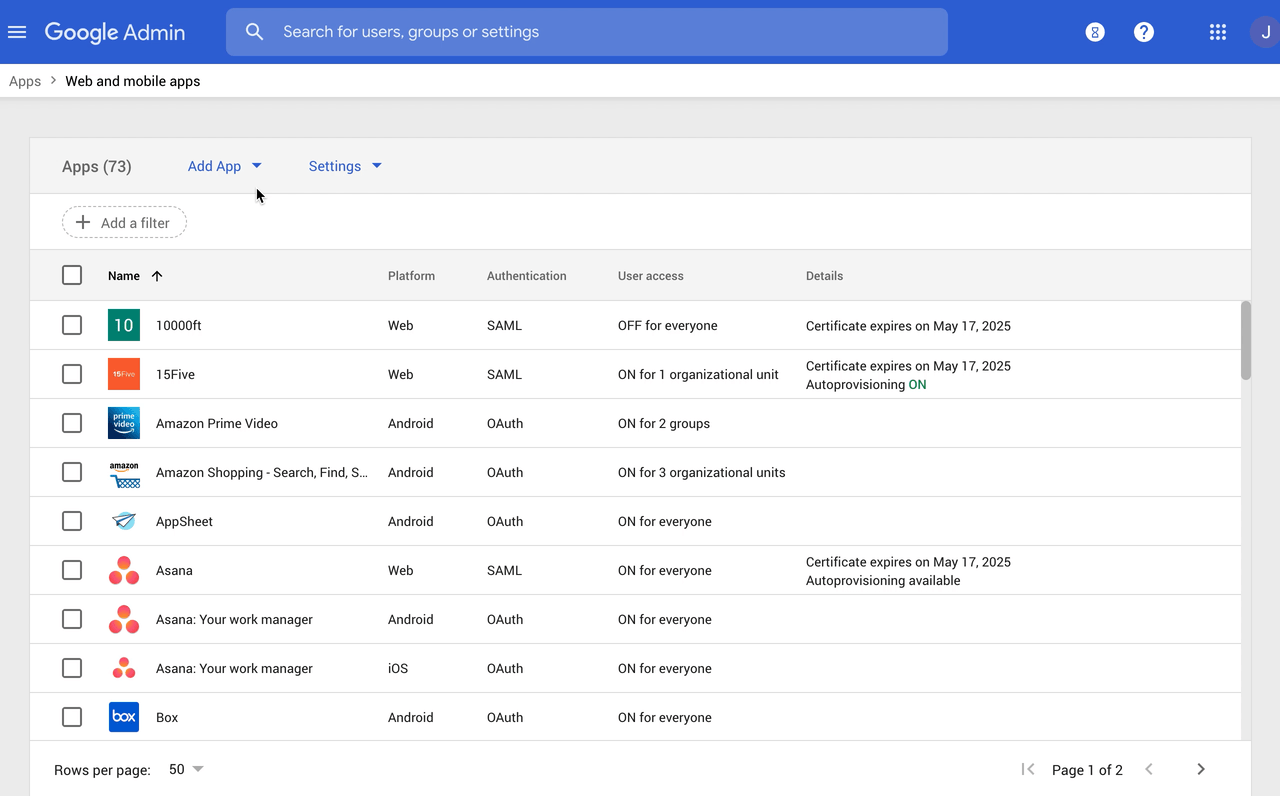
A custom SAML app is added in the Admin console under Apps, Web and mobile apps. A super administrator copies Google's SSO URL, entity ID and certificate into the service provider, enters the app's ACS URL and entity ID, maps attributes and groups, and turns the app on for everyone or for specific organizational units. Test SAML login confirms it before rollout.
Two limits matter at scale: a custom SAML app supports up to 75 groups, and changes can take up to 24 hours to apply.
- Starting price
- Free edition $0 (starts with a 50-user cap); Premium $8.40 per user per month on the flexible plan, billed through Google Workspace
- Free edition
- SAML SSO, 2-Step Verification, groups, basic device management
- Premium adds
- Automated provisioning, Context-Aware Access, Secure LDAP
- User cap
- Free starts at 50 users
- Custom SAML app limit
- 75 groups per app
- Free user cap
- Starts at 50 users
Independent identity platforms
Independent identity platforms replace or sit beside the directory in your productivity suite. They make sense when the app estate is mixed, when users are on both Microsoft and Google, or when the identity provider should not depend on one suite.
Okta Workforce Identity
Okta Workforce Identity
Independent workforce identity platform with Universal Directory, SSO and MFA. Lifecycle and access governance capabilities depend on suite or add-ons.
Okta fits companies with many third-party SaaS apps and someone who will own provisioning rules, because its lifecycle automation is mature and its price rises with the plan.
Okta publishes three plans, billed annually: Starter at $6 per user per month (single sign-on, MFA, Universal Directory and 5 Workflows), Core Essentials at $14 and Essentials at $17. Essentials adds Adaptive MFA, Lifecycle Management, Access Governance and 50 Workflows. Professional and Enterprise are quote only, and Workforce Identity has a $1,500 annual contract minimum, which matters below about 20 users. Okta's pricing page gives no clear feature list for Core Essentials, so ask before choosing it.
The practical gate is $17: automated joiner, mover and leaver changes and access reviews sit in Essentials, not in the $6 plan that most price comparisons quote.
- identity administration should remain independent of the Microsoft productivity tenant
- a mixed app portfolio needs explicit directory and lifecycle ownership
- existing Microsoft licenses already cover the necessary access controls and a second IdP adds no tested value
- the team cannot support federation and provisioning ownership across systems
- Users like
- reliable SSO and MFA and quick implementation, per G2's summary of reviewer themes
- Users dislike
- onboarding time, occasional configuration issues and pricing, per G2 reviewers' themes
- Source: G2, 1,429 reviews
How it works in practice
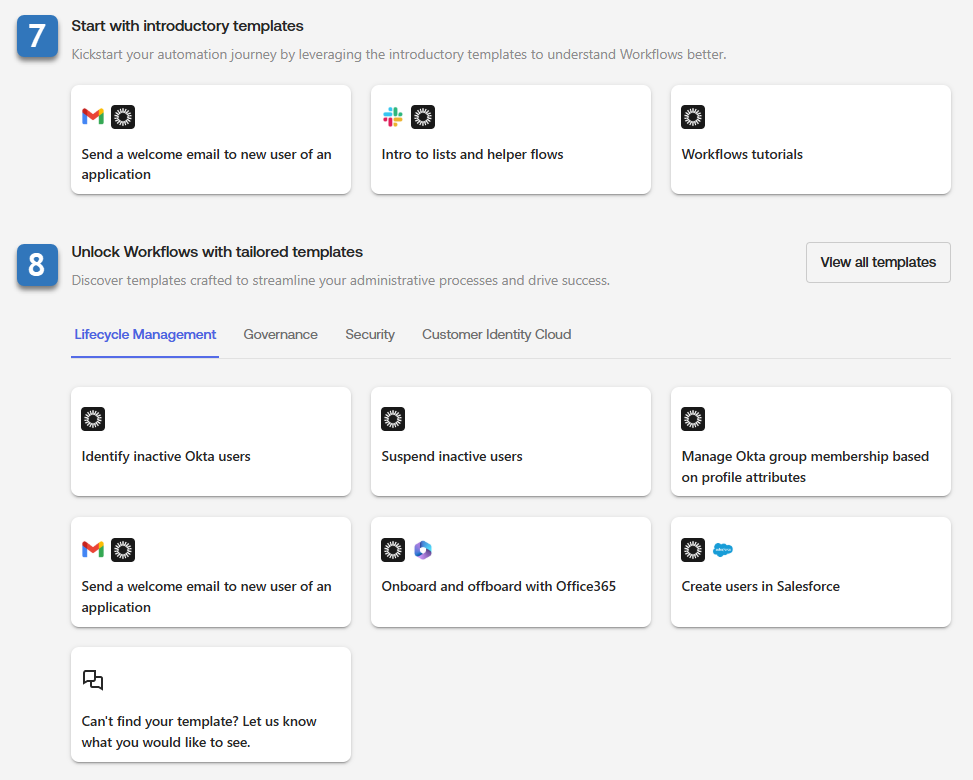
Lifecycle Management treats the HR system as the source of truth. When a record changes in Workday, BambooHR or SuccessFactors, Okta creates, updates or deactivates accounts in connected apps over SCIM. Okta Workflows adds no-code flows built from event and action cards, with execution history and an API endpoint to start a flow.
Okta's own documentation warns that mixing standard lifecycle provisioning with custom provisioning actions in a flow can produce conflicting changes, and downstream app rate limits can interrupt flows. Test an offboarding end to end before trusting it. Our Okta review and Okta pricing breakdown cover the plans in more detail.
- Starting price
- Starter from $6 per user per month, annual billing; $1,500 annual contract minimum
- Starter
- SSO, MFA, Universal Directory
- Essentials
- Adaptive MFA, Lifecycle Management, Access Governance
- Workforce contract minimum
- $1,500 annually
- Annual minimum
- $1,500
- Workflows
- 5 on Starter, 50 on Essentials
- Lifecycle and governance
- Essentials ($17) and up
JumpCloud
JumpCloud
JumpCloud bundles Apple MDM and Android management into its directory and identity platform and prices per user instead of per device.
JumpCloud is the natural pick for a team with Mac, Windows and Linux machines that wants directory, single sign-on and device management from one vendor at a per-user price.
JumpCloud publishes three bundles per user per month, billed annually: Device Management at $9, SSO at $11 and Device Identity Management at $13. Monthly billing costs $2 more in each case. Individual add-ons such as Cloud LDAP and Cloud RADIUS are $3 each, and Access Requests is $5. Platform Essentials, Platform and Platform Prime are quote only, and Platform Essentials is capped at 300 users. New customers get a 30 day trial but no free plan.
The saving for small offices is hosted LDAP and RADIUS: Wi-Fi, VPN and legacy apps authenticate against JumpCloud instead of a server you run.
- you want directory, SSO and device management from one vendor with a public per-user price
- you run Mac, Windows and Linux and want MDM for phones as an add-on
- you need the deepest mobile controls, which reviewers say are still evolving
- you only need mobile management and have no use for the directory layer
- Users like
- easy onboarding and unified management of identity and devices, per G2's summary of reviewer themes
- Users dislike
- Windows group policy gaps, MFA gaps with LDAP and a learning curve, per G2's summary of reviewer themes
- Source: G2, 4,121 reviews
How it works in practice
Cloud LDAP is set up by creating a binding user in the admin portal with the LDAP bind DN option enabled, adding users and groups to the LDAP directory, and pointing the app at ldap.jumpcloud.com on port 389 with STARTTLS or 636 for LDAPS. Plaintext connections and anonymous binds are refused, and the directory is read-only, so changes go through the console or API. MFA for LDAP apps is enforced through a conditional or global policy.
Suspended users are still billable, so offboarding means deleting accounts, not only suspending them. See our JumpCloud pricing guide for the billing rules.
- Starting price
- Device Management $9, SSO $11, Device Identity Management $13 per user per month, billed annually
- Entry price
- $9 per user per month, annual
- MDM add-on
- $5 per user per month, annual
- Trial
- 30 days
- Public Device Management
- $9/user/mo annual
- Public SSO
- $11/user/mo annual
- Public Device Identity Management
- $13/user/mo annual
- Platform packages
- Contact Sales
- Legacy free
- Only eligible pre-February 2024 accounts
- Hosted LDAP and RADIUS
- $3 each as add-ons
- Free plan
- None for new customers
- Quote only
- Platform Essentials, Platform, Platform Prime
OneLogin
OneLogin
A dedicated cloud identity provider with SSO, MFA, directory sync and role-based provisioning, owned by One Identity (Quest) since 2021, with public list prices for three of its four packs.
OneLogin is one of the few established identity providers that publishes three per-user prices, so a small team can budget without a sales call.
Basic is $3 per user per month and includes SSO, MFA, an app catalog and Active Directory sync, but limits security policies and provisioning rules to 5. Essentials at $6 removes that limit and adds automated provisioning and deprovisioning plus Entra ID and Google Workspace directory sync. Business at $10 adds SmartFactor adaptive MFA, Desktop MFA, HR sync from Workday, UKG, Namely or BambooHR, role-based access control, RADIUS and virtual LDAP. Enterprise is call for pricing and holds delegated administration, LDAP sync and API access management. OneLogin Workflows is a separate $2 per user per month add-on.
OneLogin has belonged to One Identity, a Quest Software business, since October 2021, and the pricing page still sells Workforce Identity under that ownership.
- you want a standalone identity provider with published per-user prices and directory sync from Active Directory, Entra ID, Google Workspace or an HR system
- you need RADIUS or virtual LDAP for Wi-Fi, VPN and legacy apps on the Business pack
- you want identity and device management in one product, because nothing on OneLogin's pages shows MDM
- you need delegated administration, LDAP sync or API access management for multi-tenant MSP use, which are Enterprise-only with no public price
- Users like
- MFA and password vaulting, and one access point for many apps, per G2's summary of reviewer themes
- Users dislike
- limited advanced IAM features, occasional login issues and slow support during outages, per G2's summary of reviewer themes
- Source: G2, 291 reviews
How it works in practice
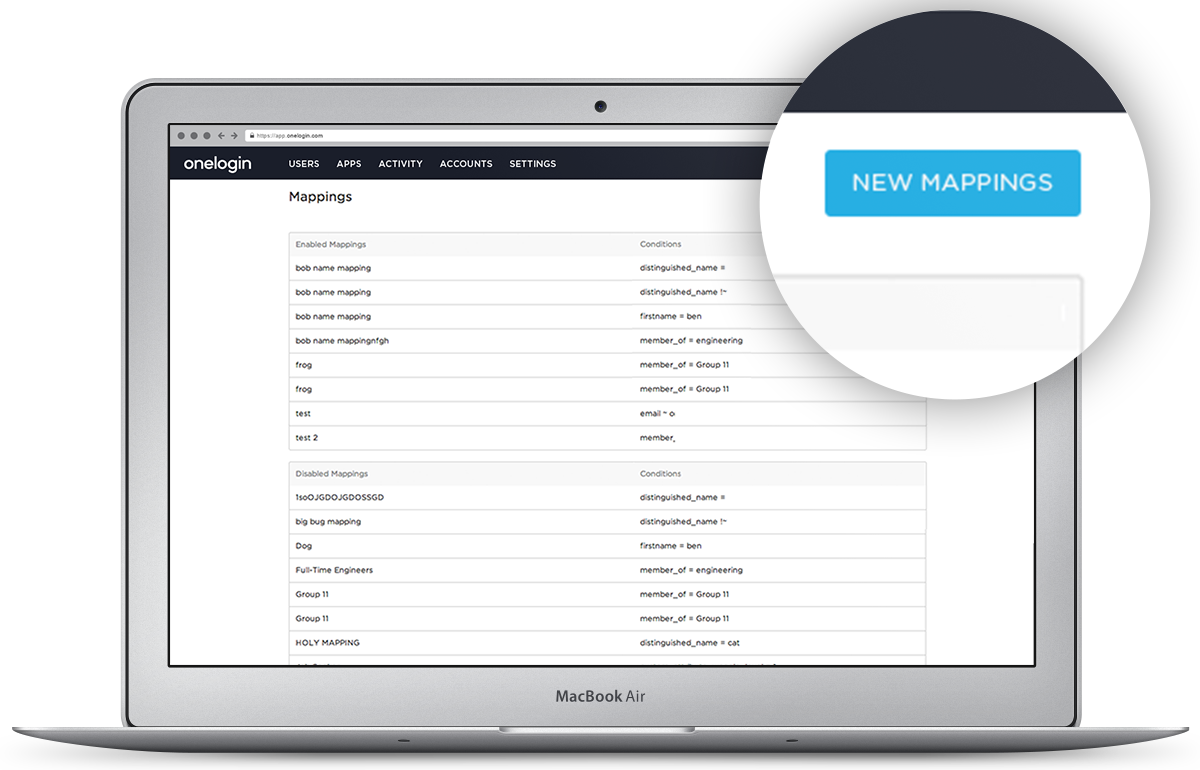
OneLogin controls access through user mappings, which are if-then rules. A condition checks a source, an operator and a value, for example a custom attribute city equal to Montreal, and an action such as adding a role. In OneLogin's developer example, users in Montreal automatically receive a Montreal reader role, and roles assigned by a mapping can't be removed by hand.
Mappings changed through the API don't run on their own: a user must be created or updated, or an admin must run Reapply Mappings in the console.
- Starting price
- Basic $3, Essentials $6, Business $10 per user per month; Enterprise by quote; Workflows add-on $2
- Basic ($3)
- SSO, MFA, AD sync, 5 provisioning rules
- Essentials ($6)
- Unlimited provisioning rules, Entra ID and Google sync
- Business ($10)
- SmartFactor adaptive MFA, Desktop MFA, HR sync, RBAC
- Workflows
- $2 per user per month add-on
- Provisioning rules
- 5 on Basic, unlimited from Essentials
- Add-on
- Workflows, $2 per user per month
Rippling IT
Rippling IT
Rippling IT drives identity, SSO, MFA, app provisioning and device management from the same employee record as HR and payroll, so a hire, role change or exit changes accounts, groups and devices without tickets.
Rippling IT makes sense when HR, payroll and IT should run from the same employee record, so that employee data decides app access and device policy.
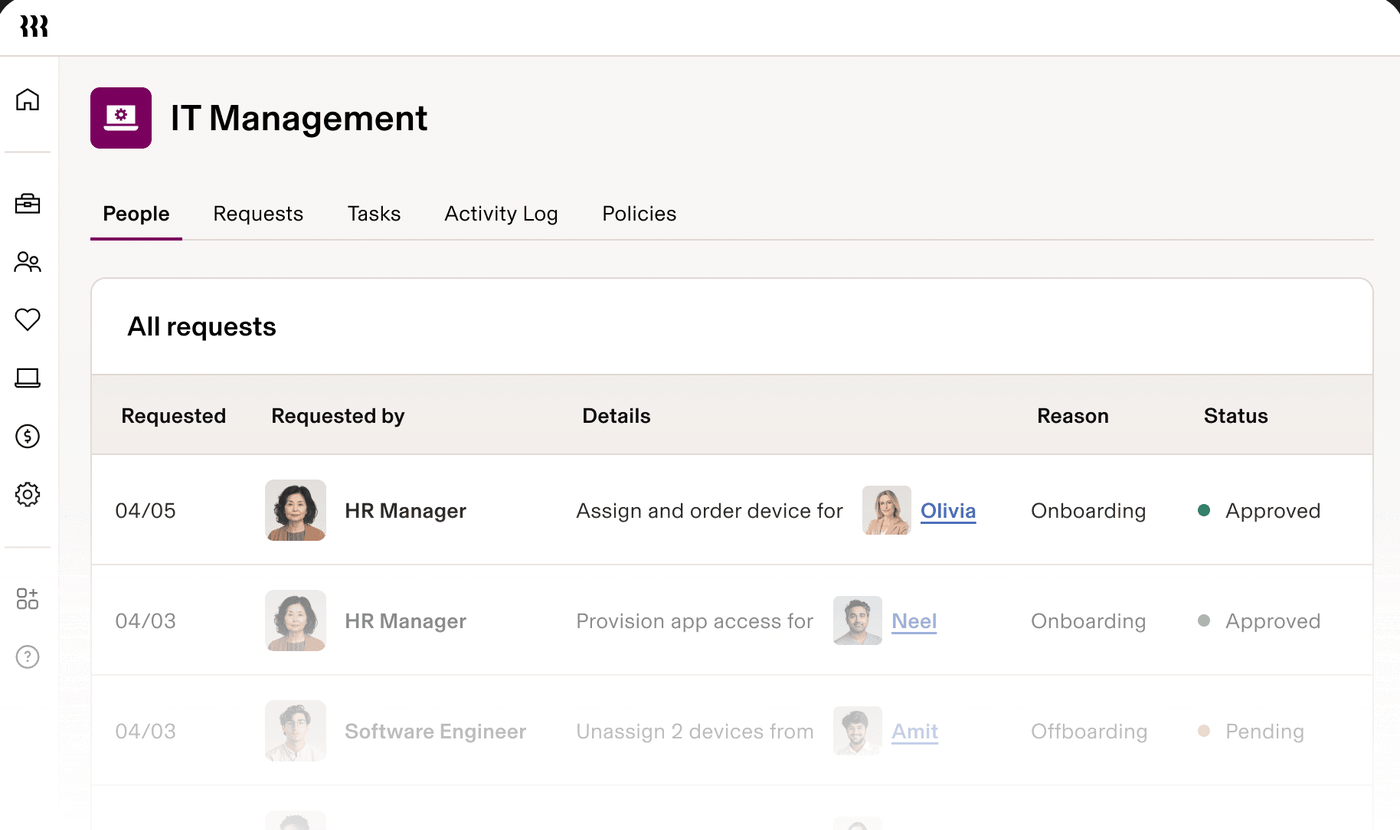
Rippling stores attributes such as role, department, manager and status, or syncs them from an external HR system or directory. Rules and dynamic groups called Supergroups act on those attributes, so a hire, a role change or an exit creates, updates or revokes app accounts, group memberships, licenses and device policies without a ticket. Custom apps connect over SAML and SCIM, and Cloud RADIUS and virtual LDAP cover Wi-Fi, VPN and legacy systems. Device management covers macOS, Windows, iOS and iPadOS.
Rippling publishes no IT price. Its pricing page says plans start at $8 per employee per month with a monthly base fee, and the quote form takes it from there. Third-party benchmarks (Vendr) put a median deal near $45,645 a year, and independent estimates for the IT modules disagree with each other, so treat any number you read elsewhere as a guess until you have a quote.
- you also want HR and payroll in the same system, so employee data decides app access and device policy
- you want joiner, mover and leaver changes to provision and suspend accounts automatically instead of by ticket
- you need a published price or a predictable per-user bill, because Rippling IT is quote only
- you want a standalone identity provider with no HR layer, or device management for Android and Linux, since Rippling lists macOS, Windows, iOS and iPadOS
- Users like
- HR and IT in one place and automated provisioning and offboarding, per G2 reviewers
- Users dislike
- complex setup for smaller teams without IT experience and device-agent prompts during meetings, per G2 reviewers
- Source: G2, 1,204 reviews
How it works in practice
Rippling's own SSO rollout guide describes three steps: add employees from Rippling, an external HR system, a directory or a CSV; set up Supergroups; then deploy SSO with pre-built or custom SAML and SCIM apps, preview the changes and fix account mismatches. After that, provisioning, updates and revocation run automatically. The guide claims a 50 app rollout in one day, which is a vendor claim without supporting data.
Whether Rippling IT can be bought without the HR platform isn't stated on the pricing page, so ask in the first call.
- Starting price
- No published IT price; plans start at $8 per employee per month with a monthly base fee, per Rippling's pricing page
- Pricing
- Quote only, monthly base fee
- Provisioning
- SAML and SCIM, rule-based from HR data
- Devices
- macOS, Windows, iOS, iPadOS
- Dynamic groups
- Supergroups by department, location or tenure
- Device management
- macOS, Windows, iOS, iPadOS
- Integrations
- Pages cite 600+, 650+ and 800+ apps
Zoho Directory
Zoho Directory
Zoho's standalone directory and identity service with SSO, MFA, Active Directory sync, conditional access, device login and hosted Cloud LDAP and RADIUS, priced well below most identity vendors.
Zoho Directory is the cheapest all-in-one directory in this list, and the one with the least independent evidence behind it.
The Free plan covers 10 users with SSO for 3 third-party apps (unlimited Zoho apps), MFA through Zoho OneAuth, Cloud RADIUS and Cloud LDAP for 10 users, and anomaly detection. Standard is $2 per user per month and Professional is $7, both billed monthly, with 15% off for yearly billing and a 45 day trial. Standard removes the app limit and adds custom provisioning and a custom domain. Professional adds 10 directory stores, custom admin roles and unlimited RADIUS and LDAP. Zoho's pricing page showed euros in our browser, so the dollar figures come from the Zoho-provided listing on G2 and should be confirmed at checkout.
The warning is evidence: G2 shows 4.0 from 2 reviews, and Capterra and GetApp show none. Run the 45 day trial before betting a client on it.
- you want the cheapest credible all-in-one directory with SSO, MFA and device login, especially if you already run Zoho apps
- you need hosted Cloud LDAP or RADIUS for Wi-Fi, VPN or printers without running servers
- you need independent proof from many reviews, because G2 shows only 2 reviews and Capterra and GetApp show none
- you need full device management with patching and app deployment, since the pages read describe device login only
- Users like
- too few reviews to name themes
- Users dislike
- too few reviews to name themes
- Source: G2, 2 reviews

How it works in practice
Zoho Directory can be the identity provider for a custom app, or it can accept an external one. In the second case an admin opens Security, Custom Authentication, adds Okta, Entra ID or Google as a SAML identity provider, chooses which user groups sign in through it and sets the IdP priority. Smart groups assign users automatically by department, role or attribute, and conditional access policies can deny, allow or require MFA by location, time, IP and device.
The pages we read describe device login for Linux, Mac and Windows laptops, not full device management with patching and app deployment, and they don't document SCIM or OIDC in depth.
- Starting price
- Free for 10 users; Standard $2, Professional $7 per user per month billed monthly; 15% off billed yearly
- Free plan
- 10 users, SSO for 3 third-party apps
- Standard ($2)
- Unlimited SSO apps, custom provisioning
- Professional ($7)
- 10 directory stores, custom admin roles
- Trial
- 45 days
- Billing
- $2 and $7 monthly, 15% off yearly
A multifactor layer on top of your directory
Sometimes the directory is fine and the gap is the second authentication factor. A layer that sits in front of Active Directory, Entra ID, Google Workspace or Okta is cheaper than replacing the directory.
Cisco Duo
Cisco Duo
Duo puts MFA, single sign-on and device trust in front of the directory you already run, whether that is Active Directory, Entra ID, Google Workspace or Okta. It does not host your full directory or automate joiners, movers and leavers.
Duo is the cheapest way to add strong MFA, single sign-on and device checks to a directory you already run.
Duo publishes four editions per user per month: Free for up to 10 users, Essentials at $3, Advantage at $6 and Premier at $9. Essentials adds Duo SSO, the Duo Directory user store, phishing-resistant MFA, passwordless sign-in and Trusted Endpoints. Advantage adds Duo Passport, risk-based authentication and Active Directory Defense. Premier adds complete device trust and VPN-less access to private resources. Self-service licenses are sold in blocks of 10 under 100 users and 25 above, and the pricing page doesn't say whether billing is annual or monthly.
Duo's documentation describes MFA, SSO and inbound directory sync. It doesn't describe provisioning or deprovisioning accounts in other apps, so a team that wants joiner, mover and leaver automation still needs a directory or HR-driven tool next to it. Capterra reviewer summaries praise easy setup and reliable MFA and complain about unreliable push delivery when a phone is lost, though we could not read the live review pages.
- you already have a directory and want strong MFA, SSO and device checks on top of it at a published per-user price
- you have 10 or fewer users and want free MFA, or you want phishing-resistant MFA from the $3 Essentials tier
- you need one product that hosts the directory and automates app provisioning and deprovisioning, because Duo's docs describe MFA, SSO and inbound sync only
- you want device trust or VPN-less access on a tight budget, since those start at Advantage ($6) or Premier ($9)
How it works in practice
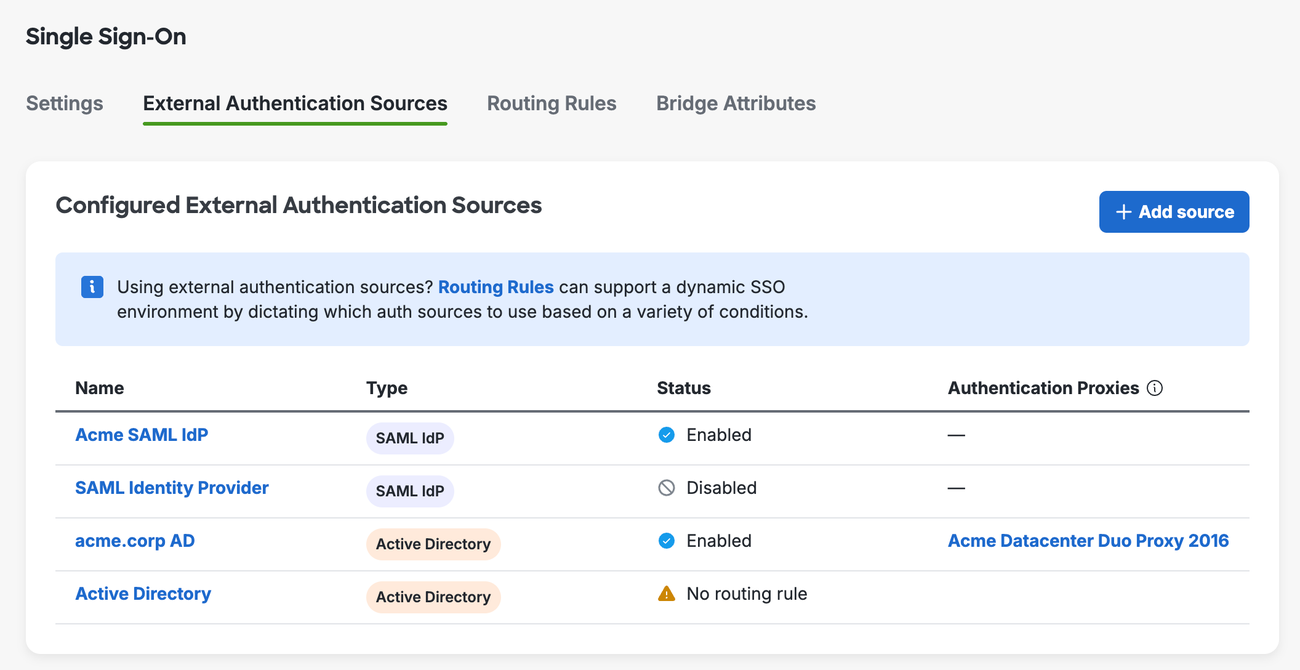
For SSO, an admin picks an authentication source: Duo Directory, on-premises Active Directory through the Duo Authentication Proxy (version 6.5.1 or later), or an external SAML identity provider such as Entra ID. Routing rules, up to 30, choose the source per login. When Active Directory or a SAML provider is the source, that system, not Duo, manages passwords and policies.
Trusted Endpoints marks a device as managed by checking it against a management system such as Intune or Jamf, or through Duo Desktop. Enabling a block policy before Duo Desktop is deployed can lock users out, so roll it out in monitor mode first.
- Starting price
- Free up to 10 users; Essentials $3, Advantage $6, Premier $9 per user per month
- Free
- Up to 10 users, MFA only
- Essentials ($3)
- SSO, Duo Directory, Trusted Endpoints, passwordless
- Advantage ($6)
- Passport, risk-based authentication, Active Directory Defense
- Premier ($9)
- Device trust, VPN-less access
- SSO and Trusted Endpoints
- Essentials ($3) and up
- Licenses
- Blocks of 10 under 100 users
Identity governance software
Identity governance software adds access requests, approvals and certification campaigns on top of provisioning: managers or app owners confirm, on a schedule, that each person still needs each access, and removals are tracked until they happen. Separation-of-duties checks block conflicting access, such as the same person creating and approving payments, before it is granted.
A small team can cover part of this without a dedicated product. Entra ID Governance is a $7 per user per month add-on to the Microsoft stack, and Okta's Essentials plan at $17 includes Access Governance and access requests. SaaS management tools such as Torii and Zluri also run access reviews, which we cover in our SaaS management software comparison. A dedicated governance platform becomes worth the cost when a regulator or auditor requires formal certifications across many systems. In practice the top IGA options for a small company are three: Entra ID Governance at $7 per user per month, Okta Access Governance inside the $17 Essentials plan, and SailPoint by quote.
SailPoint
SailPoint
The reference identity governance platform: access requests, certification campaigns, joiner-mover-leaver lifecycle and separation-of-duties checks across many systems, sold to enterprises on a services-led implementation.
SailPoint is the reference platform for identity governance, built and sold for enterprises, and it is the tool to look at only when certification campaigns are a requirement.
SailPoint publishes no price list. Packaging is three suites, Standard, Business and Business Plus, with newer agentic suites that add non-human identities, and SailPoint added a commitment model called Navigators in December 2025. There is no small-business edition and no stated minimum. A third-party benchmark, Vendr, shows a median of about $109,835 a year across 39 purchases, with the lowest at $21,086, and puts professional services at 30 to 60 percent of first-year cost.
The G2 rating of 4.6 covers all SailPoint products, not only the cloud platform, and reviewers are mostly enterprises.
- compliance requires formal access certifications and separation-of-duties checks across many systems
- you have the budget and a partner for a multi-month deployment
- your identity governance budget is below roughly $20,000 a year or you cannot fund an implementation project
- you mainly need SSO, MFA and basic onboarding and offboarding for a few hundred users
- Users like
- centralized governance automation and audit-ready certification campaigns, per G2 reviewers
- Users dislike
- a steep learning curve and slow support resolution, per G2 reviewers
- Source: G2, 258 reviews
How it works in practice
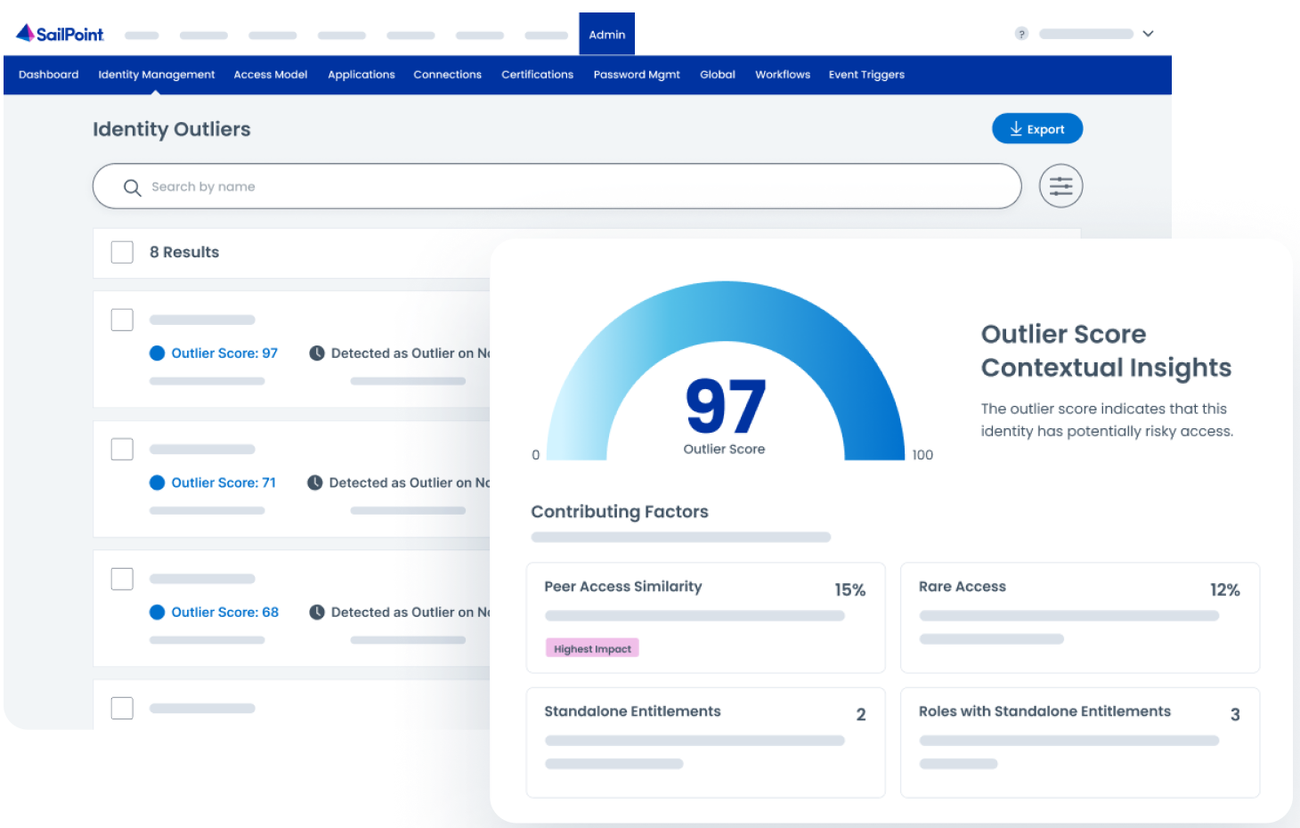
Per SailPoint's developer documentation, a certification campaign is created from scratch or from a scheduled template, previewed, edited and activated. Campaign types include Manager, Source Owner, Identities, Access Items, Role Composition and Uncorrelated Accounts. Reviewers grant or revoke each access item and can reassign a certification with a required comment. If any reviewer chose revocation, the campaign enters a remediation phase and completes when remediation finishes.
The access request side recommends items based on peer group and role and can approve low-risk requests automatically. SailPoint went public on Nasdaq in February 2025 and, in 2026, announced an agentic identity fabric and the intent to acquire Entro, a non-human identity vendor.
- Starting price
- Quote only; no public price list or minimum
- Pricing
- Quote only
- Campaign types
- Manager, Source Owner, Identities, Access Items, Role Composition
- Third-party benchmark
- Vendr median about $109,835 a year
- G2 scope
- All SailPoint products
Which IAM plan includes automated user provisioning
The cheapest plan with automated user provisioning is Zoho Directory Standard at $2 per user per month, followed by OneLogin Essentials at $6 and Entra ID P1 at $7. Provisioning is the feature most often locked behind a higher plan, so check this table before comparing sign-in prices.
| Tool | Lowest plan with automated provisioning | Price per user per month | Limit or catch (USD where priced) |
|---|---|---|---|
| Microsoft Entra ID | P1 for group and on-premises app provisioning | $7, paid yearly | Nested groups cannot define scope; lifecycle workflows need the governance add-on |
| Google Cloud Identity | Premium | $8.40, flexible plan | Free covers SSO and 2-Step Verification only |
| Okta Workforce Identity | Essentials for Lifecycle Management | $17, billed annually | $1,500 annual minimum; Starter has SSO, MFA and 5 Workflows |
| JumpCloud | Not broken out by plan on the pricing page | From $9, billed annually | Ask which bundle includes SCIM-based lifecycle rules |
| OneLogin | Essentials for unlimited provisioning rules | $6 | Basic is limited to 5 rules |
| Rippling IT | Quote only | Quote only | Provisioning runs from HR data |
| Zoho Directory | Standard for custom provisioning | $2, billed monthly | Free has default provisioning only |
| Cisco Duo | Not offered | Not applicable | Duo syncs users in; it doesn't provision other apps |
| SailPoint | Quote only | Quote only | Governance and lifecycle sold as suites |
What IAM software costs for a small team
IAM software for a small team costs from $2 per user per month: the cheapest published paid price is Zoho Directory Standard, and the highest published per-user price in this list is Okta Essentials at $17. Two tools are quote only. Four have a free tier, each with a cap: 50 users to start on Google Cloud Identity Free, 10 on Duo Free, 10 on Zoho Directory Free, and Entra ID Free, which comes with a Microsoft 365 or Azure subscription. JumpCloud has no free plan for new customers.
Five things raise the bill beyond the headline price:
- Minimums. Okta Workforce Identity has a $1,500 annual contract minimum, so a 10-person team pays more than $6 per user.
- Plan gates. Provisioning automation moves you up: OneLogin Essentials at $6, Okta Essentials at $17, Google Premium at $8.40.
- Add-ons. OneLogin Workflows is $2 per user per month, JumpCloud LDAP and RADIUS are $3 each, and Entra governance is a separate $7.
- Billing term. JumpCloud costs $2 more per user per month on monthly billing, and Zoho takes 15% off for yearly billing.
- Layers. Duo, SailPoint or a governance add-on sits on top of the directory, not instead of it.
Monthly cost at list price. Okta rows apply the $1,500 annual minimum. Duo, Rippling IT and SailPoint are left out: Duo sits on top of a directory, and the other two are quote only. Microsoft 365 Business Premium already includes Entra ID P1.
How to roll out IAM without locking yourself out
Most identity incidents in a small team come from the rollout, not the tool: an MFA policy that locks out the admin who can fix it, or an offboarding rule nobody tested.
The main risks of rolling out MFA are lockouts and delays. Entra ID's security defaults are all or nothing, so you can't exempt a single account. Duo warns that enabling a block policy before Duo Desktop is deployed can lock users out. Google says changes to a custom SAML app can take up to 24 hours to apply, and Capterra reviewers of Duo mention push notifications that fail when a phone is lost. The steps below are ordered to catch each of these before they reach everyone.
List apps, accounts and owners
Export the apps people sign in to and the accounts that exist in each. Mark the ones that are shared logins or service accounts, because SSO won't cover them.
Create two break-glass admin accounts
Create two or more cloud-only accounts that are not federated or synced, protect each with a hardware security key (passkey) instead of a shared password, keep the keys sealed, exclude the accounts from policies that block or restrict sign-in, and alert on any sign-in. Microsoft's emergency access guidance recommends exactly this setup.
Pilot with one group
Move IT staff and a few volunteers first. Use report-only or monitor mode where the tool offers it, such as Conditional Access report-only in Entra ID.
Enforce MFA, admins first
Require MFA for admins, then everyone. Prefer phishing-resistant methods such as security keys or passkeys for admin roles. On Microsoft tenants, MFA is already required for the Azure portal, Entra admin center and Intune admin center, and for the Microsoft 365 admin center since February 2025.
Connect your source of truth and three apps
Point the tool at HR data or the directory, and set up provisioning for the three apps that cost the most in licenses or hold the most sensitive data.
Test an offboarding end to end
Disable a test user and check that each connected app removes access. Repeat after every provisioning rule change.
What IAM doesn't answer: who owns your service accounts
IAM software doesn't answer who owns your service accounts, because every tool above manages people. The logins that aren't people, such as backup jobs, deploy pipelines, API integrations and scheduled scripts, usually sit outside SSO and outside the review cycle, and the person who created them may have left. A directory can list them, but a list doesn't say who is responsible for each one or whether it is still needed.
The IT Lead is built for that single gap: you import service accounts from CSV, nominate an owner, collect an emailed attestation and keep the review trail. It records ownership and decisions and doesn't change anything in your systems. If you want a starting point, our service account inventory template has the columns, and the privileged access management comparison covers vaulting and rotation for the accounts that carry admin rights.
Which tool to pick
- You have Microsoft 365 Business Premium or E3Microsoft Entra ID P1, already included
- You run Google Workspace and want SAML SSO for freeGoogle Cloud Identity Free, up to 50 users
- You manage Mac, Windows and Linux devices and want one consoleJumpCloud, from $9 to $13 per user per month
- You use many SaaS apps and want lifecycle automationOkta Essentials at $17, or OneLogin Essentials at $6
- HR data should drive access and devicesRippling IT, by quote
- You only need to add MFA to an existing directoryDuo Free or Essentials at $3
- An auditor requires certification campaignsSailPoint, or Entra ID Governance for a lighter start
Frequently asked questions
What does an identity and access management system do?
An identity and access management system controls who can sign in to which systems and what they can do there. It authenticates people with single sign-on and MFA, decides what they may reach, creates and removes their accounts in connected apps, and records the access they hold so it can be reviewed.
What is the best software for managing users and access?
The best software for managing users and access depends on the stack. Microsoft Entra ID P1 is the default for Microsoft 365 teams because it is included in Business Premium, Google Cloud Identity suits Google Workspace, JumpCloud suits mixed device fleets, and Okta or OneLogin suit teams with many third-party SaaS apps.
What are the top IGA tools?
The top identity governance (IGA) tools start with SailPoint, the reference platform. Smaller teams often start with the governance features inside their identity provider, such as Entra ID Governance at $7 per user per month or Okta Access Governance in the $17 Essentials plan.
Is there free identity and access management software?
Free identity and access management software exists, but every free tier has a cap. Google Cloud Identity Free starts at 50 users, Duo Free and Zoho Directory Free cover 10 users, and Entra ID Free is included with a Microsoft 365 or Azure subscription. JumpCloud has no free plan for new customers.
Do I need IAM software if I only use Microsoft 365?
If you only use Microsoft 365, you already have Entra ID. The question is the plan: Business Premium includes P1 with Conditional Access, while risk-based policies and Privileged Identity Management need P2 and lifecycle workflows need the governance add-on.
What is the difference between IAM and PAM?
The difference between IAM and PAM is scope: IAM manages everyday sign-in and access for all users. Privileged access management controls and records the use of admin and break-glass accounts, usually with approvals, session limits and password rotation.