
IT management software is the set of tools an IT team uses to run its daily work: a service desk for tickets, device management for laptops and phones, an asset inventory for hardware and licenses, and an identity layer for accounts and app access. Most products start in one of those four jobs and add the others over time. This page compares eight options for IT teams of roughly 3 to 100 people and for MSPs: HaloITSM, Freshservice, Jira Service Management, ManageEngine ServiceDesk Plus, NinjaOne, Atera, JumpCloud and Rippling IT.
For device management specifically, our guide to unified endpoint management software compares eight tools and what each one needs underneath it.
Remote control is one job in this stack, and our guide to remote access software compares eight tools for it.
The eight differ less in features than in where they start. Four are service desks first, two are device management first, and two start from the directory or the HR record. So this page shows which of the four jobs each tool covers, what the price unit is (agent, technician, device or user) and which plan unlocks the part you probably need. We read vendor material and did not run these products.
- IT management tools compared
- 8
- jobs: tickets, devices, assets, accounts
- 4
- with a free plan (Jira Service Management, ServiceDesk Plus)
- 2
- per agent per month across four published service desk prices
- $13 to $99
Best IT management software at a glance
The short answer: pick the tool that starts where your biggest daily pain is. If it's tickets, choose one of the four service desks. If it's patching, remote fixes and unmanaged laptops, choose NinjaOne or Atera. If it's accounts and onboarding, look at JumpCloud or Rippling IT. A team of three to ten people rarely needs more than two of these.
 Best for full ITIL on one flat priceHaloITSMEvery module and the AI agents are in one plan: US$99 per agent per month at 5 to 10 agents, falling to US$85 at 100 or more, billed annually.
 Best for fast adoption with a CMDBFreshserviceStarter is $19, Growth $49 and Pro $99 per agent per month billed annually. Asset management starts at Growth.
 Best free service desk for three agentsJira Service ManagementFree for 3 agents, then Standard at $21.50 per agent per month. Assets arrive with Standard.
 Best free plan for five techniciansManageEngine ServiceDesk PlusFree for up to 5 technicians, cloud paid from US$13 per technician per month billed yearly.
 Best when devices come firstNinjaOneMonitoring, patching, scripts, remote access and ticketing in one console, priced per device on a quote.
 Best for tickets and RMM per technicianAteraUnlimited endpoints per technician, from 149 EUR per technician per month billed annually.
 Best when the directory and the laptops share a consoleJumpCloudDevice Management $9, SSO $11 and Device Identity Management $13 per user per month, billed annually.
 Best when HR data should decide accessRippling ITPlans start at $8 per employee per month with a monthly base fee, and the IT price is by quote.
| Tool | Starts as | Price (as listed) | Covers natively | What the entry tier leaves out | G2 rating |
|---|---|---|---|---|---|
| HaloITSM | All-in-one ITSM, one flat price | US$99 per agent per month at 5 to 10 agents, US$85 at 100+, billed annually | Tickets, CMDB | Nothing by tier; onboarding is a separate required package | 4.8 (38) |
| Freshservice | Service desk with a discovery agent | Starter $19, Growth $49, Pro $99 per agent per month, billed annually | Tickets, assets and CMDB (from Growth) | SLA management and service catalog start at Growth; change and problem management at Pro | 4.6 (1,387) |
| Jira Service Management | ITSM service desk for Atlassian teams | Free for 3 agents; Standard $21.50, Premium $55.28 per agent per month | Tickets, assets (from Standard) | Assets need Standard; change and problem management need Premium | 4.3 (1,004) |
| ManageEngine ServiceDesk Plus | ITSM help desk with free tier | Free for 5 technicians; cloud paid from US$13 per technician per month, billed yearly | Tickets; assets, CMDB and change in higher editions | Asset, CMDB and change management sit above the base edition | 4.2 (255) |
| NinjaOne | RMM with built-in ticketing | Quote; about $1.50 to $3.75 per device per month | Devices, tickets, inventory | No published price per plan | 4.7 (5,850) |
| Atera | RMM plus help desk for IT teams | From 149 EUR per technician per month, billed annually; unlimited endpoints | Devices, tickets | No ITIL change or CMDB process; prices shown in EUR | 4.6 (1,287) |
| JumpCloud | Directory-led device management | $9, $11 or $13 per user per month, billed annually | Accounts, devices | No ticketing; SSO and device management are separate packages | 4.5 (4,129) |
| Rippling IT | HR-driven identity and device management | From $8 per employee per month plus a base fee; IT by quote | Accounts, devices (macOS, Windows, iOS, iPadOS) | No ticketing; no published IT price | 4.7 (1,242) |
 The IT Lead Our product | Service account ownership reviews | Team $49/month (up to 250 service accounts), MSP $129/month (up to 1,000), per workspace | No reviews yet |
Prices are US list prices read on vendor pages in October and November 2026. A job that is missing from a cell is one the vendor doesn't list.
What is IT management software?
IT management software is the set of tools that run an IT team's four daily jobs, and no single product does all four well. Tickets is the service desk: requests arrive, get an owner and a deadline, and are closed with a record. Devices is the work of keeping laptops, phones and servers patched, monitored and reachable, usually called remote monitoring and management (RMM) or mobile device management (MDM). Assets is the inventory of what you own, who has it and what it's worth. Accounts is the identity layer: who exists, which apps they can open and what happens when they leave.
The service desk vendors add a vocabulary of their own: ITIL, a catalog of IT processes such as incident, request, change and problem management. A team of five usually needs incident and request handling and little else, which is why the tier that adds change and problem management shows up as a gate in the table above.
Each job has its own deeper guide on this site: service desk software, IT service management software, IT asset management software, endpoint management software, mobile device management software and single sign-on software. This page is the map, and those pages hold the detail. We don't repeat their tool lists here.
Which jobs each tool covers
The flow below lists the tools under each job. A tool can appear in several columns, and the bottom line of each column is where that job tends to break when no tool owns it.
- Job 1Tickets
- HaloITSM
- Freshservice
- Jira Service Management
- ManageEngine ServiceDesk Plus
- NinjaOne
- Atera
Where it breaks Requests arrive by email and chat with no owner and no deadline. - Job 2Devices
- NinjaOne
- Atera
- JumpCloud
- Rippling IT
Where it breaks A laptop misses patches for months and nobody sees it. - Job 3Assets
- Freshservice
- Jira Service Management
- ManageEngine ServiceDesk Plus
- HaloITSM
- NinjaOne
Where it breaks The inventory says one thing and the network says another. - Job 4Accounts
- JumpCloud
- Rippling IT
Where it breaks A leaver keeps access to apps nobody wrote down.
Two things stand out. Nothing in the eight is strong on all four jobs: the service desks lean on a discovery agent or an integration for devices, and the device tools lean on a lighter ticket queue. And accounts sit apart from the rest, which is why identity usually ends up in a separate tool or in the directory you already pay for.
Service desk first: HaloITSM, Freshservice, Jira Service Management and ServiceDesk Plus
The four service desks put the ticket at the center. A request comes in, rules route it, a timer runs against a deadline, and the agent resolves it with a knowledge article or a change. They differ in how the price scales and which plan adds assets, change and problem management.
HaloITSM
HaloITSM
HaloITSM is a single-plan ITSM platform where every module and the AI agents are included per agent, covering ITIL incident, request, change and problem with CMDB, SLAs and a self-service portal.
A single-plan ITIL service desk where every module and the AI agents are included in the per-agent price.
What it covers natively. Incident, request, change and problem management with a CMDB, SLAs and a self-service portal. Unlimited SLAs and OLAs are included, and the portal embeds in Microsoft Teams. Email, portal, Teams, phone or monitoring alerts create a ticket, rules route it, SLA and OLA timers escalate it, and AI suggests knowledge articles and replies.
Where the money goes. The price is US$99 per agent per month at 5 to 10 agents, billed annually, falling to US$85 at 100 or more. There are no tiers or add-ons, but an onboarding package is required and is quoted separately, so ask for that number before comparing it to a tool you can start yourself.
- you want all ITSM modules and AI at one per-agent price with no tiers or add-ons
- you run an MSP or a mixed IT and customer service team and may later add HaloPSA or Halo CRM on the same platform
- you want a free plan or a published price below roughly US$99 per agent for a team of 5 to 10
- you want a published implementation cost, since onboarding is mandatory and quoted separately
- Users like
- easy setup and ease of use, per G2 reviewers
- Users dislike
- limited UI and workflow customization and report building needing SQL, per G2 reviewers
- Source: G2, 38 reviews

How it works in practice
What users report. G2 reviewers like the easy setup. The same reviewers point to limited UI and workflow customization, and to report building that needs SQL. The G2 sample is small, so treat the 4.8 as early. HaloITSM is a service desk only: devices come in through a separate tool, and the same vendor sells HaloPSA and Halo CRM for MSP and customer service teams that want to stay on one platform.
- Starting price
- US$99 per agent per month billed annually at 5 to 10 agents, falling to US$85 at 100 or more; onboarding package required
- SLA management
- Unlimited SLAs and OLAs, all included
- Self-service portal
- Included, embeds in Teams
- AI
- AI agents included, no separate licence
Freshservice
Freshservice
Freshservice combines a service desk with a CMDB filled by a Discovery Agent on laptops and a Discovery Probe that scans a domain or IP range, so an agent sees an asset next to its tickets.
A service desk with a discovery agent, so an agent sees the laptop next to its tickets.
What it covers natively. Starter ($19 per agent per month, billed annually) covers incident management, knowledge management, task management and a support portal. Growth ($49) adds the service catalog, SLA management, on-call management and cloud management. Pro ($99) adds problem, change, major incident, workload and release management and employee journeys. A Freddy AI Copilot add-on is $29 per agent per month.
How assets get in. A Discovery Agent on laptops and a Discovery Probe that scans a domain or IP range feed the CMDB. Asset management starts at Growth with 100 Asset Units included, and a server counts as 4 units while a desktop counts as 1. Occasional agents can be added with Day Passes, which start at $3.
- you also need a service desk and want assets, relationships and tickets in one place
- your team values fast adoption and a clean interface over deep configuration
- you only want asset tracking: the Starter plan has no asset units and Growth starts at $49 per agent
- you need contracts and software asset management: those sit in the ITAM Pro tier
- Users like
- ticket organization and automation, per G2 reviewers
- Users dislike
- confusing ticketing reports and missing features, per G2 reviewers
- Source: G2, 1,387 reviews

How it works in practice
What to watch. The Starter plan has no asset units, so a team that wants an inventory pays at least the Growth price per agent. Contracts and software asset management sit in the ITAM Pro tier. G2 reviewers praise ease of use and automation and flag missing or limited features. Freshservice manages tickets and assets, not the laptop itself: patching and remote control still need an RMM or MDM.
- Starting price
- Asset management from the Growth plan at $49 per agent per month billed annually, with 100 Asset Units included; standalone ITAM plans are quote only
- Discovery
- Discovery Agent and Discovery Probe
- Asset metering
- Asset Units; a server counts 4, a desktop 1
- Plan gate
- Not on Starter
- Incident plans
- Incident management on all plans; SLA and on-call management from Growth ($49); major incident management from Pro ($99), per agent per month billed annually
Jira Service Management
Jira Service Management
Jira Service Management is Atlassian's service desk, now sold in the Service Collection with Assets and Customer Service Management. A free plan covers 3 agents, Standard adds Assets and Rovo AI, and Premium adds change, problem and incident management.
The service desk for teams that already live in Jira or Confluence, with a free plan for three agents.
What it covers natively. The Free plan includes a portal, email, Microsoft Teams and Slack intake, customizable forms, queues, a workflow editor, alerts with on-call schedules and an incident template, an embedded knowledge base and 1,250 automation steps per subscription per month. Standard ($21.50 per agent per month) adds Assets and configuration management, audit logs, data residency, Rovo AI features and 3,000 automation steps per user per month. Assets on Standard holds up to 5,000 objects.
Where the gate is. Change and problem management and advanced incident management with post-incident reviews need Premium at $55.28 per agent per month. Jira Service Management is licensed per agent, and customers are unlimited and unlicensed.
- you have 3 or fewer agents and want a free service desk with portal, email, Teams and Slack
- your team already works in Jira or Confluence and wants dev and IT on one ticket
- you need change and problem management at a low price, since they require Premium at $55.28 per agent / month
- nobody on the team has time to configure workflows, permissions and automation limits
- Users like
- ease of use, integrations and automation, per G2 reviewers
- Users dislike
- a steep learning curve and complex setup, per G2 reviewers
- Source: G2, 1,004 reviews

How it works in practice
What users report. G2 reviewers like the ease of use, integrations and automation, and complain about a steep learning curve and complex setup. The tool rewards a team that already thinks in Jira projects, because a request and a development ticket can link directly. If nobody owns workflow configuration, the flexibility turns into work.
- Starting price
- Free for 3 agents; Standard $21.50 per agent / month, Premium $55.28 per agent / month (monthly billing)
- SLA management
- SLA goals with JQL and calendars
- Assets/CMDB
- From Standard, 5,000 objects
- AI
- Rovo credits; virtual agent on Premium
- Incident gating
- Alerts, on-call and an incident template on Free; advanced incident and problem management with post-incident reviews from Premium
ManageEngine ServiceDesk Plus
ManageEngine ServiceDesk Plus
ServiceDesk Plus is an ITIL-ready help desk with incident, request, SLA, portal and knowledge base in the base edition, with asset, CMDB, change and project management layered on in higher editions, in cloud or on-premises form.
An ITIL-ready help desk with a real free plan and an on-premises option.
What it covers natively. The base edition includes incident and request management, SLAs with multi-level escalation, a self-service portal and a knowledge base. Asset management, the CMDB, change management and project management are layered on in higher editions. Email, portal, chat, Teams or monitoring alerts create a ticket, rules and AI route it, an SLA with escalation starts and solutions feed the knowledge base. AI is included in all editions, but the agent-style Zia Agents are Enterprise only.
Where the money goes. Free for up to 5 technicians. Cloud paid starts at US$13 per technician per month billed yearly, or US$16 billed monthly. It is also sold as software you host yourself.
- you want a genuinely free plan for up to 5 technicians and a clear price ladder to grow into
- you need asset management, CMDB and change management in the same tool and can live with paying for add-ons on lower editions
- you want every ITIL module in one flat per-agent price without add-ons on the entry edition
- you need agent-based AI such as Zia Agents on a budget plan, since they are Enterprise only
- Users like
- customizable and integration-friendly, with strong asset management and automation scores, per G2 reviewers
- Users dislike
- limited functionality for some teams and support that could be quicker, per G2 reviewers
- Source: G2, 255 reviews
How it works in practice
What users report. G2 reviewers find it customizable and integration-friendly, and report limited functionality for some teams and support that could be quicker. At 4.2 it has the lowest G2 rating of the four service desks here. It suits a team that wants to start free and add asset and change modules later, and it suits teams that must keep data on their own servers.
- Starting price
- Free for up to 5 technicians; cloud paid from US$13 per technician per month billed yearly (US$16 billed monthly)
- SLA management
- Multi-level SLAs and escalations, all editions
- Self-service portal
- Portal and KB in base edition
- AI
- Included in all editions, Zia Agents Enterprise only
Devices first: NinjaOne and Atera
NinjaOne and Atera start from the device. An agent on each laptop reports health, a monitor turns a problem into an alert, and the alert can open a ticket, run a script or both. They bill in units a small team can reason about: devices for NinjaOne and technicians for Atera.
NinjaOne
NinjaOne
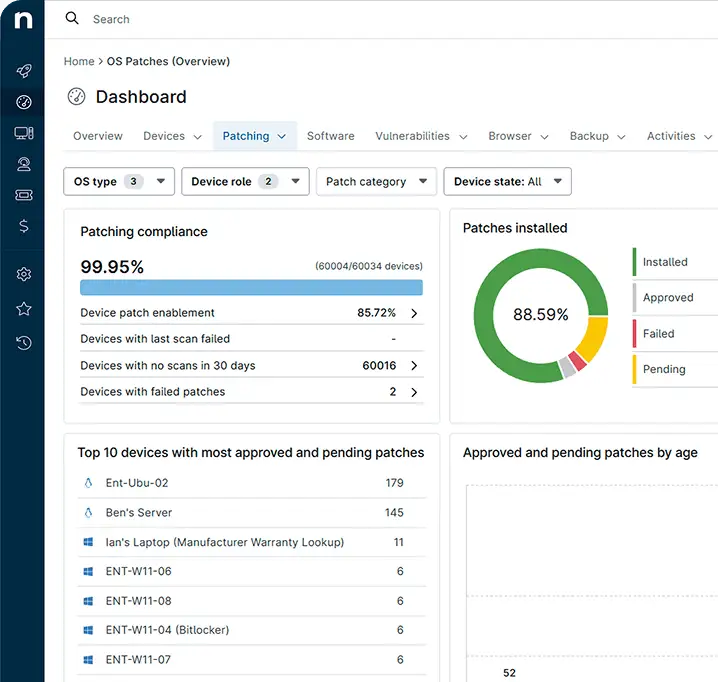
NinjaOne is a cloud RMM that monitors Windows, macOS and Linux devices, runs scripts and patches, offers four remote access options, and includes ticketing with ticket types, statuses, splitting, merging, approvals and time entries.
A cloud RMM where device alerts become tickets and scripts fix the common ones.
How a problem moves. Monitors on Windows, macOS and Linux devices alert technicians or create tickets automatically, and scripts or automations can remediate. Four remote access options let a technician take over a machine. The built-in ticketing has ticket types, statuses, splitting, merging, approvals and time entries that can be billed, and NinjaOne also connects to outside PSA tools such as ConnectWise and Autotask, and to Freshservice and Zendesk for teams that want the service desk elsewhere. Those time entries cover billable ticket work, not shift attendance, so teams that need both usually add separate clock in clock out apps.
What else is in the console. A self-service portal lets end users start remote access, restore files and manage tickets. Mobile device management for iOS, iPadOS, macOS and Android, patching with Approve, Manual or Reject per category, inventory from the agent plus network discovery for printers and switches, and documentation links are modules in the same product.
- you manage devices first and want tickets created by device alerts in the same console
- you are an MSP or a small internal team that bills by device and wants automation to fix common issues before a person touches them
- you need a full ITIL service desk with change, problem and CMDB processes
- you want a published price per plan, because the pricing page shows only a per-device range
- Users like
- ease of use, per G2 and Gartner reviewers (the rating covers the whole platform)
- Users dislike
- missing or limited features, per G2 reviewers
- Source: G2, 5,850 reviews
How it works in practice
Where the money goes. Pricing is per device on a quote: about $3.75 per device per month at 50 devices or fewer, falling to $1.50 at 10,000. The page doesn't name plans, so you can't compare tiers before talking to sales. G2 reviewers praise ease of use and point to missing or limited features; the 4.7 rating covers the whole platform. NinjaOne is not an ITIL service desk: there is no change or problem process and no CMDB beyond inventory.
- Starting price
- Quote based, per device: about $3.75 per device per month at 50 devices or fewer, falling to $1.50 at 10,000; no named plans; 14-day trial
- Ticketing
- Built in; ticket types, statuses, splitting, merging, approvals
- Remote access
- Four options
- Pricing
- Quote based, per device
- PSA integrations
- ConnectWise, Autotask and others
Atera
Atera
Atera bundles ticketing, a service portal, remote monitoring, patching and remote access in one platform priced per technician with unlimited endpoints, and adds AI Copilot to every plan since June 2026.
RMM, ticketing, remote access and patching in one platform, priced per technician with unlimited endpoints.
How a ticket gets made. Email, the portal, Teams, Slack or an RMM alert creates a ticket, automation rules assign it, an SLA applies, and the technician uses remote access or AI to resolve it. Ticketing is tied to device alerts and to billing, which is the pattern MSPs want. Since June 2026 the AI Copilot is included on every plan, while the Robin agent costs extra.
Where the money goes. Professional is 149 EUR per technician per month billed annually (169 EUR monthly), Expert is 189 EUR and Master is 219 EUR. The pricing page shows euros, and endpoints are unlimited per technician, so a team of three technicians managing 400 laptops pays for three seats, not 400 devices.
- you want help desk, remote access and patching in one tool and your team is small enough that per-technician pricing beats per-user or per-device
- you run an MSP or an internal team that needs ticketing tied to device alerts and billing
- you need formal ITIL change, problem and CMDB management
- you need a USD price list or a free plan; Atera lists EUR prices and offers only a 30-day trial
- Users like
- ease of use and one dashboard for tickets and device health, per G2 reviewers
- Users dislike
- some missing features such as checklists, per G2 reviewers
- Source: G2, 1,287 reviews
How it works in practice
What users report. G2 reviewers value ease of use and a single dashboard for tickets and device health, and miss features such as checklists. Skip it if you need formal ITIL change and problem management or a CMDB, a USD price list, or a free plan: there is only a 30-day trial.
- Starting price
- Professional 149 € per technician per month billed annually (169 € monthly), Expert 189 €, Master 219 €; EUR shown on the pricing page, unlimited endpoints
- Endpoint cap
- None, unlimited devices per technician
- AI
- Copilot included, Robin agent extra
- Channels
- Email, portal, Teams, Slack
Accounts and devices from one directory: JumpCloud and Rippling IT
JumpCloud and Rippling IT start from the person. The directory or the HR record says who exists, and device and app access follow from it. Neither has a ticket queue, so they pair with a service desk rather than replace one.
JumpCloud
JumpCloud
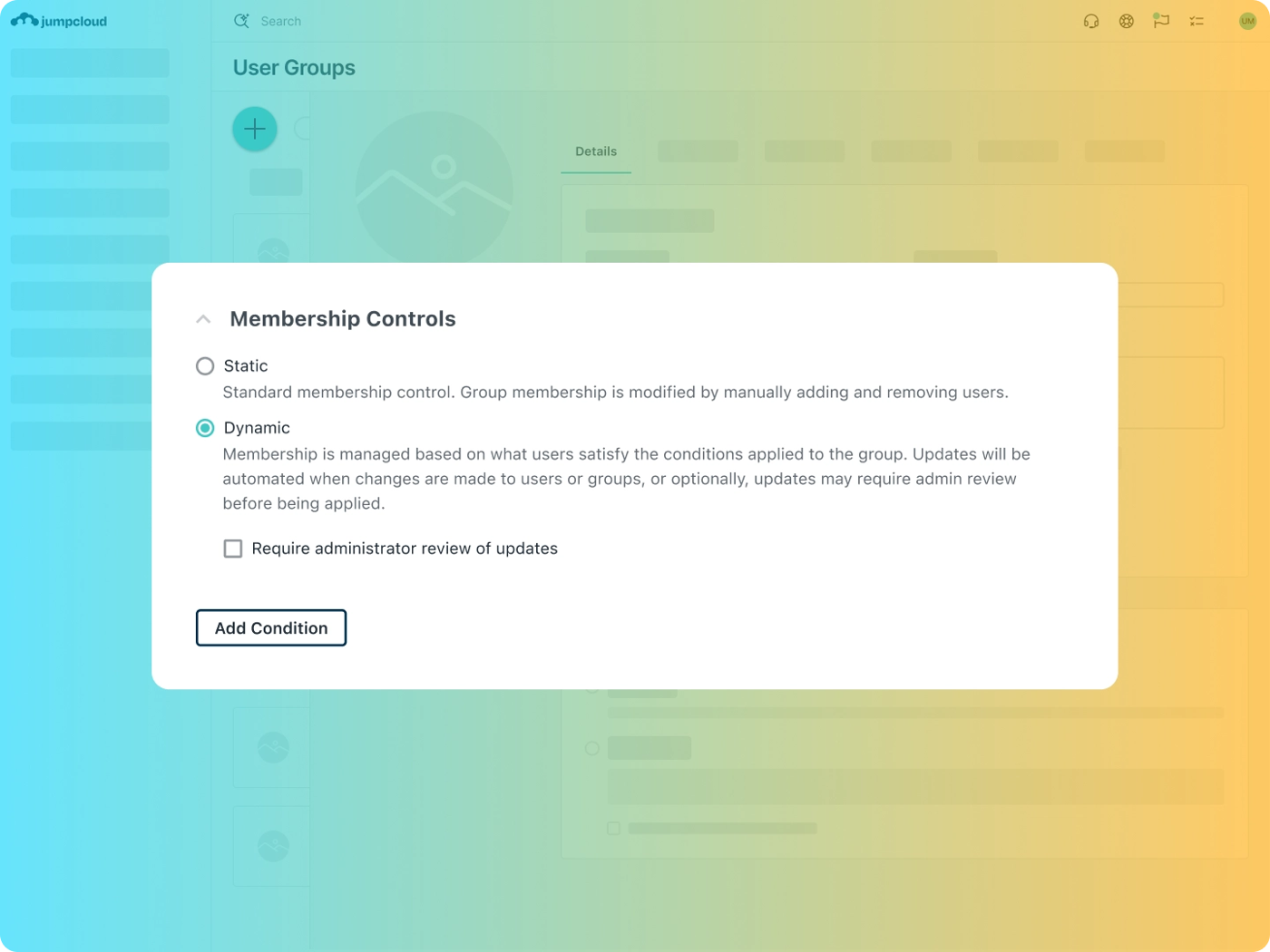
Cloud directory, SSO and device management for macOS, Windows and Linux through an agent or MDM, priced per user.
A cloud directory with SSO and device management in one console, priced per user.
What it covers natively. Directory, SSO and device management for macOS, Windows and Linux through an agent or MDM, with phones available as an add-on. The public prices, billed annually, are $9 per user per month for Device Management, $11 for SSO and $13 for Device Identity Management, which combines the two. The mobile MDM add-on is $5 per user per month. There is a 30-day trial. The free plan exists only for accounts that qualified before February 2024.
How it fits an IT team. Because the unit is the user and not the device, a person with a laptop, a desktop and a phone costs the same. Platform packages that bundle more are quote only.
- you want directory, SSO and device management from one vendor with a public per-user price
- you run Mac, Windows and Linux and want MDM for phones as an add-on
- you need the deepest mobile controls, which reviewers say are still evolving
- you only need mobile management and have no use for the directory layer
- Users like
- easy onboarding and unified management of identity and devices, per G2's summary of reviewer themes
- Users dislike
- Windows group policy gaps, MFA gaps with LDAP and a learning curve, per G2's summary of reviewer themes
- Source: G2, 4,129 reviews
How it works in practice
What users report. G2 reviewers like the easy onboarding and the unified management of identity and devices. They describe Windows group policy gaps, MFA gaps with LDAP and a learning curve. Reviewers also say the deepest mobile controls are still evolving. JumpCloud manages devices and accounts, not tickets. The sign-in side is covered in single sign-on software.
- Starting price
- Device Management $9/user/mo; SSO $11/user/mo; Device Identity Management $13/user/mo, billed annually; Platform packages quote-only
- Entry price
- $9 per user per month, annual
- MDM add-on
- $5 per user per month, annual
- Trial
- 30 days
- Public Device Management
- $9/user/mo annual
- Public SSO
- $11/user/mo annual
- Public Device Identity Management
- $13/user/mo annual
- Platform packages
- Contact Sales
- Legacy free
- Only eligible pre-February 2024 accounts
Rippling IT
Rippling IT
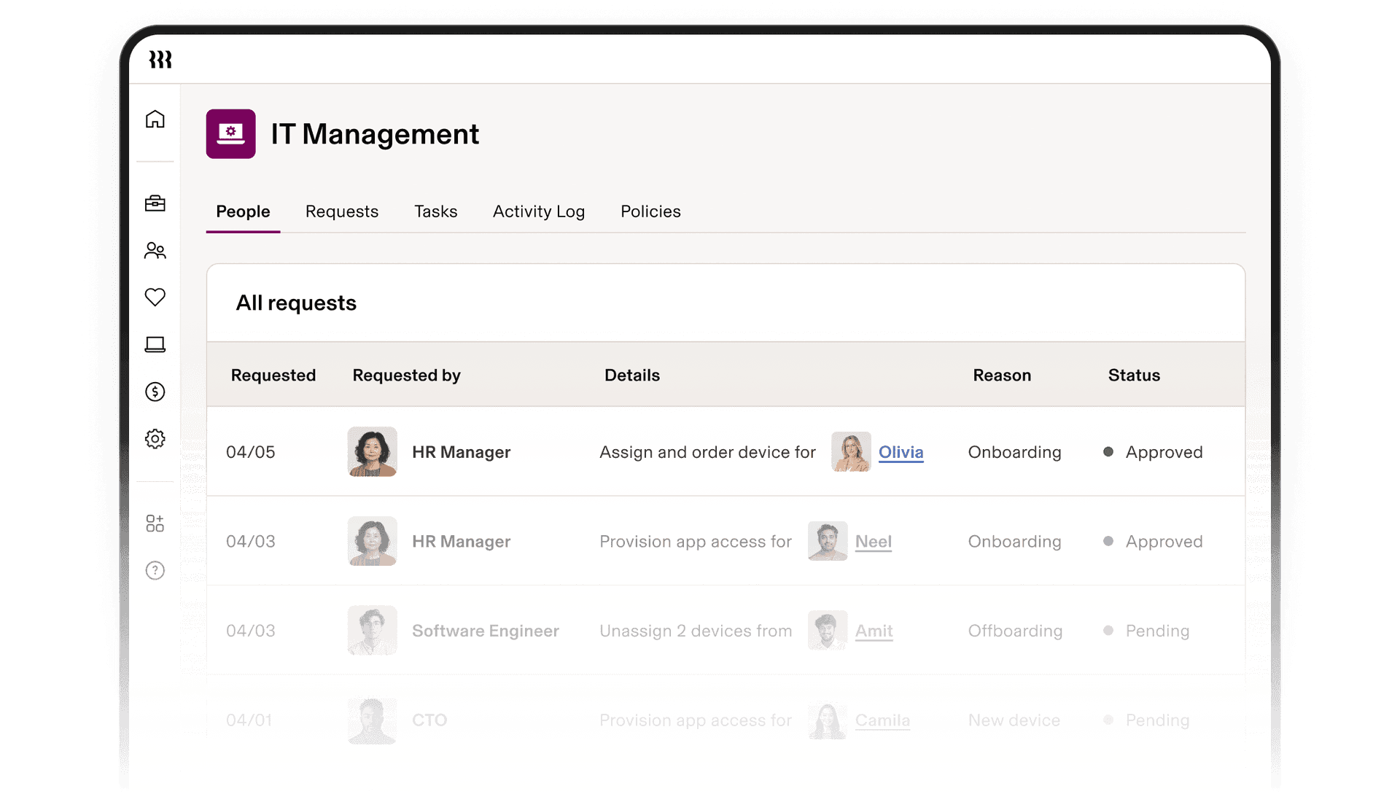
Rippling IT drives identity, SSO, MFA, app provisioning and device management from the same employee record as HR and payroll, so a hire, role change or exit changes accounts, groups and devices without tickets.
Identity, SSO, MFA, app provisioning and device management driven from the HR and payroll record.
How it works. A hire, role change or exit in the HR record changes accounts, groups, licenses and managed devices without a ticket. Provisioning uses SAML and SCIM and is rule-based from HR data, and dynamic groups can be built by department, location or tenure. Device management lists macOS, Windows, iOS and iPadOS.
Where the money goes. Rippling's pricing page says plans start at $8 per employee per month with a monthly base fee, and the IT price is not published, so every cost question goes through sales.
- you also want HR and payroll in the same system, so employee data decides app access and device policy
- you want joiner, mover and leaver changes to provision and suspend accounts automatically instead of by ticket
- you need a published price or a predictable per-user bill, because Rippling IT is quote only
- you want a standalone identity provider with no HR layer, or device management for Android and Linux, since Rippling lists macOS, Windows, iOS and iPadOS
- Users like
- HR and IT in one place and automated provisioning and offboarding, per G2 reviewers
- Users dislike
- complex setup for smaller teams without IT experience and device-agent prompts during meetings, per G2 reviewers
- Source: G2, 1,242 reviews
How it works in practice
What users report. G2 reviewers like having HR and IT in one place and the automated provisioning and offboarding, and describe complex setup for smaller teams without IT experience and device-agent prompts during meetings. Skip it if you want a standalone identity provider with no HR layer, or device management for Android and Linux, which Rippling doesn't list.
- Starting price
- No published IT price; plans start at $8 per employee per month with a monthly base fee, per Rippling's pricing page
- Pricing
- Quote only, monthly base fee
- Provisioning
- SAML and SCIM, rule-based from HR data
- Devices
- macOS, Windows, iOS, iPadOS
- Dynamic groups
- Supergroups by department, location or tenure
What a team of five agents pays
The price unit of IT management software decides the bill more than the headline number. Take a team of five IT staff supporting 100 employees and 120 laptops. The service desks bill by agent, Atera bills by technician, NinjaOne bills by device and JumpCloud bills by user, so the same company gets very different arithmetic.
| Tool | Unit | Arithmetic for this team | Monthly list price |
|---|---|---|---|
| ServiceDesk Plus | per technician | Free for up to 5 technicians | $0 |
| Jira Service Management Standard | per agent | 5 x $21.50 | $107.50 |
| Freshservice Starter | per agent | 5 x $19, billed annually | $95 |
| Freshservice Growth | per agent | 5 x $49, billed annually | $245 |
| HaloITSM | per agent | 5 x US$99, billed annually | US$495 |
| Atera Professional | per technician | 5 x 149 EUR, billed annually | 745 EUR |
| NinjaOne | per device | 120 x $1.50 to $3.75 | $180 to $450 |
| JumpCloud Device Management | per user | 100 x $9, billed annually | $900 |
| Rippling IT | per employee | Base fee plus per-employee price, by quote | Not published |
Two caveats apply. The Halo price is the published rate for 5 to 10 agents, and its required onboarding package isn't in the monthly figure. The NinjaOne range is the published floor and ceiling per device, and the real rate at 120 devices comes from a quote. The calculator below covers the four per-agent service desks only.
List prices read on vendor pages in October and November 2026. Jira Service Management is free for 3 agents and ServiceDesk Plus is free for 5 technicians, which the calculator does not subtract.
Free plans and trials
Two of the eight have a free plan with a real limit, and most of the rest offer a trial. Free helps most when you are replacing a shared mailbox, where the first job is just getting requests into a queue.
| Tool | Free plan | Trial | Limit that matters |
|---|---|---|---|
| Jira Service Management | Free for 3 agents | Standard trial | 3 agents; Assets need Standard |
| ServiceDesk Plus | Free for 5 technicians | Not stated | Asset, CMDB and change in higher editions |
| NinjaOne | None | 14 days | Quote required after |
| Atera | None | 30 days | No free plan; prices in EUR |
| JumpCloud | Only accounts from before February 2024 | 30 days | New accounts pay from $9 per user |
| Freshservice | None listed | Try-it-free offer on each plan | Asset units start at Growth |
| HaloITSM | Not stated | Not stated | Onboarding package required |
| Rippling IT | Not stated | Not stated | Quote only |
How to choose
The right IT management software starts from the job that hurts, not from the longest feature list. The stack below is the smallest one that works for each team shape.
| Team shape | Smallest stack that works | Why |
|---|---|---|
| 1 to 3 IT staff, requests in a shared mailbox | Jira Service Management Free or ServiceDesk Plus Free | A queue, a portal and an SLA clock at $0 |
| 3 to 10 staff, many laptops, remote users | NinjaOne or Atera, with its ticketing | Alerts, patching, remote access and tickets in one console |
| 5 to 25 staff, formal request and change handling | HaloITSM, Freshservice Pro or Jira Premium | Change and problem management, SLAs and a CMDB |
| Fast-growing company, onboarding is the pain | JumpCloud or Rippling IT next to a service desk | Accounts and devices follow the person, tickets stay in the queue |
| MSP with several clients | NinjaOne or Atera, plus a PSA if billing needs one | Multi-tenant management, per-technician or per-device billing |
For an internal team, the usual first step is the ticket queue, then device management, then the inventory, and identity last. For an MSP the order flips: devices first, because the contract is written around them. If you already run Microsoft 365 or Google Workspace, check what the suite includes before paying for an identity layer, and read endpoint management software and patch management software before you choose a device tool.
Cloud or on premises matters less than it used to. ServiceDesk Plus is the one of these eight that its vendor also sells as software you host yourself, so check it first if a policy requires on premises, and remember that you then own the upgrades.
What these tools don't answer
None of these eight IT management tools tells you who owns a service account, why it exists or when someone last confirmed it. Directories list accounts and service desks list tickets, and an account that no person is responsible for sits in the gap. A review of service account owners fills it, and the guide to service account ownership shows how to start with a spreadsheet.
FAQ
What is the best IT management software for a small business?
The best choice depends on the job that hurts most. For a shared mailbox full of requests, Jira Service Management is free for 3 agents and ServiceDesk Plus is free for up to 5 technicians. For managing laptops and fixing issues remotely, NinjaOne and Atera combine monitoring, patching, remote access and ticketing. For accounts and onboarding, JumpCloud and Rippling IT drive access from the directory or the HR record.
What is the difference between ITSM and RMM software?
ITSM (IT service management) software runs the ticket process: requests, incidents, changes, SLAs and a knowledge base. RMM (remote monitoring and management) software watches devices, patches them, runs scripts and gives technicians remote access. Atera and NinjaOne include both in one product, while HaloITSM, Freshservice, Jira Service Management and ServiceDesk Plus are ITSM first.
Is there free IT management software?
Yes, free IT management software exists, with limits. Jira Service Management has a free plan for 3 agents and ServiceDesk Plus has a free plan for up to 5 technicians. JumpCloud's free plan is open only to accounts that qualified before February 2024, and NinjaOne and Atera offer trials of 14 and 30 days.
How much does IT management software cost per month?
IT management software prices run from US$13 per technician (ServiceDesk Plus cloud) to US$99 per agent (Freshservice Pro and HaloITSM at 5 to 10 agents), billed annually in most cases. NinjaOne is quoted per device, about $1.50 to $3.75 per device per month, and Atera is 149 EUR per technician per month on its Professional plan.
Do I need an ITIL service desk?
Most teams of 3 to 10 people need incident and request handling, an SLA clock and a knowledge base, not the full ITIL set. Change and problem management are gated behind Freshservice Pro and Jira Service Management Premium, and HaloITSM and ServiceDesk Plus offer them as well. Add them when a repeat outage or a risky change makes the process worth the cost.