Endpoint protection software is the agent on each laptop and server that blocks malware and ransomware, and in most current products also records what happens on the device so you can investigate an alert. This page compares six products for IT teams of roughly 3 to 50 people and MSPs: Microsoft Defender for Business, Bitdefender GravityZone, CrowdStrike Falcon, SentinelOne Singularity, Sophos Endpoint and Huntress Managed EDR. Consumer antivirus, network firewalls and device management tools solve different problems and aren't ranked here.
The six split along who looks at the alert when it fires, a point vendors rarely state on the pricing page. With five of them, you or your team does. With Huntress, an analyst at the vendor's security operations center (SOC) does. That choice decides more of the real cost than the list price per device, so this page names it for every tool and gives each price with its unit.
- endpoint protection products compared
- 6
- publish a USD price (Sophos does not)
- 5
- has a human SOC in the base price (Huntress)
- 1
- device cap on CrowdStrike Falcon Go purchases
- 100
Best endpoint protection software at a glance
The short answer: pick the tool that matches who watches the alerts. Defender for Business is the cheapest route if you already live in Microsoft 365, Bitdefender is the lowest list price for prevention, CrowdStrike and SentinelOne are the EDR platforms you run yourself, Sophos fits a team that wants ransomware rollback in the base product, and Huntress is the one to look at if nobody can answer an alert at 2 a.m.
 Best if you already pay for Microsoft 365Microsoft Defender for BusinessAntivirus, EDR and automated investigation at $3 per user per month, and included in Business Premium. Capped at 300 users, and it has no human monitoring.
 Best low list price for preventionBitdefender GravityZoneAbout $27 per device per year for Business Security at 10 devices, with firewall, device control and a cloud console. EDR starts at the quote-only Enterprise tier.
 Best self-serve EDR platformCrowdStrike Falcon Go, Pro and EnterpriseThree bundles from $59.99 per device per year, bought in a cart, on Windows, macOS and Linux. Falcon Go stops at 100 devices.
 Best for automated response and rollbackSentinelOne SingularitySingularity Complete is $179.99 per endpoint per year and adds one-click rollback. Sold through partners, so expect a quote conversation.
 Best for ransomware rollback without extra tiersSophos EndpointRollback, web control and peripheral control are in the base product. There is no public USD price.
 Best when nobody watches alerts overnightHuntress Managed EDR$8.99 per endpoint per month with a 24x7 SOC that decides on host isolation. Reseller purchases need at least 50 endpoints; MSPs have no minimum.
| Tool | Type | Price (as listed) | EDR | Who triages alerts | Rating |
|---|---|---|---|---|---|
| Microsoft Defender for Business | Endpoint protection built for Microsoft 365 | $3 per user per month, billed yearly (5 devices per user, 300 users) | Included, with automated investigation | You | 4.5 (30) |
| Bitdefender GravityZone | Layered endpoint security with a central console | About $27 per device per year (Business Security, 10 devices, 1 year) | Enterprise tier and above (quote) | You; MDR PLUS is a quote | 4.2 (113) |
| CrowdStrike Falcon Go, Pro and Enterprise | Cloud-delivered endpoint platform | $59.99, $99.99 or $184.99 per device per year (Go, Pro, Enterprise) | Described on the Enterprise bundle; confirm per bundle | You; Falcon Complete is a quote | 4.7 (678) |
| SentinelOne Singularity | Autonomous endpoint platform | $179.99 per endpoint per year (Complete), via partners | Included in Complete | You; MDR is an add-on | No reviews yet |
| Sophos Endpoint | Prevention-first endpoint protection | No public USD price | Sophos EDR tier above Endpoint | You; MDR is an add-on service | No reviews yet |
| Huntress Managed EDR | Managed EDR with a 24x7 SOC | $8.99 per endpoint per month, 12-month term | Included, SOC-managed | Huntress SOC | 4.8 (974) |
Prices are list prices in the currency and unit the vendor shows, read on vendor pages on November 5, 2026. Ratings are G2 scores; no rating is shown for SentinelOne and Sophos.
Read the price column with its unit in mind. Microsoft prices per user and covers up to five devices each, Bitdefender, CrowdStrike and SentinelOne price per device or endpoint (CrowdStrike and SentinelOne per year, Huntress per month), and Sophos publishes no price. For a team of 25 people with 40 devices, the annual list arithmetic looks like this.
| Tool | List price used | 40 devices for a year | What the price includes |
|---|---|---|---|
| Microsoft Defender for Business | $3 per user per month x 25 users | $900 | Antivirus, EDR, automated investigation |
| Bitdefender GravityZone Business Security | about $26.95 per device per year | about $1,078 | Prevention, firewall, device control; no EDR |
| CrowdStrike Falcon Go | $59.99 per device per year | $2,399.60 | Go bundle; Go is limited to 100 devices |
| Huntress Managed EDR | $8.99 per endpoint per month x 12 | $5,389.20 (50-seat minimum) | EDR, managed antivirus and the SOC; priced at the 50-seat reseller minimum |
| SentinelOne Singularity Complete | $179.99 per endpoint per year | $7,199.60 | EDR, rollback, Control features |
This is arithmetic on list prices without discounts or taxes, not a quote, and the rows don't buy the same thing: the cheap rows don't include a person watching, and the Huntress row does. Huntress is shown at its 50-seat minimum for reseller purchases; through an MSP there is no minimum, and 40 seats would cost $4,315.20 a year. Sophos is missing because it publishes no price.
Antivirus, EDR and managed detection: what you are buying
Three product layers get sold under the name endpoint protection, and the price page rarely says which one you get.
- Prevention. Next-generation antivirus, anti-ransomware and exploit blocking. It stops known and suspicious behavior on the device and sends a log line. Bitdefender Business Security and Premium are mostly this layer.
- Detection and response (EDR). The agent also records what processes, files and connections did, so a person can see how an alert started and act on it: isolate the host, kill a process, roll back changes. Defender for Business, CrowdStrike, SentinelOne and Sophos EDR provide this layer, and your team has to read the alerts.
- Managed detection and response (MDR). People at the vendor watch the alerts, decide, and often act for you. Huntress sells this as its base product, while Sophos, SentinelOne, CrowdStrike and Bitdefender sell it as a separate service or tier.
A small IT team usually doesn't have a person free to run layer 2 around the clock. That is why the fair question for each product is not "does it have EDR" but "what happens at 2 a.m. when it fires". If the answer is "an email to the IT lead", you are buying layer 2 and accepting that you are the SOC.
How we compared the tools
The sources are each vendor's US pricing page, one product or feature page and, where available, a docs or help page, plus the review site rating where one is published. We did not run hands-on tests, so nothing here is a detection score, and we did not review Palo Alto Networks, Trend Micro, ESET or Microsoft Defender for Endpoint Plan 2. Independent test results from labs such as AV-Comparatives or MITRE are a separate decision input and not covered here.
- Price and unit. Per user, device or endpoint, and the billing period, with the cap or minimum that applies.
- Tier gate. Which tier unlocks EDR, rollback, device control and managed response.
- Who triages. You, a partner or the vendor's SOC.
- Platform coverage. Windows, macOS, Linux and servers.
- Deployment path. What you need in place to roll the agent out to 40 laptops.
- What users report. Rating and review count from G2 where the page loaded.
If you already pay for Microsoft 365: Defender for Business
Microsoft Defender for Business
Microsoft Defender for Business
Pricing and docs read November 5, 2026
A team on Microsoft 365 Business Premium that wants EDR and automated investigation without buying another agent.
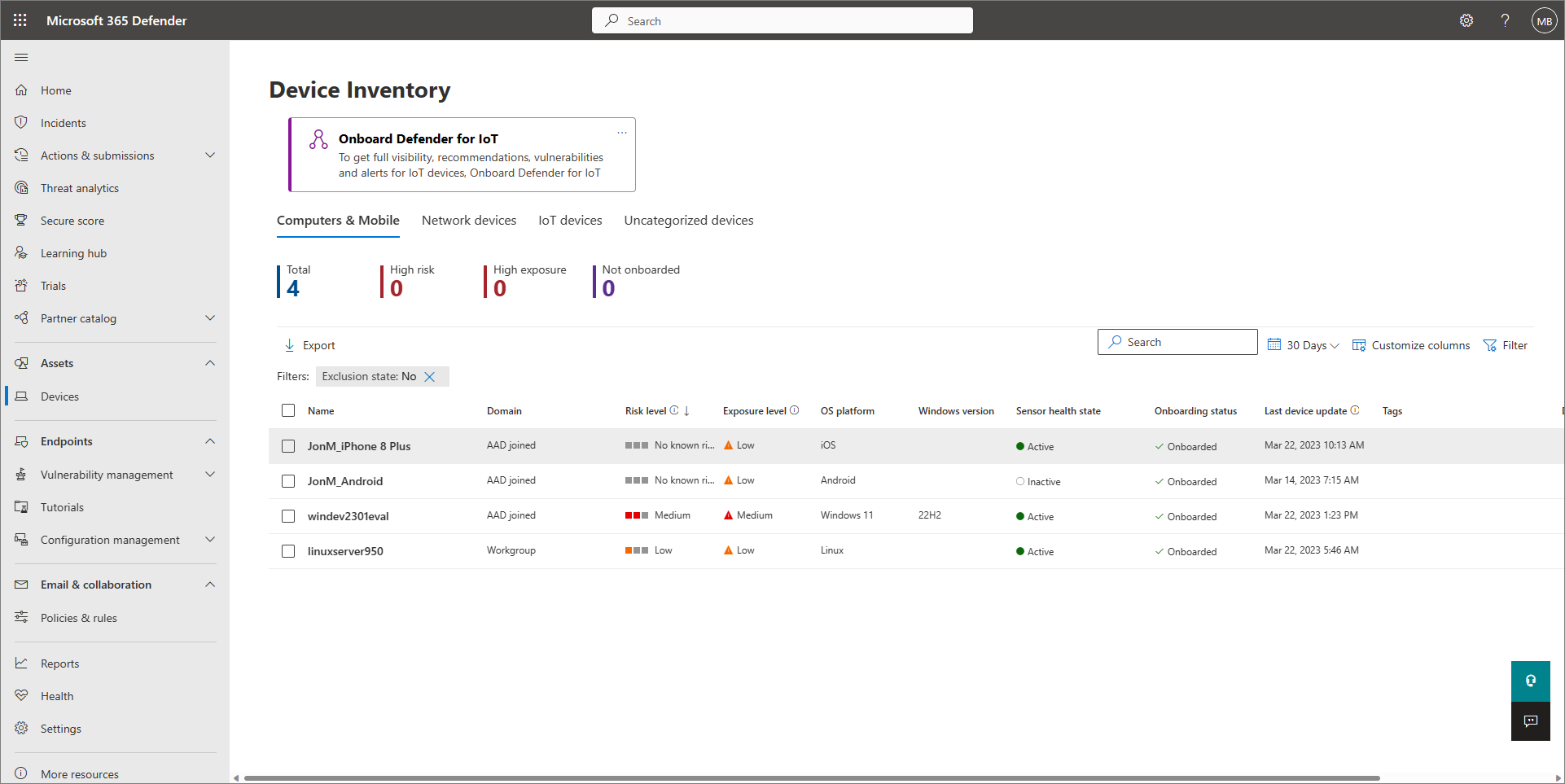
How the job gets done. Defender for Business is managed from the Microsoft Defender portal. Home cards show threats, accounts and devices at risk. From the device inventory you can run an antivirus scan or start an automated investigation, and the Action Center has a Pending tab where you approve or reject the remediation actions that the investigation proposes. Isolating a device is a manual action. Microsoft also lists automatic attack disruption among the features, and it covers vulnerability management as well.
Rollout. Windows devices onboard with a local script, Group Policy or Intune. Microsoft recommends the local script for up to 10 devices at a time, and it creates trust with Entra ID and enrolls the device in Intune if it isn't enrolled. Macs use a local script or Intune, and iOS and Android use the Defender app or Intune. MSPs get multi-tenant management through Microsoft 365 Lighthouse and can use the Defender for Endpoint APIs to connect RMM and PSA tools.
What is in the license. The plan includes everything in Defender for Endpoint Plan 1 plus some Plan 2 features. It is included in Microsoft 365 Business Premium ($22 per user per month, billed yearly), which adds Intune Plan 1. Standalone it is $3 per user per month, billed yearly, for up to five devices per user and up to 300 users, with a one-month free trial that needs a card.
- you already pay for Microsoft 365 Business Premium, where Defender for Business is included
- you want EDR and automated investigation at a per-user price that covers up to five devices
- you need 24x7 human monitoring: Defender for Business has no managed detection service, and Threat Experts and long hunting retention are Defender for Endpoint P2 only
- you have more than 300 users, or you run Windows Server and Linux servers broadly: the cap is 300 users and servers need a $3 add-on each, with a different license above 60 servers
- Users dislike
- review text not shown on the public page
- Source: G2, 30 reviews
How it works in practice
What that team misses. Servers cost extra: a server license is $3 per server, and Microsoft points to a different license above 60 servers. Custom attack surface reduction rules need Intune, and web content filtering allows one policy for the whole organization. Advanced hunting retention and Threat Experts are Defender for Endpoint Plan 2 only, and nobody at Microsoft watches your alerts. We found no ransomware rollback feature on the published vendor pages. G2 shows 4.5 from 30 reviews, a small sample, and the review text is not shown on the public page.
- Starting price
- $3 per user per month, billed yearly (up to 5 devices per user, up to 300 users); servers $3 per server per month; also included in Microsoft 365 Business Premium at $22 per user per month, billed yearly
- Plan limits
- Up to 300 users, 5 devices per user
- Server cover
- $3 add-on per server, more than 60 servers needs another license
- Web filtering
- One policy for the whole organization
- Deployment
- Local script, Group Policy or Intune
Platforms you run yourself: Bitdefender GravityZone and CrowdStrike Falcon
Bitdefender GravityZone and CrowdStrike Falcon are both sold per device, both give your team the console, and neither puts an analyst behind the alert unless you buy the managed service on top. The difference is where the money goes. Bitdefender sells layered prevention cheaply and moves EDR to quote-only tiers, while CrowdStrike sells EDR-class bundles at self-serve prices that start higher.
Bitdefender GravityZone
Bitdefender GravityZone
Pricing and compare pages read November 5, 2026
A small team with Windows laptops and a few file servers that wants strong prevention, a firewall and device control at the lowest list price in this group.
How the job gets done. GravityZone Business Security bundles modern endpoint protection, network attack defense and risk management in the GravityZone Control Center, a single console that Bitdefender hosts in the cloud or that you can run as an on-premises virtual appliance. The Business Security compare page shows ransomware mitigation, firewall and, from the Business tier, device control and web access control. Patch management is an add-on. Premium adds attack forensics and visualization, a sandbox analyzer and fileless attack defense. Bitdefender positions Premium as early attack prevention without detection and response capabilities.
What it costs. The US page shows a calculator rather than a fixed price. At 10 devices for one year it showed $269.49 for Business Security (list $384.99, shown with a 30% discount) and $615.99 for Premium (list $879.99), taxes not included. That works out to about $27 and about $62 per device per year, and the self-serve range is 1 to 100 devices on 1, 2 or 3 year terms. The subscription renews automatically unless you cancel.
- you want strong prevention and a firewall and device control at the lowest list price per device in this group
- you want a cloud-hosted console, with the option to run it as an on-premises appliance
- you need EDR or 24x7 response on a small-business plan: the compare page shows EDR as not listed for Small Business, Business and Premium
- you are an MSP who wants RMM and PSA integrations: those belong to the separate MSP product
- Users dislike
- review text not shown on the public page
- Source: G2, 113 reviews
How it works in practice
What that team misses. EDR is not listed on the Small Business, Business or Premium tiers. It starts at Enterprise, and managed detection starts at MDR PLUS, and both are contact-us. RMM and PSA integrations such as Datto, ConnectWise and Kaseya belong to the separate MSP product, so an MSP should price that one. G2 shows 4.2 from 113 reviews, and G2 redirects the GravityZone page to the combined GravityZone XDR listing, so the number covers the whole family. We didn't read the review text.
- Starting price
- Business Security $269.49 and Business Security Premium $615.99 for 10 devices for one year (about $27 and $62 per device per year, taxes not included, 30% off list as shown); Enterprise, XDR and MDR packages on request
- Self-serve range
- 1 to 100 devices, 1 to 3 year terms
- Renewal
- Recurring subscription, auto-renews
- EDR
- Starts at Enterprise (quote)
CrowdStrike Falcon
CrowdStrike Falcon Go, Pro and Enterprise
Pricing read November 5, 2026
A team that wants an EDR platform it can buy in a cart today, across Windows, macOS and Linux, and grow into later.
How the job gets done. Falcon uses one sensor per device and a cloud console. The pricing page sells three bundles per device: Falcon Go at $59.99 per year, Falcon Pro at $99.99 and Falcon Enterprise at $184.99, with monthly billing shown at $7.99, $14.99 and $19.99 per device. Billing is annual and paid up front, you can cancel within 30 days for a full refund, and a 15-day trial needs no credit card. The cards list modules such as next-gen antivirus, device control, firewall management, endpoint detection and response, and threat intelligence and hunting.
Rollout and MSP use. CrowdStrike documents API-driven PowerShell and Bash install scripts, which need an API client with the Sensor Download read scope, plus Ansible, Chef and Puppet modules. For MSPs, Flight Control gives a parent account that sees detections across child accounts and can set policies that the children use.
- you want a self-serve price list for a platform that also scales to enterprise modules later
- you manage Windows, macOS and Linux devices and want one sensor
- you have more than 100 devices and want the Falcon Go price: purchases of Go are limited to 100 devices
- you want someone else to watch the alerts: Falcon Complete (managed detection and response) is contact-sales only
- Users dislike
- review text not shown on the public page
- Source: G2, 678 reviews
How it works in practice
What that team misses. Falcon Go is limited to 100 devices per purchase, and the three cards show the same module names, so we couldn't confirm from the page which bundle includes EDR. The Enterprise page describes it, and you should ask before buying Go for that purpose. Managed detection and response (Falcon Complete) is contact-sales only, so a self-serve team triages its own alerts. G2 shows 4.7 from 678 reviews for the Falcon endpoint platform as a whole, not for Go alone, and the review text is not shown on the public page.
- Starting price
- Falcon Go $59.99, Pro $99.99, Enterprise $184.99 per device per year, billed annually (monthly billing $7.99, $14.99 and $19.99 per device); Go is capped at 100 devices
- Billing
- Annual, paid up front; monthly price shown separately
- Device cap
- Falcon Go up to 100 devices
- Trial
- 15 days, no credit card
- OS
- Windows, macOS, Linux
Platforms sold through partners: SentinelOne and Sophos
SentinelOne and Sophos are mostly bought through resellers, so the price conversation starts with a partner. SentinelOne publishes list prices for two tiers. Sophos publishes none.
SentinelOne Singularity
SentinelOne Singularity
Pricing as of November 5, 2026; docs and review pages not public
A team that wants automated response and fast rollback on Windows, macOS and Linux and will buy through a partner who tunes it.
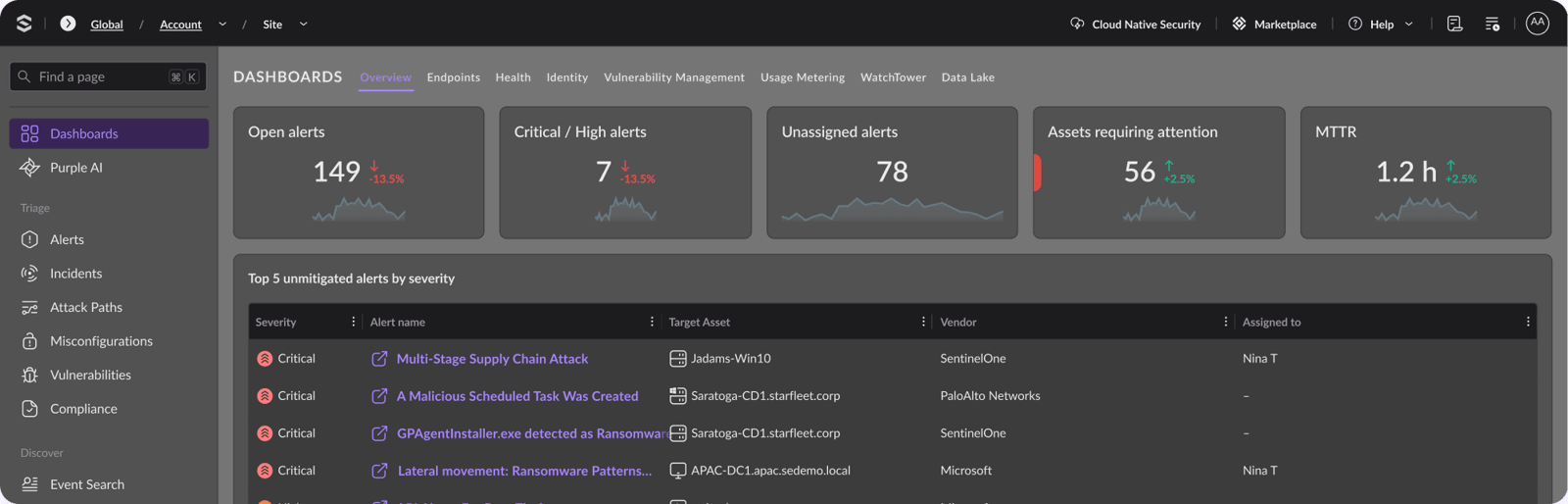
How the job gets done. Singularity is one agent and one console. The pricing page shows Singularity Complete at $179.99 per endpoint per year and Singularity Commercial at $229.99, all in US dollars and priced for 5 to 100 workstations. Complete includes all Core and Control features and adds EDR where you can automate incident response with policy or use remediation actions, including one-click rollback. Control adds network control for Windows, macOS and Linux, USB and Bluetooth device control for Windows and macOS, and rogue device discovery.
Retention. Complete keeps 14 days of EDR data, which you can extend to 365 days, and Commercial adds identity detection and 90 days of retention. Managed threat hunting and MDR are add-ons on both tiers.
- you want automated response and rollback on Windows, macOS and Linux endpoints without writing playbooks
- you buy through a partner or MSP who will deploy and tune it
- you need a published price for every tier: Core and Control are not priced on the pricing page, and managed threat hunting and MDR are add-ons
- you need long history on the cheaper plan: Complete keeps 14 days of EDR data, 90 days starts on Commercial
How it works in practice
What that team misses. Core and Control have no price on the pricing page, purchases run through authorized partners, and we found no small-business plan. SentinelOne's documentation and review pages are not publicly available, so we show no rating, no deployment steps and no integration list for it. The MSP integrations we found, such as N-able and NinjaOne, come from partner coverage and not from SentinelOne's own docs, so confirm them with your RMM vendor.
- Starting price
- Singularity Complete $179.99 and Commercial $229.99 per endpoint per year (5 to 100 workstations, US dollars, sold through partners); Core and Control not priced; Enterprise on request
- Standard EDR retention
- 14 days, extendable to 365 days
- Price scope
- 5 to 100 workstations, annual
- Managed service
- Threat hunting and MDR are add-ons
Sophos Endpoint
Sophos Endpoint
Product pages as of November 5, 2026; pricing and review pages not public
A team that wants ransomware rollback, web control and peripheral control in the base product and may already run a Sophos firewall.
How the job gets done. Sophos Endpoint is prevention first: exploit mitigation, deep learning malware prevention and CryptoGuard, which rolls back ransomware file encryption. Peripheral control, web control and automatic ransomware rollback are checked for the Endpoint, EDR, XDR and MDR tiers in the tech specs. Sophos EDR sits on top and adds automated response such as process termination, ransomware rollback and network isolation, an analyst option to isolate an endpoint, and a live response shell to run scripts or reboot. Sophos MDR is a separate managed service for 24x7 monitoring.
Fit with a Sophos firewall. The tech specs list automatic device isolation through Sophos Firewall as Synchronized Security. The page lists Windows, macOS and Linux endpoints and servers from one agent.
- ransomware rollback and web and peripheral control in the base product matter more to you than a public price list
- you already run a Sophos firewall and want automatic device isolation through Synchronized Security
- you need a price before talking to a partner: Sophos publishes no USD price
- you run servers or Linux workloads: those need a separate Workload Protection subscription, and vulnerability management is only offered with MDR
How it works in practice
What that team misses. There is no public USD price, so budgeting needs a quote. The feature notes say server workloads can need a separate Workload Protection subscription, and vulnerability management is optional and tied to MDR, so ask about both. Admins in community threads report that GPO startup scripts can fail silently, and Sophos provides sample install scripts for that case. Sophos review pages are not publicly available, so we show no rating.
- Starting price
- No public USD price: Sophos points buyers to partners and a free trial
- Tiers
- Endpoint, EDR, XDR, MDR (managed service)
- Ransomware
- Automatic file encryption rollback
- OS
- Windows, macOS, Linux
If nobody watches alerts overnight: Huntress
Huntress Managed EDR
Huntress Managed EDR
Pricing and deployment docs read November 5, 2026
A team or MSP that wants analysts to watch endpoint alerts, decide on isolation and write the incident report.
How the job gets done. Huntress runs an agent on each endpoint and its security operations center reviews detections. The isolation docs say the SOC determines when an incident is isolation worthy, host isolation takes effect after an analyst sends the incident report, and the endpoint keeps only its connection to the Huntress portal until it is released. Admins can also isolate and release hosts manually. Active remediation and host isolation are on by default. The base price includes managed antivirus: Huntress manages the built-in Microsoft Defender Antivirus for you at no additional cost.
Rollout. Windows agents install through the GUI installer, a PowerShell or command line script, or an RMM. The docs list Datto, NinjaOne, Kaseya, ConnectWise, Atera, N-able, Syncro, LogMeIn, PDQ and Naverisk, and Intune, SCCM and Group Policy work as well.
- nobody on your team watches security alerts at night, and you want analysts to do it
- you want to keep Microsoft Defender Antivirus as the prevention layer and add detection and response on top
- you want one prevention suite with device control, web filtering and patching in the same console: the pricing page lists EDR and managed antivirus, not those layers
- you buy through a reseller with fewer than 50 endpoints or want month-to-month: reseller purchases have a 50-seat minimum per product, and the standard term is 12 months
- Users dislike
- review text not shown on the public page
- Source: G2, 974 reviews
How it works in practice
What that team misses. The pricing page lists EDR and managed antivirus, not device control, web filtering or patching, so this is a detection layer on top of Defender, not a full prevention suite. Pricing is $8.99 per endpoint per month at MSRP with a 12-month standard term, and purchases through a reseller have a 50-seat minimum per product while MSPs have none; direct customers commit to a license minimum. We couldn't confirm supported OS versions on an official page. G2 shows 4.8 from 974 reviews, and the review text is not shown on the public page.
- Starting price
- $8.99 per endpoint per month (MSRP, 12-month standard term); reseller purchases have a 50-seat minimum, MSPs have none
- Triage
- Huntress SOC decides isolation-worthy incidents
- Deployment
- GPO, SCCM, Intune, scripts or a supported RMM
- Antivirus
- Managed Microsoft Defender Antivirus included
What each tier unlocks
Tier names change the meaning of the price, so these two vendors are worth reading line by line before you ask for a quote.
SentinelOne Singularity- CoreBase agent; not priced on the pricing page
- ControlAdds network control, USB and Bluetooth device control and rogue device discovery; not priced on the pricing page
- Complete, $179.99Includes Core and Control and adds EDR with policy or one-click rollback, 14 days of retention
- Commercial, $229.99Adds identity detection and 90 days of retention
- EnterpriseContact sales for pricing
Bitdefender GravityZone- Business Security, $269.49 for 10 devicesModern endpoint protection, network attack defense, risk management; patch management is an add-on
- Business Security Premium, $615.99 for 10 devicesAdds attack forensics and visualization, a sandbox analyzer and fileless attack defense
- EnterpriseEDR and XDR start here; contact us
- MDR PLUSManaged detection and response; contact us
A first-week rollout routine
Whatever you pick, test it before you trust it. This routine takes a few hours spread over a week and surfaces the questions that the demo doesn't.
Pick a pilot group
Choose 5 to 10 devices that include every operating system you run, one laptop that travels and, if the tool covers it, one server.
Deploy the way you will deploy at scale
Use the same path for the pilot that you plan for all devices: Group Policy, Intune, your RMM or the vendor script. Microsoft recommends its local script for up to 10 devices at a time, so a larger pilot should use Intune or Group Policy instead.
Fire a harmless test alert
Download the EICAR test file on a pilot device and check that the alert reaches the console and that the right person gets notified.
Drill host isolation
In tools that offer it, such as
Microsoft Defender for Business, Sophos Endpoint and Huntress Managed EDR, isolate a pilot device and release it again. Time it, and note who has the permission.Name who answers which alert
Write down who reads alerts, in which hours, and what happens outside them. If the honest answer is nobody, price a managed service now instead of after the first incident.
Review exclusions at 30 days
List every exclusion and policy exception with an owner and an expiry date, then roll out in rings of about 10 percent, 40 percent and the rest.
Which tool for which team
- You already pay for Microsoft 365 Business PremiumMicrosoft Defender for Business
- You want the lowest list price for prevention with firewall and device controlBitdefender GravityZone
- You want a self-serve cart for an EDR platform on Windows, macOS and LinuxCrowdStrike Falcon Go, Pro and Enterprise
- You buy through a partner and want one-click rollbackSentinelOne Singularity
- You run a Sophos firewall and want rollback in the base productSophos Endpoint
- Nobody on your team watches alerts overnightHuntress Managed EDR
What these tools don't answer
Endpoint protection tells you what happened on a device. It doesn't tell you who is responsible for the accounts and keys that the tooling itself needs. CrowdStrike's own install scripts, for example, need an API client with a download scope, and an RMM deployment adds more. After a few years a team has a long list of service accounts and API clients that nobody remembers creating. That is the gap  The IT Lead fills: it records an owner for each service account and keeps a review trail. It doesn't protect endpoints, and it isn't a replacement for any tool on this page.
For the neighboring jobs, see our guides to endpoint management software, patch management software and vulnerability management software. They cover the device inventory, the update cycle and the weakness scanning that endpoint protection depends on.
FAQ
What is the difference between antivirus, endpoint protection and EDR?
Antivirus blocks known malware on one device. Endpoint protection adds anti-ransomware, exploit blocking and central management. EDR also records what happened on the device so you can investigate and respond, for example by isolating the host. Managed detection and response (MDR) adds people who watch those alerts for you.
Is Microsoft Defender for Business enough for a small IT team?
It can be if you run Windows and Mac devices and Microsoft 365. It includes antivirus, EDR and automated investigation at $3 per user per month, but it has no human monitoring, servers cost $3 each, and the plan stops at 300 users.
How much does endpoint protection cost per device?
On the published vendor pages on November 5, 2026: about $27 per device per year for Bitdefender Business Security at 10 devices, $59.99 to $184.99 for CrowdStrike Falcon, $179.99 for SentinelOne Complete, $8.99 per month for Huntress, and $3 per user per month for Defender for Business. Sophos publishes no price.
Do small IT teams need managed detection and response?
They need an answer to who reads alerts when the IT team is offline. If nobody can, a managed service such as Huntress, or an MDR add-on from SentinelOne, Sophos, CrowdStrike or Bitdefender, covers that gap at an extra cost.
Which operating systems do these endpoint protection tools cover?
On the published vendor pages, CrowdStrike Falcon, SentinelOne and Sophos Endpoint list Windows, macOS and Linux. Bitdefender GravityZone covers Windows, Mac and Linux, with mobile as an add-on. Defender for Business covers Windows, macOS, iOS and Android, and servers need the $3 add-on. Huntress lists Windows and macOS clearly, and we could not confirm Linux support level on an official page.
Does Microsoft Defender for Business replace third-party endpoint protection?
For many Microsoft 365 teams it can, because it includes antivirus, EDR and automated investigation at $3 per user per month. It does not replace a managed service, since nobody at Microsoft watches your alerts, and Huntress is designed to run on top of Microsoft Defender Antivirus.
Does endpoint protection replace patching and device management?
No. Protection blocks and detects threats, while patching removes the vulnerabilities and device management enforces configuration. Most teams need all three.