Access review software asks the right person to confirm, tool by tool, who still needs which access, records each keep-or-remove answer and keeps the evidence an auditor asks for. This page compares eight tools for IT teams of roughly 3 to 50 people and MSPs without a dedicated identity governance team, and it follows one quarterly review of a finance app through each product, from setting the scope to the report that leaves the tool.
The choice usually comes down to three questions: which identity platform you already pay for, whether a denied access is removed for you or only recorded, and whether you can live with a quote instead of a price. Only one of the eight tools publishes a price you can budget from, and that one is an add-on that needs a license you may not hold yet. Two tools, Vanta and Torii, leave the removal itself to a person, per their own help pages.
- access review tools compared
- 8
- publishes a price, Entra ID Governance at $7 per user per month
- 1
- leave the removal itself to a person (Vanta, Torii)
- 2
- G2 rating range across the seven tools with a G2 page
- 4.5 to 4.8
Answer, picks and compare table
 Best if your people and apps already live in Microsoft EntraMicrosoft Entra ID GovernanceAdds recurring reviews of groups, Teams and Entra-connected apps for $7 per user per month on top of Entra ID P1 or P2, with automatic removal of denied access.
 Best for campaigns that remove access through connectorsConductorOne (C1)Campaigns scoped by app, entitlement or user, routed to managers and owners, with denied access removed by the review policy or sent as a ticket. Quote only.
 Best when service accounts must sit in the same reviewZluriCertifications cover apps, groups and users, with a filter for service and API accounts and playbooks that remove access when the review ends. Quote only.
 Best if SOC 2 or ISO 27001 evidence is the reason you reviewVantaReviews feed the same audit evidence page as your other controls, but a denial is tracked and not removed.
 Best for a Microsoft 365 tenant onlyCoreViewTemplates for Teams, groups, SharePoint, OneDrive, guests and mailbox permissions, with periodic repeats and CSV export.
 Our product · for the gaps between toolsThe IT LeadRecords who owns each service account and whether that owner still needs it, from a CSV. It isn't an access review suite.
| Tool | Type | Removes denied access? | Price basis | Rating |
|---|---|---|---|---|
| Microsoft Entra ID Governance | Review module inside an identity platform | Yes, auto-apply on groups and apps | $7.00 per user per month, paid yearly, as an add-on that needs Entra ID P1 or P2 (or Microsoft 365 E3 or E5) first; free trial offered. Entra ID P2 at $10 includes basic access reviews | 4.6 (5) |
 Okta Identity Governance | Review module inside an identity platform | Yes for individual assignments; group-based access needs manual removal unless auto-remove is on | No public price (quote only); sold as an add-on to Okta Workforce Identity, which has a $1,500 annual contract minimum | No reviews yet |
| ConductorOne (C1) | Dedicated identity governance | Yes, through the review policy, or a ticket for apps without automation | Quote only; the pricing page offers platform pricing by managed identities (slider from 100 to 20,000) or monthly usage-based Flex pricing in C1 Tokens | 4.8 (13) |
 Lumos | Dedicated identity governance | Yes, across 100+ integrations (vendor claim) | No price published; the pricing page offers a demo and a free identity assessment | 4.7 (69) |
| Zluri | SaaS management and identity governance | Yes, deprovisioning playbooks run when the review ends | No public pricing, demo request only | 4.6 (177) |
 Torii | SaaS management with access reviews | No automatic step stated; a remediation owner removes it | Quote only; the support doc says access reviews are available on the Enterprise plan and the Torii Identity module; Vendr buyer data shows a median of about $32,000 per year for the platform | 4.5 (325) |
| Vanta | Compliance automation with access reviews | No, a denial starts a remediation flow only | Quote only; Access Management starts at the Plus plan and may need an upgrade or add-on per the help center; free trial of about 5 to 7 days | 4.5 (2,897) |
| CoreView | Microsoft 365 governance | Reviewer revokes; the docs we read don't say if finishing applies it in Microsoft 365 | Quote only, per licensed Microsoft 365 identity; no minimum or trial stated | 4.6 (119) |
Prices and docs were read on vendor pages on November 2, 2026. Ratings are G2 scores read the same day. Entra ID Governance has 5 G2 reviews and ConductorOne 13, so treat those two as thin. Okta Identity Governance has no G2 page of its own, so we show no rating for it.
Here's how to read the table, especially the removal column. Entra ID Governance is priced per user, Okta Identity Governance is an add-on to an Okta base plan, CoreView is priced per licensed Microsoft 365 identity, ConductorOne by managed identities or by usage, and the other four are quote only. The cost section further down puts one team size on the one scale that allows it.
What access review software does and what it doesn't
Access review software, also called access certification software, collects who has access to which systems, sends each reviewer a keep-or-remove list, records the answers and keeps the evidence an auditor asks for. A review campaign is one round of that process: a scope such as "everyone in the finance apps", a list of reviewers, a due date and a final report.
Three parts do most of the work. Collection pulls accounts and permissions from your identity provider and apps through connectors, or from an uploaded file when an app has no connector. Routing sends each line to a reviewer, usually the person's manager or the app owner, with a fallback when no one answers. Remediation turns a "remove" answer into an actual change, either automatically through the connector or as a ticket someone has to close.
What these tools don't do. Reviewing access isn't granting it. Provisioning and password rotation belong to your identity platform or a privileged access tool, and our guides to identity and access management software and privileged access management software cover those. If you only need a checklist and a spreadsheet for a first review, our user access review checklist is the place to start.
How often to run access reviews
How often to run access reviews depends on the rules you answer to, not on the tool. PCI DSS v4.0 requirement 7.2.4 requires every user account and its privileges to be reviewed at least once every six months. HIPAA's minimum necessary standard doesn't set a recertification interval, so you define one in your own access policy. For SOC 2 and ISO 27001 we found no fixed number of days either, which means the auditor checks that you ran the review as often as your own policy says. Check the wording with your auditor before you promise anything.
| Situation | Common interval in months | Why |
|---|---|---|
| Systems in PCI DSS scope | At least every 6 months | PCI DSS v4.0 requirement 7.2.4 |
| Finance, production and admin access | Quarterly | Highest impact if a leaver keeps access |
| Standard SaaS apps | Twice a year to yearly | Lower impact, higher volume |
| Contractors, guests and shared accounts | Quarterly | They leave without an HR event |
| Service accounts and tokens | Twice a year | They have no manager to notice them |
The quarterly and twice-a-year figures are common practice, not a rule from a standard. A tool that supports recurring campaigns makes any of them cheap, because the next round starts without anyone remembering it.
What to look for in access review software
Netwrix's own guide lists integration breadth, reviewer context, closed-loop removal and compliance evidence as the capabilities that matter. We agree with the list and add one more for small teams: what you have to buy first. The table shows the question to ask each vendor.
| Access review software criterion | Vendor question | Reason |
|---|---|---|
| Coverage | Which of my apps and groups can it read, and what happens to an app with no connector? | Reviews limited to your identity provider miss everything outside single sign-on |
| Reviewer context | Does the reviewer see last sign-in, peers or a recommendation? | Without it, reviewers approve everything |
| Removal | Does a denial remove access, create a ticket or only record the answer? | Auditors test that access was actually removed |
| Evidence | What leaves the tool: a report, CSV, checksums, decisions with timestamps? | This is the part you hand over in an audit |
| What you buy first | Which license or platform must I already own? | Governance is often an add-on, and every user in scope has to be licensed |
How we chose these tools
We picked tools a small IT team can realistically buy or already owns part of, then checked six things for each: where its reviews can reach, who reviews, how a denial is carried out, what evidence leaves the tool, what the price counts and what you must own first. Each entry follows one quarterly review of one finance app from scope to report, so you can compare the steps and see where a tool stops.
Prices and docs were read on vendor pages on November 2, 2026. Ratings come from G2 pages we opened that day. Where a rating or a review theme couldn't be read, the entry says so instead of filling the gap. No vendor paid for a place here, and we don't link to vendor sites.
Not covered here: Netwrix Identity Manager, SailPoint, Saviynt, YouAttest, Pathlock and Console. Netwrix ranks its own product first in the guide at the top of Google, so we didn't use its list as ours. Our SailPoint vs Saviynt comparison covers the two large suites.
Review modules inside identity platforms
If your identity platform already holds your people and apps, its governance module is the shortest path to a review. The catch in both entries below is the same: the review only sees what the platform manages, however good the campaign screen looks.
Microsoft Entra ID Governance
Best if your people and apps already live in Microsoft Entra
Entra ID Governance suits a Microsoft 365 shop that wants quarterly reviews of group membership and Entra-connected apps inside the admin center it already uses.
One review, start to finish. An admin with the Identity Governance Administrator role opens ID Governance, then Access Reviews, then New access review, and picks Teams and Groups or Applications. Selecting several groups or apps creates one separate review per group or app. Reviewers can be group owners, selected people, the managers of the people under review or the users themselves, and a fallback reviewer catches reviews with no valid owner. Reviews run for a set number of days and can repeat weekly, monthly, quarterly or yearly.
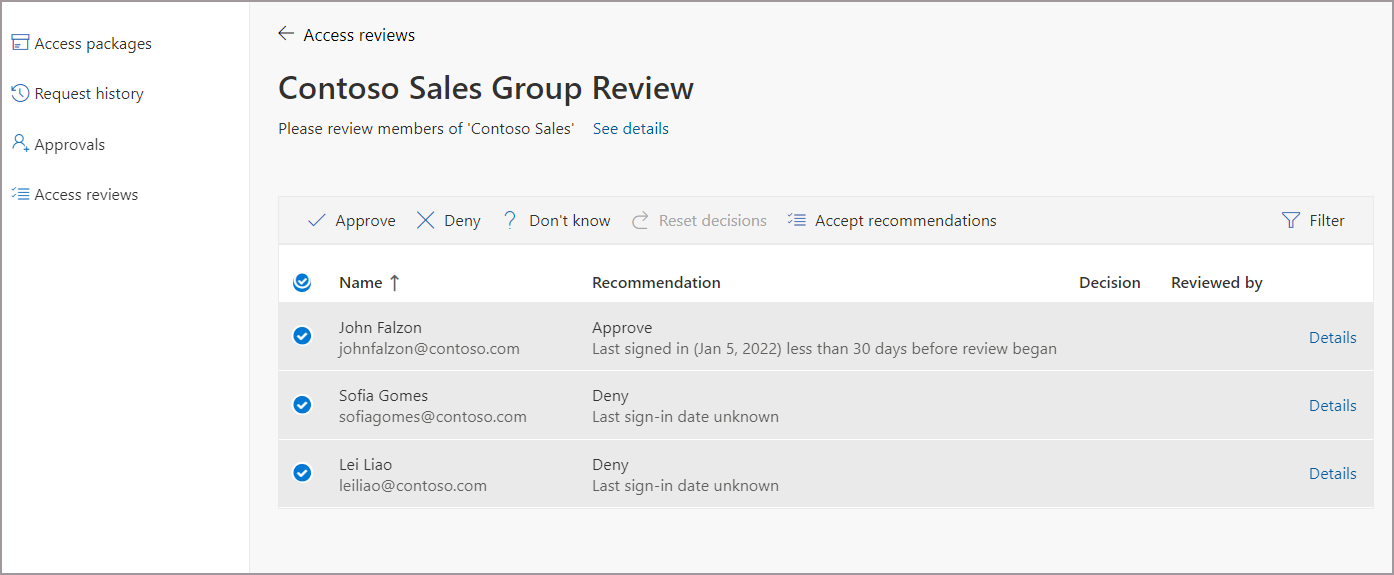
The reviewer opens a list with Approve, Deny, Don't know and Accept recommendations buttons. Decision helpers show whether someone signed in during the last 30 days, and a machine-learning helper compares a person's group membership with their peers. Reminders go out halfway through. You choose what happens when a reviewer doesn't answer: no change, remove access, approve access or take the recommendations. With auto apply on, denied people are removed from the group or app when the review ends. Multi-stage reviews allow up to three sequential reviewers, and the inactive-user scope reaches back up to 730 days.
What it costs. Microsoft's pricing page lists Entra ID Governance at $7.00 per user per month, paid yearly, with a free trial. It's an add-on: Microsoft's licensing doc requires Entra ID P1 or P2, or Microsoft 365 E3 or E5, first, and every member user in scope or reviewing needs a license. Entra ID P2 at $10 includes basic access reviews. For 100 users the Governance add-on alone comes to $8,400 per year (100 x $7 x 12), on top of the base plan. Our Entra ID pricing guide explains the base tiers.
Reviews and limits. G2 shows 4.6 out of 5 from 5 reviews for the Governance product, too few for G2 to summarize what users like or dislike. Reviews only cover Entra groups and apps that are integrated with Entra, and Entra roles and Azure roles are reviewed in Privileged Identity Management.
- your people and apps already live in Microsoft Entra and you want reviews inside the admin center you use
- you want denied access removed automatically from the group or app when the review ends
- most of your apps sit outside Entra: reviews only cover Entra groups and apps integrated with Entra
- you hold no Entra ID P1 or P2 license yet: Governance is an add-on and every user in scope must be licensed
- Users like
- too few reviews for G2 to summarize
- Users dislike
- too few reviews for G2 to summarize
- Source: G2, 5 reviews
- Starting price
- $7.00 per user per month, paid yearly, as an add-on that needs Entra ID P1 or P2 (or Microsoft 365 E3 or E5) first; free trial offered. Entra ID P2 at $10 includes basic access reviews
- Review scope
- Groups, Teams, Entra-integrated apps
- Reviewers
- Managers, owners, self, selected users
- Remediation
- Auto-apply removes denied access
- Licence
- Add-on to Entra ID P1/P2
- Price
- $7/user/mo, paid yearly, add-on
- Prerequisite
- Entra ID P1 or P2, or Microsoft 365 E3 or E5
- Scope
- Entra groups, Teams, Entra-integrated apps
- Max stages
- 3
- G2
- 4.6 from 5 reviews
Okta Identity Governance
Best if Okta is already your identity provider
Okta Identity Governance fits a team that already signs in through Okta and wants certification campaigns next to its SSO and provisioning, with entitlements and service accounts in scope.
One campaign, start to finish. A super admin or access certifications admin opens Identity Governance, then Access Certifications, then Certification campaigns, and creates a resource campaign. You pick an application, group, service account or collection, then narrow the people: everyone assigned, a custom scope written in Okta Expression Language, people with no recent activity or people with separation-of-duties conflicts. A reviewer can be the user, the manager, a group, an owner or a custom expression, and a fallback reviewer is required. A second review level is optional. Campaigns can run once or repeat, and they can also be created through the API or Okta Workflows.
Reviewers approve or revoke with a justification that you can make mandatory. Reminders go out at the midpoint, on the end day or a set number of days before, and an optional Slack notification exists. Remediation starts right after a decision, but auto-removal only works for access assigned to an individual app or group. Group-based access needs manual removal unless you switch on the optional auto-remove setting. An auditor reporting package and campaign summary reports come with it, and Okta's docs set limits of 500 active campaigns per org and 100,000 review items per campaign.
What it costs. Okta publishes no price for Identity Governance. Its docs say Access Governance isn't available as a standalone add-on, and the add-on sits on top of an Okta Workforce Identity base that has a $1,500 annual contract minimum. Okta's public suites cost $6, $14 and $17 per user per month billed annually. The Essentials suite lists Access Governance in its feature bullets, but its comparison table cell for Identity Governance is blank and a footnote describes Identity Governance as an add-on, so the real bill is a quote. Our Okta pricing guide covers the base plans.
Reviews and limits. Okta Identity Governance has no G2 page of its own, so we show no rating. The 4.5 from 1,432 reviews that G2 shows for Okta is for the whole platform and says nothing about this module.
- Okta is already your identity provider and you want certification campaigns next to your SSO and provisioning
- you need campaigns that cover entitlements, admin roles and service accounts in Okta
- you are not on Okta: Identity Governance is an add-on to an Okta Workforce Identity base
- you need a price before a sales call: none is published and Okta's own table is unclear about which suite includes it
- Starting price
- No public price (quote only); sold as an add-on to Okta Workforce Identity, which has a $1,500 annual contract minimum
- Campaign types
- Resource and identity campaigns
- Reviewers
- User, manager, group, owner, custom
- Active campaigns
- 500 per org (docs limit)
- Licence
- Add-on to Workforce Identity
- Price
- Quote only, add-on to Workforce Identity
- Base minimum
- $1,500 annual contract
- Limits
- 500 active campaigns, 100,000 items per campaign
- G2
- No page for this module
Dedicated identity governance for lean teams
ConductorOne and Lumos are built around reviews and lifecycle rather than adding them to a login product. Neither publishes a price, and both are bigger than a team of three really needs.
ConductorOne (C1)
Best for campaigns that remove access through connectors
ConductorOne, now branded C1, suits a team that wants a campaign to end with access actually removed, not a list of names to chase.
One campaign, start to finish. An admin opens Governance, then Campaigns, then New campaign, and sets the type, a due date, the scope type and the owners. Scope can be by entitlements, by access conflicts, by inheritance or by users, which is in early access, and the type can't be changed later. You then choose apps and entitlements, narrow by department, manager or whether a grant is unused, check that the data sources synced and stage the campaign. Staging takes a snapshot and locks the scope. Reviewers are routed by manager, app owner, entitlement owner or account owner, with a fallback and delegates.
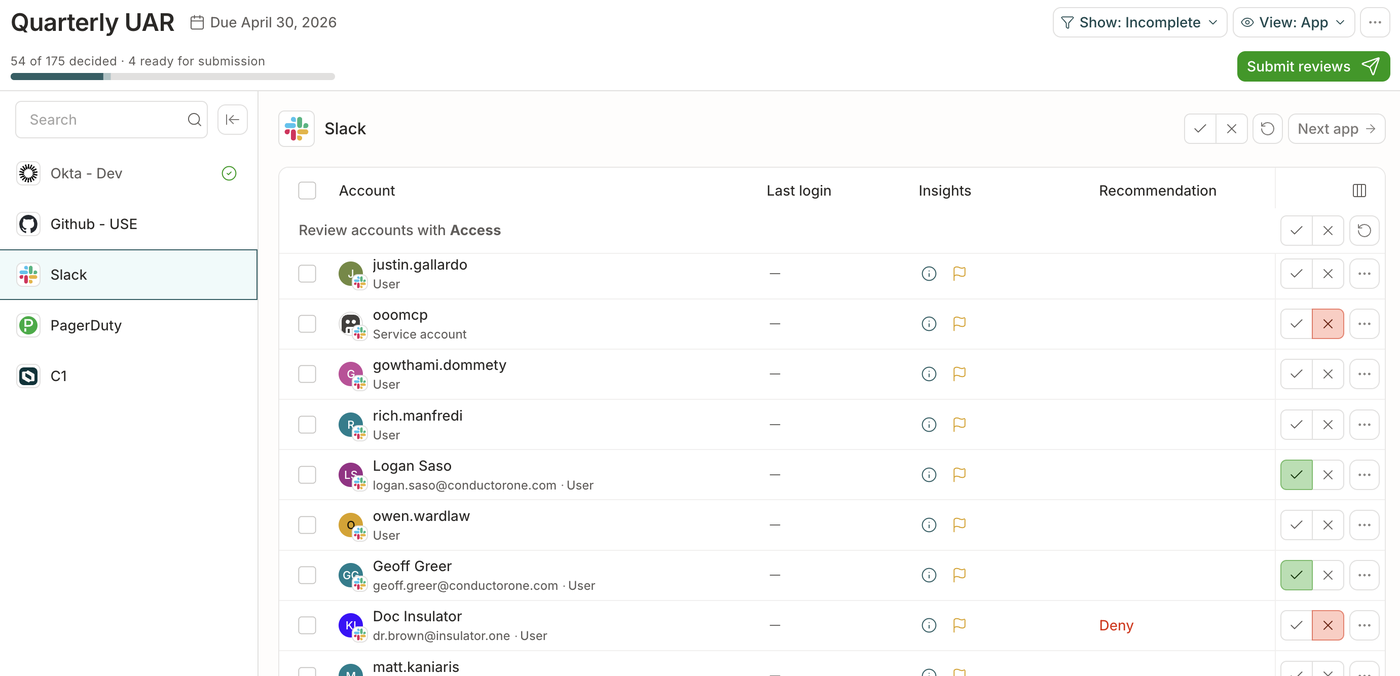
In the reviewer view, shown below, each app has a progress bar and approve and deny buttons per account. AI recommendations suggest 'Take a closer look' or 'Remove this access', and an Insights tab shows how many others hold the same access. A denial is removed through the entitlement's deprovisioning method, which the review policy can run automatically, or it becomes a ticket in your ITSM tool for apps with no automation. Recurring campaigns run from a template with a schedule. Reports download as Excel with MD5 and SHA256 checksums.
What it costs. The pricing page shows no USD price. It offers platform pricing by managed identities, with a slider from 100 to 20,000, or monthly usage-based Flex pricing metered in C1 Tokens. It states no free tier, trial or minimum. G2 lists the product as C1 at 4.8 out of 5 from 13 reviews, with ease of use, support and reliability as the praise tags and integration issues and missing features as the complaint tags.
- you want campaigns that remove denied access through connectors instead of leaving a to-do list
- you want recurring campaign templates and AI recommendations for reviewers
- you need a published price or a free tier: neither exists on the pricing page
- your team is very small: the pricing slider starts at 100 managed identities and the campaign model is built for a governance program
- Users like
- ease of use, support and reliability, per G2's tags
- Users dislike
- integration issues and missing features, per G2's tags
- Source: G2, 13 reviews
- Starting price
- Quote only; the pricing page offers platform pricing by managed identities (slider from 100 to 20,000) or monthly usage-based Flex pricing in C1 Tokens
- Scope types
- Entitlements, access conflicts, inheritance, users
- Evidence
- Excel with checksums
- Recurrence
- Campaign templates
- Rebrand
- ConductorOne is now C1
- Price
- Quote only
- Reviewers
- Manager, app owner, entitlement owner, account owner
- G2
- 4.8 from 13 reviews (listed as C1)
Lumos
Best when non-human identities must sit in the same review
Lumos fits a team that wants service accounts and other non-human identities reviewed in the same view as people, with an AI first pass on the easy calls.
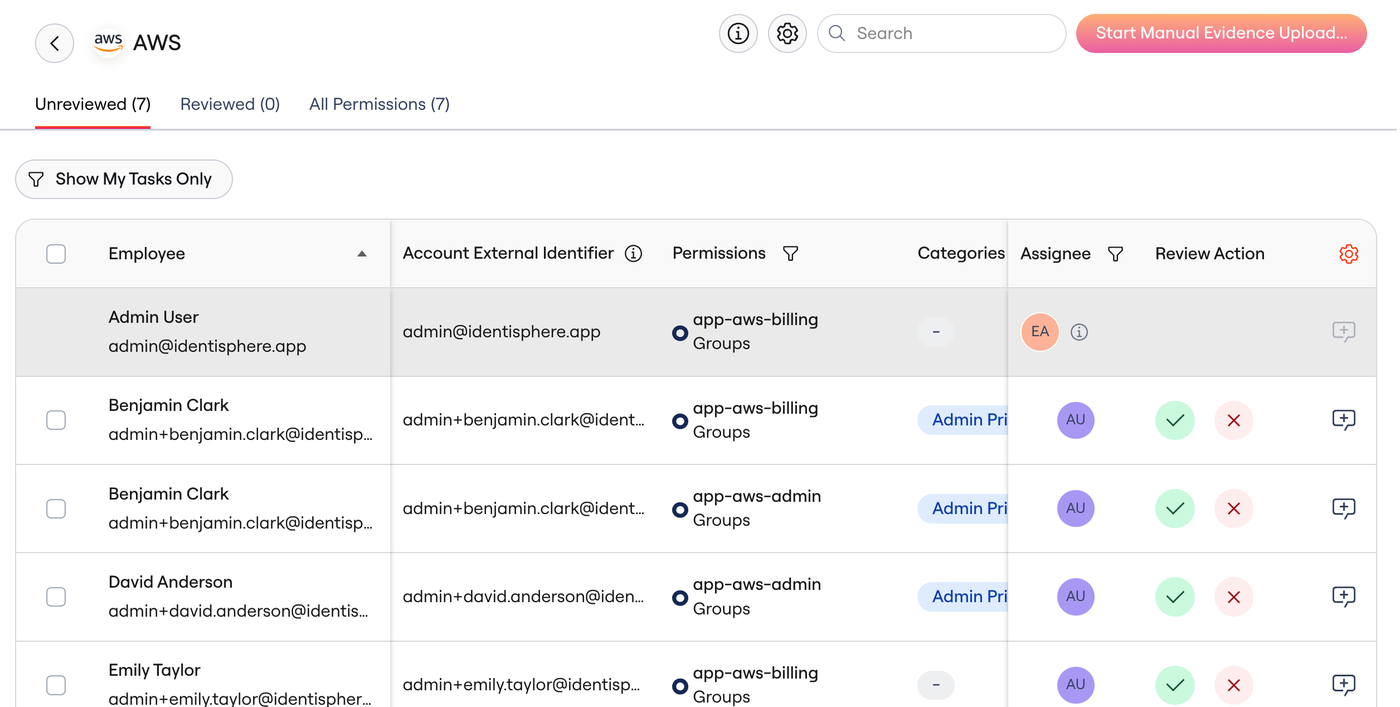
One campaign, start to finish. We could read the reviewer side only, because Lumos's admin documentation sits behind a login. The reviewer opens a notification or signs in through SSO, clicks Continue Review for an app and chooses a Permissions review, which covers roles and groups, or an Accounts review, which covers app access. Each line can be rejected, modified or approved, the rest can be bulk-approved, and the reviewer adds notes for the auditor. Admin privileges and unmatched accounts are flagged for a closer look.
Lumos says its reviews cover humans, service accounts and other non-human identities in one view, that rejected access is deprovisioned across more than 100 integrations and that an immutable audit trail is kept. That's vendor wording we couldn't test. It also describes an AI agent that does a first pass, sorting low-risk items from anomalies by role, department, last activity, peer group and separation of duties.
What it costs. The pricing page lists no plans or prices. It offers a demo and a free identity assessment, so we treat it as demo-led. Third-party sites quote conflicting figures, and we don't use them. G2 shows 4.7 out of 5 from 69 reviews. The praise tags are ease of use, time savings and automation, and the complaint tags are integration issues, limited integrations and complex setup.
- service accounts and other non-human identities need to sit in the same review as people
- you want an AI first pass on reviews with anomalies flagged
- you need a price before a demo: the pricing page shows none
- you want to read how an admin sets up a campaign first: its admin docs sit behind a login
- Users like
- ease of use, time savings and automation, per G2's tags
- Users dislike
- integration issues, limited integrations and complex setup, per G2's tags
- Source: G2, 69 reviews
- Starting price
- No price published; the pricing page offers a demo and a free identity assessment
- Scope
- Humans, service accounts, non-human identities
- Removal
- Through 100+ integrations (vendor claim)
- AI
- First-pass agent
- Admin docs
- Behind a login
- Price
- Not published, demo-led
- G2
- 4.7 from 69 reviews
SaaS management and compliance tools with access reviews
In Zluri, Torii, Vanta and CoreView, access reviews are one feature of a bigger product. That's cheaper in attention if you already own the product, and really expensive if you buy it only for this.
Zluri
Best when service accounts and groups need the same review as apps
Zluri suits a team that already wants SaaS discovery and license reclamation and needs access certifications that reach service and API accounts.
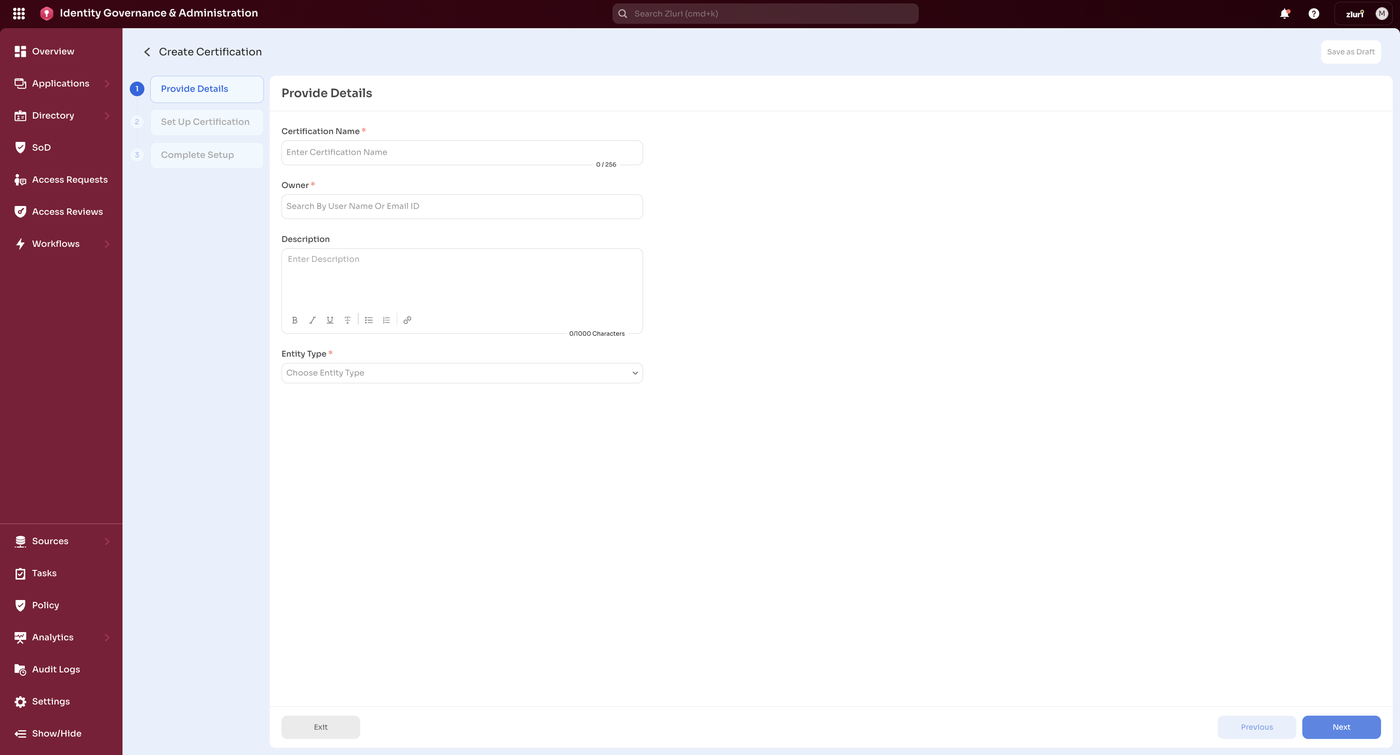
One certification, start to finish. In Access Reviews you click Create New Certification and walk a three-step wizard: details, setup and completion, with drafts saved at any step. The certification owner must hold an Owner, Admin or IT Admin role. The entity type is Applications, Groups or Users, and a Known Accounts review can filter by account type, including Service, API, Group, Employee and Shared, and by privileged role. Default reviewers are the app owner or the reporting manager for apps, and the reporting manager or department head for groups, with multi-level reviews and per-entity overrides.
A recurring toggle repeats the certification, and reminders go to reviewers before the end date and to the owner before the remediation date. Zluri describes closed-loop remediation: deprovisioning playbooks run through API integrations when the review concludes, or they can be turned into a manual task. A PDF report lists the apps in scope, the reviewer actions and timestamps. Zluri cites 300+ connectors, a platform-wide number that isn't specific to reviews.
What it costs. Zluri has no public price. Vendr, a buying platform, shows a median contract of about $36,820 per year for the whole platform, with a range from $14,045 to $75,900, and that's secondary data. Infotech announced on October 14, 2026 that it acquired Zluri, which continues as a standalone division. G2 shows 4.6 out of 5 from 177 reviews. Ease of use and automation draw 12 mentions each, and limited integrations lead the complaints with 8.
- you want the widest discovery sources (SSO, finance, MDM, CASB, browser and desktop agents) and automatic license reclamation on a schedule
- you also need access reviews and a service account and API token inventory in the same tool
- you want to see a price before talking to sales: there is no pricing page
- you need highly customized workflows or hourly data: reviewers cite limited customization and a 24 hour refresh
- Users like
- ease of use (12 mentions) and automation (12)
- Users dislike
- limited integrations (8) and limited features (7)
- Source: G2, 177 reviews
- Starting price
- No public pricing, demo request only
- Discovery
- SSO, finance, MDM, CASB, agents
- Non-human IDs
- Service accounts, keys, tokens, bots
- Owner
- Infotech (acquired October 2026)
- Price
- Quote only
- Entity types
- Applications, groups, users
- Account types
- Service, API, group, employee, shared
- Evidence
- PDF report
- G2
- 4.6 from 177 reviews
Torii
Best when app owners should answer, even for apps with no integration
Torii suits a team that wants app owners to review their own apps, including apps Torii can't connect to, and that already has budget for a SaaS management platform.
One campaign, start to finish. In Access Reviews you create a campaign in a wizard. Step one picks apps with live filters, for example sanctioned apps with more than 10 users. Step two sets the user scope: everyone by default, or privileged users such as those whose role contains Admin. Step three assigns reviewers, either named people or a dynamic field such as App Owner, plus remediation owners. For an app that isn't integrated, the reviewer uploads a user file. Torii says human and non-human identities, such as bots and service accounts, run through the same review flow.
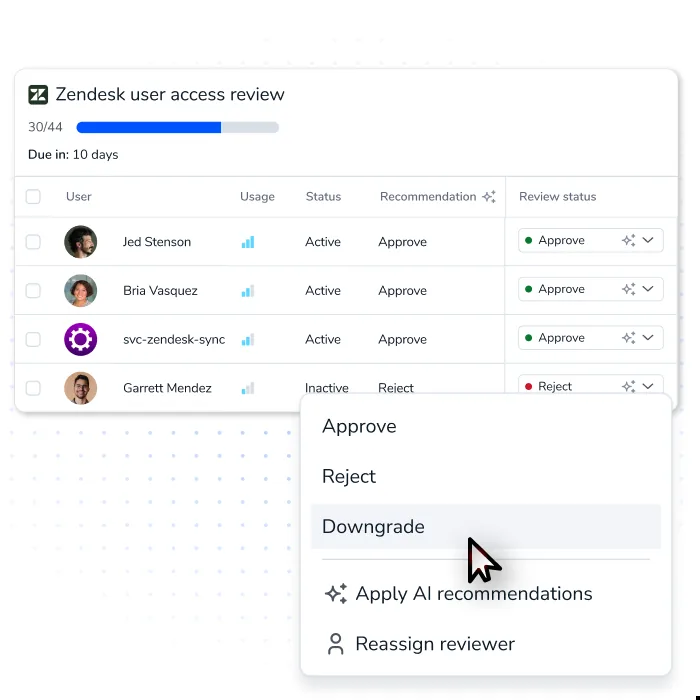
Reviewers approve or reject with comments, using usage data and Torii recommendations. Rejected access is then handled by a remediation owner, usually IT, who removes or downgrades it in Torii or in the app, verifies the removal and submits the final report. A campaign's deadline is used for monitoring only, so it doesn't escalate. Reports of finished campaigns can be exported.
What it costs. Torii's support doc says access reviews are available on the Enterprise plan and the Torii Identity module, which matters for a small team. It publishes no price, and Vendr shows a median of about $32,000 per year for the platform, or $15,000 to $35,000 for companies with 100 to 500 employees. Freshworks announced on October 12, 2026 that it signed an agreement to acquire Torii. G2 shows 4.5 out of 5 from 325 reviews, with ease of use at 31 mentions and missing features at 16.
- you want app owners, not IT, to answer for each app and a campaign that also covers apps with no integration
- you want service accounts and bots in the same review flow as people
- you need access reviews on a lower plan: the support doc limits them to Enterprise or the Torii Identity module
- you want removal to happen automatically: remediation is owner-driven
- Users like
- ease of use (31 mentions) and app integration (20)
- Users dislike
- missing features (16) and poor reporting (7)
- Source: G2, 325 reviews
- Starting price
- Quote only; the support doc says access reviews are available on the Enterprise plan and the Torii Identity module; Vendr buyer data shows a median of about $32,000 per year for the platform
- Plan gate
- Enterprise plan or Torii Identity module
- Remediation
- Owner-driven
- Non-human IDs
- Same review flow
- Owner
- Freshworks deal announced October 12, 2026
- Price
- Quote only
- Non-integrated apps
- Reviewer uploads a user file
- G2
- 4.5 from 325 reviews
Vanta
Best if SOC 2 or ISO 27001 evidence is the reason you review
Vanta suits a team that already buys it for SOC 2 or ISO 27001 and wants reviews that feed the same evidence, as long as someone else removes the access.
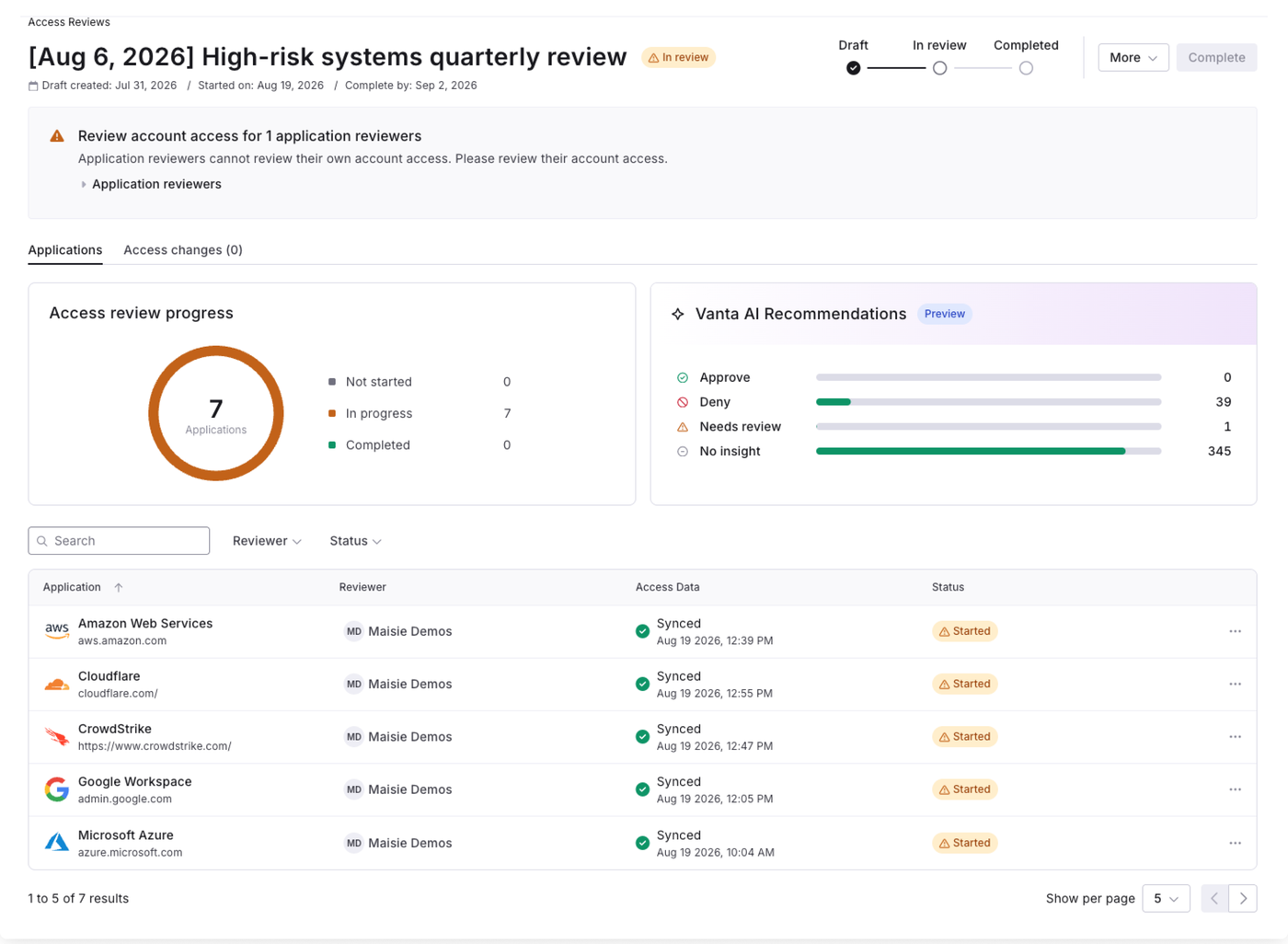
One review, start to finish. In Access, then Reviews, you create a draft, name it and select the in-scope apps. A Synced column shows which apps pulled data automatically and which need an upload. For an app with no integration you upload a CSV, or a screenshot or PDF that Vanta's image parser turns into an access file. When every app has data, you start the review and reviewers get a notification. They open an app, approve or deny each account and add notes, and every account needs an owner before the review can be submitted. After the start you can't add apps or re-upload files. Schedules, due-date windows and reminders are set in Settings, then Personnel, then Access reviews.
This is where Vanta stops. A denial starts a remediation flow, but Vanta's help center says it can't currently write any changes to your applications. Someone has to remove the access in the app and document it. Completed reviews fill the access review test page that holds your audit evidence, and a review can be exported.
What it costs. Vanta publishes no USD price, only four plans (Essentials, Plus, Professional, Enterprise) and a request for a demo. Access Management starts at the Plus plan, and the help center says it may need an upgrade or add-on. A free trial of about 5 to 7 days and startup pricing exist. On G2 it holds 4.5 out of 5 from 2,897 reviews. Ease of use has 798 mentions and compliance 606. The leading complaints are integration problems (207), pricing for small businesses (178) and cost (173).
- you already buy Vanta for SOC 2 or ISO 27001 and want reviews tied to the same evidence
- you need reviews of apps that have no integration, using a CSV or screenshot upload
- you want denied access removed for you: the help center says Vanta cannot write changes to your applications
- you only need access reviews: they are one feature of a compliance suite that reviewers on G2 call expensive
- Users like
- ease of use (798 mentions) and compliance (606)
- Users dislike
- integration problems (207), pricing (178) and cost (173)
- Source: G2, 2,897 reviews
- Starting price
- Quote only; Access Management starts at the Plus plan and may need an upgrade or add-on per the help center; free trial of about 5 to 7 days
- Plan
- Plus and above
- Remediation
- Tracks a denial, doesn't revoke
- Non-integrated apps
- CSV, screenshot or PDF upload
- Evidence
- Feeds the audit evidence test page
- Price
- Quote only, Plus plan and above
- G2
- 4.5 from 2,897 reviews
CoreView
Best for a Microsoft 365 tenant and nothing else
CoreView suits a Microsoft 365 shop that needs repeat reviews of Teams, SharePoint, OneDrive, guests and mailbox permissions from ready templates.
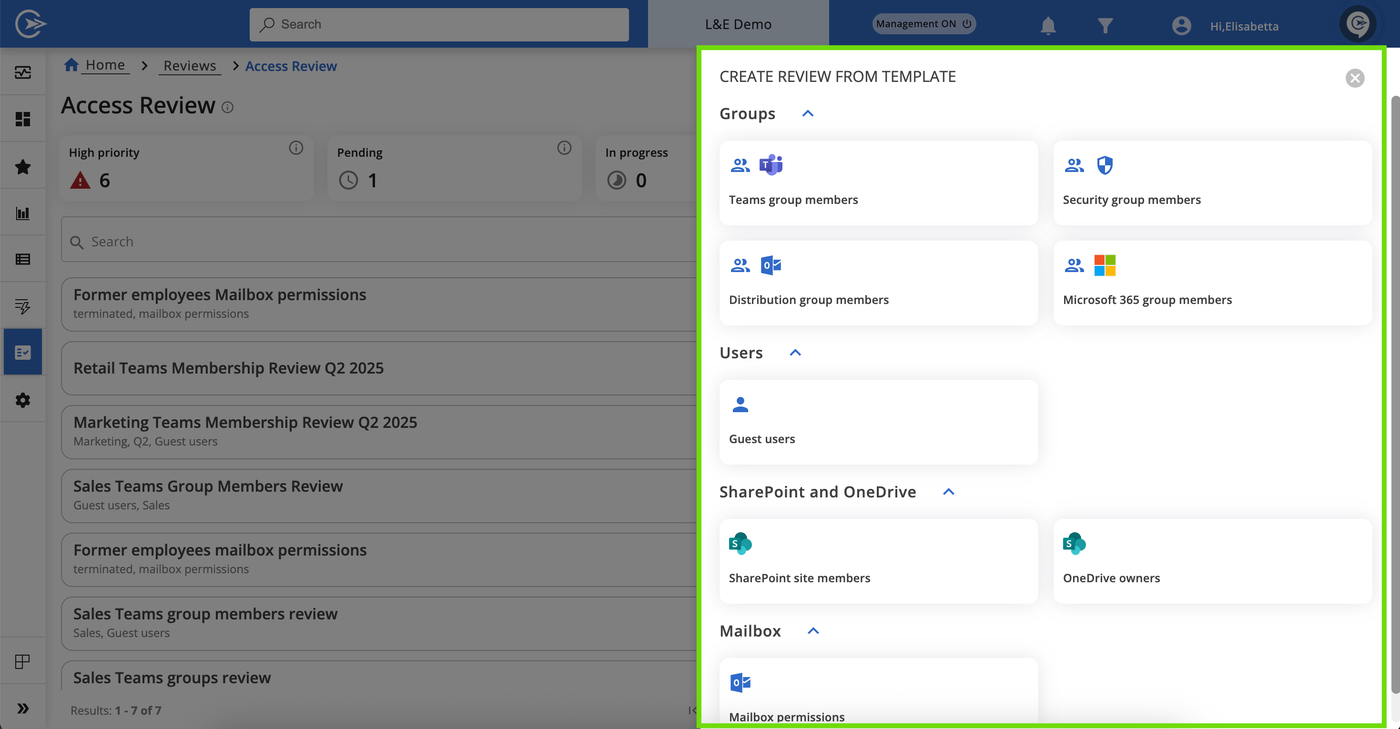
One review, start to finish. In Reviews, then Access Review, you create a review from a template: Teams group members, security, distribution or Microsoft 365 group members, guest users, SharePoint site members, OneDrive owners or mailbox permissions. You set a title, tags and a High, Medium or Low priority, then a start date, which can't be the same day, and a due date. A periodic setting repeats the review every set number of days, for example 90. Reviewers are the resource owners, custom email addresses or tenant admins, with a backup when no owner exists, and reviewers without a CoreView account get a temporary restricted one.
Reviewers approve, modify or revoke each person's access, and the changes stay pending until the review is finalized. The docs we read don't say whether finalizing applies the changes in Microsoft 365, so ask. Reminders go out a set number of days before the due date, and all decisions can be exported as CSV for an audit.
What it costs. CoreView prices by the number of licensed identities and gives no figure, with no minimum or trial stated. On G2 it holds 4.6 out of 5 from 119 reviews. Automation draws 12 mentions, ease of use 11 and reporting 7. The complaints are a steep learning curve (6), navigation (5) and limited features (4).
- your estate is Microsoft 365 and you need reviews of Teams, SharePoint, OneDrive and mailbox permissions
- you want reviews by resource owners from templates, with periodic repeats
- you need to review non-Microsoft SaaS apps: scope is Microsoft 365
- you need to know the price first: it is per licensed identity and quote only
- Users like
- automation, ease of use and reporting, per G2's counts
- Users dislike
- a steep learning curve and navigation, per G2's counts
- Source: G2, 119 reviews
- Starting price
- Quote only, per licensed Microsoft 365 identity; no minimum or trial stated
- Scope
- Teams, groups, SharePoint, OneDrive, guests, mailboxes
- Recurrence
- Periodic, set in days
- Evidence
- CSV export of decisions
- Price basis
- Per licensed identity
- Price
- Quote only, per licensed identity
- G2
- 4.6 from 119 reviews
What the licence basis costs a 100-person company
The licence basis differs a lot between these tools, and most of it is hidden. This table says what you can and can't budget for a 100-person company from public pages.
| Tool | What the public page lets you budget | Annual USD figure for 100 users |
|---|---|---|
| Entra ID Governance | $7 per user per month, paid yearly, plus the base Entra license | $8,400 for the add-on alone |
| Okta Identity Governance | Add-on price not published; base has a $1,500 annual minimum | Quote |
| ConductorOne (C1) | Platform price by managed identities, or usage-based Flex | Quote |
| Lumos | Demo-led, no price | Quote |
| Zluri | No price; Vendr median about $36,820 per year for the platform | Quote |
| Torii | No price; needs Enterprise or Torii Identity; Vendr $15,000 to $35,000 at 100 to 500 employees | Quote |
| Vanta | No price; Plus plan and above, may need an add-on | Quote |
| CoreView | Per licensed identity, no figure | Quote |
A quarterly review routine for one admin
Any of these tools works better with a short routine. The tool collects and routes, and a person decides what the scope is, who is accountable and what happens when no one answers. The sequence assumes one admin and a finance app as the first scope.
- IT adminPick the scope, such as the finance apps and admin groups, and list the accounts, including service accounts and guests Week 1
- IT leadName a reviewer and a fallback reviewer for every app, and decide what happens to a review nobody answers Week 1
- IT adminStart the campaign with a due date two weeks out and send the kickoff notice Week 2
- ReviewersApprove or remove each account and write a short reason for anything unusual Weeks 2 to 3
- IT adminCarry out or confirm every removal, then check in the app that the account is gone Week 4
- IT leadExport the report, file it with the date and keep the open exceptions list for next quarter Week 4
Run the first campaign on one app before you point the tool at everything. A review that nobody finishes, or a denial nobody carries out, gives you a report and no change in access, and that's exactly what an auditor tests for.
Service accounts and non-human identities in access reviews
Most review campaigns list people. The accounts that cause trouble in an audit are often service accounts, API tokens and bots, because no manager notices them and no HR event retires them. Okta lists service accounts as a campaign resource, Zluri filters reviews by Service and API account types, Lumos and Torii say they put non-human identities in the same flow, and C1's own reviewer screenshot shows a service account row with an access decision next to it.
All of that assumes the tool can already see the account. Before that, someone has to say who owns it and why it exists. Our service account access review template shows the fields to record, and the non-human identity lifecycle guide covers the stages. The IT Lead covers the ownership step on its own, described below.
Which tool fits which team
- Microsoft 365 with Entra ID P1 or P2 already paid for, and your apps are connected to EntraEntra ID Governance, after checking the per-user add-on against your headcount
- Okta is your identity provider and you want campaigns next to SSOOkta Identity Governance, after getting a quote with the base plan included
- You want a denied account removed through a connector or a ticket, and can budget a quoteConductorOne (C1)
- Service and API accounts must be reviewed with people, and you want SaaS discovery tooZluri
- App owners should answer for apps with no integrationTorii, with the Enterprise plan or Identity module
- SOC 2 or ISO 27001 is the reason, and your team removes access by handVanta, if you already buy it for compliance
- Only Microsoft 365 matters: Teams, SharePoint, OneDrive and mailboxesCoreView
- Non-human identities in the same review as people, with an AI first passLumos, after a demo that shows the admin side
Shortlist two tools and run both against the same finance app, including one account that should be removed, one guest and one service account. The tools look alike in a demo, but they behave differently when a reviewer says no. Check that the account is actually gone in the app, and ask for the report you would hand an auditor.
Access review software FAQ
What is access review software?
It's software that collects who has access to which systems, asks the right reviewer to approve or remove each person's access, records the answer and keeps the evidence for an audit. The stronger tools also remove the access when a reviewer says no, instead of leaving a to-do list.
How often should access reviews be done?
PCI DSS v4.0 requirement 7.2.4 requires accounts and privileges to be reviewed at least every six months. Many teams review finance, production and admin access quarterly and other apps once or twice a year. SOC 2 and ISO 27001 leave the interval to your own policy, and the auditor checks that you followed it.
Is there free access review software?
None of the eight tools lists a free plan. Entra ID Governance shows a free trial on Microsoft's pricing page and Vanta offers a trial of about 5 to 7 days. For a first review a spreadsheet and a checklist work, and our user access review checklist shows the steps.
What is the difference between an access review and access certification?
Access review and access certification mean the same thing. Okta calls the process access certification and runs it as campaigns, and Entra, Vanta and CoreView say access reviews. Both ask a reviewer to confirm or remove access on a schedule.
Do I need an identity provider before buying access review software?
You don't always need one first, but two of these tools do. Entra ID Governance and Okta Identity Governance need Entra or Okta underneath. ConductorOne, Lumos, Zluri, Torii and Vanta connect to your identity provider and apps, and Vanta and Torii also take uploaded files for apps with no connector.
Can access review software remove access automatically?
Some access review tools can remove access automatically. Entra auto-apply removes denied people from groups and apps, ConductorOne runs deprovisioning from its review policy and Zluri runs playbooks when the review ends. Vanta's help center says it can't write changes to your apps, and Torii leaves removal to a remediation owner.
Can access reviews cover service accounts?
Okta, Zluri, Lumos and Torii all describe service or non-human accounts in their reviews. The tool still needs to see the account, and someone has to know who owns it, so an ownership list comes first, which is why it's worth doing before any purchase.