A service account access review template should show every non-human identity, its business owner, its actual permissions, the reviewer's decision and proof that any requested change happened. The template below is ready to copy into a spreadsheet or ticketing system. It's deliberately plain. It separates account inventory from entitlement decisions so an approval can't hide an unnecessary privilege.
Service accounts run jobs that people rarely watch, and that's exactly why they drift. A scheduled export, backup agent or integration can still work long after its original engineer's last day. A useful review answers two distinct questions: whether the workload still needs the identity and whether each permission is justified. You'll also need a safe path to remove access without interrupting production, and you won't get one by guessing.
- Export a fresh inventory from each source system. Include workload identities, service principals and automation accounts.
- Assign a named human owner and an independent reviewer. Unknown ownership is an unresolved finding. It isn't an approval.
- Review each material entitlement, not just whether the account exists. Record keep, reduce, revoke or investigate.
- Keep the source snapshot, dated decision, change ticket and post-change verification together, so an auditor doesn't have to hunt for them.
- Treat missing activity as a reason to investigate. It isn't proof that the account's safe to delete.
What should a service account access review template include?
A service account access review template needs identity, ownership, access, activity, decision and remediation fields. Use a separate row for each meaningful account-to-resource permission, because one line per account hides what each grant does. A single account-level checkbox can't prove that its broad administrative role was appropriate.
| Field | What to record | Why the reviewer needs it |
|---|---|---|
| Review ID and snapshot date | Review batch and source export time | Reconstruct the exact state reviewed |
| Platform and environment | Directory, cloud account, SaaS tenant, production or test | Locate the correct control plane |
| Immutable identity ID | Object ID, principal ID or account SID | Avoid name collisions and renames |
| Display name and identity type | Service user, service principal, managed identity or role | Distinguish credential and permission models |
| Workload and business purpose | Job, application, dependency and data flow | Decide whether access is still needed |
| Named accountable owner | Human name, team and backup contact | Route a decision to someone who knows the workload |
| Resource and entitlement | Exact resource, role, scope and grant path | Evaluate least privilege rather than a generic account |
| Credential model | Managed identity, federation, key, certificate or password | Flag long-lived secrets without storing them |
| Activity evidence | Last observed use, data source, lookback and blind spots | Avoid treating missing telemetry as inactivity |
| Risk and dependency | Privileged scope, sensitive data and outage impact | Prioritize review and safe change planning |
| Reviewer and decision | Named reviewer, date, keep/reduce/revoke/investigate | Preserve explicit authorization |
| Justification and expiry | Business reason, exception owner and recheck date | Prevent permanent unexamined exceptions |
| Change and verification | Ticket, implementer, change time and new export/log | Prove that the requested outcome happened |
Never paste passwords, private keys, tokens or connection strings into the spreadsheet. Store only references to a secret manager or approved evidence repository. Access-review evidence can expose infrastructure names and permission paths, so don't leave the completed workbook in a shared folder. It's sensitive operational data.
Copy-ready CSV for the entitlement review
Paste this header into a CSV file, then populate it from fresh exports. Each row represents one identity and one permission or role assignment. Keep the field names stable between review cycles so you can compare decisions.
review_id,snapshot_at,platform,environment,identity_id,identity_name,identity_type,workload,business_owner,technical_owner,resource,entitlement,grant_path,credential_type,last_activity_at,activity_source,activity_limitations,risk_tier,dependency,reviewer,decision,decision_at,justification,exception_expires_at,change_ticket,implementer,change_completed_at,verification_evidence,verification_at,closure_statusThe CSV is a schema. It isn't a credential dump. Import it into a controlled spreadsheet, database or access-governance workflow. Use a protected evidence folder for exports and a separate remediation log if multiple changes share one decision.
Example review register
The values below are fictional. They show how a reviewer's decision and the technical change stay connected without disclosing secrets. Credential columns hold references to a secret manager, never the secrets themselves.
Service Account Access Review Register
Four linked tables. Table 1 lists each identity once. Tables 2 to 4 hold one row per identity and resource, keyed by identity name and resource here. In your own copy, key them on the immutable identity ID instead of the name.
| Review ID | Snapshot date | Platform | Environment | Identity ID | Identity name | Identity type | Workload | Business owner | Technical owner |
|---|---|---|---|---|---|---|---|---|---|
| SAR-2026-Q4 | 2026-10-31 | AWS | Production | AROAEXAMPLE1234567890 | svc-orders-export | IAM role | Nightly orders report export | Analytics lead | Platform team |
| SAR-2026-Q4 | 2026-10-31 | Microsoft Entra | Production | 8c1f2a77-0000-4000-8000-000000000042 | ci-release-agent | Service principal | Release pipeline | Engineering manager | Platform team |
| SAR-2026-Q4 | 2026-10-31 | Active Directory | Production | S-1-5-21-1111111111-2222222222-3333333333-1104 | legacy-sync-bot | Service user | Old CRM sync | Unassigned | Infrastructure team |
| SAR-2026-Q4 | 2026-10-31 | Google Cloud | Production | 112233445566778899001 | backup-job-prod | Service account | Nightly backup | Infrastructure lead | Infrastructure team |
| Identity name | Resource | Entitlement | Grant path | Credential type | Last activity | Activity source | Activity limitations | Risk tier | Dependency |
|---|---|---|---|---|---|---|---|---|---|
| svc-orders-export | All storage buckets in the account | Broad storage write role | Role policy | Temporary role session | 2026-10-29 | IAM last accessed | Supported services and actions only | Elevated | Nightly export job |
| ci-release-agent | Production deployment | Deployment role | Direct role assignment | Client secret reference in vault | 2026-10-30 | Service principal sign-in log | Log retention not confirmed | Critical | Release pipeline |
| legacy-sync-bot | Old CRM integration | Administrator | Group membership | Password reference in vault | Unknown | None collected | Domain controller logs not in scope | Critical | Unknown |
| backup-job-prod | Backup repository | Read and write | Project IAM binding | Key file reference in vault | 2026-10-28 | Service account insights | API key use isn't reflected | Elevated | Restore procedure |
| Identity name | Resource | Reviewer | Decision | Decision date | Justification | Exception expires |
|---|---|---|---|---|---|---|
| svc-orders-export | All storage buckets in the account | Security lead | Reduce | 2026-10-31 | Job writes to one bucket only, scope the grant to it | None |
| ci-release-agent | Production deployment | Security lead | Keep | 2026-10-31 | Pipeline needs the role, owner confirmed | None |
| legacy-sync-bot | Old CRM integration | Security lead | Investigate | 2026-10-31 | No owner yet, temporary risk exception while the system owner investigates | 2026-11-30 |
| backup-job-prod | Backup repository | Security lead | Keep | 2026-10-31 | Restore job depends on read and write | None |
| Identity name | Resource | Change ticket | Implementer | Change completed | Verification evidence | Verification date | Closure status |
|---|---|---|---|---|---|---|---|
| svc-orders-export | All storage buckets in the account | CHG-105 | Platform engineer | Pending: new policy export | Remediation pending | ||
| ci-release-agent | Production deployment | None needed | None | Owner attestation | 2026-10-31 | Reviewed | |
| legacy-sync-bot | Old CRM integration | CHG-106 | Infrastructure team | Ownership escalation record | Unable to verify | ||
| backup-job-prod | Backup repository | None needed | None | Restore test note | 2026-10-31 | Reviewed |
An unknown owner isn't a reason to sign off. Escalate the account to the system owner, check the last change ticket and trace the workload before anyone removes a credential. If the account is production-critical, record a temporary risk exception with an owner and an expiry.
How do you run a service account access review?
Run a service account access review by scoping systems, exporting identities, matching owners, checking entitlements, recording decisions and verifying remediation. Don't call the campaign complete when the spreadsheet is signed. It's closed when requested changes are implemented or documented as approved exceptions.
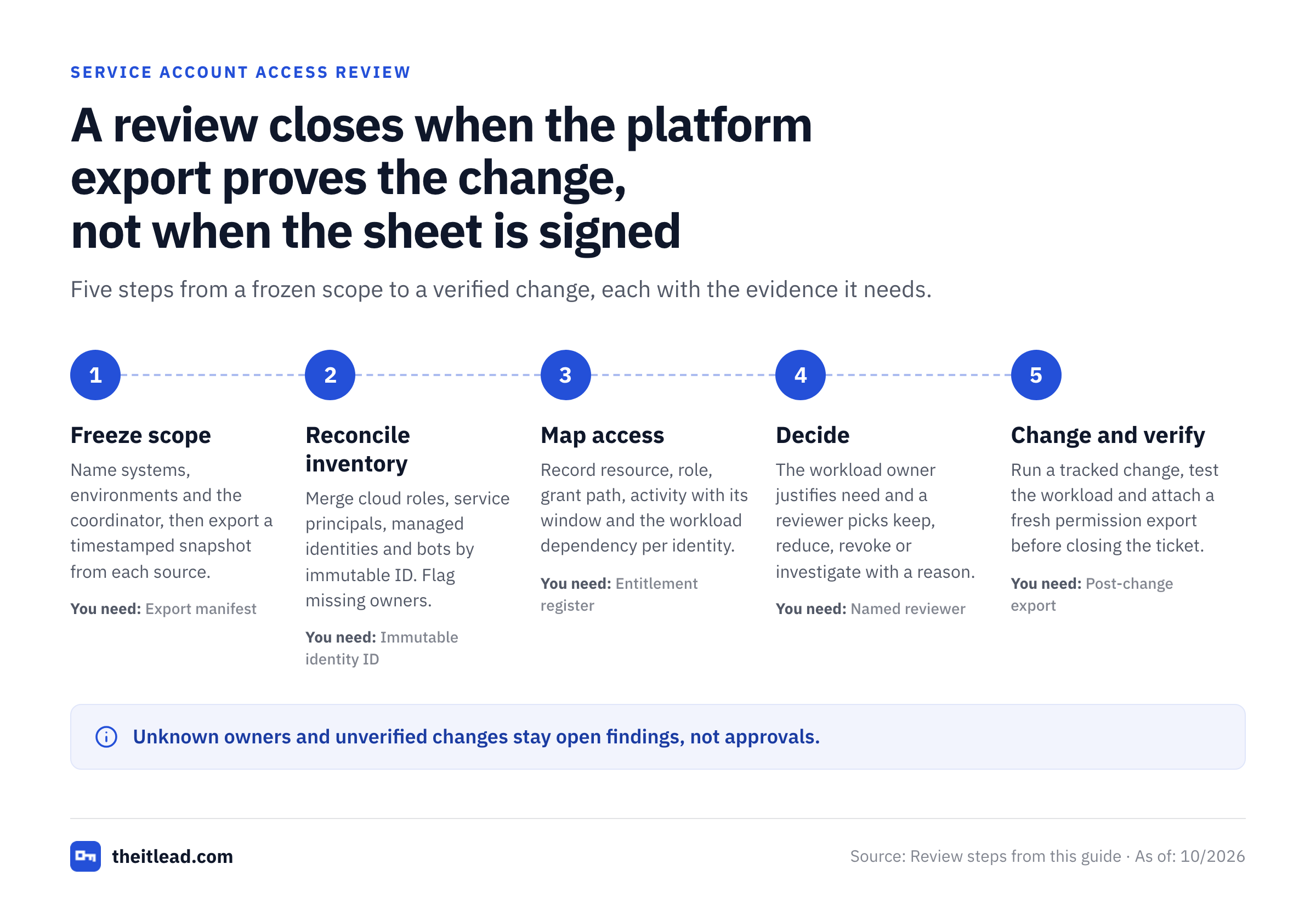
Freeze the scope and evidence date
Name the systems, environments, review period and accountable coordinator, so nobody's guessing what's in scope. Export a timestamped snapshot from each authoritative source. Keep a manifest of which systems were included and which couldn't be queried.
Reconcile the inventory
Merge cloud roles, directory service users, app registrations, managed identities, CI/CD credentials and SaaS integration identities. It's tedious, but it's where most gaps show up. Match by immutable ID where possible. Mark missing owners and ambiguous duplicates as findings. Don't resolve them silently.
Map entitlements and dependencies
For each identity, record resource scope, effective role or grant, privilege level and workload dependency. Ask the application owner what the automation must do, not merely whether it's still running.
Collect activity and credential context
Record observed activity with its reporting window and gaps. Identify long-lived keys, interactive login capability, delegation and impersonation paths where relevant. Don't copy secret values into evidence.
Route explicit decisions
Have the workload owner justify business need and a qualified reviewer approve the permission scope. Use keep, reduce, revoke or investigate. Require a reason and due date for exceptions.
Change access safely and verify
Create a tracked change, assess outage impact, implement through approved controls and test the workload. Capture the updated permission state and close the ticket only after independent verification.
Define the right review unit
An identity can have several unrelated grants. One app registration might read a mailbox, write to a storage container and hold a tenant-wide API permission. An account-level "keep" decision tells you almost nothing about those differences.
Use an identity-level register for existence, owner, credential model and lifecycle status. Use an entitlement-level review for each material resource and privilege. Link both through the immutable identity ID, because names get reused and renamed. For nested groups, inherited roles or delegated access, note the grant path and the effective permission if you can establish it.
Assign an owner who understands failure impact
The owner should know which job uses the identity, who's affected when it stops, what breaks if access changes and how to test the result. That's usually an application or platform owner, not necessarily the person who created the account.
A security reviewer should challenge privileged scope and segregation of duties. The engineer implementing a revocation shouldn't be the only person attesting that the revocation succeeded. Small teams that don't have a separate verifier can use a compensating second-person check, documented in the evidence record.
Don't confuse access review with password rotation
An access review decides whether an identity and its privileges remain justified. Credential rotation changes an authenticator. You can rotate a password on schedule and you'll still have an orphaned account with administrator access.
Review both tracks, but record them separately, since they're answering different questions. For static credentials, capture the credential type, storage location reference, expiry and responsible team. A reviewer can request migration to a managed or federated identity when the workload supports it. That's a project, not a quick fix. That request needs a change plan rather than an automatic key deletion.
Which service accounts belong in the review?
Include every non-human identity that can authenticate or obtain privileges in the selected environment. If it can authenticate or hold a permission, it's in scope. A complete scope reaches beyond traditional directory users to cloud roles, service principals, managed identities, automation bots and application grants.
| Identity pattern | Where to discover it | Review emphasis |
|---|---|---|
| Traditional service user | Directory, host or database account inventory | Interactive sign-in, password custody, service dependencies |
| Microsoft Entra service principal | Enterprise applications, app role assignments and consent grants | API permissions, tenant scope, application owner |
| Azure managed identity | Managed identity resources and role assignments | Resource binding, role scope and workload owner |
| AWS IAM role used by automation | IAM roles, trust policies and attached permissions | Who can assume the role, unused permissions and resource access |
| Google Cloud service account | IAM principals, role bindings and service account policies | Impersonation, key creation and attached workloads |
| CI/CD or SaaS integration bot | Pipeline configuration, integration settings and vendor admin consoles | Token scope, ownership, third-party access and expiry |
The review inventory isn't a list of credentials alone. An identity that authenticates with short-lived tokens still needs an owner and permission review. Conversely, a key inventory without the associated role assignments won't reveal what a stolen key could access.
Microsoft Entra: separate permissions from access reviews
Microsoft documents how administrators can inspect enterprise application permissions, including delegated grants and application role assignments. Those records belong in the entitlement review, and they're often the longest part of it. A service principal's existence doesn't prove that every granted API permission remains necessary, and that's easy to overlook.
Microsoft also documents service-principal access reviews for privileged Microsoft Entra and Azure resource roles through PIM. That capability has specific licensing prerequisites, including Workload ID Premium in addition to an eligible Entra governance or P2 license. Don't assume every tenant can automate these reviews with its current subscription. Check what you've actually licensed.
AWS: inspect role usage without overreading it
AWS IAM last accessed information can show attempted access for supported services and actions associated with roles. IAM Access Analyzer also produces unused-access findings for supported IAM users and roles. The review should record the report window, the role trust policy and the workload that assumes it.
An unused-access finding is a lead. It isn't a safe-delete order. A disaster-recovery role or infrequent scheduled job may have no recent observed activity yet still be necessary. Check the job schedule, expected invocation and rollback plan before reducing or removing privileges. You'll want to know what's supposed to run, and when.
Google Cloud: validate activity blind spots
Google Cloud documents service account insights for identities that haven't authenticated during the insight window. Its documentation warns that some authentication paths aren't reflected in the same usage metrics, including API keys bound to service accounts and some activity outside Google Cloud.
Record both the insight and its limitations. Cross-check with workload configuration, service account usage metrics and the application owner. The application owner will know what the telemetry can't see. Google also recommends that you avoid service account keys where more secure authentication methods are viable, and limiting permissions granted to service accounts.
How should reviewers decide whether to keep, reduce or revoke access?
Reviewers should decide on the basis of a current workload need, the minimum permissions required and the evidence available. A missing sign-in event isn't enough to approve or revoke access. Every decision needs a named person, date and reason, and that's non-negotiable.
| Decision | Use when | Required follow-through |
|---|---|---|
| Keep | Owner confirms a legitimate workload and the grant is appropriately scoped | Save business justification and next review trigger |
| Reduce | The workload is needed but a role, resource scope or grant is excessive | Open a least-privilege change and verify the reduced access |
| Revoke | The identity or grant has no valid use and removal is safe | Disable or remove through change control, then capture proof |
| Investigate | Ownership, telemetry, effective access or dependency is unknown | Assign an investigator and deadline; don't silently approve |
Use a two-part approval for high-impact access
The workload owner confirms operational need, because they're the one who knows what breaks. A separate IT or security reviewer checks privilege scope and policy exceptions. That's the second signature. A business owner who says "we need the nightly export" hasn't automatically justified an administrator role across the entire tenant.
For high-impact grants, ask the owner to identify the exact API action, database operation or deployment step. Where feasible, test a narrower role in a non-production environment first. Where a non-production test isn't possible, say so in the record. Capture what failed and what passed. That evidence makes a reduction defensible without claiming a perfect permission model.
Treat exceptions as time-bound decisions
An exception should include the exact permission, business reason, approving authority, compensating control, expiry and re-review trigger. A blank expiration date turns a temporary concession into standing privilege, and it stays that way until someone notices.
Don't let the review spreadsheet double as an unrestricted secrets repository or a list of permanent waivers. Store approval records where access is controlled and the decision history is preserved, which a shared drive usually isn't.
What evidence proves a service account access review was completed?
A completed review needs the original access snapshot, reviewer decisions and proof that remediation happened. A signed spreadsheet without the final permission state is an incomplete record when it contains reduce or revoke decisions.
Use an evidence package with the components in the checklist below. Each item answers a question an auditor asks, and a missing item is a gap you'd want to find before the auditor does. Keep the package in one protected location so that nobody has to reassemble it later.
- Scope statement and named review coordinator
- Timestamped source exports with system and environment identifiers
- Reconciliation log for missing, duplicate and unowned identities
- Entitlement register with exact roles, resources and grant paths
- Named reviewer decisions with timestamps and justifications
- Approved exceptions with owner, expiry and compensating controls
- Change tickets for reduce and revoke decisions
- Post-change exports or logs confirming the new access state
- Validation notes for workload tests and any rollback
- Final sign-off with open findings and the next review trigger
Example evidence trail for a permission reduction
A reporting service account has a broad storage role, but the application owner confirms that the job writes only to a specific bucket. The reviewer records reduce and links a change request. That's the authorization. The platform engineer narrows the grant, runs the scheduled export and attaches a new policy export.
The verifier checks the new role and the job run, then attaches both to the ticket. The evidence package now connects the original risk, the authorization, the technical action and the outcome. If the export fails, the ticket stays open and the team follows the documented rollback path.
Record what wasn't reviewed
Every campaign needs a coverage statement, and it keeps you from claiming more coverage than you had. Name unreachable tenants, missing activity logs, inherited permissions that weren't resolved and integrations whose owner couldn't be found. Mark them as open findings. They aren't completed reviews.
A complete record can contain exceptions and open items, but it shouldn't misrepresent them. Use distinct closure states such as reviewed, remediation pending, exception approved and unable to verify. Give each open state an accountable person and follow-up date.
How often should service account access be reviewed?
Service account access review frequency should follow your organization's policy, risk assessment and applicable control obligations. There isn't a universal quarterly requirement for every service account in NIST SP 800-53. Its AC-2 account-management control calls for review at an organization-defined frequency.
A practical policy can use risk tiers, and it doesn't need many: review highly privileged production identities more often, lower-risk integrations less often and any identity immediately after a material change. These are policy-design examples. They aren't universal regulatory deadlines.
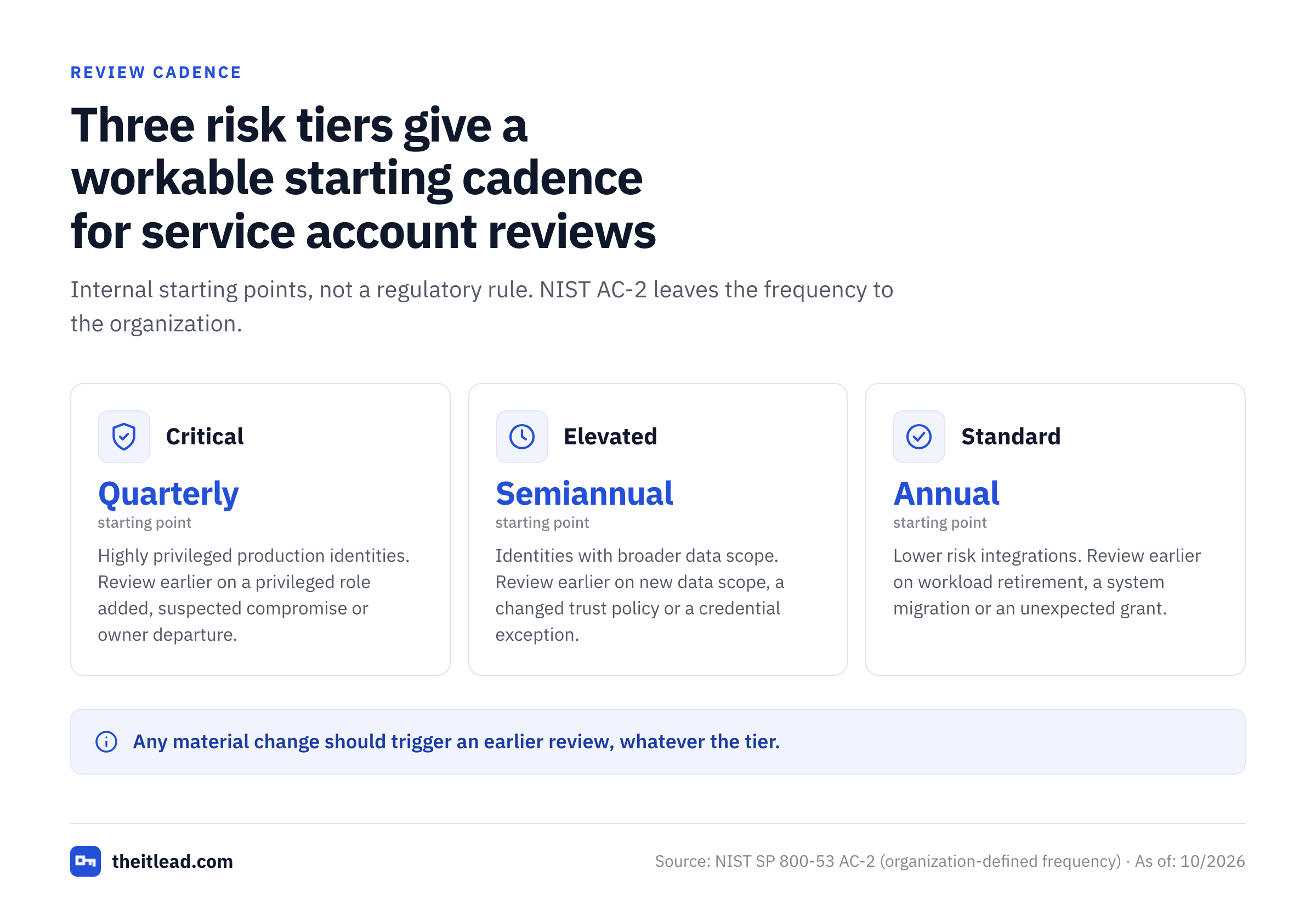
| Risk tier | Suggested internal starting point | Event that should trigger an earlier review |
|---|---|---|
| Critical | Quarterly | Privileged role added, suspected compromise or owner departure |
| Elevated | Semiannual | New data scope, changed trust policy or credential exception |
| Standard | Annual | Workload retirement, system migration or unexpected grant |
The schedule matters less than coverage and follow-through, and that's clearly the part that holds up in an audit. An annual review with a real owner, explicit permissions and verified revocations can be more useful than a monthly campaign that rubber-stamps a stale list. Adapt the cadence to your risk appetite, contractual obligations and actual review capacity.
How do you handle unowned or inactive service accounts?
Unowned or inactive service accounts require investigation before approval or deletion. The safe sequence is to identify the workload, assign a temporary accountable owner, check activity limitations and plan a reversible change if removal appears justified.
Unowned account triage
Search the deployment configuration, service manager, scheduled tasks, CI/CD definitions, secret-manager references and recent change tickets. Someone's name is usually in one of them. Ask the system owner to nominate a human who's accountable for the identity. If no one can explain its purpose, flag it as an unresolved security finding and set an escalation date. That's an open risk, so don't close it quietly.
For a privileged account, involve security before a new permanent owner attests. Ownership isn't proven by whoever replies first in chat. Record the evidence linking the person to the workload.
Inactive account triage
Check the observation window against expected workload behavior. Don't assume the telemetry covers a full business cycle. A monthly billing process, emergency recovery path or seasonal batch job may not run during the telemetry window. Compare the last-used signal with configuration and business calendars, since a job that hasn't run yet looks the same as an abandoned one.
If retirement is appropriate, you'll want a reversible disable or scoped permission reduction with monitoring before permanent deletion. Record how the team would restore service if an unexpected dependency appears. Don't turn a spreadsheet cleanup into a production outage.
Can a spreadsheet replace an identity governance tool?
A spreadsheet can coordinate a bounded service account access review, but it can't discover every identity or enforce changes by itself. The review still needs authoritative exports, an accountable owner, a decision record and proof from the underlying platform.
Use a spreadsheet when the scope is small, the source systems are known, you've got an authoritative export for each and reviewers can manually reconcile changes. Consider a governance workflow when your campaigns span many tenants, reviewers, inherited grants and recurring exceptions. Whichever route you choose, check whether a governance product covers non-human identities. Don't assume a human-user certification module does.
For teams building a service account inventory before certification, see the service account inventory template, ownership matrix and service account audit checklist. The inventory answers what exists. The ownership matrix answers who's accountable. The access review adds the permission decision and the verified outcome.
The IT Lead's service-account ownership workflow is a narrower companion to this review. It isn't a replacement for cloud IAM or an identity governance suite. It focuses on CSV-based owner nomination, attestations and an audit trail. It doesn't scan cloud tenants, rotate credentials or disable accounts, so source exports and remediation stay in your existing systems.
Service account access review FAQ
Service account reviews are strongest when every identity has a human owner, every important permission has a decision and every requested change has verification. The answers below cover scope, inactive accounts, audit evidence, review frequency and how an access review differs from secret rotation.
What is a service account access review?
A service account access review is a documented check that a non-human identity still serves a legitimate workload and holds only the access that workload needs. It records a human owner, a reviewer decision and remediation evidence.
Should service principals and managed identities be included?
Yes. Service principals and managed identities can hold permissions even without traditional passwords. Review their resource roles, grants, workload owners and available usage evidence.
Is an inactive service account safe to delete?
No. An inactivity signal can miss infrequent jobs or unsupported authentication paths. Verify dependencies and plan a reversible change before removal.
What should an auditor receive after the review?
Provide the dated inventory, exact entitlement snapshot, named decisions, exceptions, remediation tickets and post-change verification. Document gaps instead of silently marking them complete.
Does NIST require quarterly service account reviews?
NIST SP 800-53 AC-2 uses an organization-defined review frequency. Set and document a cadence based on your applicable requirements and risk assessment rather than claiming a universal quarterly mandate.
Can an access review replace secret rotation?
No. Access review checks whether identities and permissions remain justified. Rotation changes credentials. Both controls can be necessary, but they answer different questions.