1Password Business is a strong choice for teams that need shared credentials, managed vault access and identity-provider integration. Its biggest advantage isn't password storage alone. It's the combination of everyday autofill with a documented process for granting access, investigating credential risk and offboarding employees. But it's not a privileged access management platform, and a departing employee's access removal doesn't undo passwords they've already copied.
This 1Password Business review focuses on what an IT lead can actually administer: vault permissions, user provisioning, recovery, reporting, cost and the evidence an auditor may request. It draws on 1Password's published product and support documentation rather than a hands-on lab test, and pricing and plan details were checked on November 2, 2026.
- Best fit: teams that share non-SSO credentials and need managed vault access.
- US Business list price: $8.99 per user per month with annual billing.
- SSO authentication and automated provisioning are separate configurations.
- Business reports help investigate access, but exported evidence still needs ownership and retention.
- Removing vault access isn't a substitute for rotating previously shared credentials.
Is 1Password Business worth it?
1Password Business is worth considering when the IT team must make shared passwords usable without losing track of who can access them. Its Business plan adds identity-provider integration, administrative reporting and granular vault permissions. The product is particularly relevant where employees still need credentials for systems that don't participate in company SSO.
The case is weaker when a team only needs a few shared logins, when every important application already has individual SSO accounts, or when the purchase is supposed to replace a privileged access management system. A password manager can store a privileged credential, but that doesn't make it a system for session recording, just-in-time elevation or rotating every external service password automatically.
| Evaluation area | Editorial assessment | What to verify during a trial |
|---|---|---|
| Shared credential workflow | Strong fit for team vaults and group permissions | Can each role access only its assigned vaults? |
| Identity integration | Business supports SSO unlock and provisioning | Does your IdP mapping suspend users correctly? |
| Audit support | Useful activity, usage and security reports | Can your auditor accept the available export and scope? |
| Offboarding | Defined process, but requires credential changes | Who rotates shared passwords after suspension? |
| Operational overhead | Moderate, with real policy and recovery work | Who owns vault design and exception handling? |
| Budget | Per-user Business subscription | Is the incremental governance worth the seat cost? |
The assessments in this table are workflow judgments, not laboratory scores. No one can infer your deployment's actual adoption rate or risk reduction from a feature list. Run a small pilot and keep the results as evidence.
What does 1Password Business actually include?
1Password Business combines employee-facing password management with controls for the organization. People save and autofill credentials in apps and browser extensions. Administrators assign shared vault access, create groups, set policies and inspect reports. The central design choice is that a vault groups credentials while access to that vault can be granted to people or groups.
The distinction between personal Employee vaults and shared company vaults matters more than a feature checklist. An employee may keep a credential in their Employee vault even though the company will need it later. If that person leaves without moving the work item, IT has an ownership and recovery problem. A shared vault with a named business owner is easier to hand over, although it still needs permission reviews.
The Business plan's published comparison includes browser extensions, shared items, group management, business reports, identity-provider integrations and developer tooling. It also lists a complimentary Families membership for employees. That's a personal benefit, not an administrative control, so don't count it as an audit requirement.
How granular are vault permissions?
1Password's Business support documentation separates item permissions from client settings and vault management. IT can distinguish the ability to view an item from the ability to create, edit, archive or delete it. Additional settings govern actions such as copying passwords, exporting items and sharing outside the vault. Managing vault membership is another permission.
A sensible design starts with business functions, not individual names. Give the Finance group access to the finance systems vault, the Support group to approved shared support accounts and a small break-glass group to emergency credentials. Keep each vault's owner in a separate register. Otherwise, a tidy password manager can become an undocumented directory of exceptions.
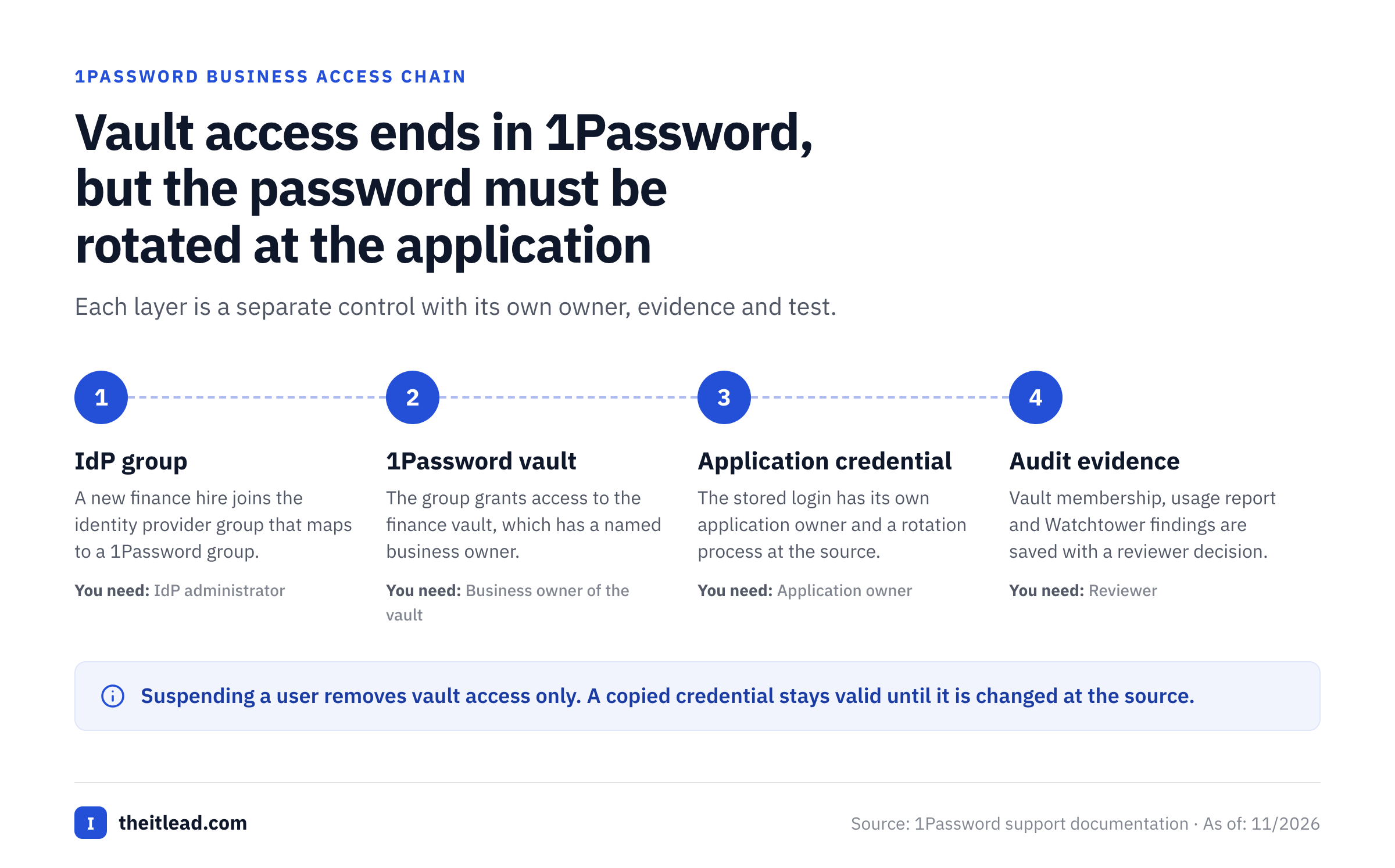
There is a catch: once a user has seen or copied a password, later revocation can't make that knowledge disappear. That is why vault membership and credential rotation need separate controls. Don't promise an auditor that deleting a user automatically invalidates all shared application passwords.
What does Watchtower tell IT?
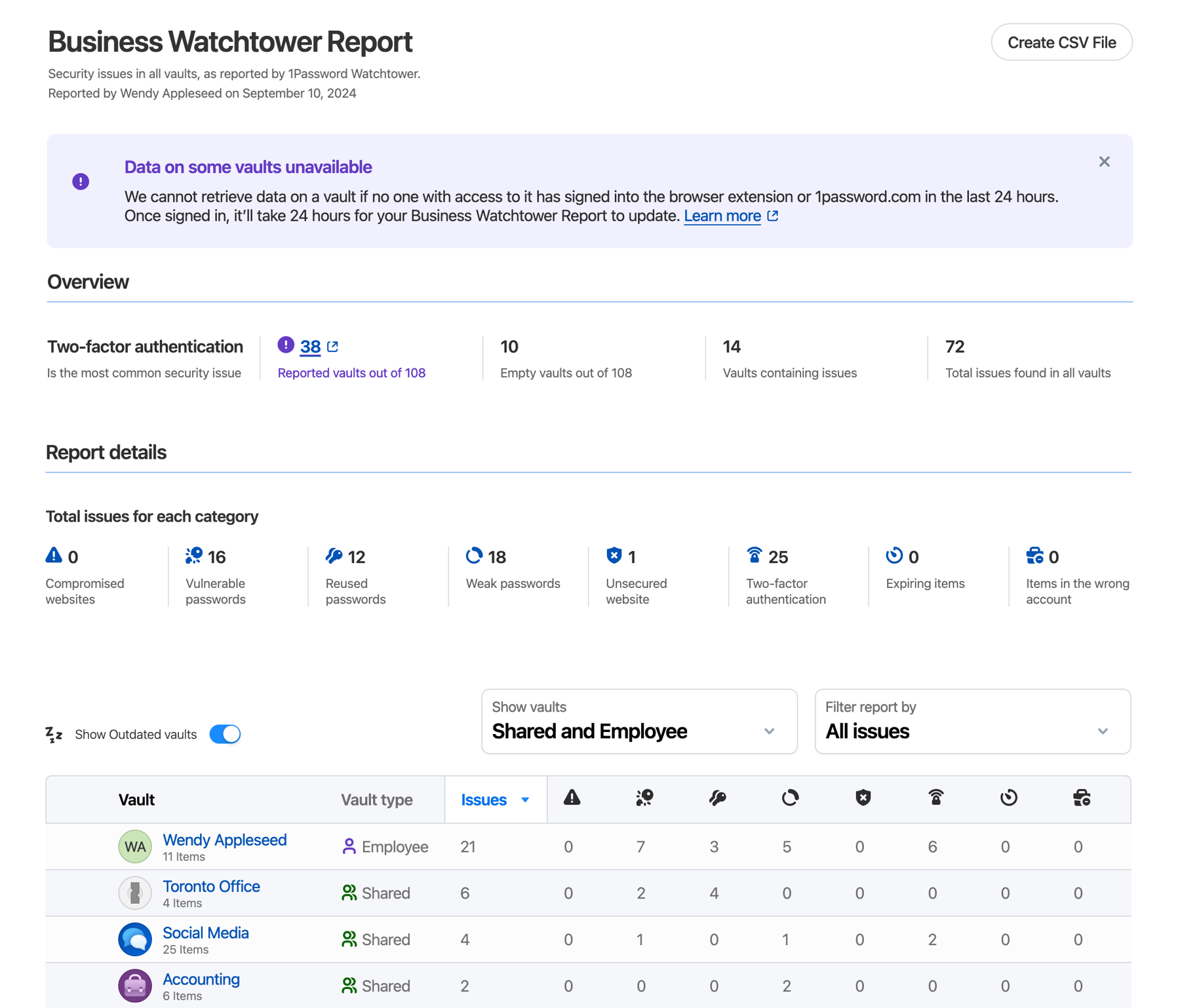
Watchtower identifies potential credential-health problems, including weak, reused or compromised passwords. Business Watchtower reports aggregate issues across organizational vaults. They help an administrator prioritize investigation, but they don't prove every affected account has been fixed.
The reporting detail has a practical privacy boundary. For Employee vaults and shared vaults that the administrator can't access, the report may show issue counts rather than the underlying items. That means an organization needs a remediation owner who actually has permission to inspect and change the affected credentials.
Another detail matters during an audit: the support documentation says vault report information can be missing or outdated until a member with access signs in and triggers an update. A dashboard with stale data isn't evidence that a control ran successfully. Record the last observed refresh, the person assigned to remediate the issue and the follow-up result.
How well do SSO and automated provisioning work?
1Password Business supports identity-provider integration, but SSO and provisioning aren't the same feature. Unlock with SSO authenticates a person through an identity provider. Automated provisioning creates users and groups, changes group access and can suspend users. IT must configure and test the two workflows separately.
The vendor documents Microsoft Entra ID, Okta and other providers. For a company already using Entra ID, the practical test isn't simply whether a sign-in screen appears. It's whether the correct group assignment gives a new employee the right vault, whether a role change removes an obsolete vault and whether suspension reaches 1Password when the person leaves.
What should IT test before switching on SSO?
Start with an isolated pilot group. Confirm that the identity-provider email address matches the 1Password account, that the required client versions are installed and that owners can still access the organization during an IdP outage. 1Password's current SSO guidance says owners continue to use their account password and Secret Key rather than SSO. This is a deliberate recovery boundary, not a configuration error.
Then test an existing employee's migration. The vendor notes that existing users need their original sign-in details before moving to SSO. A lost Secret Key can therefore trigger account recovery during rollout. Have recovery owners ready before enforcing the new method across the company.
Finally, simulate the failure path. Establish which team members can still use an already linked app while the IdP is unavailable, which operations require an online connection and who can recover an owner. A login demonstration isn't enough; the outage and recovery exercises reveal whether the design is sustainable.
How should provisioning map to vault ownership?
Use groups as the normal access path and document exceptions. A new finance employee might receive an IdP group, which creates or updates their 1Password group membership, which grants access to a finance vault. The credential itself remains a separate asset with its own application owner and rotation process.
This chain gives IT a clearer story than individual vault invitations. It also makes quarterly reviews easier because the reviewer can inspect the IdP group, 1Password group, vault membership and application account as distinct layers. The important question is whether those layers still agree after transfers and departures.
Can 1Password Business support an audit?
1Password Business can supply useful evidence for a credential-management audit, but it won't automatically produce a complete compliance package. The vendor documents an audit log, usage reports, sign-in reports and security reports. Those sources answer different questions and shouldn't be treated as interchangeable.
An audit log helps explain administrative events. A usage report can show which items were accessed in a vault and which actions occurred. A Business Watchtower report highlights security issues. The underlying business process still needs a reviewer, a decision and a record of remediation.
| Audit question | Evidence to request | Important limitation |
|---|---|---|
| Who could access this shared credential? | Vault membership and group permission snapshot | A permission snapshot doesn't show prior access |
| Did a person use a credential? | Usage report scoped to the relevant vault | Report visibility depends on permissions |
| Did an admin change settings? | Administrative audit log | Confirm export format and retention for your plan |
| Was a weak password corrected? | Watchtower finding plus change ticket | An alert isn't proof of remediation |
| Was offboarding completed? | Suspension record, vault review and rotation ticket | Suspending 1Password doesn't revoke copied credentials |
| Can the company recover access? | Named owners, recovery procedure and test record | Recovery depends on people and protected account access |
1Password's offboarding guide says a Business usage report covers the past 12 months of accessed items, and that you only see items in vaults you can also access, so ideally an owner runs it. Rather than assume every reviewer can see every vault, have an authorized owner generate the evidence for the specific control. Export it to your company's evidence repository with a timestamp, report scope and reviewer decision.
A useful quarterly attestation doesn't just say “access reviewed.” It names the application, credential owner, vault, entitled group, reviewer, decision, exception and due date. That's the difference between observing a dashboard and operating a repeatable control.
What are 1Password Business's biggest limitations?
The limitations are less about whether passwords can be saved and more about the work surrounding those passwords. Most failures happen at the boundary between the vault and the underlying application.
Revocation doesn't invalidate a password someone already knows
The vendor's own offboarding guide tells administrators to change shared passwords and tokens after an employee leaves. It also recommends examining the person's vault access and usage report to prioritize changes. That's clearly an important point about the system boundary: removing access to a vault isn't the same as invalidating a credential at the service that accepts it.
For a high-risk shared account, IT should identify the application owner, rotate the password or token in that application, update the stored item and verify the former employee's sessions or accounts have been revoked. The last step may require work outside 1Password. Don't let a completed 1Password suspension ticket hide unfinished application offboarding.
It doesn't replace PAM or machine identity governance
A vault can store an administrative password, but it isn't automatically a privileged session broker. Teams that need time-bound elevation, session monitoring, approval gates for production access or rotation of dynamic service credentials should evaluate a dedicated privileged access or secrets-management product. The correct comparison is about workflow coverage, not which tool has more features on a marketing page.
Likewise, a list of service accounts inside vaults isn't an ownership attestation. A nonhuman account may exist in a cloud tenant, CI system or legacy application without being stored in 1Password. An IT team still needs an inventory and an accountable owner for each identity. This is especially important when one shared credential opens a critical production system.
Recovery and security policies need careful ownership
1Password's recovery guidance tells you to add at least one other person to the Owners group, because owners can't recover their own accounts. Recovery rights can also be given to custom groups, so decide deliberately who holds them and check their sign-in activity regularly.
The product's encryption model includes the Secret Key in standard sign-in flows. That is useful protection against some server-side attacks, but it also makes emergency access planning important. SSO deployments have different enrollment and recovery mechanics. An administrator should document the actual setup used by the organization rather than copy a generic recovery checklist.
Cost grows with the number of Business seats
A per-user subscription is straightforward to budget, but it can be hard to justify for people who rarely touch a shared credential. The better comparison is not cost per password. It's cost per employee who needs the administrative, security and identity features, weighed against the effort of running a smaller plan or another solution.
There is also setup work that won't appear on a vendor invoice: vault design, group mapping, onboarding, recovery exercises, report ownership and offboarding rotation. If nobody owns those tasks, paying for Business won't create a mature control environment.
How much does 1Password Business cost in the US?
The public US Business price is $8.99 per user per month, billed annually, according to 1Password's pricing page checked November 2, 2026. The site also advertises a 14-day trial without a credit card. Teams Starter Pack has a different model: $24.95 per month billed annually for up to 10 members, with up to 10 additional seats available.
| Plan | Published US pricing | Practical buyer fit |
|---|---|---|
| Teams Starter Pack | $24.95 per month billed annually, covering up to 10 members | Smaller teams focused on shared vaults |
| Teams Starter Pack extra seats | $4.99 per additional seat per month billed annually, up to 10 extra seats | Small groups expanding within the Starter Pack cap |
| Business | $8.99 per user per month billed annually | Organizations needing IdP integration and business administration |
| Enterprise purchasing | Contact sales for a tailored quote | Larger or more complex procurement requirements |
The vendor's comparison table also displays a $2.49 per-user equivalent for the Starter Pack, but the package price is the better budgeting unit. Don't multiply that displayed per-user equivalent by a smaller headcount and assume you can buy a fractional team package.
For 25 Business users, the published annual-rate arithmetic is $8.99 x 25 x 12 = $2,697 before any applicable taxes, negotiated terms or extra services. For 50 Business users, the same calculation is $5,394 annually. These are illustrations from the public list price, not invoices or vendor quotes.
A small team should compare the actual Starter Pack eligibility with the Business features it needs. A group that wants Entra ID SSO and automated provisioning shouldn't assume those functions are included in Starter Pack simply because it can share vaults. Read the separate 1Password Business pricing breakdown for the plan-by-plan purchasing questions.
What does a safe 1Password Business rollout look like?
A good rollout begins with credential ownership, not a mass invitation email. If you migrate unmanaged shared passwords into new vaults without cleaning up who owns them, the company keeps the same access problem in a nicer interface.
Inventory shared credentials
List critical shared logins, application owners, existing users and whether the application supports individual SSO accounts.
Design vaults and groups
Define the smallest useful vault boundaries. Assign business owners and map IdP groups before inviting everyone.
Pilot SSO and provisioning separately
Test new-hire creation, transfer, suspension, account recovery and owner access during an IdP outage.
Create an evidence routine
Assign a reviewer to vault membership, usage reports, Watchtower issues and exception tickets.
Practice an offboarding case
Suspend a test account, inspect vault exposure, rotate a test shared credential and confirm the external application rejects the old secret.
A practical pilot scorecard
Of course staff should like autofill, but don't judge a pilot only by that. Ask whether a new employee gets the correct vault without an ad hoc request. Check whether an internal transfer removes access they no longer need. Confirm whether a reviewer can produce the evidence they need without obtaining broader vault permissions.
Also time the steps that require a person. An administrator may need to approve an exception, investigate a Watchtower alert or rotate a shared password at the source. Record that effort. That is the operational cost of the control.
- We know which shared credentials are still necessary and who owns them.
- A new hire receives the right vaults through documented group mapping.
- A transferred employee loses obsolete vault access.
- Suspension and group removal are tested separately.
- Shared passwords are rotated after relevant offboarding events.
- Owners have a protected and tested recovery route.
- Our auditor accepts the available usage and administrative evidence.
- We can explain the annual Business cost for our actual seat count.
What do published reviews say about 1Password?
TechRadar's general 1Password review, last updated in July 2025, praises the broad platform support and calls the shared vault system particularly useful in a business setting. It also notes a learning curve for new users and says signing in online is a little more of a task because of the Secret Key. Its plan prices are older than the vendor's current ones, so the pricing here comes from 1Password's own page.
Those observations are useful for planning a pilot, but a single editorial review isn't a reliable measurement of enterprise performance, and none of it substitutes for your own identity-provider setup.
Use reviews as a question generator. Ask your pilot group to try autofill in the browsers your company supports, invite a guest to an appropriate vault, recover a lost device and complete a role change. Then record the result in your own environment.
How does 1Password Business compare with alternatives?
1Password Business should be compared against the control you need, not only against other password vaults. A lower-cost password manager might be enough for shared logins, while a company with demanding privileged session requirements may need a different category altogether.
| Your primary requirement | Evaluation direction | Question to ask |
|---|---|---|
| Simple team password sharing | Compare Teams Starter Pack with other team password managers | Can we keep access ownership understandable without Business? |
| Group-based access and IdP onboarding | Compare Business administration with competing business vaults | Can we prove a joiner, mover and leaver workflow end to end? |
| Broad privileged access control | Evaluate PAM products separately | Do we need elevation approval, session evidence or credential rotation? |
| Dynamic developer and workload secrets | Evaluate dedicated secrets managers | Do we need short-lived credentials or workload identity? |
| Service account ownership attestations | Use a separate identity inventory and review process | Who signs off that each nonhuman identity still needs access? |
Don't assume Bitwarden, Keeper, Dashlane or an enterprise PAM product is cheaper or better for your organization without comparing the exact current edition, contract and controls. A useful shortlist starts with the missing workflow, not a brand ranking. For IT leaders already considering identity platforms, the Okta review and Microsoft Entra ID review explain different parts of the identity stack.
Where does service account ownership fit?
1Password helps people store and share credentials, while service account governance is about ownership: every nonhuman identity needs a named owner and a recorded attestation that it still needs access. An inventory, review date, accountable owner and evidence trail remain necessary even when the credential is stored in a vault.
A lightweight ownership workflow can complement a password manager. The IT Lead, the product behind this site, is built around service account ownership reviews: you import accounts from CSV, assign an owner to each one and collect the owner's confirmation in a review trail an auditor can follow. It doesn't rotate passwords, disable accounts or touch your directory. That narrower scope matters: it helps document decisions without claiming to enforce them in the underlying system.
If you need a starting point for the review itself, use the service account ownership matrix and service account access review template. Keep the credential inventory and the access attestation connected by a stable account identifier, not by copying the password into a spreadsheet.
Frequently asked questions about 1Password Business
Is 1Password Business good for small businesses?
1Password Business can be a good fit for a small business, especially when it needs managed shared vaults and identity-provider integration. Compare it with Teams Starter Pack if your team doesn't need the Business administration features.
Does 1Password Business include SSO?
Yes. Business supports Unlock with SSO through supported identity providers. SSO authentication and automated provisioning must be configured and tested separately.
Does 1Password automatically rotate shared passwords when an employee leaves?
Don't assume so. The vendor's offboarding guidance instructs administrators to change shared passwords and tokens after a departure. Vault suspension alone doesn't invalidate a copied credential.
Can 1Password Business provide audit reports?
Business provides administrative, usage and security reporting. Your organization still needs to define evidence scope, retention, reviewers and remediation records.
How much is 1Password Business per user?
The US public price checked November 2, 2026 is $8.99 per user per month with annual billing. Confirm current commercial terms before signing.
Is 1Password Business a privileged access management system?
It's a business password manager with access controls. Don't treat a shared vault as a substitute for privileged session controls, just-in-time elevation or application-side credential rotation.
Final verdict
1Password Business earns consideration when the real problem is shared credential access across employees, departments and applications that aren't fully covered by SSO. The documented vault controls, provisioning integrations and reports give IT useful building blocks for governance.
Its limitations are equally important. The platform can't replace application-side credential revocation, recovery planning or a service account ownership review. Buy it when those boundaries are understood, the annual seat cost fits and a pilot proves the specific access workflow your team needs. Don't buy it on the assumption that one password vault will solve every identity problem.