IT asset management (ITAM) software keeps a record of the hardware, software licenses and cloud subscriptions your company owns, who has each item and what state it's in from purchase to disposal. For a small IT team the choice comes down to how assets get into the tool, long before any feature list. Some products find them by scanning, some sync from your MDM, and some depend on a spreadsheet and discipline.
Lansweeper finds devices by scanning the network, yet it's built for inventory, not for handing laptops to people. Snipe-IT is free to self-host and strong on check-out. BlueTally syncs Intune and Jamf devices to employees. Freshservice and Jira Service Management put assets next to tickets (our service desk software comparison covers both as service desks). Two of the nine, Asset Panda and ServiceNow, don't publish a price, so the tables below say "quote only" instead of guessing.
- IT asset management tools compared
- 9
- find devices themselves with a scan or an agent
- 5
- are quote based or quote only
- 3
- to self-host Snipe-IT
- $0
Our picks by situation
 Best free tracker with check-outSnipe-ITFree to self-host, with hosted plans from $39.99 a month, but it won't find devices on its own.
 Best when devices must be found by scanningLansweeperSensor scans, an agent and cloud APIs build one inventory, with a free tier up to 100 assets.
 Best for Intune or Jamf shopsBlueTallySyncs managed devices every 10 minutes and checks them out to the matching employee.
 Best if you also need a service deskFreshserviceA discovery agent feeds the CMDB, so an agent sees the asset next to its tickets.
 Best for MSPs already on NinjaOneNinjaOneInventory comes with the RMM agent, plus SNMP discovery for printers and switches.
 Best inside Jira Service ManagementJira Service Management AssetsA flexible object schema you design and link to requests and changes.
 For the gap discovery leavesThe IT LeadNot an asset tracker: it records who owns each service account and when it was last reviewed.
IT asset management software compared
| Tool | Type | How assets get in | Price (USD unless noted) | Rating |
|---|---|---|---|---|
| Lansweeper | Network discovery and inventory | Sensor scans, agent, cloud APIs | Free up to 100 assets; Starter from EUR 270 per month and Pro from EUR 474 per month, billed annually with 2,000 assets included (the page showed euro prices only) | 4.5 (Capterra, 75) |
 ManageEngine AssetExplorer ManageEngine AssetExplorer | Scan-based ITAM with contracts | Agent and agentless scans | Cloud from $1,245 per year for 250 assets; on premises from $955 per year; a free edition covers 50 nodes in the cloud and 25 on premises | 4.6 (Capterra, 13) |
| NinjaOne | RMM with built-in inventory | Agent, plus SNMP discovery | Quote based; the pricing page gives $1.50 to $3.75 per device per month and doesn't say which plan includes asset management | 4.7 (Gartner Peer Insights, 484) |
| Snipe-IT | Open source asset tracker | CSV import, API or MDM sync | Free self-hosted; hosted plans from $39.99 per month ($399.99 per year), flat per account | 4.4 (Capterra, 23) |
| BlueTally | SaaS asset tracking synced from MDM | Intune or Jamf sync, or Excel import | Free for the first 50 assets; Core $199 to $232 per month for 250 assets and Business $299 to $348 per month for unlimited assets, depending on billing term; flat per account with unlimited users | 4.6 (Capterra, 80) |
 Asset Panda Asset Panda | Configurable asset tracking with a mobile app | Spreadsheet import, MDM integrations, manual | Quote only; a 7-day trial follows the quote | 4.6 (Capterra, 1,370) |
| Freshservice | Service desk with a discovery agent | Discovery agent and probe | Asset management from the Growth plan at $49 per agent per month billed annually, with 100 Asset Units included; standalone ITAM plans are quote only | 4.5 (Capterra, 805) |
| Jira Service Management Assets | Object database inside Jira Service Management | Discovery scanner, imports, connectors | Included on Standard (5,000 objects) and Premium (50,000 objects) plans, from $21.50 to $26.90 per agent per month billed monthly; extra objects cost $0.02 each per month | 4.5 (Capterra, 779) |
 ServiceNow IT Asset Management ServiceNow IT Asset Management | Enterprise ITAM on the Now Platform | Asset and CI records synced with the CMDB | Quote only | 4.3 (544) |
| The IT Lead Our product | Service account ownership reviews | Collects owner attestations for service accounts and keeps the review trail | Access code | No reviews yet |
Prices come from each vendor's pricing page, read on October 19, 2026. Lansweeper showed euro prices only. Ratings name their source: Capterra, Gartner Peer Insights or G2.
What IT asset management software does (and what it does not)
ITAM software records what you own and follows each item through its life: bought, assigned, repaired, retired. The record usually covers three kinds of assets: hardware such as laptops, phones and network gear, software licenses and seats, and cloud or SaaS subscriptions. For SaaS usage, unused seats and renewals specifically, a dedicated tool usually goes further: see our comparison of SaaS management software. Good tools add the dates that cause problems later, such as warranty expiry, license renewal and expected return. If you only need the list of what exists and who holds it, our guide to IT inventory software compares seven lighter tools.
Four neighboring categories get mixed up with it, and buying the wrong one is the usual mistake.
- IT asset management answers what you own, who has it and what state it's in. Snipe-IT, BlueTally, Asset Panda and AssetExplorer sit here.
- A CMDB answers which configuration items exist and how they depend on each other. ServiceNow, Freshservice and Jira Service Management Assets include one. If you are moving off ServiceNow, see our ServiceNow alternatives guide.
- RMM answers whether an endpoint is healthy, patched and reachable. NinjaOne is an RMM with inventory built in.
- MDM answers whether a phone or laptop is enrolled and configured. Intune and Jamf feed Snipe-IT and BlueTally.
Discovery tools such as Lansweeper sit between the first two: they build the inventory that an ITAM or CMDB then manages.
An accurate inventory also matters if you add data controls later. Endpoint data loss prevention software only protects the laptops that run its agent, so the device list tells you what is covered and what isn't.
How we chose these tools
The list is built for small IT teams and MSPs, roughly 3 to 15 people running a few hundred devices. Each tool was judged on six points, and every fact comes from the vendor's pricing, product or docs pages, or from the review site named in the entry.
- How assets get in. Found by a scan or agent, synced from an MDM, imported from a spreadsheet, or typed in. This decides how much babysitting the inventory needs.
- Assignment. Whether a device can be checked out to a named person, with a return date and a history.
- Licenses and contracts. Whether software seats, renewals and warranties live in the same tool.
- Plan gates. Which tier unlocks the asset features, the integrations or the API.
- Published price. What the vendor lets you see without a sales call, and the unit it counts: assets, devices, agents or objects.
- Effort to run. Whether you host it, who administers it and what breaks when you don't.
Tools were picked by relevance to a small team, so ITSM and MDM products that don't track assets as their main job are left out. Our guide to mobile device management software covers the MDM side. Some bigger names are missing for that reason, but the nine here cover every way assets get in.
How assets get into each tool
Most tools do more than one thing. Each one is shown at the step it's mostly chosen for.
- Step 1Scan or run an agent
- Lansweeper
- ManageEngine AssetExplorer
- NinjaOne
- Freshservice
Breaks when a device that never joins a scanned network or runs the agent never shows up - Step 2Sync from your MDM
- BlueTally
- Snipe-IT
Breaks when devices that aren't enrolled are missed, and Linux devices can't come from Intune - Step 3Import or build it yourself
- Asset Panda
- Jira Service Management Assets
- ServiceNow IT Asset Management
Breaks when the record is only as current as the last import - Step 4Keep an owner on record
- The IT Lead
Left open nobody can say who owns a service account or why it still exists
Tools that find assets on their own
If you don't trust anyone to keep a spreadsheet current, start here. These three build the inventory from what's actually on the network or on managed laptops.
Lansweeper
Lansweeper discovers hardware and software by passive detection and credentialed scans from a sensor, plus an agent for laptops and API connections to AWS, Azure and Google Cloud, and merges the results into one record per asset.
Discovery is the whole point of this tool: it finds devices you didn't know about and writes down what's installed on them.
You install a sensor on a machine inside a subnet and connect it to a hub. The sensor sees devices as they communicate, and once you create discovery credentials and a discovery action with IP ranges and timing, it scans actively for the operating system, hardware, installed software and users. Without credentials it falls back to fingerprinting for manufacturer, model and OS. A separate IT Agent covers Windows, macOS and Linux laptops that rarely join the network, and API connections to AWS, Azure and Google Cloud bring in cloud assets. Everything is reconciled into one record per asset, matched on MAC address, serial number and hostname, never on IP address.
- you don't know what is on the network and want it found by scanning rather than typed in
- you run Windows, macOS, Linux, printers and network gear and want one inventory of all of it
- you need check-out to employees and return tracking: the sources we read show discovery and inventory, not a check-out workflow
- you are under about 2,000 assets and price-sensitive: paid plans start at 2,000 assets and reviewers report sharp price rises
- Users like
- network scanning and asset discovery that work out of the box, per Capterra reviewers
- Users dislike
- price, a steep learning curve and a dated interface, per Capterra reviewers
- Source: Capterra, 75 reviews

How it works in practice
Assets can also be created by hand, with a catch: a rescan can overwrite manual edits unless the field is locked, and a deleted asset reappears if it's scanned again. Plan around that before you let people edit records.
Plan gates matter here. Starter includes only service desk ticket enrichment integrations. All integrations, the vulnerability and lifecycle insights need Pro, and full API access needs Enterprise. Named integrations include Jira Service Management, Freshservice, HaloITSM, TOPdesk and Microsoft Intune, with the ServiceNow CI Synchronizer on Enterprise. The free tier covers up to 100 assets after a 14-day trial, which is enough to test whether the scan finds what you expect.
The sources we read show discovery and inventory but no check-out or return workflow. One Capterra reviewer from 2025 describes the product as on premises, while the vendor's current pages describe a browser-based platform with sensors you install, so confirm the architecture before you commit.
- Starting price
- Free up to 100 assets; Starter from EUR 270 per month and Pro from EUR 474 per month, billed annually with 2,000 assets included (the page showed euro prices only)
- Discovery
- Sensor scans, agent, cloud APIs
- Free tier
- 14-day trial, then up to 100 assets
- Plan gate
- All integrations need Pro
ManageEngine AssetExplorer
AssetExplorer inventories workstations and servers with agent-based and agentless scans, tracks asset states from in store to in repair, and keeps purchase orders, contracts, vendors and warranties next to the scan history.
Scan-based inventory with purchase orders, contracts and warranties in the same tool, at a price you can read before you call anyone.
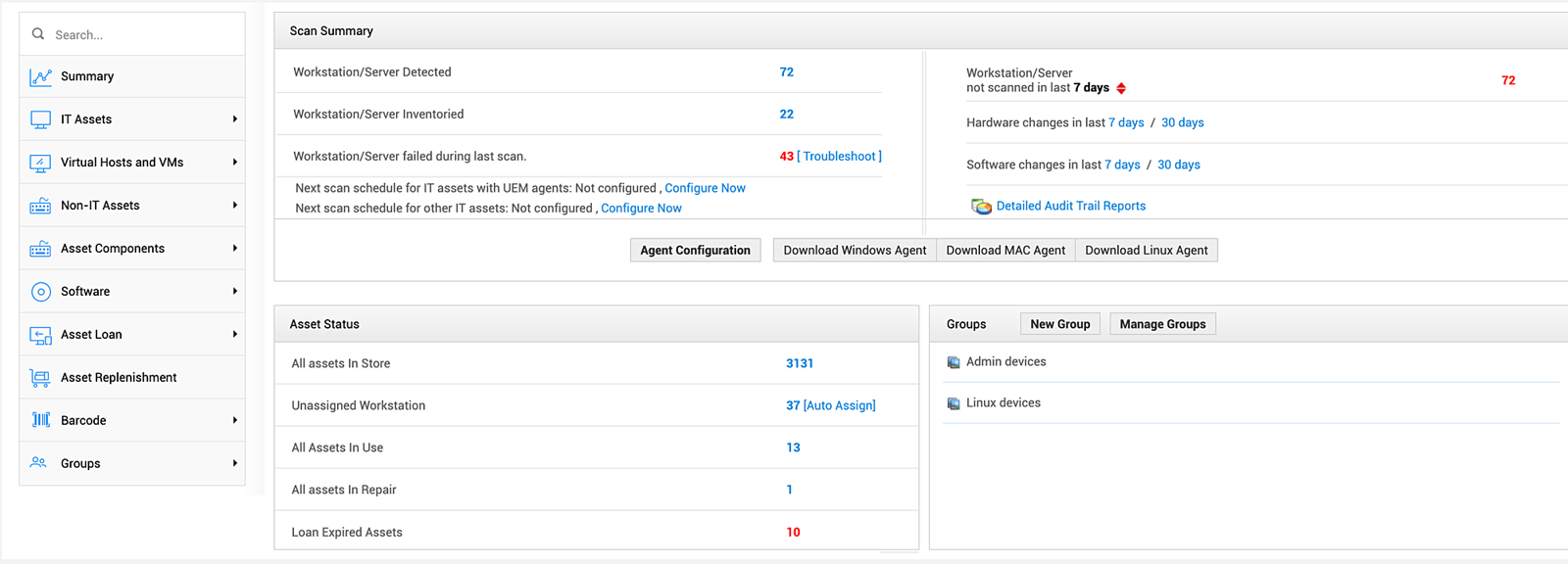
Assets arrive through scans. You can run the UEM agent on Windows, Mac and Linux machines, run agentless network or domain scans, or run standalone audit scripts on machines outside the domain that push an XML file to the server. The Asset Summary page shows how many workstations and servers were detected, inventoried and failed in the last scan, with a Troubleshoot link and hardware and software change counts for the last 7 and 30 days.
Assets then move through states such as in store, in use and in repair, and unassigned workstations can be auto-assigned to the last logged-in user. Purchase orders, contracts, vendors and warranty or renewal dates sit beside the scan history, and audit reports are built from that history.
- you want scheduled scans plus purchase orders, contracts and warranty dates in one asset tool
- you want a per-asset price that is published, with a cloud and an on-premises option
- you want a big review base to lean on: Capterra shows only 13 reviews
- you have many machines outside the main subnet or on external VMs: reviewers say those sometimes need manual work
- Users like
- audit preparation and agentless discovery, per Capterra reviewers
- Users dislike
- limited report customization and manual work for off-subnet machines, per Capterra reviewers
- Source: Capterra, 13 reviews
How it works in practice
AssetExplorer is its own product with its own pricing page, separate from ServiceDesk Plus, which bundles asset management in its Professional and Enterprise editions. The cloud edition is sold in packs of assets, from 250 to 10,000, with yearly prices from $1,245 to $16,695. The on-premises edition runs from $955 to $11,995 a year for the same pack sizes. A free edition is capped at 25 nodes on premises and 50 in the cloud, per the product page. Remote control is a paid add-on at $315 per concurrent session per year, and one Capterra reviewer says it only works for Windows and Mac computers.
Integrations named on the product page include ManageEngine Endpoint Central, Microsoft 365, Lansweeper and Zapier. Capterra reviewers praise audit preparation and agentless discovery, and say assets on external VMs or off-subnet machines sometimes need manual work. With only 13 reviews, treat the 4.6 as a small sample.
- Starting price
- Cloud from $1,245 per year for 250 assets; on premises from $955 per year; a free edition covers 50 nodes in the cloud and 25 on premises
- Discovery
- Agent, agentless and standalone audit scripts
- Pricing unit
- Per pack of IT assets
- Free option
- 25 nodes
NinjaOne
NinjaOne builds hardware, software and warranty inventory from its agent on managed endpoints and adds network discovery for devices that can't run an agent, such as printers, switches and NAS boxes.
If you already patch endpoints with NinjaOne, the inventory is already there, and network discovery adds the printers and switches.
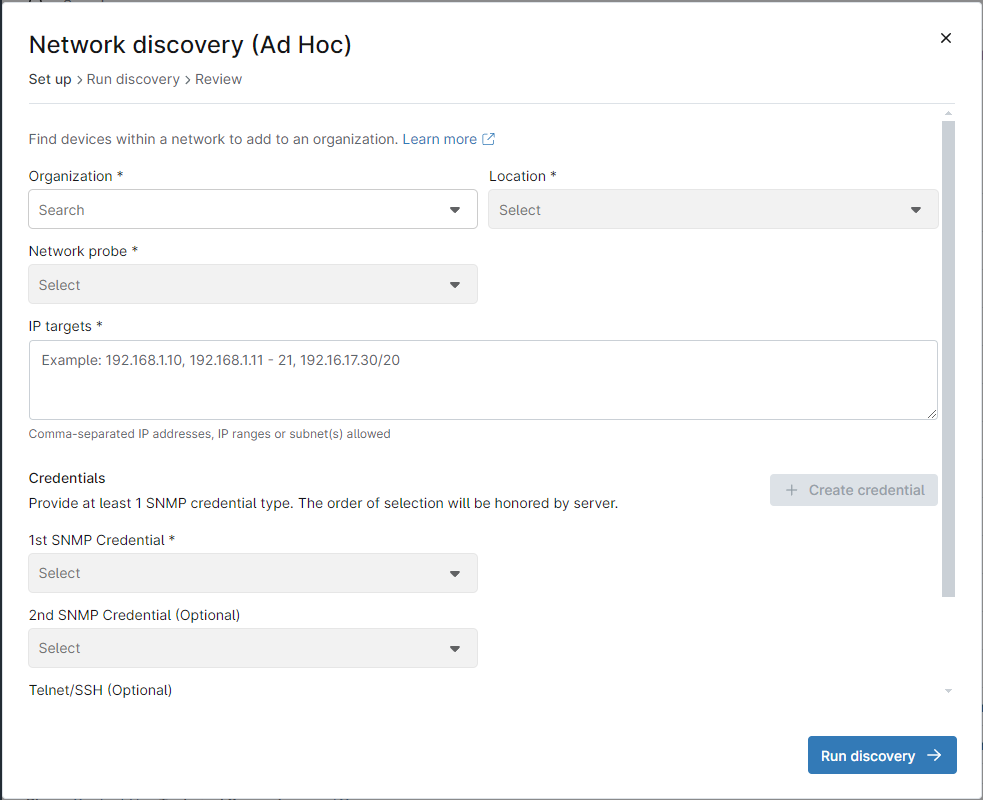
Most assets arrive through the NinjaOne agent installed on managed endpoints, which feeds hardware and software inventory. For devices that can't run an agent, such as printers, switches, routers and NAS boxes, an admin runs network discovery: pick the organization and location, choose a Windows machine with the agent as the network probe, enter IP ranges, add SNMP credentials and click Run discovery. After a few minutes you select the discovered devices, name them, assign roles and add them. Devices already in the organization show grayed out.
Warranty status refreshes automatically for Dell, HP, Lenovo, Toshiba and Microsoft hardware, and expiring warranties can be reported and alerted on from the device search grid. NinjaOne also lists software license tracking, lifecycle monitoring and relationship mapping of devices, apps and users.
- you already manage endpoints with NinjaOne, or an MSP wants asset data per client in the console you patch from
- you want warranty status for Dell, HP, Lenovo, Toshiba and Microsoft devices refreshed automatically
- you need to hand laptops to people and track returns: we found no documented check-out workflow
- you want asset management without buying an RMM: it comes with the platform and the pricing page doesn't list a standalone plan
- Users like
- ease of use, per G2 and Gartner reviewers (the rating covers the whole platform)
- Users dislike
- missing or limited features, per G2 reviewers
- Source: Gartner Peer Insights, 484 reviews
How it works in practice
The pricing page gives a range of $1.50 to $3.75 per device per month, falling with volume, and says full pricing is by quote. but it doesn't say which plan includes asset management, so ask before you assume it's in the base price. Network discovery needs a Windows machine with the agent and open scanning ports, and agents can't be installed on network devices, so those rely on ICMP, SNMP, SSH or Telnet.
The documentation describes no check-out or employee assignment workflow. The asset view is monitoring-led, not a borrow-and-return system. NinjaOne names ServiceNow as an ITSM integration through its public API.
The 4.7 from 484 ratings on Gartner Peer Insights, and the 4.7 on G2, rate the whole RMM platform, not its asset features. G2 reviewers' most common complaint is missing or limited features.
- Starting price
- Quote based; the pricing page gives $1.50 to $3.75 per device per month and doesn't say which plan includes asset management
- Discovery
- Agent plus SNMP network discovery
- Warranty lookup
- Dell, HP, Lenovo, Toshiba, Microsoft
- Pricing
- Quote based
Tools you feed from an MDM, a spreadsheet or by hand
The three tools below are better at assignment, audits and licenses than at finding devices. They only know what you import or sync, so their value depends on how disciplined the intake is. That's often enough, though, for a team with a few dozen laptops.
Snipe-IT
Snipe-IT tracks hardware, licenses, accessories and consumables with check-out to named people, audits, depreciation and a REST API. You can run it yourself for free or pay Grokability for hosting.
The default answer for a small team that wants check-out, licenses and audits without a per-asset bill.
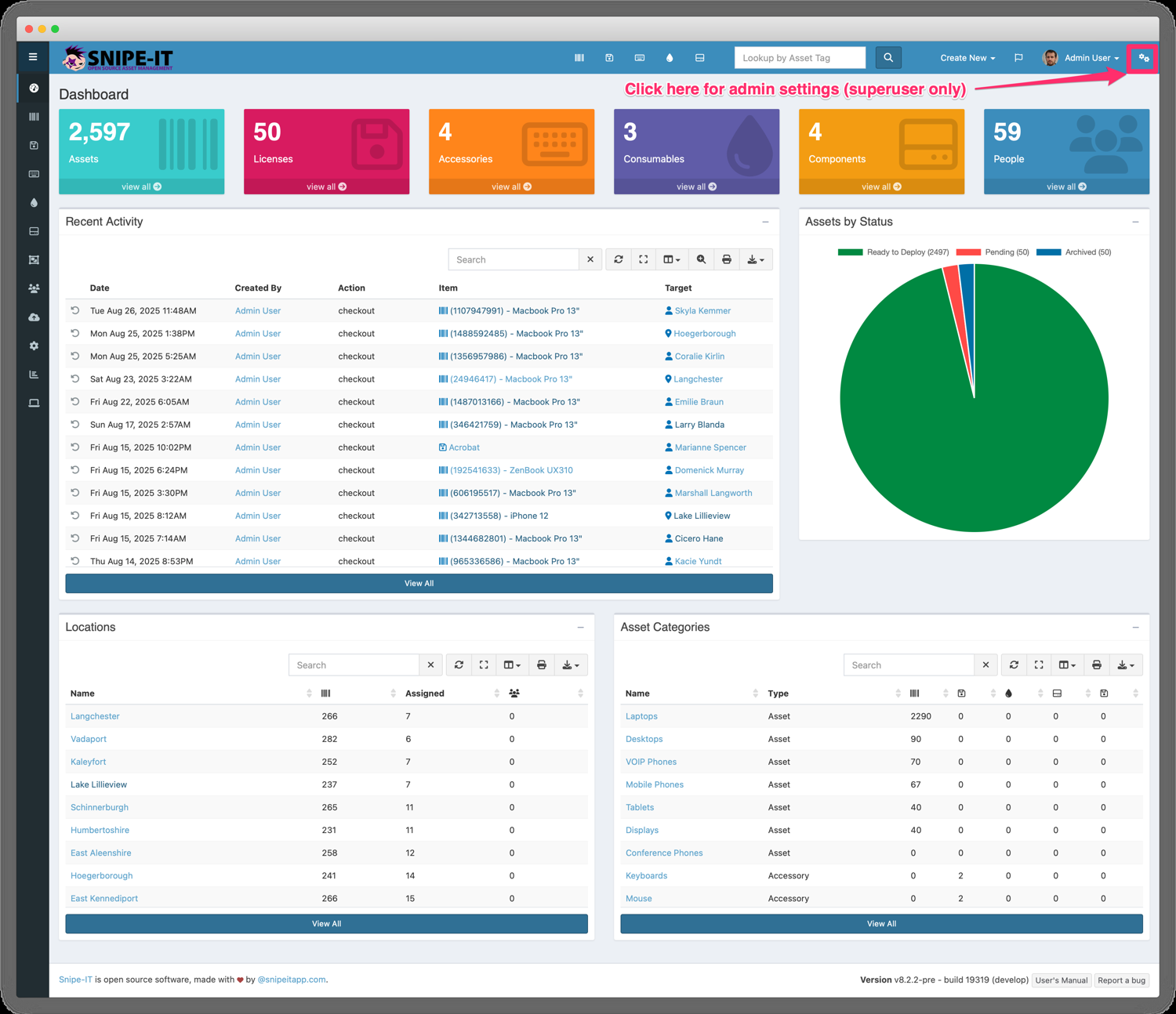
Assets get in by manual entry or CSV import. The importer uses the Asset Tag as the key, so a row updates an existing asset or creates a new one, creates missing models, categories, manufacturers, locations and suppliers on the way, and can check an asset out to a user or location during the import. The features page also lists 20 native MDM and RMM sync adapters, including Jamf, Microsoft Intune and Kandji, plus a custom HTTP adapter, so inventory can come from device management tools too.
From there, admins check assets out to people and check them back in with one click. The docs advise checking out to a person rather than a location, because accountability works best with a name. Kits speed up onboarding, and an optional acceptance step collects a digital signature.
- you want laptops, phones and licenses checked out to named people and can host a small server, or pay a flat hosted fee
- you want a published flat price with no per-asset or per-user charge
- you need the tool to find devices on its own: Snipe-IT doesn't scan the network, so inventory comes from CSV, the API or an MDM sync
- nobody wants to maintain a self-hosted server and you need phone support, which only comes with the Enterprise Support plan
- Users like
- free, flexible and easy to use once it is running, per Capterra reviewers
- Users dislike
- hard self-hosted setup and upgrades, and no automatic network scans, per Capterra reviewers
- Source: Capterra, 23 reviews
How it works in practice
Depreciation has three models in settings, covering linear and two half-year conventions. Software licenses have seats you check out and expiry alerts, and there are accessories, components and consumables with low-stock alerts. QR labels print from the app and work with handheld barcode scanners. Sign-in supports SAML, LDAP and Active Directory, Google Secure LDAP and SCIM, and there's a JSON REST API plus Slack and Teams notifications.
Self-hosting is free, of course, with community support on GitHub and Discord, but you carry the server and the upgrades. The hosted plans don't differ by users or assets, both of which the pricing page lists as unlimited. They differ by API rate limit: 120 calls a minute on Basic and 240 on Small Business. Phone support and help with API integration need the Enterprise Support plan, which has no listed price.
The weak spots are on Capterra too: a reviewer lists no automatic network scans and no RFID integration, others find self-hosted setup and upgrades hard, and the official mobile app is in beta. Only 23 reviews back the 4.4, and many are from before 2023, so treat it as a rough signal.
- Starting price
- Free self-hosted; hosted plans from $39.99 per month ($399.99 per year), flat per account
- Discovery
- None built in; CSV, API or MDM sync
- Hosting
- Self-hosted or Grokability-hosted
- Free option
- Yes, self-hosted
BlueTally
BlueTally keeps one asset per device, syncs devices from Intune or Jamf every 10 minutes, checks them out to the matching employee and logs every check-out, with warranty, audit and license tracking.
Plug in Intune or Jamf and every managed device shows up already assigned to the right employee.
Devices arrive by Excel import or by syncing from an MDM. With Intune, an admin connects through an OAuth setup, runs a connection test, chooses the device scope (company, personal or both), and maps the asset ID, with the serial number recommended, and an employee field such as primary user. The sync then runs every 10 minutes, and the first one can take up to 40 minutes. BlueTally creates one product per model and one asset per device, checks each device out to the matching employee and checks it back in automatically when the user changes or is removed. Employees must already exist in BlueTally by email, usually through SCIM from Entra ID or Okta.
Manual check-out with return dates and reminders sits in the same app, next to audits, maintenance records, warranty tracking and license seats.
- you run Intune or Jamf and want every managed device assigned to an employee without retyping it
- you want a flat monthly price with unlimited users and a free tier to start
- you need SSO or an API: both start on the Business plan
- you have more than 250 assets or want a native mobile app: Core stops at 250 and Capterra reviewers mention no native mobile app
- Users like
- ease of use and quick MDM setup, per Capterra reviewers
- Users dislike
- price and features gated by plan, per Capterra reviewers
- Source: Capterra, 80 reviews

How it works in practice
Read the plan table before you roll this out. Core stops at 250 assets, so the first 50 are free but growth moves you to Business, which also adds SSO, the REST API, the Jira integration and custom permissions. Corporate is where webhooks, the employee portal, self-audits by employees and multi-tenancy start. License Intelligence is an add-on on any plan, and the vendor lists SOC 2 Type II for security reviews.
The Intune help article recommends staying under 5,000 devices and allows one Intune tenant per account. Linux devices can't be imported from Intune, and the sync is one way, from Intune into BlueTally. Capterra reviewers mention bulk import problems at very high asset counts, no native mobile app and a licenses module that's mostly a counter. Several say features are gated by tier, which matches the pricing page.
- Starting price
- Free for the first 50 assets; Core $199 to $232 per month for 250 assets and Business $299 to $348 per month for unlimited assets, depending on billing term; flat per account with unlimited users
- Discovery
- MDM sync (Intune, Jamf) or Excel import
- Pricing unit
- Flat per account by asset cap
- Free option
- First 50 assets
Asset Panda
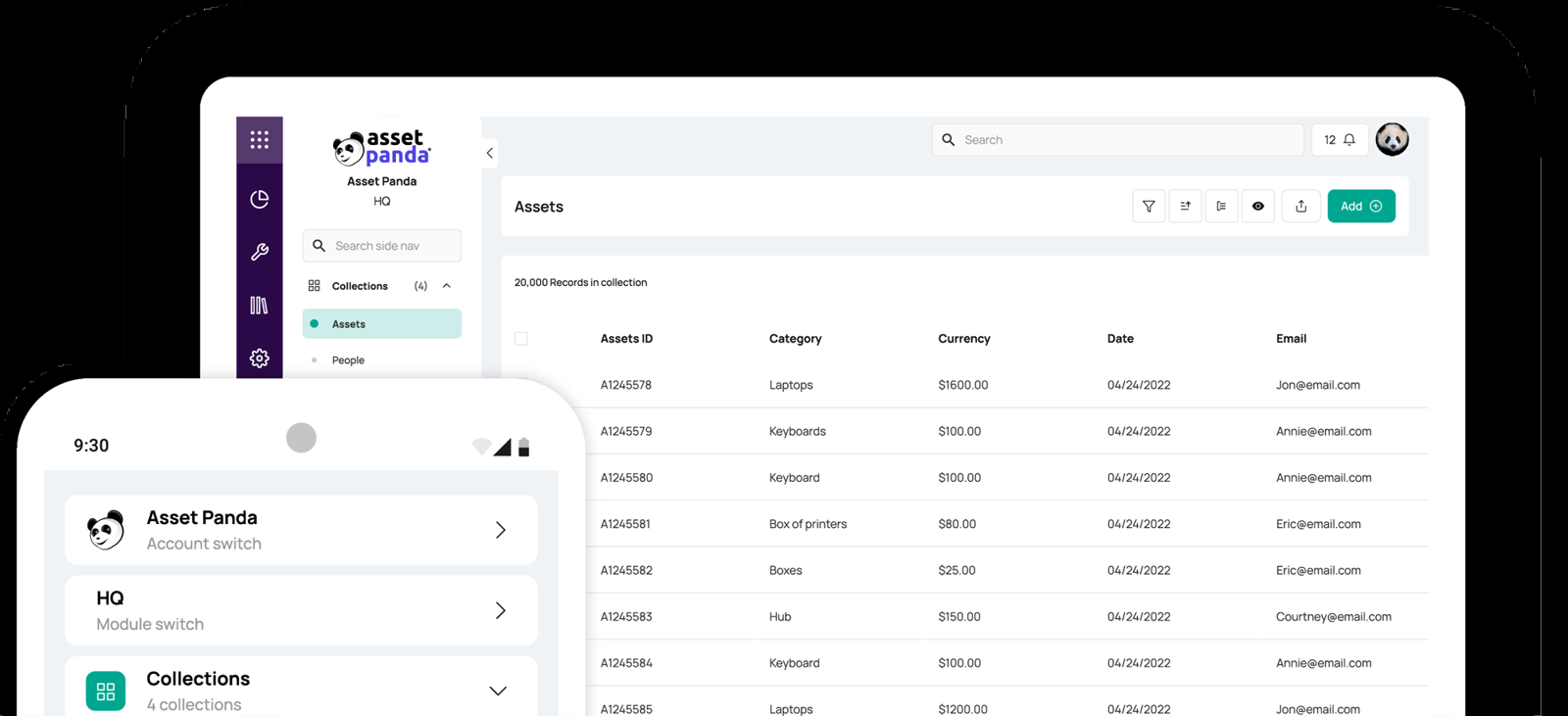
Asset Panda is a cloud asset tracker where you define the fields and forms for each asset type, tag assets with barcodes and scan or audit them with the mobile app.
A configurable tracker for teams that count more than laptops and want to audit with a phone camera.
Assets enter by spreadsheet import, by duplicating an existing asset, or by manual entry in the web or mobile app. You define the fields and forms for each asset type, so a laptop, a projector and a leased copier can each carry different data. Barcode tags are generated or printed from the web app and scanned with the mobile app's camera, with no separate scanner needed, and the same app runs field audits that admins can assign, schedule and report on.
Other features include shared asset reservations, maintenance and repair tracking, workflows and automations, and a Zapier connector and webhooks. The integrations page lists more than 30 native connections, among them Microsoft Intune, Jamf Pro, Microsoft Entra ID, Okta, ServiceNow, Freshservice and Jira.
- you track more than laptops, such as equipment, vehicles or leased gear, and want fields you define yourself
- you audit with a phone camera and barcode tags instead of a network scanner
- you need a published price: Asset Panda is quote only and a Capterra reviewer calls it expensive for smaller businesses
- you want discovery: the sources we read describe no network scanning, so assets come from import, MDM integrations or manual entry
- Users like
- customizable fields and workflows, easy reporting and mobile access, per Capterra reviewers
- Users dislike
- a clunky interface with a learning curve, per Capterra reviewers
- Source: Capterra, 1,370 reviews
How it works in practice
Pricing is a quote with a 7-day trial after it, and the FAQ says extra capacity is bought in blocks of assets. Nothing we read describes network scanning, so the inventory is only as complete as your imports and integrations.
Documentation is thin: no public help center, tutorials on YouTube, and no official page on the check-out workflow, though the FAQ covers imports, audits and barcode scanning. The integrations page doesn't describe a public API or SSO, so ask both questions in the demo.
The Capterra rating of 4.6 comes from 1,370 reviews, the largest sample in this list, but the listing sits in the general asset tracking category and many reviewers are in education, not IT. Their complaints are a clunky interface, a learning curve and, for some, cost.
- Starting price
- Quote only; a 7-day trial follows the quote
- Discovery
- None described; import or MDM integrations
- Pricing
- Quote only
- Mobile
- iOS and Android barcode scanning
Asset management inside a service desk
If tickets are your main workflow, an asset record that sits next to the ticket is worth more than a better standalone tracker. These three are service desk platforms first, so you pay per agent or by quote, not per asset.
Freshservice
Freshservice combines a service desk with a CMDB filled by a Discovery Agent on laptops and a Discovery Probe that scans a domain or IP range, so an agent sees an asset next to its tickets.
A service desk where assets, relationships and tickets share one screen, with discovery built in.
Assets enter the CMDB through the Discovery Hub. You install a lightweight Discovery Agent on Windows, Mac and Linux machines, which keeps reporting when laptops leave the network, and a Discovery Probe on a Windows server that scans a domain or IP range on a schedule, optionally pulling from SCCM and syncing Active Directory users. An asset scanned by both is updated once. Cloud accounts on AWS, Azure and VMware come in through Cloud Management.
A discovered asset has General, Relationships, Associations, Contracts and Activity tabs, so an agent sees the asset next to its tickets and its dependencies.
- you also need a service desk and want assets, relationships and tickets in one place
- your team values fast adoption and a clean interface over deep configuration
- you only want asset tracking: the Starter plan has no asset units and Growth starts at $49 per agent
- you need contracts and software asset management: those sit in the ITAM Pro tier
- Users like
- a clean interface and quick adoption, per Capterra reviewers
- Users dislike
- reporting that is hard to customize, per Capterra reviewers
- Source: Capterra, 805 reviews

How it works in practice
Usage is metered in Asset Units. A server counts as 4 and a desktop as 1, so the 100 units included with Growth cover roughly 100 laptops or 25 servers. Extra units come in packs of 500. Starter ($19 per agent per month, billed annually) has no asset units. Growth is $49 and Pro is $99 per agent per month on annual billing. For five agents on Growth that's $2,940 a year before extra asset units.
Contracts, purchase orders, software license reclaim and SaaS discovery are listed under the ITAM Pro tier on the vendor's ITAM pricing page, but those prices aren't published. Which service desk plan maps to which ITAM tier beyond the Growth package wasn't stated. Capterra reviewers praise the clean interface and fast adoption and call reporting hard to customize.
- Starting price
- Asset management from the Growth plan at $49 per agent per month billed annually, with 100 Asset Units included; standalone ITAM plans are quote only
- Discovery
- Discovery Agent and Discovery Probe
- Asset metering
- Asset Units; a server counts 4, a desktop 1
- Plan gate
- Not on Starter
Jira Service Management Assets
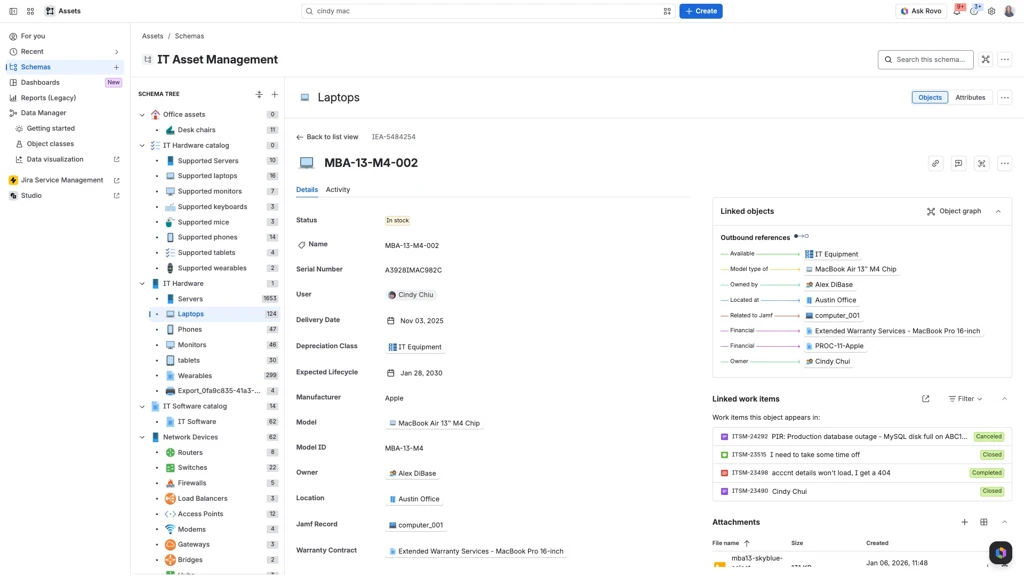
Assets lets you model hardware, software and anything else as objects with your own schema, import them from CSV, JSON, a discovery scanner or connectors such as Jamf and Intune, and attach them to requests, incidents and changes.
Not a ready-made tracker but a database you design, which pays off if your tickets already live in Jira.
An Assets admin creates a schema, defines object types and attributes, or starts from a Common Data Model or Hardware Asset Management template, and then fills it by importing. The import steps are to prepare the data, create an import structure, map object types and attributes, enable the mappings and run the import, optionally on a schedule. Sources include CSV, JSON, the Assets Discovery scanner and the REST API, and the feature page names more than 30 connectors, including Jamf, Intune, SCCM, AWS, Azure, Lansweeper and Flexera.
Any agent can then attach objects to requests, incidents and changes through the Assets object field, and an object graph shows dependencies. Only admins create schemas.
- your team already runs Jira Service Management and wants every ticket tied to the asset behind it
- you want to model more than devices, such as services, contracts or people, in one schema
- you want a ready-made asset tracker: you design the schema and imports yourself, and Capterra reviewers describe a steep learning curve
- you aren't on a paid Jira Service Management plan: Assets isn't included on Free
- Users like
- cross-team collaboration and request tracking, per Capterra reviewers (the rating covers Jira Service Management as a whole)
- Users dislike
- high cost for scaling teams and complex permissions, per Capterra reviewers
- Source: Capterra, 779 reviews
How it works in practice
Assets isn't on the Free plan, but Standard includes 5,000 objects, Premium 50,000 and Enterprise 500,000. Extra objects cost $0.02 each per month, and when the allowance runs out with extra usage disabled, you can't create new objects. Premium adds Data Manager and Hardware Asset Management templates. Per agent per month on monthly billing, Standard runs $21.50 to $26.90 and Premium $55.28 to $61.60, depending on the number of agents.
Assets Discovery is an agentless scanner for IP-enabled hosts that runs on Windows and Linux. Atlassian's Marketplace listing says Cloud Premium and Enterprise include it, and the pricing page doesn't show it in a readable form for Standard. The 4.5 on Capterra from 779 reviews covers Jira Service Management as a whole, not Assets, and reviewers' main complaints are cost for scaling teams and complex permissions.
- Starting price
- Included on Standard (5,000 objects) and Premium (50,000 objects) plans, from $21.50 to $26.90 per agent per month billed monthly; extra objects cost $0.02 each per month
- Discovery
- Assets Discovery scanner, imports, connectors
- Included objects
- 5,000 Standard; 50,000 Premium
- Not on
- Free plan
ServiceNow IT Asset Management
ServiceNow ITAM manages hardware and software assets on the same platform as its CMDB and service catalog, keeping each asset and its configuration item in sync and adding software license compliance and reclamation.
The enterprise reference point: powerful if you already run ServiceNow, and far more than a small team needs if you don't.
ServiceNow ITAM links each asset to a configuration item through the model category and keeps the two in sync with business rules. According to the Zurich release documentation, assets are created from CIs immediately or by a scheduled job that runs every 15 minutes, and CIs can be created from assets for hardware classes that have a serial number rule. Synced fields include asset tag, serial number, model, location, vendor and warranty expiration. Procurement, deployment and disposal workflows hang off the same record, and software asset management adds license compliance and reclamation of unused software.
- you already run ServiceNow for IT service management and need assets tied to the CMDB, procurement and approvals
- you need software license compliance across large vendor contracts and have admins to run the platform
- you have a small IT team: a G2 reviewer calls it overkill for smaller teams and reviewers list a learning curve and cost as top complaints
- you want a published price or a self-serve trial: we found neither
- Users like
- asset management and tracking, ease of use and integrations, per G2 reviewers
- Users dislike
- learning curve and cost, per G2 reviewers
- Source: G2, 544 reviews
How it works in practice
Pricing is quote only, and we found no public price page, free tier or self-serve trial. The Zurich documentation page we read describes the asset-to-CI link well, however, it doesn't mention discovery, so how scans feed the CMDB wasn't verified. The vendor markets a content library of more than 4.3 million publisher part numbers for software normalization, which is a vendor claim we haven't tested. Lifecycle sync needs the CSDM Lifecycle plugin, and the asset-to-CI sync only works when records are logically mapped, with states that don't map one to one. The edition split between hardware, software and enterprise packages wasn't verifiable from ServiceNow's own pages.
On G2 the 4.3 from 544 reviews praises asset management, ease of use and integrations. The most common complaints are the learning curve and cost, and one reviewer calls it overkill for smaller teams.
- Starting price
- Quote only
- Discovery
- Through the CMDB; asset and CI records sync
- Pricing
- Quote only
- Fits
- Larger, ServiceNow-based teams
What IT asset management software costs for a small team
Headline prices look comparable, yet the units differ, which is why a quick comparison of the numbers misleads.
| Tool | What the price counts | Published price |
|---|---|---|
| Snipe-IT | Flat per account | Free self-hosted, hosted from $399.99 a year |
| ManageEngine AssetExplorer | Pack of IT assets | Cloud $1,245 a year for 250 assets, on premises $955 |
| BlueTally | Flat by asset cap, unlimited users | $199 to $232 a month for Core, first 50 assets free |
| Lansweeper | Assets, 2,000 included | Free to 100 assets, then from EUR 270 a month |
| Freshservice | Agents, plus Asset Units | $49 per agent a month for Growth |
| Jira Service Management | Agents, plus objects | $21.50 to $26.90 per agent a month for Standard |
| NinjaOne | Devices | $1.50 to $3.75 a month, quote based |
| Asset Panda, ServiceNow | Quote only | No public price |
For a team with a few hundred assets, the three prices that scale by asset count work out like this, but the other tools need an agent count or a quote first.
Yearly list prices in USD from each vendor's pricing page, read on October 19, 2026. Tools priced per agent, device or object, or by quote, aren't in the slider. Snipe-IT self-hosted is free but you pay for the server and the admin time.
What asset tools don't answer: who owns your service accounts
An inventory of devices and licenses answers what you have. It doesn't answer who is responsible for the accounts that run on those devices. Discovery tools find hardware and installed software, and nobody in the scan result is the owner of the account a nightly export runs as. When an auditor asks who owns it and why it still exists, the answer is usually a guess, and the guess is still a guess after the scan. The same gap shows up in our guide to privileged access management software, where vaulting a service account still doesn't name its owner.
The IT Lead covers that one question: it imports service accounts from a CSV, asks the nominated owner to confirm ownership and purpose by email, and keeps the review trail. It doesn't scan, track devices or licenses, rotate passwords or disable anything, and it reads from CSV today, not from live directory connections.
Which tool to pick
Still, the rows overlap, so shortlist two tools and test both with your own data on a free tier or trial before you pay.
- Free, with check-out to named peopleSnipe-IT, self-hosted, or hosted from $39.99 a month
- Find every device on the network without typing anything inLansweeper, starting on the free tier
- Scans plus purchase orders, contracts and warranties at a published priceManageEngine AssetExplorer
- Intune or Jamf devices assigned to employees automaticallyBlueTally
- An MSP already patching with NinjaOneNinjaOne's built-in inventory and SNMP discovery
- Tickets tied to the asset behind them, in a service deskFreshservice, or Jira Service Management Assets if you run Jira
- Equipment beyond IT, audited by barcode on a phoneAsset Panda, after a quote
- CMDB-grade control and a dedicated adminServiceNow IT Asset Management
FAQ
What is IT asset management software?
ITAM software records the hardware, software licenses and cloud subscriptions a company owns and tracks each item from purchase to disposal. It shows who has an asset, what state it's in and when its warranty or license ends.
What is the best IT asset management software for a small business?
The best fit depends on how you want assets to get into the tool. Lansweeper finds devices by scanning, Snipe-IT is free to self-host and handles check-out, BlueTally syncs Intune and Jamf devices to employees, and Freshservice suits teams that also need a service desk.
Is there free IT asset management software?
Free ITAM software exists, with limits. Snipe-IT is free to self-host, Lansweeper is free for up to 100 assets after a 14-day trial, BlueTally is free for the first 50 assets, and ManageEngine AssetExplorer has a free edition capped at 25 nodes on premises and 50 in the cloud.
Does Snipe-IT discover devices automatically?
No. Snipe-IT doesn't scan the network. Inventory comes from manual entry, CSV import, the API or its sync adapters for tools such as Jamf and Microsoft Intune.
What is Asset Panda?
Asset Panda is a cloud asset tracking platform with web and mobile apps, configurable fields, barcode scanning and mobile audits. It doesn't publish a price and sells by quote.
What is the difference between ITAM and a CMDB?
ITAM tracks what you own and its lifecycle, such as who holds a laptop and when its warranty ends. A CMDB tracks configuration items and how they depend on each other, so you can see what a change will affect. Service desk suites such as ServiceNow and Freshservice combine both.