Mobile device management (MDM) software lets IT teams enroll phones, tablets and laptops, push settings and apps to them, enforce security rules and wipe them remotely from one console. For a small IT team the right pick depends less on the feature list than on the fleet: Apple only, a Microsoft 365 shop, or a mix of Windows, Android and Apple. This page compares nine MDM tools on platforms, price status, enrollment path and what it takes to run each one.
Six of the nine publish a price on their own site. Three are quote only, and the tables below say so instead of guessing, which is more useful than a made-up number. Two tools have a free plan, and a third offers a free tier for three devices.
- MDM tools compared
- 9
- publish a price on their own site
- 6
- have a free tier
- 3
- lowest published price per device per month, Apple devices only
- $1
Our picks by fleet type
 Best if you already pay for Microsoft 365 Business Premium or E3Microsoft IntunePlan 1 is already in those licenses, and Windows Autopilot, Conditional Access and phones sit in one console.
 Best low-cost choice for an Apple-only fleetMosyle BusinessFree for up to 30 devices, then $1 per device per month on an annual plan.
 Best for deep Apple controlJamf ProSmart Groups and PreStage enrollments reward an admin who will learn them, and the price is on request.
 Best Apple-first option with fast setupIru (formerly Kandji)Kandji, renamed Iru in October 2025, builds everything around Blueprints and patches apps automatically.
 Best mixed fleet with published pricesHexnode UEMApple, Android, Windows and Linux from $2.2 per device per month, with a 14 day trial.
 Best for kiosks and rugged devicesScalefusionSingle-app and multi-app kiosk mode on Android and iPad from the entry tier.
 Best if you want to host it yourselfManageEngine Mobile Device Manager PlusRuns in the cloud or on your own server, with a free tier for 25 devices.
 Best if you want a directory and MDM from one vendorJumpCloudPriced per user at $9 a month, with MDM available alone at $5.
 Best for MSPs that already run NinjaOneNinjaOnePhones and tablets join the endpoint console, but the mobile price isn't published.
 Our product · for the gap MDM leavesThe IT LeadRecords who owns each service account behind your tools. It doesn't manage devices.
MDM software compared
| Tool | Type | Platforms | Price as published (USD) | Rating |
|---|---|---|---|---|
| Microsoft Intune | Cloud MDM from Microsoft | Windows, macOS, iPhone, iPad, Android and Linux through Entra ID | $8 per user per month for Plan 1; included in Microsoft 365 Business Premium and E3 | 4.5 (Capterra, 42) |
| Jamf Pro | Apple-only MDM | Mac, iPhone, iPad and Apple TV with zero-touch enrollment | Quote only; Jamf Now is free for up to 3 devices | 4.7 (Capterra, 547) |
| Iru (formerly Kandji) | Apple-first MDM | Mac, iPhone and iPad with Blueprints, plus newer Windows and Android support | Quote only, annual contract | 4.9 (Capterra, 500) |
| Mosyle Business | Apple-only MDM | Mac, iPhone, iPad, Apple TV and Vision Pro, with a free tier | Free for up to 30 devices; Premium $1 per device per month, billed annually, 30 licenses minimum | 4.6 (Capterra, 88) |
| Hexnode UEM | Cross-platform UEM | Apple, Android, Windows, Linux and ChromeOS from tiered plans | Pro $2.2, Enterprise $3.2, Ultimate $4.7 per device per month, 10% off annual billing; Ultra on request; 15 devices minimum | 4.6 (Capterra, 154) |
| Scalefusion | UEM with kiosk and rugged focus | iOS, Android, Windows, macOS and Linux with kiosk mode | UEM Essential $2 per device per month, billed annually; 10 devices minimum | 4.8 (Capterra, 114) |
| ManageEngine Mobile Device Manager Plus | Budget MDM, cloud or on premises | iOS, Android, Windows, macOS and ChromeOS with a free tier | Free up to 25 devices; cloud Standard $645 per year for 50 devices, Professional $1,195 per year for 50 | 4.6 (Capterra, 937) |
| JumpCloud | Directory-led device management | Directory, SSO and MDM for Apple, Android, Windows and Linux in one console | Device Management $9, SSO $11, Device Identity Management $13 per user per month, billed annually | 4.5 (4,121) |
| NinjaOne | RMM with an MDM module | iOS, iPadOS, macOS and Android in the same console as endpoint management | Quote based; the platform range is $1.50 to $3.75 per device per month and the page does not say if MDM is included | 4.7 (Capterra, 298) |
| The IT Lead Our product | Service account ownership reviews | Collects owner attestations for service accounts and keeps the review trail | Access code | No reviews yet |
Prices come from each vendor's own pages, read on October 18, 2026. Ratings are Capterra, with the number of ratings in brackets. NinjaOne's rating covers the whole platform, mostly its RMM, and the Intune rating comes from a small listing under its old Microsoft Endpoint Manager name.
What mobile device management software does
MDM software enrolls a device, configures it and secures it. Enrolling means the device joins your management server, usually during first-time setup. Configuring means pushing Wi-Fi, VPN, email and app settings. Securing means enforcing a passcode and encryption, blocking risky settings, locating a lost device and wiping it. The server reaches Apple devices through Apple's push notification service, so the device must be able to contact it and the server's push certificate has to be valid.
MDM vs MAM vs EMM vs UEM
The four acronyms describe how much of the device or its data the tool controls. NIST's guidance on mobile device security separates them like this.
| Term | What it controls | Does the device have to enroll? |
|---|---|---|
| MDM | The device: settings, apps, restrictions, remote wipe | Yes |
| MAM | Only the apps that reach company data | No, per NIST |
| EMM | An MDM, MAM and other mobile security tools in one suite | Yes for the MDM part |
| UEM | Another name for EMM in NIST's wording; vendors use it for suites that also manage laptops | Yes for the MDM part |
In practice you buy a UEM product and use its MDM features on phones and its laptop features on Windows and Mac. NIST SP 800-124 Rev. 2 has the formal definitions.
What MDM can and cannot do on a personal device
A personally owned phone gets a lighter kind of management. On iPhone and iPad, Apple's User Enrollment keeps organizational data in a separate, cryptographically protected volume. The organization can manage its own apps and accounts, apply a limited set of restrictions and remove its own data, but it never manages the user's personal account or data. The user can unenroll at any time by signing out of the Managed Apple Account, which removes the organizational data and apps.
On Android, a work profile does the same job: work apps and data are separated from personal ones, and a wipe on a personally owned device removes only the work profile. A full factory reset is reserved for devices the company owns.
How a device gets enrolled
Zero-touch enrollment is the feature that decides how much hands-on work a new device costs you. Each platform has its own gate, and the gate is something you set up outside the MDM tool. If you skip it, you're enrolling by hand, which gets old quickly past a few dozen devices.
- Apple devicesApple Business and Automated Device Enrollment
- Jamf Pro
- Iru (formerly Kandji)
- Mosyle Business
Prerequisite the device was bought from Apple, an authorized reseller or carrier, or added with Apple Configurator, and an already set up iPhone or iPad must be erased first - Android devicesZero-touch or QR code enrollment
- Scalefusion
- Hexnode UEM
- ManageEngine Mobile Device Manager Plus
Prerequisite zero-touch needs an authorized reseller and Android 8.0 or later, while QR code and sign-in URL work without one - Windows PCsWindows Autopilot into the MDM
- Microsoft Intune
- Hexnode UEM
- Scalefusion
Prerequisite Microsoft Entra ID, an MDM subscription and devices registered with Autopilot, on Windows 10 or 11 Pro, Enterprise or Education - Across allKeep the accounts behind enrollment alive
- The IT Lead
Catches the Apple push certificate that must be renewed every year with the account that created it
The Apple push certificate deserves its own owner. Apple says it must be renewed annually and tells admins to record which Apple account created it, because that account is needed for renewal. MDM vendors warn that creating a new certificate instead of renewing the old one leaves enrolled devices orphaned and forces re-enrollment.
Network access matters too, but it's the easier one to forget. Apple devices reach Apple's push service on TCP port 5223, with port 443 as a fallback. If your guest or kiosk network blocks that port, management commands won't arrive.
How we chose these tools
The list is built for small IT teams and MSPs managing roughly 10 to 500 devices. Each tool is judged on six points:
- Platforms managed. Which of iOS and iPadOS, macOS, Android, Windows, ChromeOS and Linux it actually enrolls, and which are handled only through other products.
- Enrollment path. Whether zero-touch enrollment is available through Apple Business, Android zero-touch or Autopilot, and from which plan.
- Personal devices. Whether it supports User Enrollment and work profiles, and from which plan.
- Price transparency. A published price per device or per user, a minimum order, a free tier or a trial.
- Effort to run. Cloud or self-hosted, and how much scripting or admin time reviewers say it takes.
- Review evidence. A Capterra rating with a count and one recurring praise and complaint. G2 blocked automated access when we read the review sites, so we used Capterra throughout.
We did not research IBM MaaS360, SOTI MobiControl or Miradore for this edition. Tools that only secure data without managing the device, such as secure browser or enclave products, are not MDM and are left out.
Best MDM software for Apple fleets
All three tools in this group manage Apple devices well and treat other platforms as secondary or not at all. Apple's own deployment model sets the pattern: you buy devices through Apple Business, assign them to an MDM server, and the device enrolls itself during Setup Assistant.
Jamf Pro
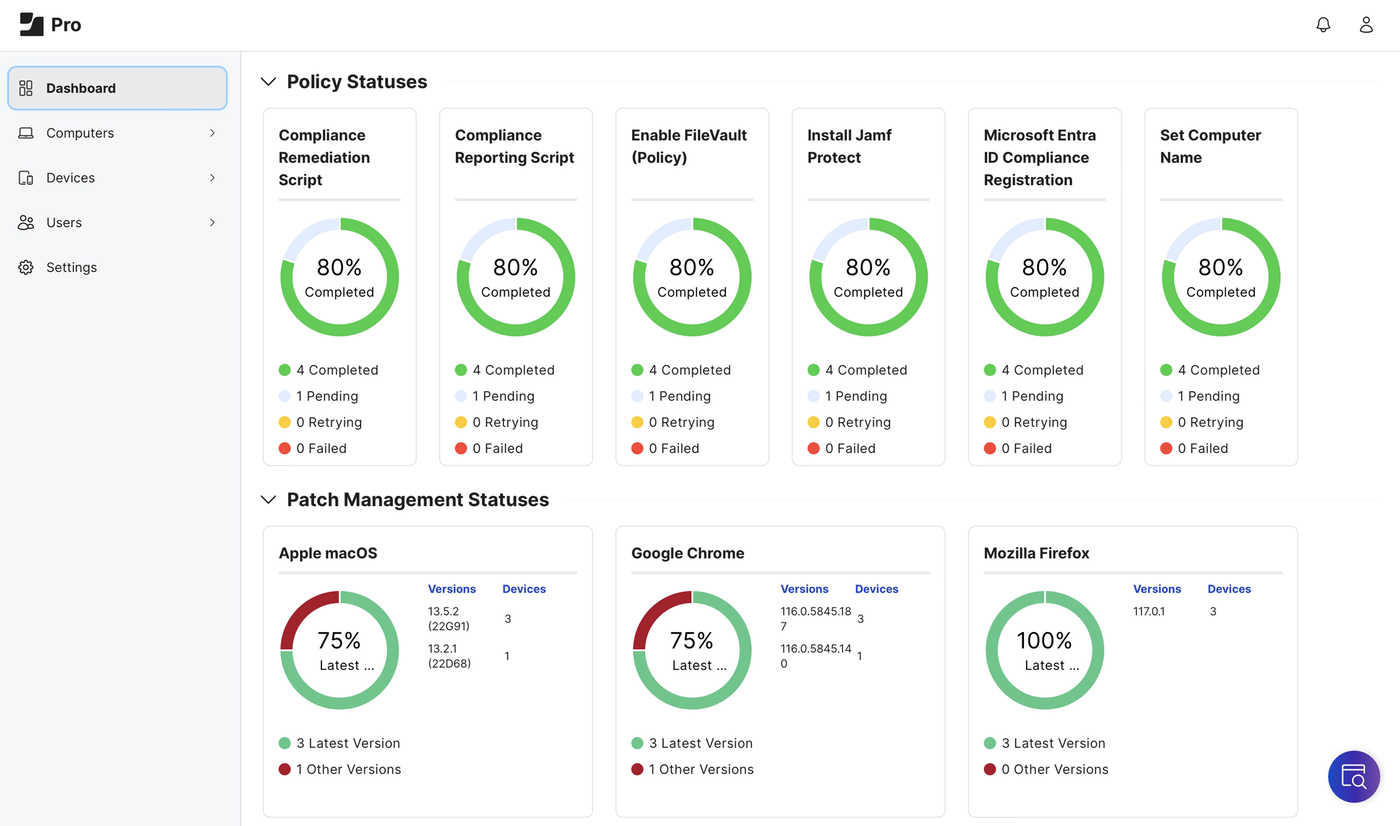
Jamf Pro manages Apple devices only. It is known for Smart Groups, PreStage enrollments and a large integration marketplace, and Jamf Now covers very small teams.
The reference choice for Apple-only fleets, as long as you have an admin who will invest in learning it.
An admin links Jamf Pro to Apple Business or Apple School Manager, then builds a PreStage enrollment that sets what the user sees in Setup Assistant and which settings are enforced. Devices bought through Apple are assigned to the Jamf MDM server in Apple's portal and scoped to a PreStage. When the user powers the device on and connects, it enrolls without anyone touching it and receives its apps and profiles. A user-initiated path covers personally owned devices.
The depth is in the automation. Smart Groups and Extension Attributes sort devices by almost any attribute, so a policy can follow a device as its state changes. Self Service+ lets users install approved apps themselves, and compliance benchmarks apply security baselines. Jamf connects to Microsoft Entra, Google Workspace, Okta and a marketplace of further integrations.
- your fleet is Apple only and you want deep Mac, iPhone and iPad control and automation
- you have an admin who will learn Smart Groups, PreStages and scripting
- you manage any Windows or Android devices and want one console
- you need a public per-device price and a light console for a few dozen devices
- Users like
- easy enrollment and app deployment, per Capterra reviewers
- Users dislike
- a steep learning curve, scripting for common tasks and price, per Capterra reviewers
- Source: Capterra, 547 reviews
How it works in practice
The business pricing page leads to a contact form for two bundles, Jamf for Mac and Jamf for Mobile, and says they are for cloud customers. Jamf Now is the self-serve product for organizations with fewer than 25 employees, and its product page says up to three devices are free. Jamf doesn't show a price above that on its own pages.
Capterra reviewers back up the skip-if. One reviewer with fewer than 300 iPads and Apple TVs says the price is "a bit much", another needed scripts for auto-updates and dock configuration, and a third ran other tools for Windows and Chromebooks. A free 14 day trial is offered.
- Starting price
- Quote only; Jamf Now is free for up to 3 devices
- Platforms
- macOS, iOS and iPadOS, tvOS, visionOS
- Pricing
- Contact sales (Jamf Now: 3 devices free)
- Hosting
- Cloud for the current bundles
Iru (formerly Kandji)
Kandji was renamed Iru in October 2025. It is an Apple-first MDM built around Blueprints and automatic app patching, with newer Windows and Android support.
Kandji's Apple-first MDM, renamed Iru in October 2025 and built around Blueprints.
The admin configures Apple's push service, connects Apple Business or School Manager and creates a token for Automated Device Enrollment. In Apple's portal the devices are assigned to Iru Endpoint as the MDM server. In Iru the admin selects devices awaiting enrollment and assigns each a Blueprint, which is a set of apps, settings and policies. Blueprint Routing rules can do the assignment automatically, and the first matching rule wins. The user turns on the Mac or iPhone, it enrolls in Setup Assistant and the Blueprint deploys. Personally owned devices enroll manually with an enrollment code.
Iru ships one-click CIS Level 1 and Level 2 templates for Mac, managed OS updates and Auto Apps that patch hundreds of Mac and Windows applications. A Migration Agent moves Macs over from another MDM. Windows and Android support is newer than the Apple side, and Google Play handles Android app distribution.
- your team is mostly Macs and iPhones and wants fast setup with onboarding help
- you want CIS compliance templates and automatic app patching without writing many scripts
- you run a mixed fleet where Windows and Android need the same depth as macOS
- you need a published price before talking to sales
- Users like
- easy setup with responsive support and onboarding, per Capterra reviewers
- Users dislike
- cost for small teams and limits in alerts and reporting, per Capterra reviewers
- Source: Capterra, 500 reviews

How it works in practice
Pricing is a quote with an annual contract, and Iru doesn't publish a minimum order. Third-party sources disagree on one, from about 25 to 100 devices, so ask before you plan around a small pilot. A free 14 day trial is offered, and onboarding and migration help is included in the price according to Iru's pricing page.
EDR, vulnerability management, workforce identity and compliance automation are separate licensed modules, so check which ones a quote includes. Older guides and some listings still use the Kandji name.
- Starting price
- Quote only, annual contract
- Platforms
- macOS, iOS and iPadOS, tvOS, visionOS, Windows, Android
- Pricing
- Quote only, annual contract
- Renamed
- Kandji to Iru in October 2025
Mosyle Business
Mosyle Business manages Apple devices only. It has a free plan for up to 30 devices and low per-device prices above that.
The cheapest way to manage a small Apple fleet, with a free plan under 30 devices.
Devices bought through Apple Business Manager or Apple School Manager enroll with Automated Device Enrollment. Mosyle says it supports all ADE configurations, installs required apps, applies security controls and creates user accounts that authenticate against Google Workspace, Microsoft 365, LDAP or Active Directory during setup. On a Mac, its Embark screen shows a progress bar while this happens. Personally owned devices enroll with Apple's User Enrollment.
Other capabilities include remote scripting with a script catalog, OS update enforcement with deadlines, managed apps and Books, a catalog of roughly 400 Mac apps outside the App Store, hardening templates mapped to CIS, SOC 2 and PCI, and macOS login with Google, Microsoft, Okta or Ping accounts.
- your fleet is all Apple and you want the lowest per-device cost
- you have fewer than 30 devices and want a free plan
- you need to manage Android or Windows devices
- you want live phone support rather than tickets
- Users like
- easy setup and good value for Apple fleets, per Capterra reviewers
- Users dislike
- slow ticket-based support, per Capterra reviewers
- Source: Capterra, 88 reviews
How it works in practice
The free plan covers up to 30 devices. The Premium plan is $1 per Mac, iPhone, iPad or Vision Pro per month, billed annually, with a minimum of 30 licenses. Fuse plans are $1.50 per month per iOS, iPadOS or visionOS device and $3 for macOS. tvOS and watchOS management is included at no extra charge.
Which features sit in which plan isn't clear from the pricing page, so ask for a feature list before you buy. Organizations switching from another Apple MDM can qualify for a longer trial and a first-year credit, according to Mosyle's pricing page. Mosyle manages no Android or Windows devices.
- Starting price
- Free for up to 30 devices; Premium $1 per device per month, billed annually, 30 licenses minimum
- Platforms
- macOS, iOS and iPadOS, tvOS, visionOS, watchOS
- Free tier
- Up to 30 devices
- Minimum
- 30 licenses on paid plans, annual
Best MDM software for Microsoft 365 shops
If your company already pays for Microsoft 365 Business Premium or E3, you may own an MDM without having turned it on.
Microsoft Intune
Intune is Microsoft's cloud MDM and app management service. Plan 1 ships inside Microsoft 365 Business Premium and E3, so many small teams already own it.
The default choice when Microsoft 365 is already paid for, and the one with the most licensing detail to read.
IT sets up the prerequisites once: the Apple push certificate and token for Automated Device Enrollment, a link to managed Google Play and Windows automatic enrollment. After that, each platform has an enrollment policy. A corporate Windows PC registers with Autopilot, the user connects and signs in, and the PC joins Microsoft Entra and receives apps and policies. An iPhone bought through Apple Business syncs its serial number to Intune, gets an enrollment policy and enrolls in Setup Assistant. Personal devices enroll through the Company Portal app or use app protection only, with no enrollment.
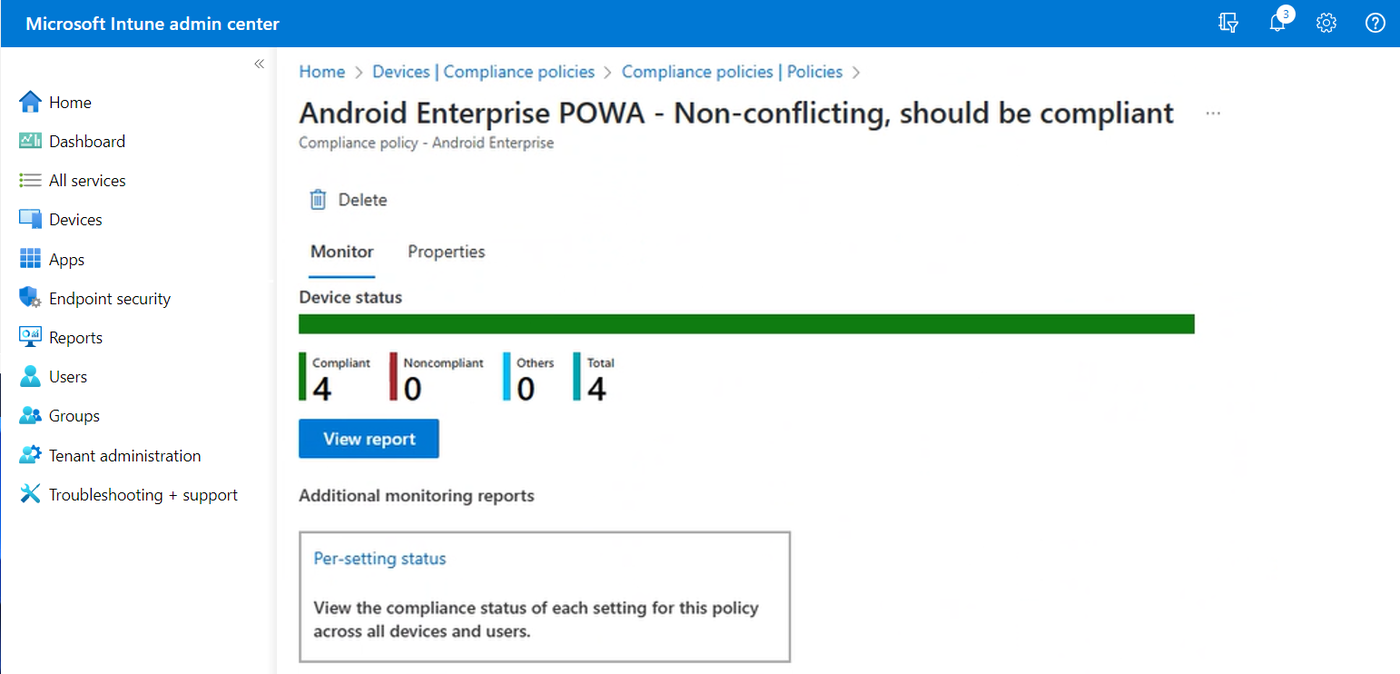
Compliance policies check things like BitLocker, Secure Boot, firewall, Defender and passcode, and Conditional Access can block a noncompliant device from company apps. Intune can also protect data inside apps on unenrolled iOS and Android devices, which suits personal phones where employees refuse full enrollment.
- you already pay for Microsoft 365 Business Premium or E3 and want Windows, Android and iPhone in one console
- you want Windows Autopilot setup and Conditional Access tied to Entra ID
- your fleet is mostly Macs and you want Apple-specific depth without learning a large admin console
- you have no Microsoft 365 licensing and want simple per-device pricing
- Users like
- Autopilot deployment and one admin portal save time, per Capterra reviewers
- Users dislike
- support is slow and the console is complex and changes often, per Capterra reviewers
- Source: Capterra, 42 reviews
How it works in practice
Plan 1 costs $8 per user per month standalone and is included in Microsoft 365 E3 and Business Premium. Plan 2 adds $4, and the Intune Suite is $10 and includes Plan 2 plus advanced modules. Remote Help ($3.50), Endpoint Privilege Management ($3), Advanced Analytics ($5), Enterprise App Management ($2) and Cloud PKI ($2) are priced separately, and third-party app patching needs Enterprise App Management or another tool. A 30 day trial is available.
Two licensing traps are worth knowing. Windows automatic enrollment needs Entra ID P1 or P2, and device-only licenses don't support app protection or Conditional Access. The Capterra figure comes from a listing of only 42 ratings under the old Microsoft Endpoint Manager name.
- Starting price
- $8 per user per month for Plan 1; included in Microsoft 365 Business Premium and E3
- Platforms
- Windows, macOS, iOS and iPadOS, Android, Linux
- Plan 1
- $8 per user per month standalone
- Included in
- Microsoft 365 Business Premium and E3
Best MDM software for mixed fleets
Mixed fleets need one console that handles Android kiosks, Windows PCs and iPhones without a separate tool for each. These three trade polish for breadth and price.
Hexnode UEM
Hexnode covers Apple, Android, Windows, Linux and ChromeOS devices and sells tiered plans that start at 15 devices, with kiosk and BYOD options.
Broad platform coverage and published prices, with features unlocked tier by tier.
Corporate Apple devices bought through Apple Business or School Manager enroll automatically in Setup Assistant. The admin assigns devices to the Hexnode MDM server in Apple Business and syncs them in the console, and devices that were already set up have to be factory reset to pick up the profile. Personal devices use User Enrollment with a Managed Apple Account, or the older profile-driven method through an enrollment link. Apple Business and Samsung Knox Mobile Enrollment are available from the Pro plan.
The plan ladder is the thing to understand. Pro adds kiosk mode, app management and location tracking. Enterprise adds geofencing, OS updates, directory integrations and web content filtering. Ultimate adds scripting, Windows Autopilot, FileVault and advanced reporting. macOS and Windows patching, BitLocker and desktop remote control exist only in the quote-based Ultra plan.
- you manage a mixed fleet that includes Android kiosks and Windows PCs
- you want a 14 day trial and published per-device prices
- you need macOS and Windows patching, which sits in the quote-based Ultra plan
- you value fast reporting and quick support responses over breadth
- Users like
- one dashboard for iPhones, Android, Windows and Apple TV, per Capterra reviewers
- Users dislike
- slow reports and uneven support response, per Capterra reviewers
- Source: Capterra, 154 reviews
How it works in practice
Pro is $2.2, Enterprise $3.2 and Ultimate $4.7 per device per month, with 10% off for annual billing. The pricing page doesn't say whether the displayed figures assume monthly or annual billing, so confirm before you budget. The minimum is 15 devices, and the 14 day trial needs no card. Technician seats rise with the plan, from two on Pro to five on Ultra.
- Starting price
- Pro $2.2, Enterprise $3.2, Ultimate $4.7 per device per month, 10% off annual billing; Ultra on request; 15 devices minimum
- Minimum
- 15 devices
- Trial
- 14 days, no card
- Platforms
- Apple, Android, Windows, Linux, ChromeOS, Fire OS
Scalefusion
Scalefusion is a per-device UEM for iOS, Android, Windows, macOS and Linux with strong kiosk and rugged-device support. BYOD enrollment, patching and the API sit in higher tiers.
A per-device UEM that is strongest on company-owned Android tablets and iPad kiosks.
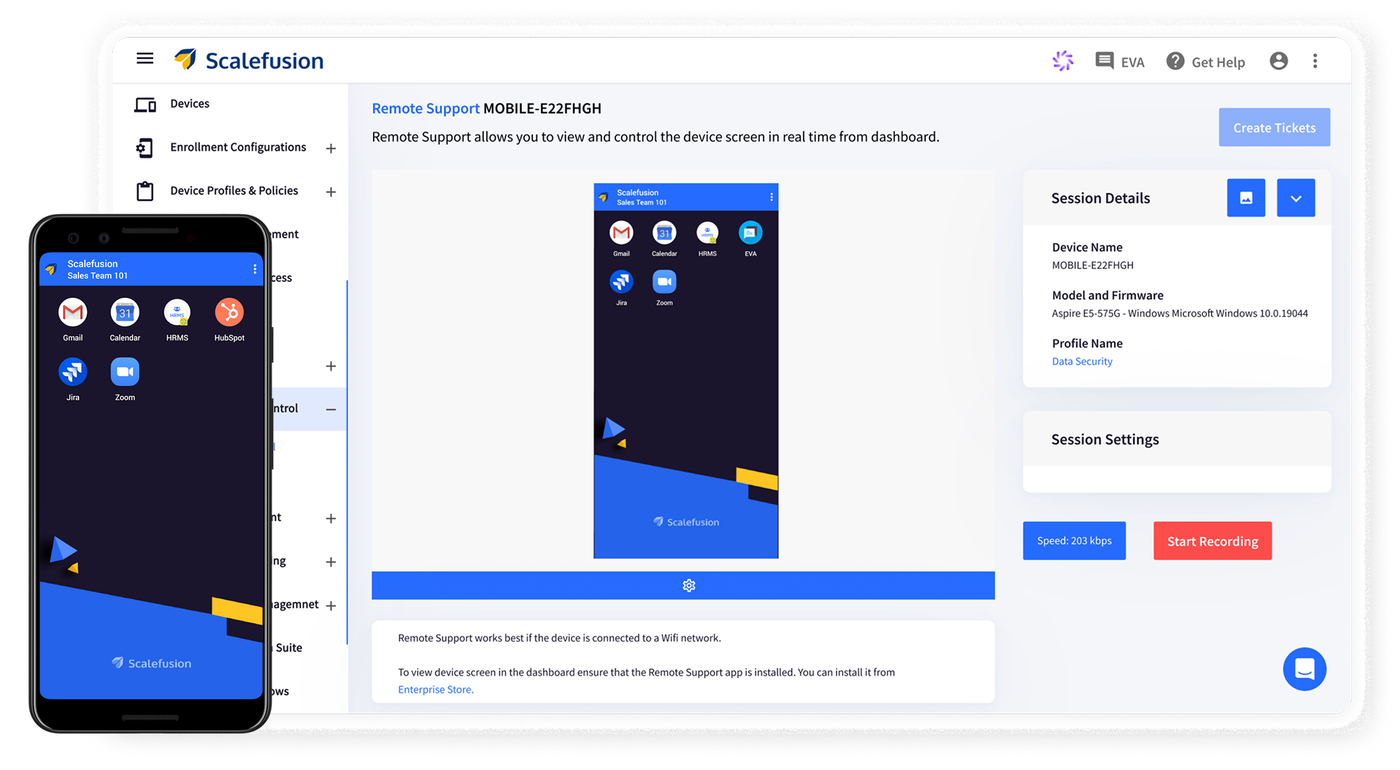
For company-owned Apple devices the admin assigns the Scalefusion MDM server in Apple Business Manager, or in Apple Configurator. The device then boots through Setup Assistant, fetches its settings from Apple and shows the Remote Management screen, which completes enrollment. Android Enterprise, zero-touch and Apple Business enrollment come with the entry tier, along with single-app and multi-app kiosk mode on Android and iPad.
The tiers decide what you can do. UEM Growth ($3.50) adds BYOD enrollment, a private app store and Wi-Fi, APN and VPN settings. UEM Business ($9) adds Windows Autopilot, OS and patch management, LDAP, dynamic groups and an API. UEM Enterprise ($10) adds webhooks, an on-premises connector and PowerShell scripting. OEM integrations cover Samsung Knox, Zebra, Lenovo, Bluebird, Kyocera and Janam.
- you manage company-owned Android tablets or iPad kiosks and want public per-device pricing
- you have 10 to a few hundred devices and can pick the tier you need
- you need BYOD enrollment or patching at the entry tier, since those start at the $3.50 and $9 tiers
- you buy licenses in small increments and want simple billing
- Users like
- responsive support and a simple dashboard, per Capterra reviewers
- Users dislike
- licenses bought in blocks and a licensing model that is hard to follow, per Capterra reviewers
- Source: Capterra, 114 reviews
How it works in practice
The entry tier costs $2 per device per month, billed annually, with a minimum of 10 devices and a 14 day trial with all features. The Business and Enterprise tiers show annual totals of $108 and $120 per device on the pricing page. Mobile threat defense needs a separate Check Point Harmony subscription. Linux and ChromeOS appear in the product navigation, but the pages we read don't show which plan includes them.
- Starting price
- UEM Essential $2 per device per month, billed annually; 10 devices minimum
- Entry price
- $2 per device per month, annual
- Minimum
- 10 devices
- Trial
- 14 days
ManageEngine Mobile Device Manager Plus
Mobile Device Manager Plus manages iOS, Android, Windows, macOS and ChromeOS devices, runs in the cloud or on your own server and has a free tier for 25 devices.
Low-cost MDM you can run in the cloud or on your own server.
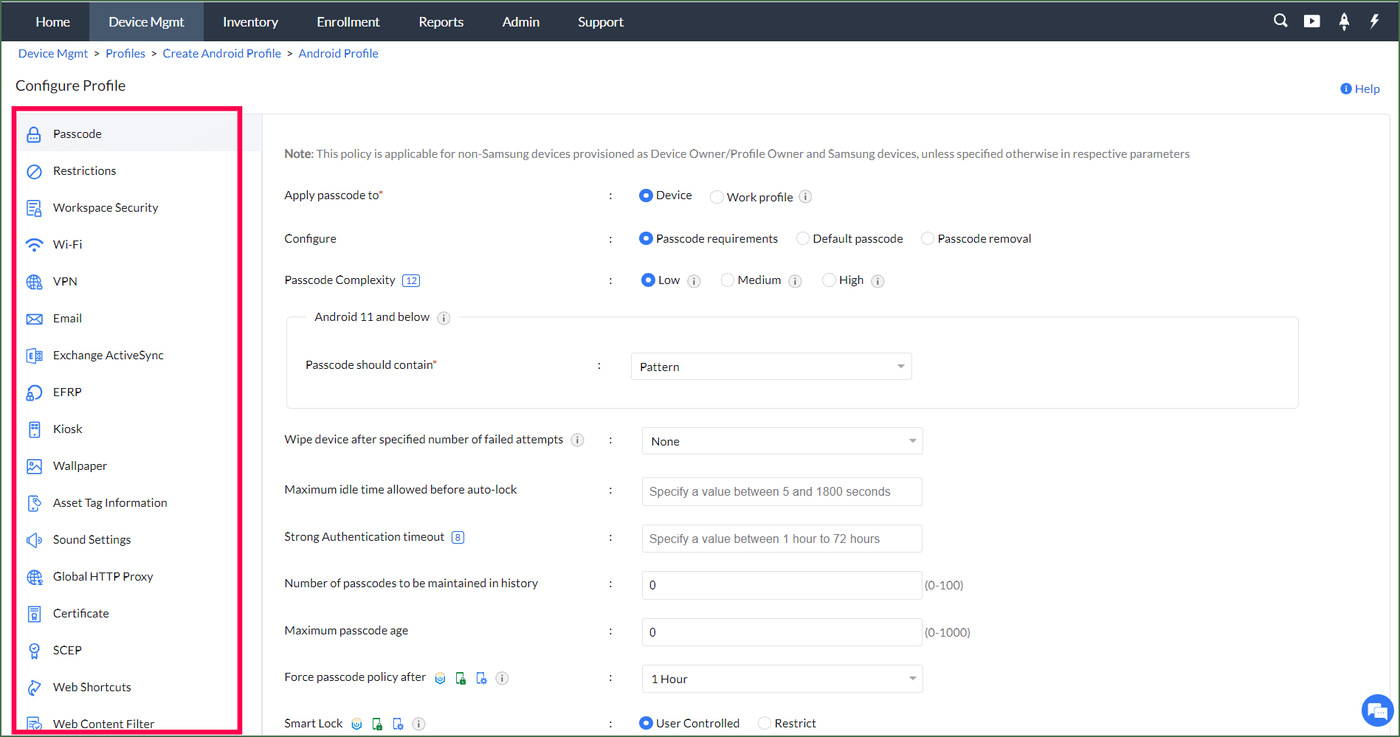
For Android, the admin sets up managed Google Play, opens Enrollment Settings in the console, chooses enrollment with the Android Device Policy app and sends invites. Users install the app and enroll, and the admin syncs the apps afterwards. A work profile can be enrolled with a QR code, and enrollment can require a one-time passcode or Active Directory credentials. Bulk enrollment by CSV and self-enrollment are also supported.
Standard covers app and device distribution, restriction profiles, kiosk mode, geotracking and remote commands. Professional adds content management, OS update policies, conditional access, remote control and geofencing. Endpoint Central is a separate, larger product that adds patching and asset management. We didn't find an Apple enrollment walkthrough in the documentation we read, so test Apple device enrollment during the trial.
- you want low cost and the option to host the server yourself
- you want a free tier and a 30 day trial that is not capped by device count
- you want a modern, uncluttered admin console
- you need Linux device management, which the product page does not confirm
- Users like
- good value and easy bulk enrollment, per Capterra reviewers
- Users dislike
- a cluttered, dated interface with a learning curve, per Capterra reviewers
- Source: Capterra, 937 reviews
How it works in practice
The tool is free for up to 25 devices. In the cloud, Standard costs $645 a year for 50 devices, $1,195 for 100, $2,845 for 250 and $5,245 for 500. Professional costs $1,195, $2,245, $5,195 and $9,595 for the same bands. Extra technicians cost extra. The headline "from $9.9 per device" on the product page matches the on-premises annual rate for 50 devices, not the cloud rate. A 30 day trial covers unlimited devices.
- Starting price
- Free up to 25 devices; cloud Standard $645 per year for 50 devices, Professional $1,195 per year for 50
- Free tier
- 25 devices
- Smallest paid band
- 50 devices
- Deployment
- Cloud or on premises
Best MDM software when you already run a directory or an RMM
These two don't start from the phone. They add device management to a platform that your team may already log into every day.
JumpCloud
JumpCloud bundles Apple MDM and Android management into its directory and identity platform and prices per user instead of per device.
One console for directory, single sign-on and devices, priced per user instead of per device.
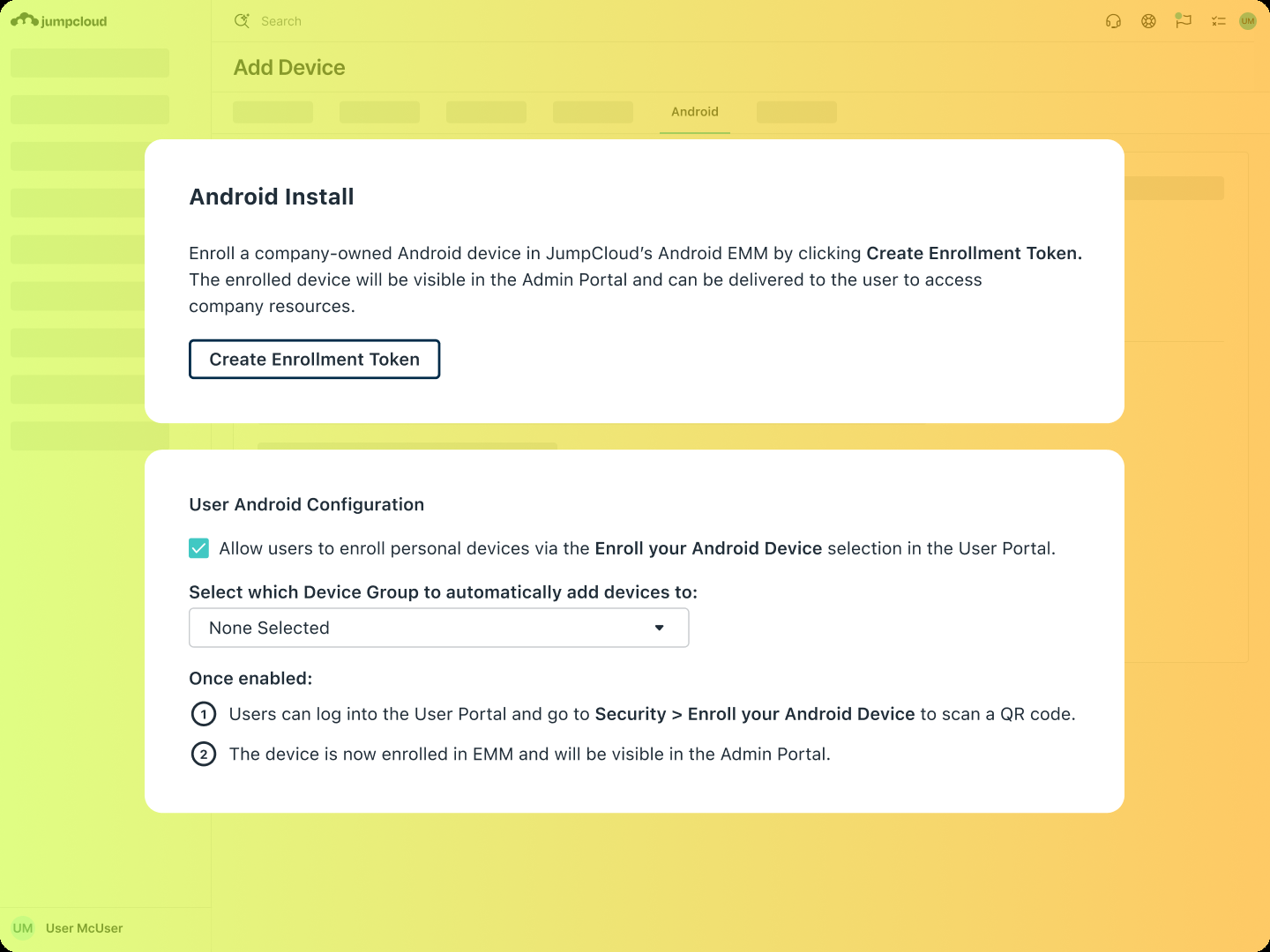
The admin uploads an Apple push certificate so JumpCloud acts as the MDM server. Company-owned devices in Apple Business use Automated Device Enrollment, other devices use Device Enrollment, and personal devices use User Enrollment once the admin allows it and the user enrolls through the user portal. On Android, the admin registers an enterprise and enrollment starts from the Android Device Policy app, with no JumpCloud agent on the phone.
The Android side offers 21 policies covering passcode, Wi-Fi, VPN, kiosk, system updates and runtime permissions. Admins can lock, reset the passcode, restart or erase a device, or remove only the work profile. Profile-based User Enrollment isn't supported on iOS and iPadOS 18.
- you want directory, SSO and device management from one vendor with a public per-user price
- you run Mac, Windows and Linux and want MDM for phones as an add-on
- you need the deepest mobile controls, which reviewers say are still evolving
- you only need mobile management and have no use for the directory layer
- Users like
- easy onboarding and unified management of identity and devices, per G2's summary of reviewer themes
- Users dislike
- Windows group policy gaps, MFA gaps with LDAP and a learning curve, per G2's summary of reviewer themes
- Source: G2, 4,121 reviews
How it works in practice
The Device Management plan is $9 per user per month billed annually or $11 billed monthly, and it includes MDM. The SSO plan at $11 doesn't include MDM. MDM can also be added alone for $5 a month annually or $6 monthly. A 30 day trial is available. Because pricing is per user, compare it with per-device tools by counting devices per person. The full plan and billing breakdown is in our JumpCloud pricing guide.
- Starting price
- Device Management $9, SSO $11, Device Identity Management $13 per user per month, billed annually
- Entry price
- $9 per user per month, annual
- MDM add-on
- $5 per user per month, annual
- Trial
- 30 days
- Public Device Management
- $9/user/mo annual
- Public SSO
- $11/user/mo annual
- Public Device Identity Management
- $13/user/mo annual
- Platform packages
- Contact Sales
- Legacy free
- Only eligible pre-February 2024 accounts
NinjaOne
NinjaOne adds MDM for iOS, iPadOS, macOS and Android to its RMM platform, with Apple Business Manager integration and multi-tenant management for MSPs.
A fit for MSPs and IT teams who already manage endpoints in NinjaOne and want phones in the same place.
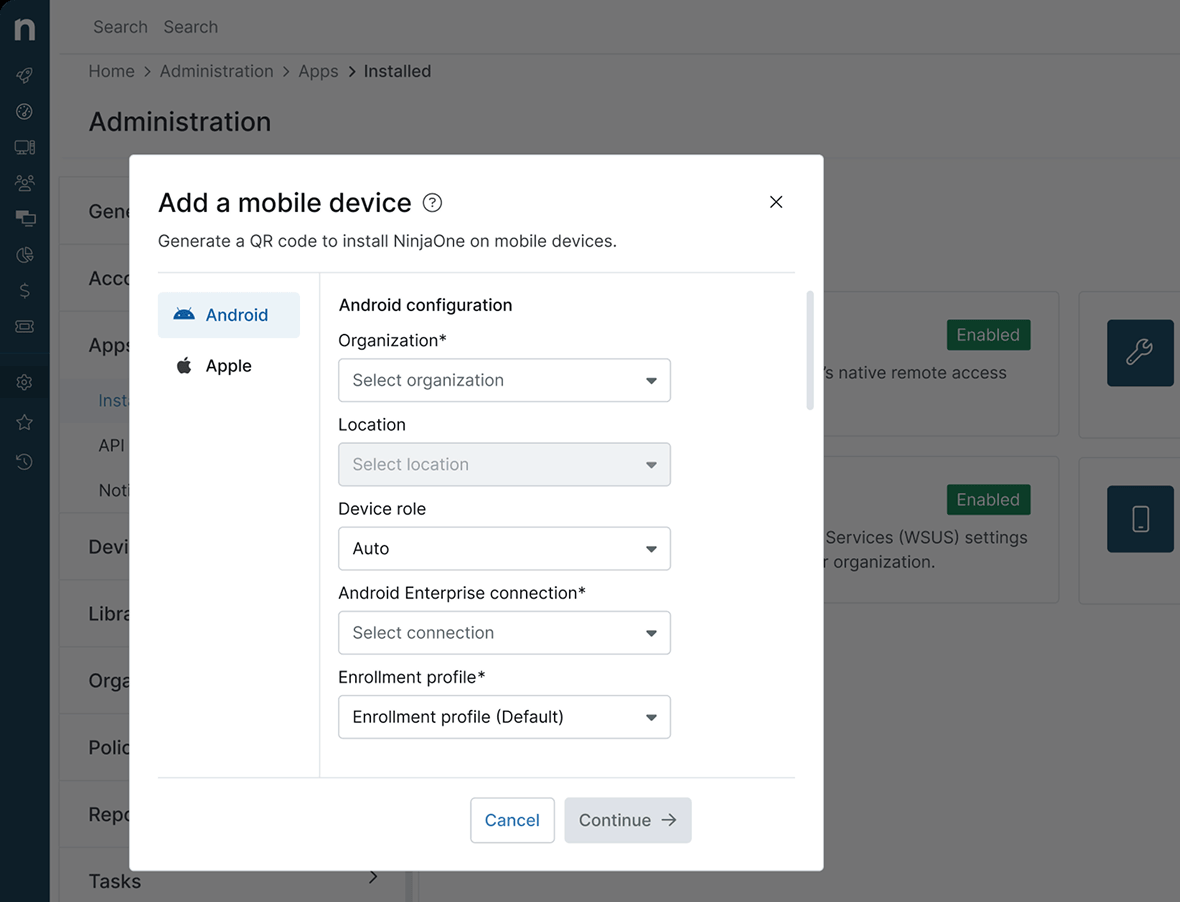
The admin picks an ownership type per enrollment. Android has "For personal and work" and "For work", and Apple has "Unsupervised" for personal devices and "Supervised" for company-owned ones. Apple Business is an optional connection for supervised and zero-touch setups, and company-owned Android devices must be new or factory reset. Policies live under Administration, Policies, MDM Policies and are assigned from the device page.
Apple and Android policies cover passcode, restrictions, apps and network settings, and Android adds security and enforcement categories. Admins can lock, wipe, locate and update devices, and deploy apps silently on both platforms. Supervised mode can block the App Store. Policy changes may need a device restart. Windows and Linux are handled through the RMM, not the MDM, and the MDM is multi-tenant, which is the reason MSPs look at it.
- you already run NinjaOne for endpoints and want phones and tablets in the same console
- you are an MSP that needs policies and app deployment across several clients
- you want a published mobile price before talking to sales
- your fleet is Apple heavy and you need the deepest MDM controls
- Users like
- reliable patching, remote access and automation, per Capterra reviewers
- Users dislike
- extra effort to set up policies and automation, per a Capterra reviewer
- Source: Capterra, 298 reviews
How it works in practice
NinjaOne's pricing page gives a platform range of $1.50 to $3.75 per device per month by volume and lists MDM as a product, but it doesn't say whether MDM is included or an add-on. Ask for the mobile line item in writing. The Capterra rating covers the platform as a whole and the sampled reviews talk about RMM, so it says little about the MDM module.
- Starting price
- Quote based; the platform range is $1.50 to $3.75 per device per month and the page does not say if MDM is included
- Mobile OS
- iOS, iPadOS, macOS, Android
- Pricing
- Quote based
- Windows and Linux
- Through the RMM, not MDM
What MDM software costs and what is free
MDM software costs depend on the pricing basis. Six of the nine tools publish a price, and the published numbers use three different bases: per device per month (Mosyle, Hexnode, Scalefusion), per user per month (Intune, JumpCloud) and per device band per year (ManageEngine). Jamf, Iru and NinjaOne are quote only. The lowest published price is Mosyle's $1 per device per month, which covers Apple devices only.
Yearly list prices from vendor pages, October 18, 2026. Entry tiers only: each vendor's higher plans cost more, and Jamf, Iru and NinjaOne aren't shown because they don't publish a price.
Is there a free MDM?
Yes, a free MDM exists, but with limits. Mosyle's free plan covers up to 30 Apple devices, ManageEngine's free tier covers up to 25 devices on any supported platform, and Jamf Now's product page says up to three devices are free. Google Workspace also includes basic mobile management by default, which covers password rules, account wipe and Android app management; advanced management is an upgrade. Free trials run 14 days for Hexnode, Scalefusion, Jamf Pro and Iru, and 30 days for Intune, JumpCloud and ManageEngine.
How to remove MDM from a device
Whether MDM can be removed depends on who owns the device and how it enrolled. On a company-owned iPhone or Mac enrolled through Automated Device Enrollment, the admin chooses whether users can remove the enrollment profile. If removal is blocked on a supervised device, only the management service can remove it. Vendors report that a wiped device still assigned to an MDM server in Apple Business enrolls again in Setup Assistant, so a factory reset doesn't free it.
| Enrollment type | Who can remove management | What leaves with it |
|---|---|---|
| Company iPhone or Mac, Automated Device Enrollment | The admin, or the user if the admin allows it | Everything the profile installed; the admin can also erase the device |
| Apple device enrolled with a profile | The user can remove the profile | All configuration profiles, settings and managed apps tied to it |
| Personal iPhone with User Enrollment | The user, at any time, by signing out of the Managed Apple Account | Organizational data and apps only |
| Android fully managed | The admin | A wipe is a factory reset |
| Android with a work profile | The admin or the user | A wipe removes only the work profile |
For a leaver, choose the action first. In Intune, Wipe is a factory reset that removes all personal and organizational data, while Retire removes company data and leaves personal data on the device. Retire is the right action for a personal phone.
What MDM leaves open: who owns the accounts behind it
An MDM setup rests on a handful of accounts and tokens that nobody reviews: the account that created the Apple push certificate, the integration that links the MDM to a directory, the service account a sync job runs under. The Apple certificate alone expires every year and can only be renewed by the account that created it. When the admin who set it up has left, that account is often the last thing anyone finds.
The IT Lead covers that gap. It imports service accounts from a CSV, asks the nominated owner to confirm ownership and purpose by email and keeps the review trail. It doesn't manage devices, rotate passwords or connect to your MDM, and it reads from CSV today. For the device inventory side, see our guide to IT asset management software. For the vaulting side of the same problem, see our guide to privileged access management software.
Which tool to pick
- Microsoft 365 Business Premium or E3 already in placeMicrosoft Intune, with Plan 1 included in the license
- Fewer than 30 Apple devices and no budgetMosyle free plan
- An Apple-only fleet with an admin who will scriptJamf Pro, after a quote
- Mostly Macs and iPhones, fast setupIru (formerly Kandji), after a quote
- Windows, Android and Apple with published pricesHexnode, from $2.2 per device per month
- Company-owned Android tablets or kiosksScalefusion
- A server you can host yourselfManageEngine Mobile Device Manager Plus
- An MSP already on NinjaOne or a team on JumpCloudNinjaOne or JumpCloud, to avoid a second console
FAQ
What is mobile device management software?
Mobile device management software lets IT enroll phones, tablets and laptops in a central console, push settings and apps to them, enforce security rules such as a passcode and encryption, and locate or wipe a lost device. Most products also support personal devices through a work profile or a limited enrollment type.
Is there a free MDM software?
Yes, there is free MDM software, with limits. Mosyle's free plan covers up to 30 Apple devices, ManageEngine Mobile Device Manager Plus is free for up to 25 devices, and Jamf Now's product page says up to three devices are free. Google Workspace includes basic mobile management at no extra charge.
What is the most popular MDM software?
We found no independent market-share figure for the most popular MDM software that we could verify. By Capterra rating count among the nine tools here, ManageEngine Mobile Device Manager Plus has the most ratings at 937, followed by Jamf Pro at 547 and Iru at 500.
Can MDM be permanently removed?
On a personal device the user can usually unenroll, which removes the organization's data and apps. On a company-owned Apple device enrolled through Automated Device Enrollment, the admin decides whether the user can remove the profile, and a wiped device assigned in Apple Business enrolls again at setup.
How much does MDM software cost?
MDM software prices range from $1 per device per month for Apple-only Mosyle to $9 per user per month for JumpCloud. Intune Plan 1 is $8 per user per month and is included in Microsoft 365 Business Premium and E3. Jamf, Iru and NinjaOne give quotes only.
Do I need MDM for personal phones?
You don't always need MDM for personal phones. Mobile application management protects company data inside apps without enrolling the device, which Microsoft supports for unenrolled iOS and Android devices. MDM adds enrollment, app deployment and device compliance, but on a personal device it controls far less.