Patch management software finds missing updates on your computers and servers, lets you approve them, installs them in a window you control and proves afterward which devices are current. This page compares eight tools for IT teams of roughly 3 to 50 people and MSPs, and it follows the same Windows security update through each one, from detection to approval, install, restart and report. Vulnerability scanners and EDR products are a different job, and they aren't ranked here.
The choice usually comes down to three questions: which operating systems and third-party apps you need to patch, whether you want a patch-only tool or an RMM suite that also does monitoring and remote access, and how much control you need over approvals and restarts. Seven of the eight tools publish a price you can use, one tool is free for the first 200 endpoints, and four document a staged rollout in the pages we read. The tables below show the price unit next to every number, because per device, per user and per technician don't add up the same way.
- patch management tools compared
- 8
- has a free tier, Action1, for the first 200 endpoints
- 1
- document staged rollouts or test groups (Action1, Patch Manager Plus, Intune, Patch My PC)
- 4
- are built on Microsoft tooling you may already own (Intune, Patch My PC)
- 2
Answer, picks by fleet and compare table
 Best free option up to 200 endpointsAction1Patching with update rings that advance on success rate, deployment and inventory, with no feature limits on the first 200 endpoints. Support is community only.
 Best published price for patch-onlyManageEngine Patch Manager PlusCloud Professional starts at $345 per year for 50 computers, with deployment windows tied to Patch Tuesday, test groups and reboot rules.
 Best for cloud-only OS patching on three platformsAutomoxPatch OS costs $1 per endpoint per month for Windows, macOS and Linux. Third-party titles sit in the quote plans.
 Best for Windows-first hands-on adminsPDQ ConnectPick a KB, deploy it, and let automations install third-party updates. From $12 per device per year, with no approval stage in the pages we read.
 Best for MSPs and RMM-first teamsNinjaOneApprove, Manual or Reject per patch category, separate scan and install schedules and detailed reboot settings, priced per device on a quote.
 Best if you already pay for Microsoft 365Microsoft IntuneUpdate rings, expedite policies and Autopatch for Windows come with Intune Plan 1. Third-party apps cost $2 more per user.
 Best third-party add-on for Intune or ConfigMgrPatch My PCA curated catalog of 3,913 products published into the Microsoft tools you already run, from $3,500 per year for up to 1,000 devices.
| Tool | Type | Operating systems | Third-party patching | Price (USD unless noted) | Rating |
|---|---|---|---|---|---|
| Action1 | Cloud patch and endpoint management | Windows, macOS, Linux; no mobile | Hundreds of apps, no count published | Free for the first 200 endpoints with no feature limits and no expiry; above 200 endpoints quote only | 4.9 (1,253) |
| Automox | Cloud patching and automation | Windows, macOS, Linux; no mobile | 633+ titles on quote plans, not in Patch OS | Patch OS $1 per endpoint per month with annual commitment; Automate Essentials and Enterprise quote only | 4.5 (329) |
| ManageEngine Patch Manager Plus | Patch management, cloud or on premises | Windows, macOS, Linux | 1100+ applications | Cloud Professional from $345 per year for 50 computers ($34.50 per month); on premises from $245 per year; Enterprise from $445 per year in the cloud for 50 computers | 4.5 (201) |
| PDQ Connect | Cloud software deployment and patching | Windows, macOS | Package Library of hundreds of apps | Basic $12, Plus $18, Premium $28 per device per year, billed annually with a 100-device minimum; 14-day trial for up to 250 devices | 4.7 (725) |
| NinjaOne | RMM with policy-driven patching | Windows, macOS, Linux | Yes, catalog size quoted two ways, ask for the list | Quote based, per device: about $3.75 per device per month at 50 devices or fewer, falling to $1.50 at 10,000; no named plans and no patch-specific price; 14-day trial | 4.7 (5,715) |
 Atera | RMM plus help desk with profile-based patching | Windows, macOS | WinGet, Chocolatey, Homebrew Cask | Professional 149 € per technician per month billed annually (169 € monthly), Expert 189 €, Master 219 €; EUR shown on the pricing page, unlimited endpoints | 4.6 (1,287) |
| Microsoft Intune | Cloud MDM with Windows update rings | Windows, macOS; Linux enrollment, no OS patching found | Windows apps only, $2 per user add-on | $8 per user per month for Plan 1; included in Microsoft 365 Business Premium and E3; Enterprise App Management add-on $2 per user per month | 4.5 (Capterra, 42) |
| Patch My PC | Third-party patching for Intune, ConfigMgr and WSUS | Windows, macOS, through Intune, ConfigMgr or WSUS | 3,913 curated products | Enterprise Plus from $3,500 per year and Premium from $5,000 per year, each covering up to 1,000 devices (about $3.50 and $5 per device per year) | 4.8 (744) |
Ratings are G2 scores read on October 30, 2026 (Intune is a Capterra score read on October 18). Atera's score is G2's Remote Monitoring and Management listing. PDQ's score covers all PDQ products.
Here's how to read the table. Action1, Automox, Patch Manager Plus, PDQ Connect and Patch My PC are priced by device or computer count, Atera by technician, Intune by user, and NinjaOne by device on a quote. The cost section later puts 100 devices on one scale where the prices are published.
Two things the table can't show are how each tool handles approvals and restarts. This second table does, using each vendor's own documentation.
| Tool | Approval step | Staged rollout | Restart control | Undo a bad patch |
|---|---|---|---|---|
| Action1 | Optional, per organization | Update rings gated by success rate | Prompt with countdown, restart can't be skipped | Not covered in the pages we read |
| Automox | Manual Approval policy | Separate policies per pilot group | Automatic Restart with a roughly 15 minute prompt | Windows KB patches only |
| Patch Manager Plus | Automatic, test and approve, or manual | Test groups (Enterprise edition) | Force, postpone or skip | Uninstall where uninstall data exists |
| PDQ Connect | None documented | Not documented | Pending Reboot status only | Not documented |
| NinjaOne | Approve, Manual or Reject per category | Not documented | Prompt, notify then reboot, automatic or none | Reject only, no uninstall documented |
| Atera | Per automation profile | Separate profiles | Reboot if needed, timed by policy | Not documented |
| Intune | Update ring deferrals and deadlines | Rings with pause up to 35 days | Active hours, deadline and grace period | Uninstall latest quality update |
| Patch My PC | Through ConfigMgr, WSUS or Intune | Update rings with delay times | Handled by the Microsoft tool | Revert to previous app version |
What patch management software does and what it doesn't
Patch management is the routine of finding, prioritizing, installing and verifying software updates, and it starts with an inventory: the agent-based tools below can only patch the devices that report in, so unmanaged machines stay invisible until an agent is installed. NIST's guide on enterprise patching (SP 800-40 Rev. 4) describes it as preventive maintenance and splits the work into four situations: routine patching on a regular cycle, emergency patching for severe or actively exploited flaws, emergency mitigation when no patch exists yet, and assets that can't be patched at all. A good tool for a small team handles the first two well and gives you a way to track the last two.
Timing matters because attackers use known flaws. The Verizon 2025 Data Breach Investigations Report found that exploiting a vulnerability was the first step in 20% of breaches, and that for flaws in edge devices, only about 54% were fully fixed during the year, with a median of 32 days. The U.S. cybersecurity agency CISA keeps a catalog of vulnerabilities that are known to be exploited, which listed 1,764 entries when we read it on October 30, 2026, and it's a sensible list to check against your own missing patches.
Microsoft publishes its monthly security updates on the second Tuesday of each month, which is why admins call it Patch Tuesday. The next one is November 10, 2026. Most of the tools below organize their schedules around it.
What these tools don't do. A vulnerability scanner tells you which flaws exist, including ones with no vendor patch yet, and EDR watches for attacks. Some patch tools link to CVE data, and some can import scanner results, but none of them replaces a scanner. For the broader picture of managing laptops, desktops and servers, see our guide to endpoint management software.
Intune as a patch tool. For Windows, Intune counts as patch management. It controls Windows updates through update rings and Autopatch, and it manages macOS updates through Apple's declarative device management. What it doesn't do on its own is patch third-party apps: that needs the Enterprise App Management add-on or a partner tool, both covered below.
WSUS status. Microsoft's documentation calls Windows Server Update Services deprecated, with no new features coming, but it continues to receive security and quality updates under the product lifecycle. We found no end-of-support date. Admins in the r/sysadmin thread that ranks for this keyword still name WSUS paired with PDQ Deploy as the free-ish baseline, so every tool here competes with that combination. WSUS handles Microsoft updates only, which is why third-party patching is the gap most of these products fill.
How we chose these tools
We picked tools a small IT team can run without a dedicated endpoint engineer, then checked five things for each: which operating systems and third-party apps it patches, how approval works, what control you get over restarts, how it reports and rolls back, and what the price counts. Each entry follows one Windows security update from detection to the report afterward, so you can compare the steps and see where one tool leaves a gap.
Prices were read from vendor pages between October 18 and 30, 2026. Atera shows euro prices to us, so we give euros. Ratings come from G2 pages we opened on October 30, 2026, plus one Capterra score for Intune. Several vendor help centers refused our automated reads, so where we relied on an alternative page, or couldn't confirm a detail, the entry says so. No tool vendor paid for a place here, and we don't link to vendor sites.
We left out Datto RMM and ConnectWise tools because we couldn't confirm their prices or patch behavior on pages we could read. We left out open-source configuration tools such as Puppet and Ansible, which can enforce package versions but aren't patch management products in the sense buyers mean.
Patch-first platforms
Patch-first tools exist mainly to patch. They cost less than a full RMM and do less around the edges, and they differ most in how much control they give you before an update lands.
Action1
Pricing, update ring and reboot docs read October 30, 2026
The free option: the first 200 endpoints get the full product, with no feature limits and no expiry.
One update, start to finish. A lightweight agent reports missing updates to the cloud console. Updates can need explicit approval, and approvals can be set per organization, which matters for MSPs. To stage the rollout you build update rings: Ring 0 takes a hand-picked set of missing updates, Ring 1 takes only what passed in Ring 0, and you can gate each step on success rate and success count. Paused updates are left out of the current ring and every outer ring. On Windows, the update downloads from the cloud, installs, and then a reboot prompt with a countdown appears to the logged-in user. The user can click Remind Later, but the required reboot can't be skipped. If nobody is logged in, no prompt appears and the endpoint restarts right after the update is set up. An endpoint that went offline after receiving the automation still runs it.
Coverage. The platform lists Windows, macOS, Linux and Windows Server, with third-party patching of hundreds of applications. We couldn't find a title count on the pages we read. Software deployment, inventory and browser-based remote access are in the same product.
- you manage up to 200 Windows, macOS or Linux endpoints and want staged patching without a license fee
- your people work remotely and a VPN or an on-premises server isn't an option
- you need vendor support on the free tier, which is community only
- you manage phones or tablets

How it works in practice
What that team misses. There's no mobile device management on the pages we read, and on the free tier support is community only, through a Discord server. Above 200 endpoints the price is a quote with no published per-endpoint figure. G2 shows 4.9 of 5 from 1,253 reviews (read October 30, 2026). The documented rollout model is strong; what we didn't find in the docs is a way to uninstall a bad Windows update from the console, so test that in the trial.
- Starting price
- Free for the first 200 endpoints with no feature limits and no expiry; above 200 endpoints quote only
- Free tier
- First 200 endpoints, no feature limits, never expires
- Support on free tier
- Community (Discord)
- Rollout model
- Update rings with success-rate gates
- Reboot
- Prompt with countdown, cannot be skipped
Automox
Pricing, policy, restart and maintenance docs read October 30, 2026
Cloud patching for Windows, macOS and Linux, with an entry plan at $1 per endpoint per month and policies you assign to device groups.
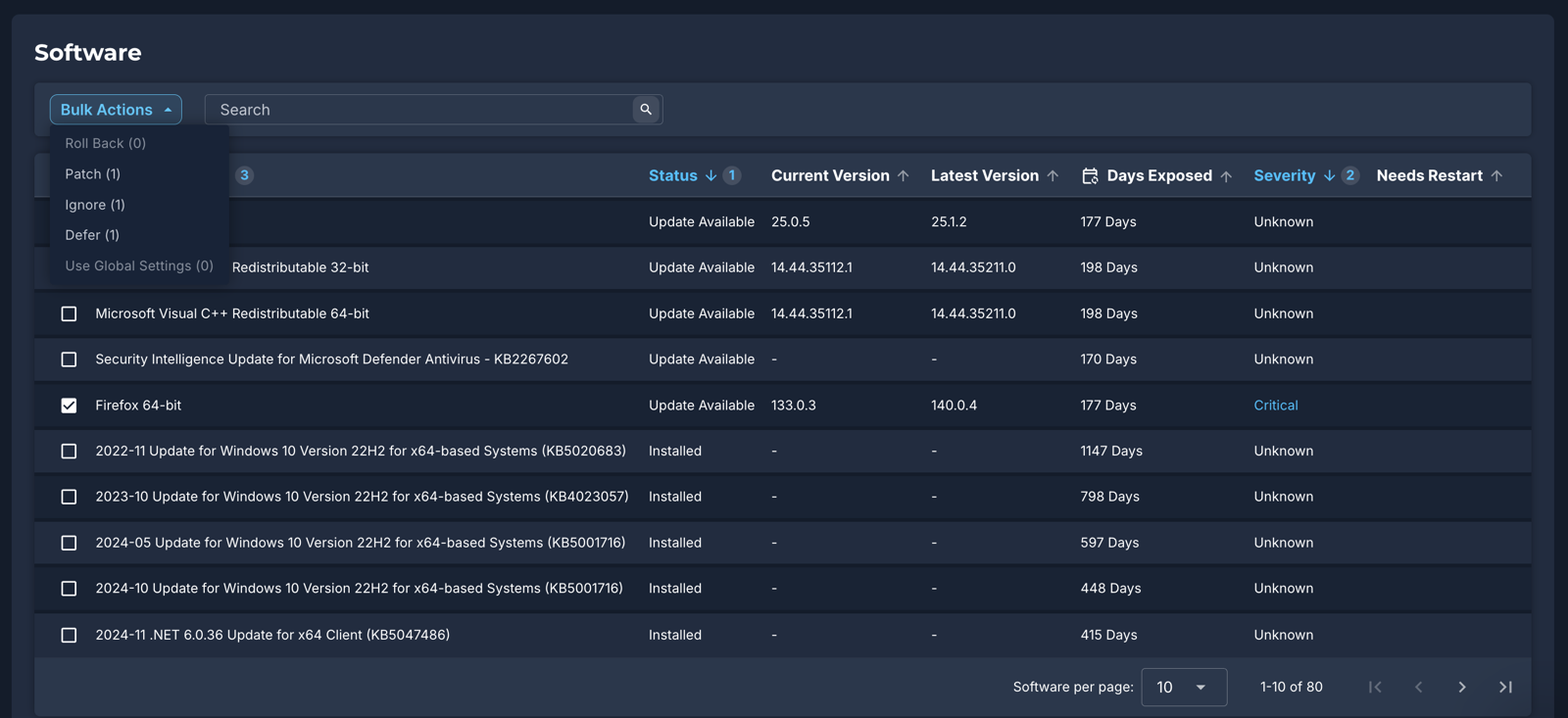
One update, start to finish. The agent scans on a cycle and reports missing updates to the cloud console. A patch policy decides what qualifies. The types are Patch All, Severity (by CVE score, critical to low), Patch Only, Patch All Except, Manual Approval and Advanced, which can filter by patch age. With Manual Approval an admin approves packages under Manage Approvals, and they install at the policy's next scheduled run in the device's local time. Policies aren't inherited down the group hierarchy, so each one is assigned to every group it should cover, and a pilot group simply gets its own policy. A device that missed its window can run the policy at its next check-in if you tick the missed-window option. If a patch needs a restart and Automatic Restart is on, logged-in users get a notice with about 15 minutes to respond, with deferrals if you enable them. A bad Windows KB can be rolled back from Device Details or with a worklet.
Coverage. Windows 10 and 11 and Server 2012 R2 through 2025; macOS 14 and newer; many RPM and DEB-based Linux distributions. Third-party patching, listed as 633+ titles on the pricing page and 580 on an older cross-OS page, is in the Automate plans, not in the $1 Patch OS plan. Automox's own maintenance policy says the platform may be down for about four hours on the Thursday after Patch Tuesday, from 8 PM Eastern, so don't schedule urgent work for that window.
- you want OS patching across Windows, macOS and Linux at a published price per endpoint
- you have remote machines and want no VPN or on-premises server
- you need third-party patching, software deployment or remote control without a sales call
- you want built-in percentage rollouts rather than building them from policies and groups
How it works in practice
What that team misses. The docs don't describe built-in staged rings or percentage rollouts, only separate policies per group. Rollback is limited to Windows KB patches. Third-party patching, software deployment and remote control sit in quote-only plans, so the $1 headline covers OS patching on three platforms and nothing else. G2 shows 4.5 of 5 from 329 reviews (read October 30, 2026). Pricing says annual commitment for the $1 plan, while another line on the page mentions pay-as-you-go, so confirm the billing term.
- Starting price
- Patch OS $1 per endpoint per month with annual commitment; Automate Essentials and Enterprise quote only
- Entry plan
- Patch OS, OS patching only
- Third-party titles
- 633+ on Essentials and above (quote only)
- Rollback
- Windows KB patches only
- Trial
- Free trial, length not stated
ManageEngine Patch Manager Plus
Pricing, approval, deployment policy and reboot docs read October 30, 2026
ManageEngine's patch-only product, sold as cloud or on premises with a price table by computer count and the most explicit approval and restart options in this group.
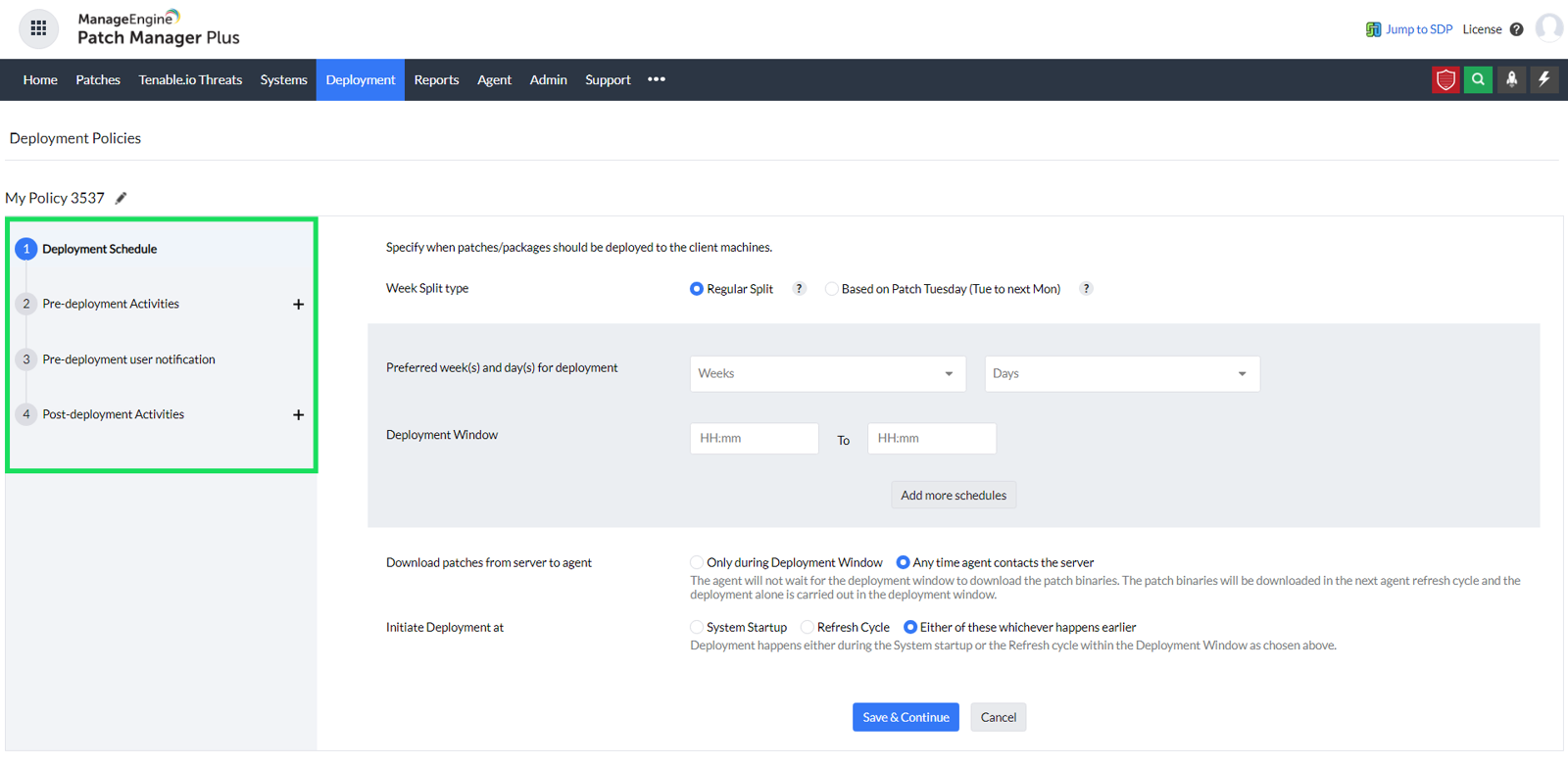
One update, start to finish. Agents scan endpoints for missing patches and report to the server, which can be your own or ManageEngine's cloud. Approval has three modes. The default approves new patches automatically. Test and Approve marks new patches Not Approved, sends them to a static test group, and approves a patch only if it installs on at least one test machine and fails on none. The third is manual approval, patch by patch. An Automated Patch Deployment task then applies approved patches under a deployment policy, which sets windows with a start and end time, specific days or weeks, or a schedule around Patch Tuesday, plus user notification and pre-download of patch files. After the install, the policy forces the restart or shutdown, lets users postpone or skips it, which is what you want on servers. Machines that missed the window can be forced after a grace-period date. Results show up in patch and compliance reports, and you can decline a patch or uninstall it where uninstall data exists.
Coverage. Windows, macOS and Linux, with 1100+ third-party applications listed on the product page. Wake-on-LAN can power on machines inside your network before a deployment.
- you want a patch-only product with deployment windows, test groups and reboot rules, and a published price per computer count
- you prefer to host the server yourself or already run other ManageEngine tools
- you manage several client organizations, because the approval setting is global
- you want remote access and ticketing in the same console
How it works in practice
What that team misses. One caveat is worth knowing before you rely on approval: it controls this product's deployment only, and it doesn't stop Windows Update from installing updates on its own, so you need a policy that turns that off. Test and Approve is listed as an Enterprise edition feature, test groups must be static, and the approval setting is global, so it can't be scoped to a single client. Remote access and ticketing are separate ManageEngine products. G2 shows 4.5 of 5 from 201 reviews (read October 30, 2026).
- Starting price
- Cloud Professional from $345 per year for 50 computers ($34.50 per month); on premises from $245 per year; Enterprise from $445 per year in the cloud for 50 computers
- Third-party apps
- 1100+ applications
- Approval modes
- Automatic, test and approve, manual
- Reboot options
- Force, postpone or skip
- Hosting
- Cloud or on premises
PDQ Connect
Pricing page and PDQ's Windows updates article read October 30, 2026; help center unreadable
The hands-on option: a clean view of missing Windows updates, a per-device yearly price, and no approval layer between you and the deployment button.
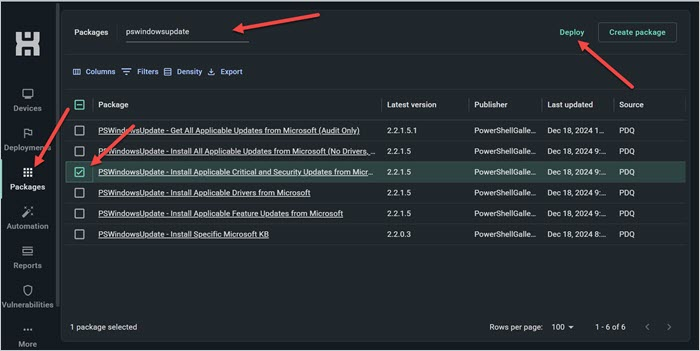
One update, start to finish. The Windows updates tab lists every applicable KB across the tenant with a status of Not Installed, In Progress, Pending Reboot, Failed or Installed. You select a KB, see which devices need it and deploy it to one or more of them, and each KB runs as its own deployment. We found no separate approval stage in the pages we read; that's the biggest difference from WSUS, which has group approvals. For third-party apps, the Package Library holds hundreds of popular titles, and automations can install updates when a new version appears, on a schedule, when a new CVE is detected or when a device joins a group. The agent pulls from the cloud, so devices need internet access, and air-gapped endpoints aren't supported. After the install the device shows Pending Reboot. The pages we read describe no reboot settings, so check how restarts are handled in your trial.
Coverage. Windows and macOS. PDQ sells two products: Connect is the cloud one, and PDQ Deploy & Inventory is the older on-premises product, still sold at $1,950 per admin per year.
- you are a Windows-first team that wants to push KBs and third-party installers yourself for a simple per-device yearly price
- your devices are online and remote, and you want no VPN, Active Directory or on-premises server
- you need a formal approval workflow and test rings, which the pages we read don't describe
- you manage Linux or air-gapped endpoints
How it works in practice
What that team misses. No documented approval workflow or test rings, no documented rollback and no Linux. PDQ Connect starts at 100 devices. We didn't map which of the three plans unlocks which feature, because the help center refused our reads. G2 shows 4.7 of 5 from 725 reviews for PDQ's listing, which covers PDQ's products together (read October 30, 2026).
- Starting price
- Basic $12, Plus $18, Premium $28 per device per year, billed annually with a 100-device minimum; 14-day trial for up to 250 devices
- OS
- Windows and macOS
- Minimum
- 100 devices
- On-premises sibling
- PDQ Deploy & Inventory, $1,950 per admin per year
- Approval stage
- None documented
RMM suites with patching
An RMM puts patching beside monitoring, scripting and remote access. You get fewer tools to run, but the patch controls are only as good as the policy model, and the setup work is real. Both tools here suit MSPs and in-house teams that also want to fix tickets from the same console.
NinjaOne
Pricing page and OS patch guide read October 30, 2026
An RMM with the most detailed patch policy model in this list, priced per device on a quote and rated 4.7 on G2.
One update, start to finish. A scan schedule detects missing Windows updates; the default is 8 AM local device time. Each patch category is set to Approve, Manual or Reject, with overrides per patch. Security updates follow Microsoft's severity levels. NinjaOne recommends applying Critical and Important updates right away, Important updates can auto-approve after a set number of days, and optional updates are usually rejected. Patch Intelligence AI can override an approval when a patch has a known issue. The install schedule is separate, defaulting to 5 PM local time, at least an hour after the scan, with stagger options to avoid every machine installing at once. Then the reboot setting applies. A logged-in user can be prompted until they accept, with an optional forced reboot after a set number of prompts, or notified and then rebooted, or rebooted automatically. With no user logged in, the device can reboot at once or retry. A pending reboot blocks further scans and installs on that device until it restarts. The dashboard lists patches as Pending, Approved, Rejected, Installed or Failed and lets you drill into devices.
Coverage. Windows, macOS and Linux. The marketing page quotes two different third-party catalog sizes (8,800+ and 6,000+), so ask the sales team for the list instead of trusting either number. The Windows guide doesn't support Vista and many Windows 7 and Server 2008 versions.
- you want patching inside an RMM, with approval policies per patch category and detailed reboot settings
- you're an MSP or a team that also needs monitoring, remote access and documentation links in one console
- you want a published price per plan before talking to sales
- you need console-based rollback for bad patches
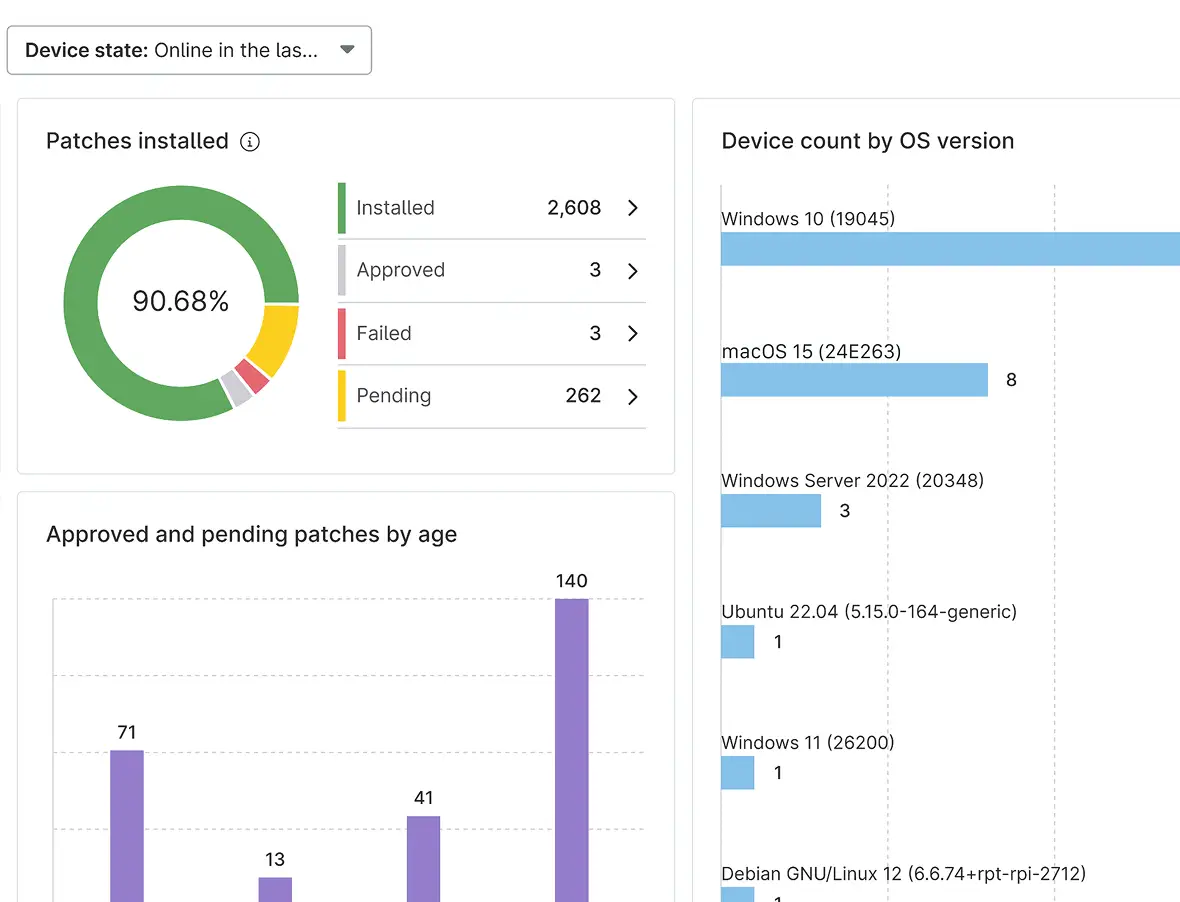
How it works in practice
What that team misses. Rejecting a known-bad patch stops its deployment, but rejecting one patch ID doesn't block newer patches for the same software, and we found no documented uninstall. The pricing page gives a range of $1.50 to $3.75 per device per month, falling with volume (the $3.75 rate applies to 50 devices or fewer), but no plan names or patch-specific price, and a 14-day trial. G2 shows 4.7 of 5 from 5,715 reviews (read October 30, 2026).
- Starting price
- Quote based, per device: about $3.75 per device per month at 50 devices or fewer, falling to $1.50 at 10,000; no named plans and no patch-specific price; 14-day trial
- Default schedule
- Scan 8 AM, update 5 PM local time
- Third-party catalog
- Page quotes 8,800+ and 6,000+; ask for the list
- Rollback
- Not documented in pages read
- OS
- Windows, macOS, Linux
Atera
Pricing read October 22, 2026; best-practices article read October 30, 2026 (German edition)
RMM and help desk in one platform, priced per technician with unlimited endpoints, which favors small teams with many devices.
One update, start to finish. Patching runs through IT automation profiles. Atera's own guidance is to split them: one profile each for Windows workstations, Windows servers and Macs, with heavier tasks in separate profiles scheduled an hour to an hour and a half apart. The recommended way to handle updates that need a restart is Reboot if needed, which restarts a device only when an update requires it and lets configuration policies set the timing. Profiles don't restart devices by default, and the devices page shows a Reboot required indicator. Atera warns that devices offline when a profile runs can restart unexpectedly later, depending on the Run on offline agents setting, so run profiles outside business hours and tell people not to shut down. A Patch & Automation Feedback email arrives one hour after a run, and the feedback report can lag if offline agents finish later. Failed patches can be retried from the patch management dashboard.
Coverage. Windows and macOS. On Macs Atera uses the native Software Update and lets you approve or postpone updates for up to 30 days. Third-party updates run through WinGet and Chocolatey on Windows and Homebrew Cask on macOS, plus internal apps from a private NuGet repository, with no fixed catalog count.
- you want ticketing, remote access and patching in one tool and your team is small enough that per-technician pricing beats per-device
- you run many devices per technician and want the bill to stay flat as the fleet grows
- you want a USD price list or a free plan
- you want ring-style staged rollouts with automatic promotion
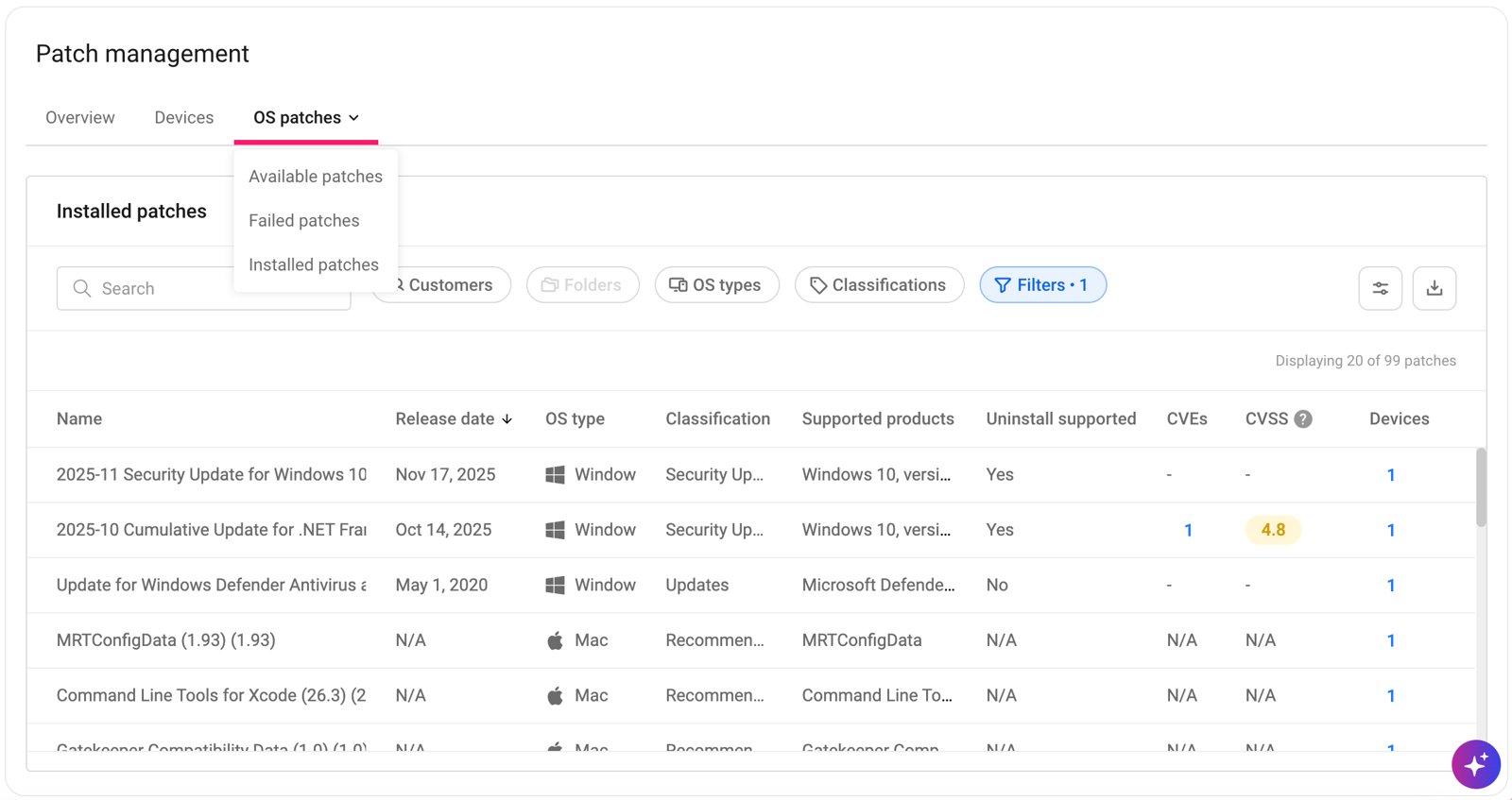
How it works in practice
What that team misses. There's no ring-style staged rollout. You build staging out of separate profiles. Detailed error-code feedback is Windows only, and restart scheduling options have limits on Server 2016 and 2019. The pricing page shows euros (Professional 149 euros per technician per month billed annually, 169 monthly) and a 30-day trial. G2 lists Atera under Remote Monitoring and Management at 4.6 of 5 from 1,287 reviews (read October 30, 2026).
- Starting price
- Professional 149 € per technician per month billed annually (169 € monthly), Expert 189 €, Master 219 €; EUR shown on the pricing page, unlimited endpoints
- Pricing unit
- Per technician, unlimited endpoints
- Reboot
- Reboot if needed, timed by configuration policy
- Mac updates
- Approve or postpone up to 30 days
- Third-party
- WinGet, Chocolatey, Homebrew Cask
Microsoft-stack tools
If your devices already enroll in Intune or Configuration Manager, you may not need another agent. The question is what the Microsoft tooling leaves undone, and Patch My PC exists to fill the biggest gap.
Microsoft Intune
Microsoft Learn update, Autopatch and app management pages read October 30, 2026
Included in Microsoft 365 Business Premium and E3, so many small teams already own the Windows patching controls and have never turned them on.
One update, start to finish. You assign a Windows update ring policy to an Entra group. The ring sets a quality update deferral from 0 to 30 days and feature update deferral from 0 to 365 days, deadlines of 2 to 30 days, and a grace period of 0 to 7 days before a forced restart. Active hours block automatic restarts, and the default scheduled install is 3 AM with a 15-minute restart countdown if you set nothing else. You can pause a ring for up to 35 days and uninstall the latest quality or feature update. When a fix is urgent, an expedite policy overrides the deferral and pushes the quality update immediately, which needs Plan 1 plus a Windows license with the Autopatch entitlement. Eligible Windows 11 devices can take hotpatch security updates that don't require a restart, shipped eight times a year. macOS 14 and newer take updates through declarative device management, with a target version, a deadline and a countdown before the forced restart.
Coverage. Third-party apps are a separate story. The Enterprise App Management add-on is $2 per user per month, covers Windows only, auto-updates only apps assigned as Required, and has no rollback or rollout rings. Microsoft's stated objective is that 80 to 90 percent of catalog app updates appear within 24 hours.
- you already pay for Microsoft 365 Business Premium or E3 and want Windows updates managed with deferrals, deadlines and rollback
- you want Entra-joined devices patched without another agent
- you need broad third-party application patching without paying for the add-on or a partner tool
- you manage Linux servers
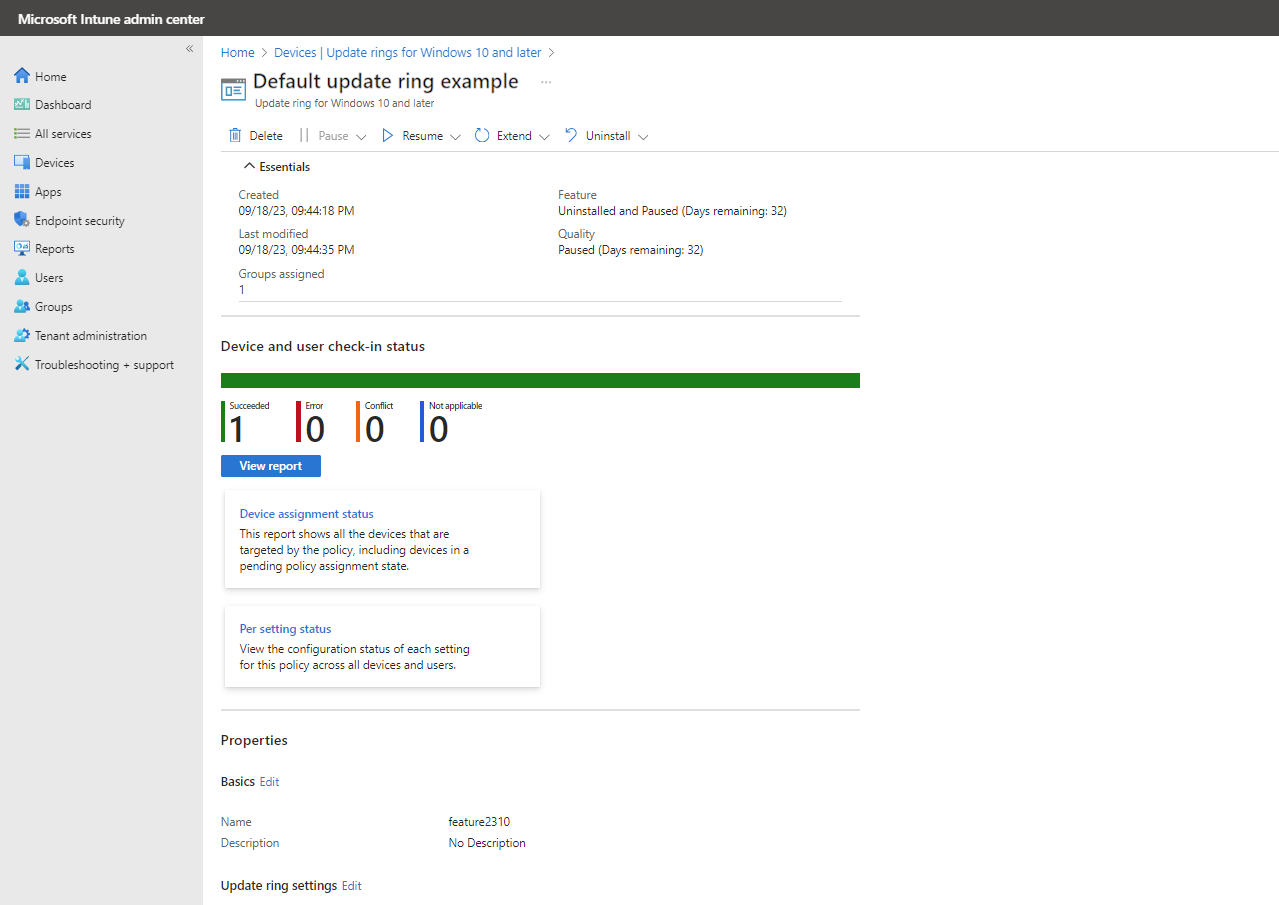
How it works in practice
What that team misses. Linux appears as an enrolled platform, but we found no native Linux OS patching in the pages we read. Intune is licensed per user at $8 per month, so a small team with many shared devices can pay for more users than it has machines. Capterra shows 4.5 of 5 from 42 reviews (read October 18, 2026), and reviewers say the console is complex and changes often.
- Starting price
- $8 per user per month for Plan 1; included in Microsoft 365 Business Premium and E3; Enterprise App Management add-on $2 per user per month
- Update rings
- Quality deferral 0 to 30 days, deadline 2 to 30 days
- Pause
- Up to 35 days per ring
- App catalog
- Windows only, Enterprise App Management add-on
- WSUS
- Deprecated but still supported
Patch My PC
Pricing and application patching pages read October 30, 2026; cloud docs index only
Not a standalone patcher but the add-on most Intune and Configuration Manager admins reach for when third-party apps fall behind.
One update, start to finish. Patch My PC's team detects a new third-party release, packages and tests it, and publishes it. The vendor says updates arrive within 24 hours of the vendor's release. In Configuration Manager the update appears as a software update that an automatic deployment rule rolls out. In WSUS an automatic approval does it. In Intune it syncs as an app and is assigned to Entra groups, and update rings delay later groups so testers and early adopters go first. The Intune Management Extension on the device runs the installer, with optional pre and post scripts and prompts that ask the user to close the app. If an update fails, retained prior versions let you revert. Patch Insights and, on Premium, Advanced Insights report deployment status and unpatched systems.
Coverage. The pricing page cites a curated catalog of 3,913 products for Windows and macOS. Premium adds CVE visibility, advanced reporting and Intune update compliance, which includes Microsoft updates. Monthly Windows security updates themselves aren't what this product installs: those still come through Windows Update, WSUS or Intune.
- you run Intune, Configuration Manager or WSUS and need third-party apps patched without packaging them yourself
- you want update rings and a revert option for application updates
- you don't use a Microsoft management tool
- you manage a few hundred devices on a small budget
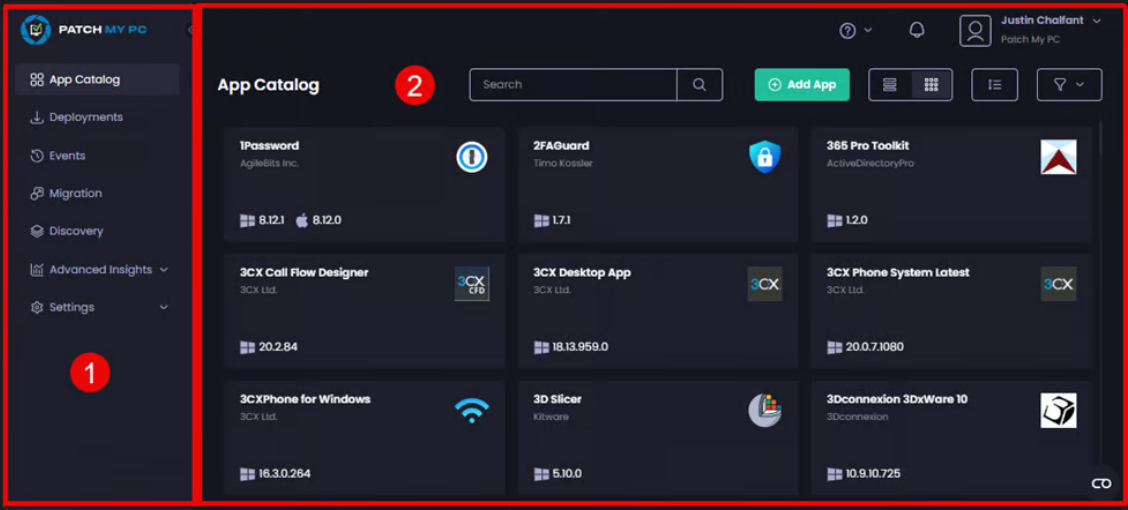
How it works in practice
What that team misses. It needs Configuration Manager, WSUS or Intune, and it's priced from a 1,000-device bundle ($3,500 per year for Plus, $5,000 for Premium), which is steep for a team of 80 machines. Custom app limits are 100 apps on Plus and 500 on Premium. We couldn't read the cloud docs beyond the index, so reboot behavior is unconfirmed. G2 shows 4.8 of 5 from 744 reviews (read October 30, 2026).
- Starting price
- Enterprise Plus from $3,500 per year and Premium from $5,000 per year, each covering up to 1,000 devices (about $3.50 and $5 per device per year)
- Catalog
- 3,913 curated products on the pricing page
- Requires
- Intune, Configuration Manager or WSUS
- Rollback
- Revert to previous app version
- Premium adds
- CVE visibility, advanced reporting, Intune update compliance
What patching costs for 100 devices
Patch management prices count different things, so a headline number misleads. This table puts 100 devices on one scale for the tools with a published price, and says what each number covers.
| Tool | Cost for 100 devices per year | What the number covers |
|---|---|---|
| Action1 | $0 | Free tier covers 200 endpoints; community support only |
| Patch Manager Plus (cloud) | $595 Professional, $845 Enterprise | One technician; extra technicians cost $195 per year each |
| PDQ Connect | $1,200 Basic, $1,800 Plus, $2,800 Premium | $12, $18 and $28 per device per year, 100-device minimum |
| Automox Patch OS | $1,200 | $1 per endpoint per month, OS patching only, annual |
| Atera | 1,788 euros per technician | Unlimited endpoints; 149 euros per month billed annually |
| Patch My PC | $3,500 Plus, $5,000 Premium | Bundle covers up to 1,000 devices; third-party apps only |
| Intune Plan 1 | $9,600 for 100 users | $8 per user per month, covers far more than patching |
| NinjaOne | Quote | $1.50 to $3.75 per device per month by volume |
A monthly patch routine for a small team
Any of these tools works better with a short routine. The tool automates the install, but someone decides what to hold back and when to widen the rollout. This sequence follows NIST's idea of maintenance groups with phased deployment, and it assumes you work from Patch Tuesday, which is November 10 next.
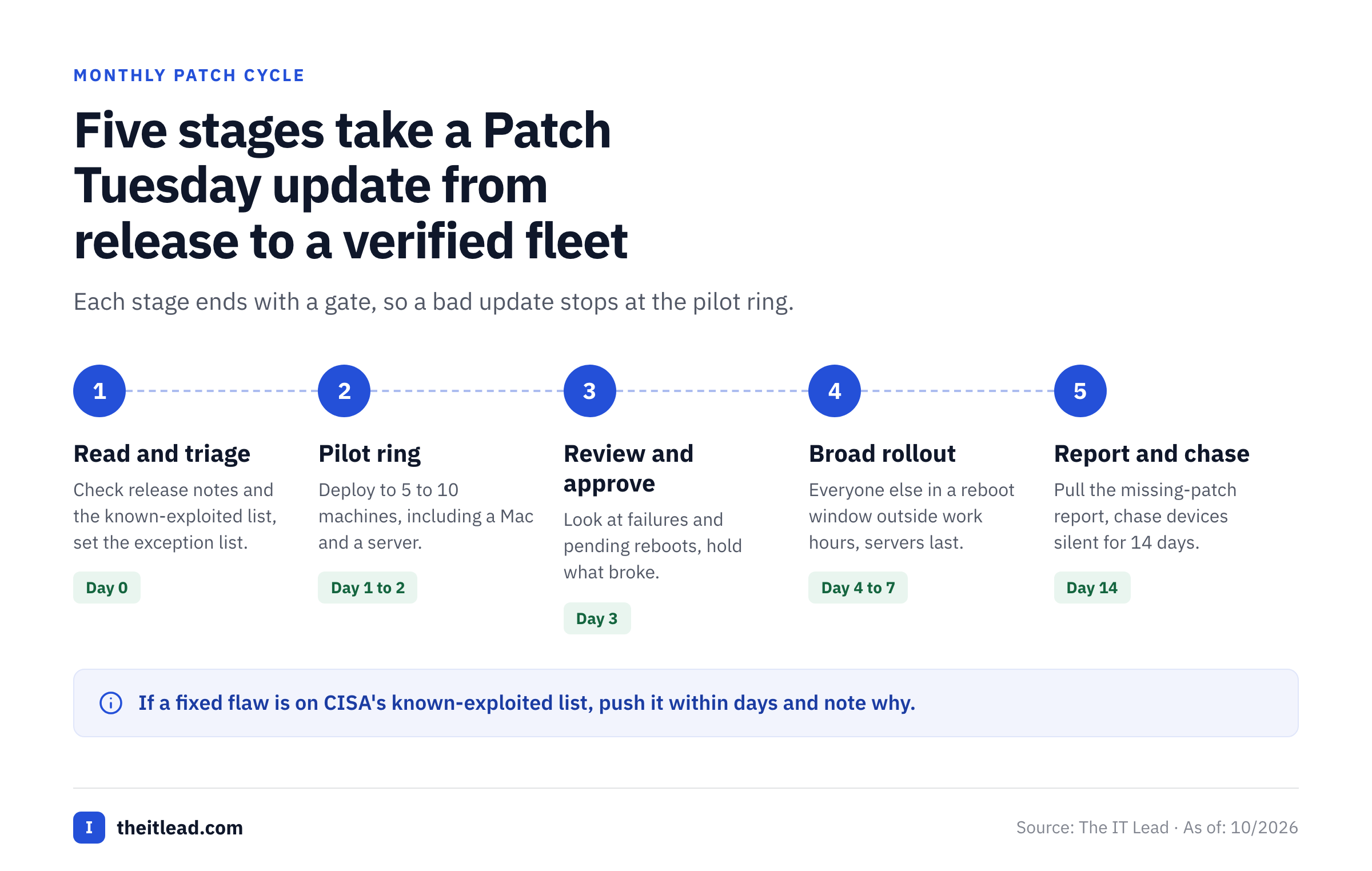
- IT adminRead the release notes and check whether any fixed flaw is on CISA's known-exploited list; mark known problem updates and set the exception list Patch Tuesday, day 0
- IT adminDeploy to a pilot ring of 5 to 10 machines, including one Mac and one server if you run any Day 1 to 2
- IT leadReview failures and pending reboots, decide what to hold, and approve the rest of the fleet Day 3
- IT adminRoll out to everyone in a reboot window outside working hours, servers last Day 4 to 7
- IT leadPull the missing-patch report, chase devices that haven't checked in for 14 days and file exceptions with an owner and a date Day 14
- IT leadIf a patched flaw is known to be exploited, skip the pilot wait and push it within days, then note why Any day
Which patch tool fits which fleet
- Microsoft 365 shop, mostly Windows laptopsIntune update rings first, then Patch My PC or the $2 add-on if third-party apps are the pain
- Up to 200 mixed computers, no budgetAction1, with community support only
- Patch-only, on premises or cloud, with test groupsManageEngine Patch Manager Plus, Enterprise edition for automated testing
- Windows-first admin who wants to push updates by handPDQ Connect
- Cloud OS patching for Windows, macOS and Linux at a published priceAutomox Patch OS
- MSP or in-house team that wants patching with monitoring and remote accessNinjaOne, or Atera if you also want tickets and pay per technician
- Intune or Configuration Manager shop with many third-party appsPatch My PC on top of what you run
Shortlist two tools and test them on ten real machines, including a laptop that's usually offline and a server with an awkward restart rule. Patch tools look the same in every demo, and the difference shows up when a laptop wakes after a week or a pending reboot blocks the next scan.
What patch tools don't answer: who owns the service accounts
A patch tool installs updates on a server, but it doesn't tell you who owns the service account that deployment job or agent runs under. These tools use powerful accounts to push software, and someone should be able to say who owns each one and why it still exists. Our service account inventory template shows what to record, and the service account audit checklist covers the review.
The IT Lead covers that question. It imports service accounts from a CSV, asks the nominated owner to confirm ownership and purpose by email, and keeps the review trail. It doesn't patch devices, rotate passwords or disable anything, and today it reads from CSV, not from live directory connections.
Patch management software FAQ
What is patch management software?
It's software that finds missing updates on computers and servers, lets you approve them, installs them in a window you control and reports which devices are current. A software patch is a small update that fixes a bug or a security flaw, such as the monthly Windows security update.
Does Microsoft Intune do patch management?
Intune does patch management for Windows and macOS. It manages Windows updates through update rings, expedite policies and Autopatch, and macOS updates through declarative device management. Third-party apps need the Enterprise App Management add-on at $2 per user per month or a partner tool such as Patch My PC.
What is the difference between patch management and vulnerability management?
Patch management installs the fixes. Vulnerability management finds and ranks the flaws, including those with no patch yet. Most small teams need both, and some patch tools import scanner results to decide what to install first.
Is WSUS still supported?
WSUS is still supported. Microsoft calls Windows Server Update Services deprecated and says it's no longer adding features, but it continues to receive security and quality updates under its product lifecycle. We found no end-of-support date. WSUS patches Microsoft products only.
What is the cheapest patch management software?
The cheapest patch management software is Action1, which is free for the first 200 endpoints with no feature limits, though support is community only. Patch Manager Plus in the cloud starts at $345 per year for 50 computers, and Automox Patch OS costs $1 per endpoint per month.