IT documentation software is where an IT team keeps the facts about its environment: assets, passwords, network layout, runbooks, backup and recovery steps and vendor contacts. This page covers that job, documentation for running IT, not API docs or customer help centers. The tools differ less in features than in how they stop the documentation from going stale, which is why each entry below says what updates the record and what stays manual.
The eight tools fall into three groups: structured IT documentation platforms (IT Glue, Hudu, NinjaOne Documentation), wikis and knowledge bases (Confluence, Notion, BookStack, Document360) and one auto-discovery tool (Docusnap). Prices range from free (BookStack, and the Confluence and Notion free plans) to quote-only. If your main problem is knowing what hardware and software you own, start with our IT asset management software comparison and come back for the documentation layer.
- IT documentation tools compared
- 8
- tools with a free plan or free license (Confluence up to 10 users, Notion Free, BookStack self-hosted)
- 3
- tools with a built-in password vault (IT Glue and Hudu)
- 2
- tools that discover assets, two of them as paid add-ons (IT Glue Network Glue, Hudu Radar) and one built in (Docusnap)
- 3
Our picks: the best IT documentation software by situation
For most small IT teams and MSPs that want structured records, Hudu is the pick, since a single $27 price per user per month includes the vault, the asset records and the knowledge base. If you already live in another platform the answer changes, so the picks below go situation by situation.
 Best flat-price IT documentationHuduOne plan at $27 per user per month billed annually, with a password vault, asset layouts and a knowledge base included and no minimum.
 Best for deep PSA and RMM syncIT GlueA large template library and long PSA and RMM integration lists, on a 36-month term with a 5 user minimum.
 Best if you already run NinjaOneNinjaOne DocumentationTemplates and fields that scripts and the API fill from the managed endpoints, with no standalone price.
 Best wiki for Jira teamsConfluenceRunbook and known-error pages linked to Jira tickets, free for up to 10 users.
 Best free self-hosted wikiBookStackBooks, chapters and pages with a built-in diagram editor and no per-user fee, if someone can host and back it up.
 Best for documentation generated from scansDocusnapAgentless scans produce inventory documents and network maps that refresh on every scan, priced in euros.
IT documentation software compared
The table follows the order of the reviews below: structured platforms first, then wikis and knowledge bases, then the scan-based tool.
| Tool | Category | Freshness mechanism | Entry price (USD unless noted) | Review rating |
|---|---|---|---|---|
| IT Glue | Structured IT documentation platform for MSPs | Techs fill flexible asset forms per client, tags link each record to configurations and passwords, and PSA and RMM syncs keep the records fed | $29 (Basic), $38 (SELECT), $44 (Enterprise) per user per month on a 36-month term, 5 user minimum, plus a one-time activation fee; discovery is a separate add-on | 4.6 (726) |
| Hudu | IT documentation platform for MSPs and internal IT | Admins define asset layouts once, techs fill them per company, and links tie assets to passwords, networks and knowledge base articles | $27 per user per month billed annually, no minimums, contracts or setup fees; 14-day trial; free unlimited portal users; optional Radar discovery add-on from $44 per month | 4.7 (373) |
| NinjaOne Documentation | Documentation module inside an RMM platform | Techs fill templates for organizations, locations and devices, and scripts or the API write field values from the managed endpoints | No standalone price published; NinjaOne lists $1.50 to $3.75 per device per month by volume, by quote, and does not say which plans include Documentation | No reviews yet |
| Confluence | Team wiki used as an IT knowledge base | Teams write runbooks and known-error pages from templates in a space, link them to Jira issues and find them through search | Free for up to 10 users; Standard $5.78 and Premium $11.16 per user per month on the monthly billing view, annual billing saves up to 17%; Enterprise by quote | 4.1 (4,371) |
 Notion Notion | General workspace used as an IT wiki | Each runbook, vendor or system is a database item with properties and a page body, found through views, filters and search | Free; Plus EUR 9.50 and Business EUR 19.50 per seat per month on the EUR view of the pricing page (USD not captured); SAML SSO from Business, audit log on Enterprise only | No reviews yet |
| BookStack | Open source self-hosted wiki | Techs write pages inside books and chapters, draw diagrams in the page editor and set permissions per shelf, book, chapter or page | Free under the MIT license, self-hosted only; optional support plans in GBP: Professional 450 per year, Enterprise 4,500 per year | No reviews yet |
 Document360 Document360 | Knowledge base software with internal and public sites | Writers draft articles in a category tree, reviewers approve them through a workflow, and readers find them through search or AI search | Quote only; the pricing page lists no plan names, prices or free tier and says cost depends on team accounts, workspaces, languages, SSO needs and AI add-ons | 4.7 (549) |
| Docusnap | Agentless IT inventory with generated documentation | An agentless scan fills the inventory, documents and network maps are generated from scan data, and every new scan refreshes them | Docusnap365 Pro EUR 199 and Business EUR 699 per month billed annually (EUR only, USD not shown), Enterprise on request; priced by users and data volume, not per device | No reviews yet |
 The IT Lead Our product The IT Lead Our product | Service account ownership reviews | Collects owner attestations for service accounts and keeps the review trail | Access code | No reviews yet |
Entry prices as published on each vendor's pricing page in October 2026. Notion and Docusnap showed euro amounts only and BookStack support plans are in pounds, so none is converted. NinjaOne's rating is for the platform, not the Documentation module. Docusnap and Notion show no rating because the review pages exposed none; BookStack has a single G2 review.
What IT documentation software does
IT documentation software stores and links the facts about an IT environment, such as assets, network layout, credentials and procedures, so any technician can find them and trust them at the moment something breaks. That is a different job from a general company wiki, because the useful questions are relational: which server runs this application, who holds the vendor contract, where is the restore procedure.
Most teams need to document the same seven things, listed here.
- Hardware and software assets need records with licenses and renewal dates.
- The network layout needs subnets, firewalls, VPNs and the diagram that shows how they connect.
- Servers, virtual machines and cloud resources need a record of who owns each one.
- Passwords and secrets belong in a vault or a secured field, not in a page.
- Backup and recovery procedures must be written so someone other than the author can run them.
- Runbooks and known errors cover the jobs and faults that repeat.
- Vendors and contacts need contract terms and support numbers.
The tools in this list split into three groups by the unit of documentation they use.
| Group | Unit of documentation | Strength | Weakness |
|---|---|---|---|
| Structured platforms (IT Glue, Hudu, NinjaOne Documentation) | Typed record with fixed fields, linked to passwords and other records | Same structure for every client or site, relationships you can query | Setup of templates, per-user cost |
| Wikis and knowledge bases (Confluence, Notion, BookStack, Document360) | Free-form page or article | Fast to start, cheap or free, good for runbooks and procedures | No typed records, nothing keeps them current by itself |
| Auto-discovery (Docusnap) | Document generated from scan data | Updates itself on every scan | Little room for free-form runbooks and passwords |
Documentation decays the moment it is written, so the useful question for each tool is what updates the record without a person remembering to. The matrix further down answers it per tool.
How we chose these tools
We picked tools by relevance to IT operations documentation, not by which pricing page loaded, and we read four sources for each: the pricing page, a feature page, a docs or help page that shows how the feature works, and a review page. Ratings and review counts are from G2 pages read on October 29, 2026, with two exceptions labeled in the entries (NinjaOne, whose rating covers the platform, and Document360, whose praise and complaint come from TrustRadius).
Six criteria shaped the order and the skip-if lines.
- The documentation model is whether the tool uses typed records, pages, articles or generated documents.
- The freshness mechanism is what updates a record without a person: discovery, a sync with your RMM or PSA, scripts, a review workflow, or nothing.
- Credentials matter, so we note whether there is a password vault or secured fields and who can see what.
- Plan gates decide which plan unlocks single sign-on, audit logs and discovery.
- Price comes with its billing basis, meaning the published figure, the billing period and any minimum or term.
- Exit means whether you can export your documentation and run it somewhere else.
No vendor paid for a place on this list, and we do not link to vendor sites.
The best IT documentation software, reviewed
Structured IT documentation platforms
The three structured platforms store typed records, which suits MSPs and internal teams with many sites, clients or similar systems that should be documented the same way.
IT Glue
Best for deep PSA and RMM sync
IT Glue is the structured platform with a large template library and a long integration list: a record for a client's Active Directory, backup or LAN is a form you fill in once and link to the passwords and devices it involves.
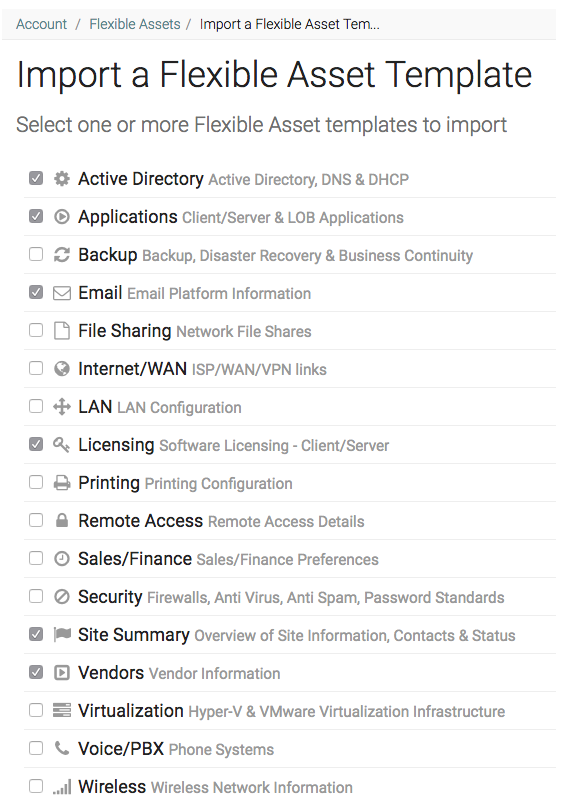
Documentation is split into core assets (configurations, passwords, locations, contacts, checklists, domain and SSL trackers) and flexible assets, which are admin-built forms with 10 field types. You can import a flexible asset type from the template library (Site Summary, Active Directory, Email, Vendors, LAN, Backup and more) or build one from scratch, though creating types needs a Manager or Administrator role. A technician documents a server by filling the matching form for the client and adding a tag field that links it to the configuration, so the two records show each other under Related Items. Long-form runbooks and SOPs live in Documents, which are indexed for search and can be linked to assets.
What keeps records current is the sync with your PSA and RMM: IT Glue lists ConnectWise Manage, Autotask PSA, Kaseya BMS, ServiceNow and HaloPSA on the PSA side, and Kaseya VSA, ConnectWise Automate, NinjaOne, N-able N-central, Datto RMM, Atera and Syncro on the RMM side. Discovery of the network and automated password rotation for Active Directory, Entra ID and Microsoft 365 accounts come from the paid Network Glue add-on. Runbooks and Documents stay manual.
- you run an MSP or a multi-site IT operation and want ready-made templates for AD, email, backup and LAN records linked to passwords and PSA or RMM data
- you want SAML SSO, MFA and a password audit trail in a product built for client documentation
- you want a short contract, because the listed prices assume a 36-month term and a one-time activation fee that cannot be waived
- you are a team of fewer than 5 people, because tiers start at 5 users and the 1 to 4 user options cost $49 to $102 per user
- Users like
- ease of use, document management and integrations, per G2 theme tags
- Users dislike
- slow performance, missing features and search limits, per G2 theme tags
- Source: G2, 726 reviews
Price, plan gates and reviews
IT Glue lists $29 (Basic), $38 (SELECT) and $44 (Enterprise) per user per month, based on a 36-month term and billed monthly by card, with a 5 user minimum and a one-time activation fee that cannot be waived. Teams of 1 to 4 users have Enterprise options at $49 to $102 per user. Network Glue costs $453 per month and needs an active IT Glue subscription. The pricing page does not say which features belong to Basic, SELECT or Enterprise, so ask for the split in writing.
On G2, IT Glue holds 4.6 out of 5 from 726 reviews. The theme tags that recur are ease of use, document management and integrations on the positive side, and slow performance, missing features, search functionality and a learning curve on the negative side. The security page lists enforced MFA, SAML SSO, an audit trail entry whenever a password is viewed and AES-256 encryption.
- Starting price
- $29 (Basic), $38 (SELECT), $44 (Enterprise) per user per month on a 36-month term, 5 user minimum, plus a one-time activation fee; discovery is a separate add-on
- Password manager
- Built in as a core asset
- Auto-discovery
- Network Glue add-on, $453 per month
- Free plan
- No
- Documentation model
- Typed records plus Documents
- Freshness
- PSA and RMM sync; discovery with Network Glue add-on
- SSO
- SAML (plan gating not stated)
Hudu
Best flat-price IT documentation
Hudu is the structured platform with the simplest buying decision: one plan, one published price and a password vault, asset records, IPAM and a knowledge base all included.
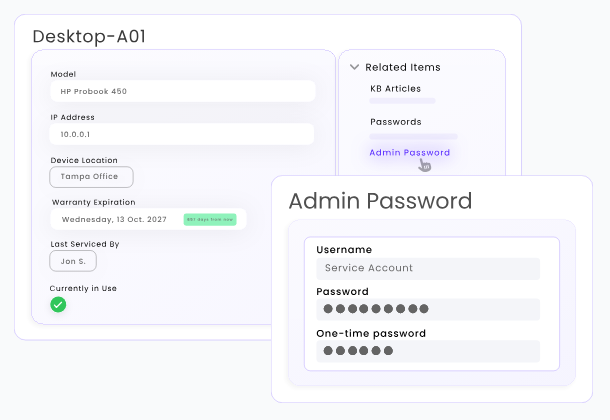
Admins build asset layouts with a drag-and-drop form builder that validates fields, so every company in the account follows the same structure, and a Gold Standard flag marks the best example of a layout. A technician documents a server by creating an asset from the layout and linking it to its credentials, network configuration and company. Passwords sit in a built-in vault next to the asset, with role-based access, one-time passwords, one-time sharing links and an access history. Step-by-step runbooks go into the knowledge base, and IPAM and rack management cover the network layout.
Freshness comes from integrations with ConnectWise, Datto, NinjaOne and Meraki, which import devices and clients automatically, and from the Radar network discovery add-on. Hudu lists more than 60 integrations in total but the full list could not be read, so check yours before you commit. Knowledge base articles stay manual.
- you want one flat per-user price with no minimum, contract or setup fee and the option to self-host
- you want client portal users for free and a password vault next to the asset records
- you need a long-established integration catalog, because G2 negative themes include poor integration and the full integration list could not be read
- you need Entra SSO without Entra ID Premium, which Hudu's SSO guide lists as required
- Users like
- ease of use, easy setup and simplicity, per G2 theme tags
- Users dislike
- missing features, UX and integration issues, per G2 theme tags
- Source: G2, 373 reviews
Price, plan gates and reviews
Hudu costs $27 per user per month billed annually, with no minimums, contracts or setup fees and a 14-day trial without a card. Portal users, who are your clients, are free and unlimited, and Hudu lists unlimited companies, assets and storage. Radar discovery is an add-on priced by collectors: $44 per month for 5 ($529 per year), $89 for 25, $269 for 150 and $449 for 500. Entra SSO needs the Super-admin role in Hudu and Entra ID Premium on the Microsoft side.
On G2, Hudu holds 4.7 out of 5 from 373 reviews. Positive theme tags are ease of use, easy setup and simplicity, and negative tags include missing features, user experience and integration issues. Hudu lists SOC 2 Type II and ISO 27001 on its pricing page.
- Starting price
- $27 per user per month billed annually, no minimums, contracts or setup fees; 14-day trial; free unlimited portal users; optional Radar discovery add-on from $44 per month
- Password manager
- Built in
- Auto-discovery
- Radar add-on, from $44 per month
- Free plan
- No, 14-day trial
- Documentation model
- Typed records plus knowledge base
- Freshness
- Device and client imports; Radar discovery add-on
- Deployment
- Cloud or self-hosted
NinjaOne Documentation
Best if you already run NinjaOne
NinjaOne Documentation is not bought on its own: it is an app inside the NinjaOne console, which makes it the natural choice for teams that already manage their endpoints there.
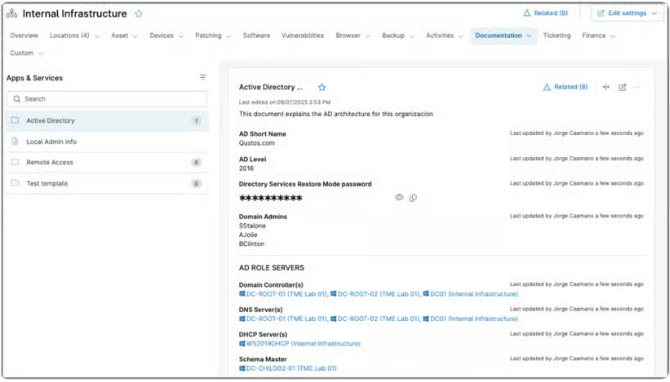
An admin enables the Documentation app, imports default templates or builds custom ones with required fields and tooltips, and then technicians pick a template under an organization (a server runbook or a network record, for example) and fill in the fields. Documents link to organizations, locations and devices, and files up to 20 MB can be attached. Credentials live in secure fields protected by MFA.
The freshness mechanism is the platform itself: scripts, the ninjarmm-cli and the public API can read and write documentation fields, so values from managed devices can fill or update a document without a person typing them. Checklists, shareable public links with an access history and a per-organization runbook export are also included. Free-text fields remain manual, and SSO and a documentation-specific audit log were not found in the sources read.
- you already run NinjaOne for endpoint management and want runbooks and device records next to the endpoints they describe
- you want fields that scripts and the public API keep current from managed devices
- you do not use NinjaOne for endpoint management, because Documentation is a module of that platform and has no standalone price
- you need a confirmed plan list, because the pricing page does not say which plans include Documentation
Price, plan gates and reviews
NinjaOne publishes no price for Documentation. The pricing page lists a per-device range from $1.50 to $3.75 per month depending on volume, region and product, by quote, with monthly or annual payment and a 14-day trial, and it does not say which plans include Documentation. Treat it as part of a platform purchase, not a documentation line item.
There is no G2 page for the Documentation module. The NinjaOne platform holds 4.7 out of 5 from 5,682 G2 reviews, but that rating covers endpoint management, and the review themes did not load, so no strength or complaint is quoted here.
- Starting price
- No standalone price published; NinjaOne lists $1.50 to $3.75 per device per month by volume, by quote, and does not say which plans include Documentation
- Password storage
- Secure fields protected by MFA
- Standalone price
- None published
- Free trial
- 14 days
- Documentation model
- Templates with typed fields
- Freshness
- Scripts, CLI and API write fields from endpoints
Wikis and knowledge bases
Confluence, Notion, BookStack and Document360 store pages and articles. Runbooks, procedures and policies fit them well, and they are cheaper or free, but they hold no typed records and update nothing by themselves.
Confluence
Best wiki for Jira teams
Confluence is the wiki to choose when your tickets already live in Jira or Jira Service Management, because runbooks and known-error pages can sit next to the issues that use them.
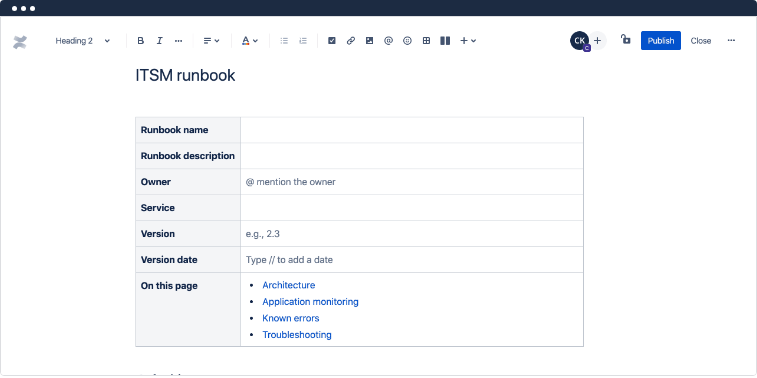
An IT team creates a space such as Infrastructure and builds pages in a page tree, usually starting from a template. The ITSM and DevOps runbook templates cover architecture, applications, known errors and troubleshooting steps. Network diagrams go in as images or from a diagramming app, and vendor lists and asset tables go in databases or tables. Pages have version history and inline comments, and live Jira issue tables can be embedded in a page.
Nothing in Confluence updates a page by itself, except those embedded Jira tables, so freshness depends on page owners and review habits. G2 reviewers report outdated drafts surfacing in search and poor search relevance, which is the documentation-decay problem in practice. No password vault was found, so credentials belong in a separate manager. If your service desk runs on Jira, our IT service management software comparison shows how the two products fit together.
- your IT team already works in Jira or Jira Service Management and wants runbooks and known errors linked to tickets
- you want a low-cost general wiki, with a free plan for up to 10 users
- you need typed asset records, linked passwords and per-client structure, because Confluence pages are free-form and no password vault was found
- you depend on search to find the current runbook, because G2 reviewers report outdated drafts surfacing and poor search relevance
- Users like
- ease of use, team collaboration and organization, per G2 summary
- Users dislike
- slow performance, unintuitive page management and a learning curve, per G2 summary
- Source: G2, 4,371 reviews
Price, plan gates and reviews
Confluence is free for up to 10 users with 2 GB of storage. Standard is $5.78 and Premium $11.16 per user per month on the monthly billing view of Atlassian's US pricing page, and annual billing saves up to 17%. Enterprise is by quote and billed annually. Single sign-on and SCIM require an Atlassian Guard subscription on the Free, Standard and Premium plans and are included in Enterprise. Rovo AI search is listed from Standard.
On G2, Confluence holds 4.1 out of 5 from 4,371 reviews. Reviewers praise ease of use, team collaboration and organization, and complain about slow performance, unintuitive page management and a learning curve.
- Starting price
- Free for up to 10 users; Standard $5.78 and Premium $11.16 per user per month on the monthly billing view, annual billing saves up to 17%; Enterprise by quote
- Password manager
- Not found
- SSO and SCIM
- Atlassian Guard subscription on Free, Standard, Premium
- Free plan
- Yes, up to 10 users
- Documentation model
- Pages in spaces
- Freshness
- Manual; embedded Jira tables stay live
Notion
Best for teams already in Notion
Notion works as an IT wiki when you treat every runbook, vendor and system as a database item with properties, but it is a general workspace, not an IT documentation product.
Each runbook is a page inside a database with properties such as owner, system, status and review date, and its body holds the steps. Views (table, board, calendar, list, gallery) and filters let people find items, and a linked view can show the same list on another page. Permissions apply at page, teamspace and database level, and locked views protect the structure while letting people edit data. The review date and owner properties are the closest thing to a freshness mechanism: you can filter for runbooks past their date, but someone has to set and act on them.
Notion does not discover assets or draw network diagrams, and no password vault was found, so passwords and diagrams live in other tools and are embedded or linked. Page history keeps 7 days on Free, 30 on Plus and 90 on Business.
- your company already uses Notion and a small IT team wants runbooks, vendor lists and asset tables in the same workspace
- you want database views and properties such as owner, system and review date on every runbook
- you need an audit log, because it is Enterprise only, or SCIM provisioning without an enterprise contract
- you need auto-discovery, network diagrams or a password vault, none of which were found
Price, plan gates and reviews
Notion has a Free plan. The pricing page showed Plus at €9.50 and Business at €19.50 per seat per month in the euro view we got, with up to 20% off for yearly billing; we did not capture dollar amounts and do not convert. SAML SSO starts on Business, and the audit log and SCIM provisioning are Enterprise only, so a team that needs an audit trail has to buy the enterprise contract.
The G2 page for Notion exposed no rating or review text when we read it, so no rating is shown.
- Starting price
- Free; Plus EUR 9.50 and Business EUR 19.50 per seat per month on the EUR view of the pricing page (USD not captured); SAML SSO from Business, audit log on Enterprise only
- SAML SSO
- Business and above
- Audit log
- Enterprise only
- Auto-discovery
- No
- Documentation model
- Database items with properties
- Freshness
- Manual; review-date property you filter on
BookStack
Best free self-hosted wiki
BookStack is the free option that still feels like a product: a self-hosted wiki with books, chapters and pages, a diagram editor inside the page editor and per-item permissions, at no per-user cost.
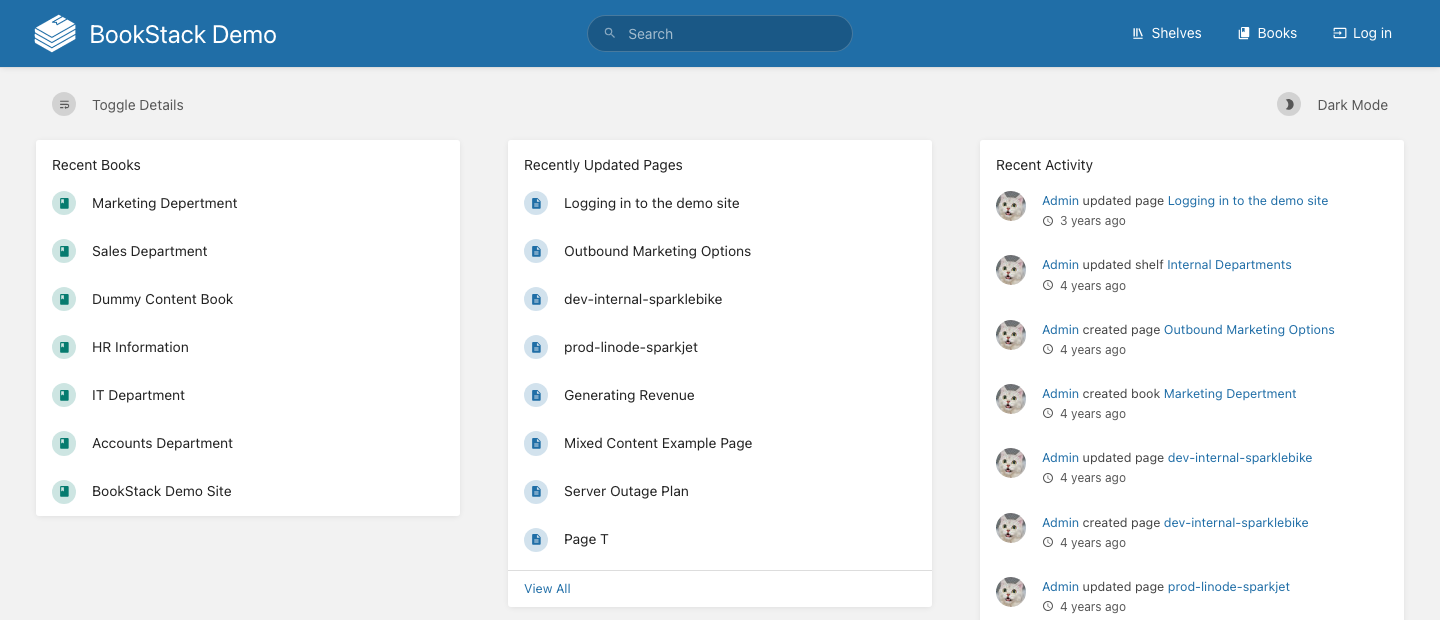
Content is organized as shelves, books, chapters and pages. A technician writes a server runbook as a page in a book, in a WYSIWYG or Markdown editor, and draws the network diagram directly in the page with the built-in diagrams.net editor. Pages keep revisions, any paragraph can be linked, and search covers all books or one. Permissions are set by role with overrides on shelves, books, chapters and pages, and sign-in works through OIDC, SAML2 or LDAP with group sync. The release notes describe an audit log with date and activity filters.
Everything is manual, and so is the operations side: you host it (PHP, Laravel and MySQL), and backups are a mysqldump of the database plus the .env, uploads and themes folders. Keep the APP_KEY when you restore, or multi-factor authentication can break. Passwords and vendor contacts would live as page text, so pair it with a password manager.
- you have a Linux admin and want a free wiki for runbooks and network diagrams with no per-user fees
- you want per-book or per-page permissions and SSO through LDAP, SAML2 or OIDC without a vendor contract
- you want a vendor-hosted service, because the project only supports self-hosting and its listed hosting sponsors are not vetted by the project
- you need typed asset records, a password vault or PSA and RMM sync, none of which were found
Price, plan gates and reviews
The software is free under the MIT license and you pay only for your own server. Optional support plans are billed annually in pounds, excluding VAT: Professional £450 and Enterprise £4,500 per year, with free community support on the Community tier. The project lists third-party hosting sponsors but says it does not test or vet them.
BookStack has a single G2 review, which says nothing useful, so we use another signal: the BookStackApp repository on GitHub had about 19,100 stars and a push on October 29, 2026.
- Starting price
- Free under the MIT license, self-hosted only; optional support plans in GBP: Professional 450 per year, Enterprise 4,500 per year
- License
- MIT, free
- Hosting
- Self-hosted only
- Backups
- Manual, you run mysqldump and copy folders
- Documentation model
- Pages in books and chapters
- Freshness
- Manual; revisions per page
Document360
Best for a reviewed knowledge base
Document360 is knowledge base software, so it fits runbooks and procedures written as reviewed articles, and the readers can be your IT team, the whole company or customers.
A technician writes an article in a category tree using a WYSIWYG or Markdown editor, with snippets and variables that keep repeated details such as hostnames in one place. Editing a published article creates an unpublished draft, and the old version goes into revision history where versions can be compared or copied back. A workflow routes each article through writers, editors and reviewers by role, which gives written content a built-in review process. Readers find articles through search or the AI search.
It holds free-form articles only: the sources read show no typed asset records, no password vault and no discovery. Sign-in works through SAML 2.0, OpenID Connect or JWT, and SCIM provisioning works with Okta and Entra ID, though not with Google as the identity provider.
- you want a polished internal or public help center with review workflows and AI search for runbooks written as articles
- your security team requires SAML or OpenID sign-in and SCIM provisioning through Okta or Entra ID
- you need linked asset, configuration, password or network records, because nothing read shows those structured objects
- you need a published per-seat price to budget, because pricing is quote only
- Users like
- easy article creation, role-based access, versioning and support, per TrustRadius reviewers (14 reviews)
- Users dislike
- Word import cleanup, limited multi-language support, no mobile app and cost, per TrustRadius reviewers (14 reviews)
- Source: G2, 549 reviews
Price, plan gates and reviews
Document360 publishes no plan names or prices. The pricing page says the quote depends on team accounts (editors and reviewers), workspaces, languages, SSO and security needs, whether the knowledge base is public, private or mixed, and AI usage, and the AI chatbot and AI Premium Suite items are add-ons.
On G2, Document360 holds 4.7 out of 5 from 549 reviews, but the page showed no review text. TrustRadius, read the same day, gives 9.1 out of 10 from 14 reviews: reviewers praise easy article creation, role-based access, versioning and support, and complain about Word import cleanup, limited multi-language support, no mobile app and cost.
- Starting price
- Quote only; the pricing page lists no plan names, prices or free tier and says cost depends on team accounts, workspaces, languages, SSO needs and AI add-ons
- Pricing
- Quote only
- SSO
- SAML, OpenID Connect or JWT, plus SCIM
- Asset records and password vault
- Not shown in the sources read
- Documentation model
- Articles in a category tree
- Freshness
- Manual; review workflow and snippets
Auto-discovery documentation
Docusnap differs from the other seven tools because it writes the documents itself.
Docusnap
Best for documentation generated from scans
Docusnap is the tool to pick when you do not want to type the inventory at all: it scans your estate without agents and generates the documents, network maps and reports from what it finds.
An admin installs the Docusnap Enterprise Gateway on a server, defines organizations, sites, domains and platforms, and schedules agentless scans with more than 25 scan modules covering servers, clients, network devices, switches, routers and DNS. The inventory fills the Docs area, where documents populate from scan data, and network maps and topology diagrams are produced from the same results and refresh with every scan. Microsoft 365 is inventoried through an Entra ID app registration, which the in-app setup can create with a Global Administrator account. Business and above add controlled documents with approval and version history, plus ITAM, permission analysis and framework assessments such as NIS-2.
The gap is everything that is not scannable. The pages read did not describe a password vault, free-form runbooks, SSO, MFA or an audit log, so pair Docusnap with a wiki or an MSP platform for procedures and credentials. For the inventory side of the same problem, see our IT inventory software comparison.
- you need documentation that updates itself from agentless scans of a Windows and network estate, including network maps and reports
- you must document Microsoft 365 and Entra next to on-premises infrastructure
- you mainly need a password vault, free-form runbooks and a wiki, none of which were described on the pages read
- you need USD pricing, because only EUR amounts are shown and the Pro edition leaves out ITAM, permission analysis and controlled documents
Price, plan gates and reviews
Docusnap365 is priced by users and data volume, not per device. The pricing page showed euros only, with a currency toggle that showed no dollar amounts: Pro is €199 per month billed annually for 3 to 10 users, Business is €699 per month billed annually for 10 to 30 users, and Enterprise is on request. Scan refresh runs every 24 hours on Pro, 12 on Business and 6 on Enterprise. The on-premises Docusnap 15 is quote only. We do not convert to dollars.
The G2 page exposed no rating or review text and Capterra returned an access error, so no rating is shown.
- Starting price
- Docusnap365 Pro EUR 199 and Business EUR 699 per month billed annually (EUR only, USD not shown), Enterprise on request; priced by users and data volume, not per device
- Auto-discovery
- Yes, agentless, 25+ scan modules
- Currency shown
- EUR only
- Pricing basis
- By users and data volume, not per device
- Documentation model
- Generated documents and maps
- Freshness
- Scheduled agentless scans (24, 12 or 6 hours by edition)
- Password vault
- Not described
How each tool keeps documentation current
Documentation decay is the real cost of every option here, and the tools handle it in four different ways: scans, syncs with the tools you already run, scripts and API writes, or people. The table shows what refreshes a record on its own and what is left to your team.
| Tool | Unit of documentation | What updates it without a person | What stays manual |
|---|---|---|---|
| IT Glue | Typed record, Documents | PSA and RMM sync; discovery and password rotation with the Network Glue add-on | Documents and runbooks |
| Hudu | Typed record, knowledge base | Device and client imports; Radar discovery add-on | Knowledge base articles |
| NinjaOne Documentation | Template with typed fields | Scripts, CLI and API write fields from managed devices | Free-text fields |
| Confluence | Page | Embedded Jira issue tables | Everything else on the page |
| Notion | Database item | Nothing found | Everything, including review dates |
| BookStack | Page | Nothing found | Everything; you run the backups |
| Document360 | Article | Snippets and variables reuse one value across articles | Content; a review workflow routes it |
| Docusnap | Generated document | Scheduled agentless scans | Procedures and credentials |
Two patterns follow from the table. Tools that sync with an RMM or PSA are only as current as that sync, so a client without the agent installed is a blank page. And a review date on a wiki page works only if someone owns the filter that finds overdue pages. Put an owner on the review, not just on the page.
The timeline shows the same pattern for one server record, whichever tool holds it.
- EngineerCreates the server record or page from the template and links the backup job, the vendor and the application it runs Day 1
- Sync or scanFills the fields it can reach, such as operating system, IP address and last seen, if the tool has a sync, scan or script for them Daily or weekly
- EngineerUpdates the runbook and the diagram in the same sitting as any change to the server At every change
- Record ownerConfirms the record is still right on the review date, or marks it for retirement Monthly or quarterly
- IT leadReviews the list of overdue records and assigns them Monthly
What IT documentation software costs
Three things make these prices hard to compare: Document360 and NinjaOne Documentation publish no standalone price, Docusnap and Notion show euros, and IT Glue assumes a 36-month term. The calculator therefore covers only the tools with a dollar price per user.
Monthly cost as published in October 2026. Add-ons such as discovery, activation fees and SSO subscriptions are not included.
Five things raise the bill after the first number, and the pricing pages don't add them up for you.
- Contract terms matter, because IT Glue's listed prices assume a 36-month term and a one-time activation fee, so the monthly figure understates the commitment.
- Discovery add-ons cost extra: Network Glue is $453 per month on top of IT Glue and Hudu's Radar starts at $44 per month, while Docusnap includes scanning in its edition price.
- Security features are gated: Confluence needs a separate Atlassian Guard subscription for SSO and SCIM below Enterprise, Notion puts SAML on Business and the audit log on Enterprise, and Hudu's Entra SSO needs Entra ID Premium.
- Platform bundling changes the math, since NinjaOne Documentation only makes sense inside a NinjaOne purchase, so its cost is the platform's per-device price.
- Currency and hosting add uncertainty, because euro and pound pricing needs a conversion you should confirm with the vendor, and a self-hosted BookStack costs admin hours for updates and backups.
What to document in the first 30 days
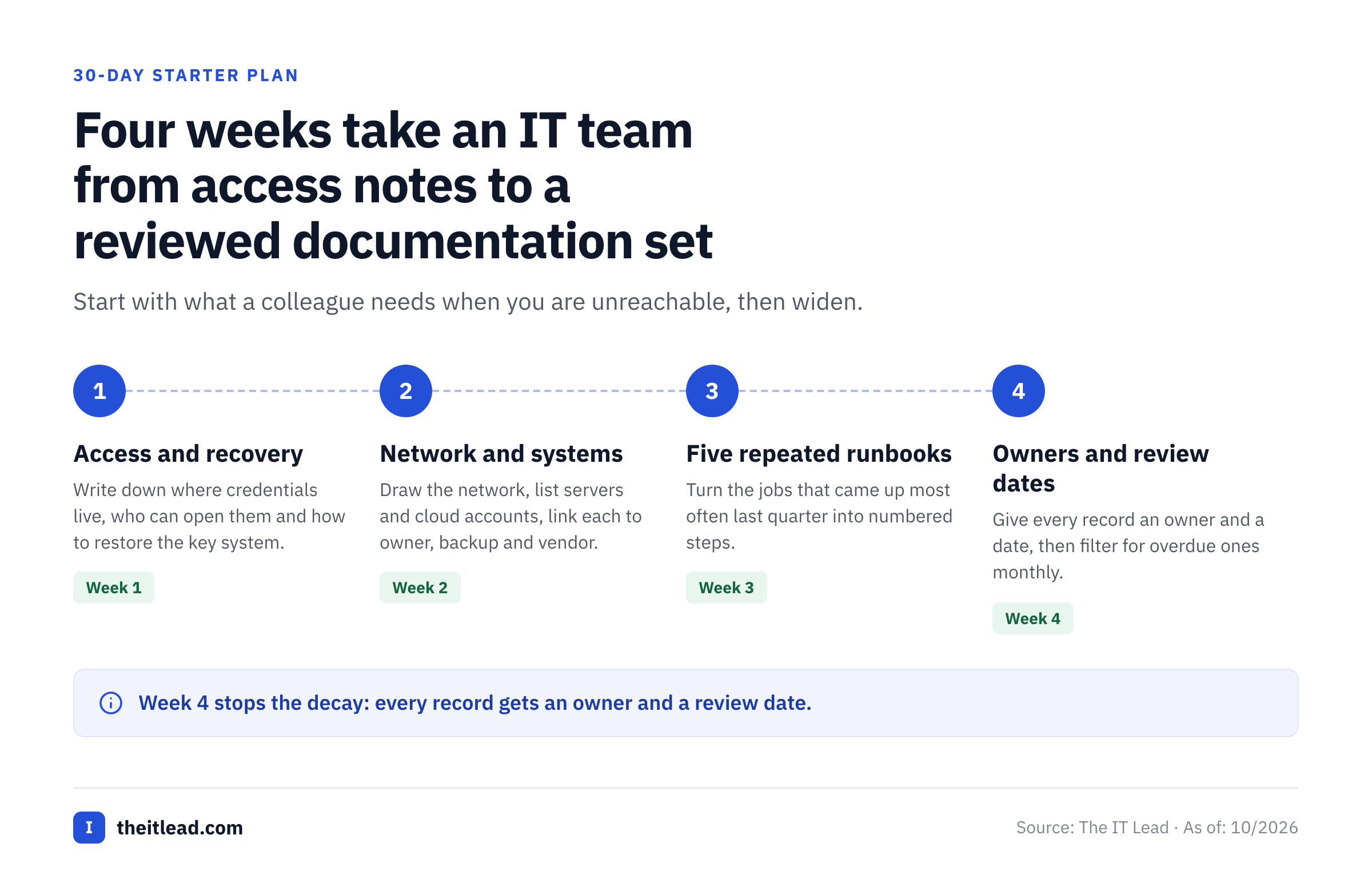
A good first 30 days of IT documentation starts with what a colleague needs at 2 a.m. when you are unreachable, then widens. Documenting everything at once produces a pile nobody trusts, and it won't get read in an incident. The checklist is the minimum set; the steps order the work.
- Where admin and break-glass credentials live and who can open them
- Network diagram with subnets, firewall, VPN and DNS
- List of servers, cloud accounts and the application each one runs
- Backup schedule and the restore steps, tested once by someone other than the author
- Runbooks for the five jobs that repeat most often
- Vendors, contract renewal dates and support contacts
- Service accounts with a named owner and a reason they exist
Document access and recovery
Write down where credentials live, who can open them and how to restore the most important system. Have a colleague follow the restore steps without your help.
Record the network and the systems
Draw the network, list servers and cloud accounts, and link each system to its owner, its backup and its vendor.
Write the five most repeated runbooks
Pick the jobs that came up most often in the last quarter, such as onboarding a laptop or renewing a certificate, and write each as numbered steps.
Set owners and a review date
Give every page or record an owner and a review date, then add a monthly filter for overdue ones. This is the step that stops the decay.
If you are choosing a tool at the same time, run these four weeks inside two trials. Hudu and NinjaOne offer a 14-day trial, and Confluence, Notion and BookStack cost nothing to try. The tool that makes week 2 painful will not get better later.
Where service account ownership belongs in your documentation
Most IT documentation lists systems and their credentials, but it rarely records whether anyone still needs a service account. A password vault shows where a credential sits and who opened it, and it doesn't ask the owner each quarter whether the account is still needed. Accounts made for a backup job, an integration or a CI pipeline outlive the people who created them, and the documentation keeps listing them as if they were fine. That's the gap our own product fills. The IT Lead imports your service accounts from a CSV, assigns a nominated owner to each one, emails owners a time-limited link to confirm ownership, purpose and whether access is still needed, and keeps a review trail. It doesn't store passwords or change accounts in your directory, and it doesn't replace your documentation tool. If you want to start with a spreadsheet, our service account inventory template has the columns, and our guide to privileged access management software covers vaulting for the accounts that matter most.
Questions to ask in every demo
- What updates a record automatically, and what happens to the record when the sync or the scan fails?
- Which plan includes SSO, MFA enforcement and the audit log, and what does it cost for our user count?
- Where do passwords live, who can see them and is every view logged?
- Can we export all documentation, including attachments and relationships, in a usable format if we leave?
- How do we find the runbook for a system during an incident, and does search show the current version first?
- What is the contract term, the activation or onboarding fee and the notice period for cancelling?
Bring one real system, such as the server that runs your payroll export, and ask each vendor to document it in front of you. The gaps in the model show up faster than in a feature tour.
Frequently asked questions
What is the best IT documentation software for a small IT team?
The best IT documentation software for most small IT teams is Hudu, because one published price of $27 per user per month billed annually includes asset records, a password vault and a knowledge base with no minimum. If your team already lives in Jira, Confluence is cheaper and links to tickets, and if you already run NinjaOne, its Documentation module sits next to your endpoints.
What is the difference between a wiki and IT documentation software?
A wiki stores free-form pages, so it suits runbooks and procedures. IT documentation software stores typed records such as servers, firewalls and vendors, links them to passwords and to each other, and often syncs with an RMM or PSA. Confluence, Notion, BookStack and Document360 are wikis or knowledge bases, while IT Glue, Hudu and NinjaOne Documentation are structured platforms.
Is there free IT documentation software?
Yes, free IT documentation software exists. BookStack is free under the MIT license if you host it, Confluence is free for up to 10 users and Notion has a Free plan. None of them include a password vault or asset discovery, and Notion keeps the audit log for Enterprise, so free options suit runbooks and procedures better than full environment documentation.
How much does IT documentation software cost?
IT documentation software costs $27 to $44 per user per month for the structured platforms with a published price (Hudu and IT Glue), about $6 to $11 for Confluence, and nothing for self-hosted BookStack. Document360 and NinjaOne Documentation have no standalone price, so ask for a quote that names the plan and the term.
How do I keep IT documentation from going out of date?
Use the tool's own refresh where it exists, such as an RMM or PSA sync, scheduled scans or scripts that write fields, and put an owner and a review date on everything else. Then filter for overdue pages every month. A sync that covers only the endpoints with an agent leaves the rest blank, so check coverage as well as freshness.