An IT inventory tool keeps a current list of the laptops, phones, monitors, peripherals, network gear and software your team owns, with the serial number, the owner and the status of each item. This page compares seven tools for teams of roughly 3 to 50 people and MSPs. Stock and parts inventory tools, the kind built for warehouses, order management or bills of materials, are a different category and aren't compared here.
The first thing to decide is how the count gets built and who keeps it right, since that decides the workload more than any feature does. Snipe-IT and GLPI are free to self-host, so the price is the server and the admin time. Lansweeper and ManageEngine AssetExplorer scan the network, so the list builds itself. BlueTally, Asset Panda and NinjaOne tie devices to people through MDM sync, phone barcode scans or an RMM agent. Asset Panda and NinjaOne don't publish a full price, so the tables say "quote based" instead of guessing.
- IT inventory tools compared
- 7
- have a free edition, free tier or free self-hosted version
- 5
- find devices themselves with a scan or an agent
- 4
- have no full public price (Asset Panda and NinjaOne)
- 2
Our picks by situation
 Best free tracker for laptops and peripheralsSnipe-ITFree to self-host, with check-out to named people, and it tracks accessories and consumables as well as laptops.
 Best free option if you also want ticketsGLPIOpen source inventory with an agent, a CMDB and a help desk in one install, at the cost of running it yourself.
 Best when the list must build itselfLansweeperSensors and an agent find devices and installed software, with a free tier up to 100 assets.
 Best scan-based tool with a published priceManageEngine AssetExplorerAgent and agentless scans plus contracts and warranties, from $1,245 a year for 250 assets.
 Best for Intune or Jamf shopsBlueTallySyncs managed devices and checks them out to the matching employee, with the first 50 assets free.
 Best for barcode audits on a phoneAsset PandaThe mobile app scans 1D and 2D barcodes, so a stock count is a walk around the office.
 Best for MSPs already on NinjaOneNinjaOneInventory arrives with the RMM agent, and network discovery adds printers and switches.
 For the gap an inventory leavesThe IT LeadNot a device tracker: it records who owns each service account and when it was last reviewed.
IT inventory software compared
| Tool | Type | How the list gets filled | Price (USD unless noted) | Rating |
|---|---|---|---|---|
| Snipe-IT | Open source asset tracker | CSV import, API or MDM sync adapters | Free self-hosted; hosted plans from $39.99 per month ($399.99 per year), flat per account | 4.4 (Capterra, 23) |
| GLPI | Open-source ITSM and asset management | GLPI Agent on endpoints, remote inventory, imports | Free self-hosted (open source); Teclib' cloud from 19 € per user per month excl. VAT; self-hosted support subscriptions 100 € to 4,500 € per month; EUR only | 4.5 (42) |
| Lansweeper | Network discovery and inventory | Sensor scans, agent, cloud APIs | Free up to 100 assets; Starter from EUR 270 per month and Pro from EUR 474 per month, billed annually with 2,000 assets included (the page showed euro prices only) | 4.5 (Capterra, 75) |
| ManageEngine AssetExplorer | Scan-based ITAM with contracts | Agent, agentless scans, audit scripts | Cloud from $1,245 per year for 250 assets; on premises from $955 per year; a free edition covers 50 nodes in the cloud and 25 on premises | 4.6 (Capterra, 13) |
| BlueTally | SaaS asset tracking synced from MDM | Intune or Jamf sync, or Excel import | Free for the first 50 assets; Core $199 to $232 per month for 250 assets and Business $299 to $348 per month for unlimited assets, depending on billing term; flat per account with unlimited users | 4.6 (Capterra, 80) |
| Asset Panda | Configurable asset tracking with a mobile app | Spreadsheet import, MDM integrations, manual | Quote only; a 7-day trial follows the quote | 4.6 (Capterra, 1,370) |
| NinjaOne | RMM with built-in inventory | RMM agent, plus SNMP discovery | Quote based; the pricing page gives $1.50 to $3.75 per device per month and doesn't say which plan includes asset management | 4.7 (Gartner Peer Insights, 484) |
| The IT Lead Our product | Service account ownership reviews | Collects owner attestations for service accounts and keeps the review trail | Access code | No reviews yet |
Prices come from each vendor's pricing page, read October 18 to 22, 2026. Ratings are Capterra, G2 or Gartner Peer Insights scores with the review count; sample sizes differ a lot.
Spreadsheet or software: when a tool starts to pay off
A spreadsheet is a fine inventory, plainly, for a team of five with thirty devices and one person who does all the handoffs. It stops working when a second person edits it, when devices change hands without anyone updating a row, or when an auditor asks who had a laptop on a specific date. A shared file rarely records why a row changed, and it can't tell you that a laptop on the list hasn't checked in for ninety days.
- Two or more people edit the file and conflicts are common
- A device changed owner and nobody can say when
- Warranty or license dates are tracked by memory
- You can't answer how many laptops are in use right now without walking around
- An audit or insurance request needs a history, not just a current list
If you're staying with a spreadsheet for now, give it the columns a tool would have, so you'll only need a CSV import when you move. Snipe-IT, BlueTally and Asset Panda import a CSV or spreadsheet, and Lansweeper and NinjaOne build the list by scanning, so a clean sheet is the cheapest way to try three of them.
| Column | What goes in | Why it matters |
|---|---|---|
| Asset tag | A short unique ID printed on a label | The key every tool uses to update a row instead of adding a duplicate |
| Type | Laptop, phone, monitor, dock, switch, accessory | Lets you filter and count by kind |
| Make and model | Dell Latitude 5440 | Warranty lookups and refresh planning |
| Serial number | From the device or the box | Matches the row to MDM and vendor records |
| Status | In use, in stock, in repair, retired | Separates spares from deployed devices |
| Assigned to | A named person, not a team | Accountability at handoff and offboarding |
| Location | Office, remote, storage | Finds spares and returns |
| Purchase date and warranty end | Dates | Triggers refresh and renewal decisions |
| Last audit | Date of the last physical or scan check | Shows which rows nobody has confirmed |
For a wider view of lifecycle, depreciation and contracts, see our guide to IT asset management software. Inventory is the first half of that job: knowing what exists, where it's and who holds it.
How we chose these tools
We picked tools by whether a small IT team can actually keep the list true, not by feature count. We checked how each list stays accurate (scan, agent, MDM sync, barcode audit or manual entry), whether there's a free path and what it costs in work, and what each price counts: assets, devices, agents or a flat account fee. We also recorded what sits behind a higher plan, such as integrations, API access or SSO, and read what reviewers on Capterra, G2 or Gartner Peer Insights complain about.
Prices were read from vendor pages between October 18 and 22, 2026. Lansweeper and GLPI showed euro prices only on our connection, so we give euro prices rather than convert them. A review score only counts for what it covers: NinjaOne's rating is for the whole RMM platform, not its inventory module.
Free and open source IT inventory software
Free tools cost nothing to license, but they'll cost you time. Someone has to host the server, patch it, back it up and upgrade it, and that someone is usually the person who also answers tickets. Both tools below fit teams that have that person, although neither is a set-and-forget install.
Snipe-IT
Capterra reviews, checked October 19, 2026
A free, self-hosted tracker that treats a keyboard and a license seat as inventory items too, which makes it the usual answer when someone asks for open source IT inventory for peripherals, although it won't find devices on its own.
The team it fits. Five to fifty people with one admin who can run a small server, or who will pay Grokability a flat fee to host it. It suits teams that hand out hardware to named people and want to know who has what, while keeping the cost flat.
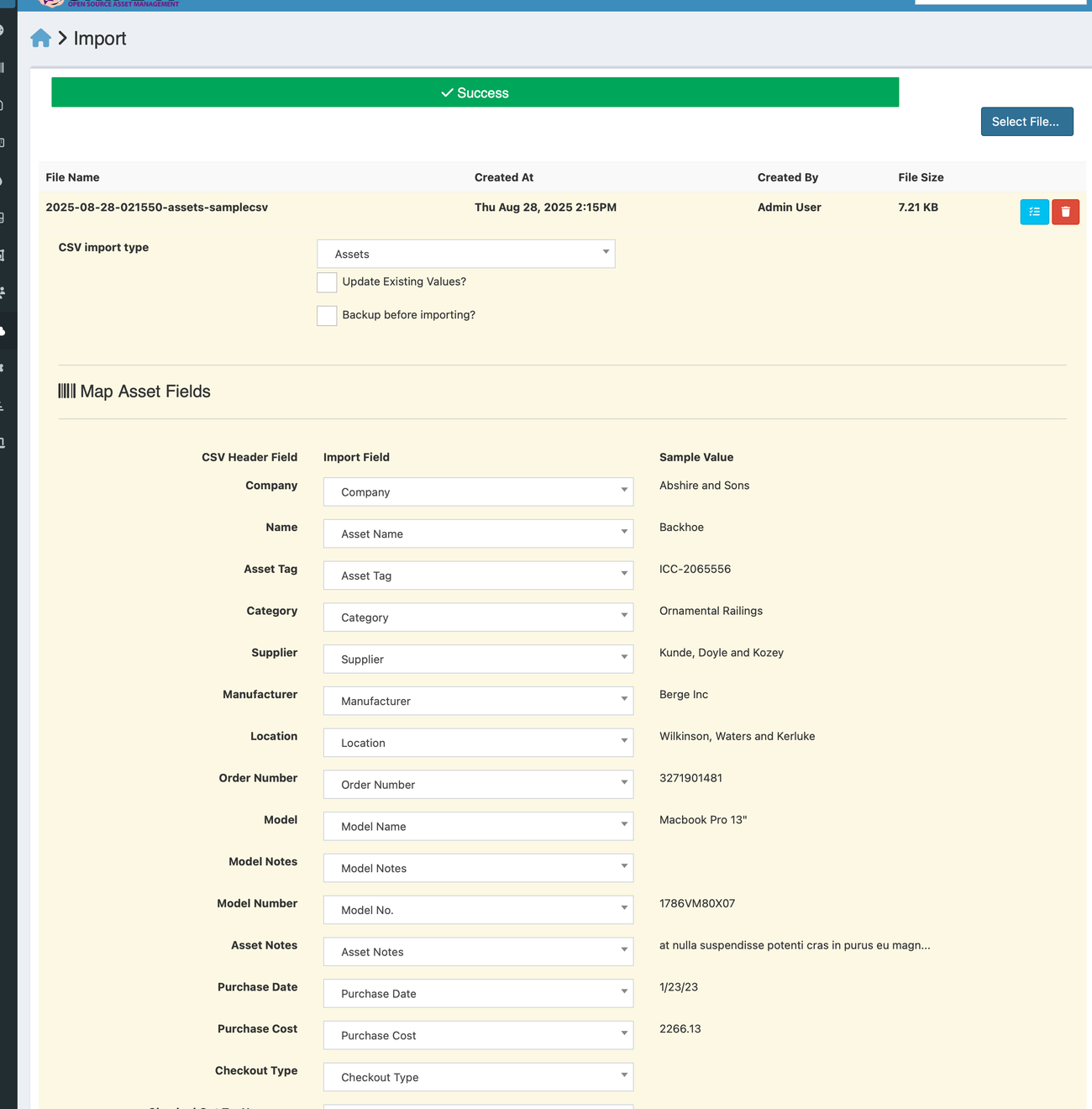
What that team gets. Assets carry statuses such as deployed, pending, ready to deploy and archived, with a full history per item. Checking an asset out to a user takes a click, and check-in is one click back. Besides assets, Snipe-IT tracks software license seats, accessories, consumables and components, with email alerts for expiring licenses and warranties and for low stock. The CSV importer matches on the asset tag, so re-importing a corrected sheet updates rows instead of duplicating them, and it creates missing models, categories and locations as it goes. QR labels can be generated, and handheld barcode scanners work.
- you want laptops, phones and licenses checked out to named people and can host a small server, or pay a flat hosted fee
- you want a published flat price with no per-asset or per-user charge
- you need the tool to find devices on its own: Snipe-IT doesn't scan the network, so inventory comes from CSV, the API or an MDM sync
- nobody wants to maintain a self-hosted server and you need phone support, which only comes with the Enterprise Support plan
- Users like
- free, flexible and easy to use once it is running, per Capterra reviewers
- Users dislike
- hard self-hosted setup and upgrades, and no automatic network scans, per Capterra reviewers
- Source: Capterra, 23 reviews
How it works in practice
What that team misses. There's no network scan. Devices arrive by manual entry, CSV import, the REST API or one of the sync adapters for tools such as Jamf and Microsoft Intune, so a device nobody enrolled or imported never appears. The self-hosted version is free for unlimited users and assets with community support only; hosted plans start at $39.99 a month, flat per account, and phone support comes only with the Enterprise Support plan, which has no listed price. Capterra reviewers say install and upgrades are hard on a self-hosted server.
- Starting price
- Free self-hosted; hosted plans from $39.99 per month ($399.99 per year), flat per account
- Discovery
- None built in; CSV, API or MDM sync
- Hosting
- Self-hosted or Grokability-hosted
- Free option
- Yes, self-hosted
GLPI
G2 reviews, checked October 22, 2026
An open source suite that began as an inventory and help desk tool, with an agent that reports what's installed on each machine, so the list can build itself without a license fee.
The team it fits. Teams that already run PHP and MySQL apps, MSPs that want customers separated inside one install (GLPI calls them entities), and shops that want inventory, tickets and a CMDB in one free tool.
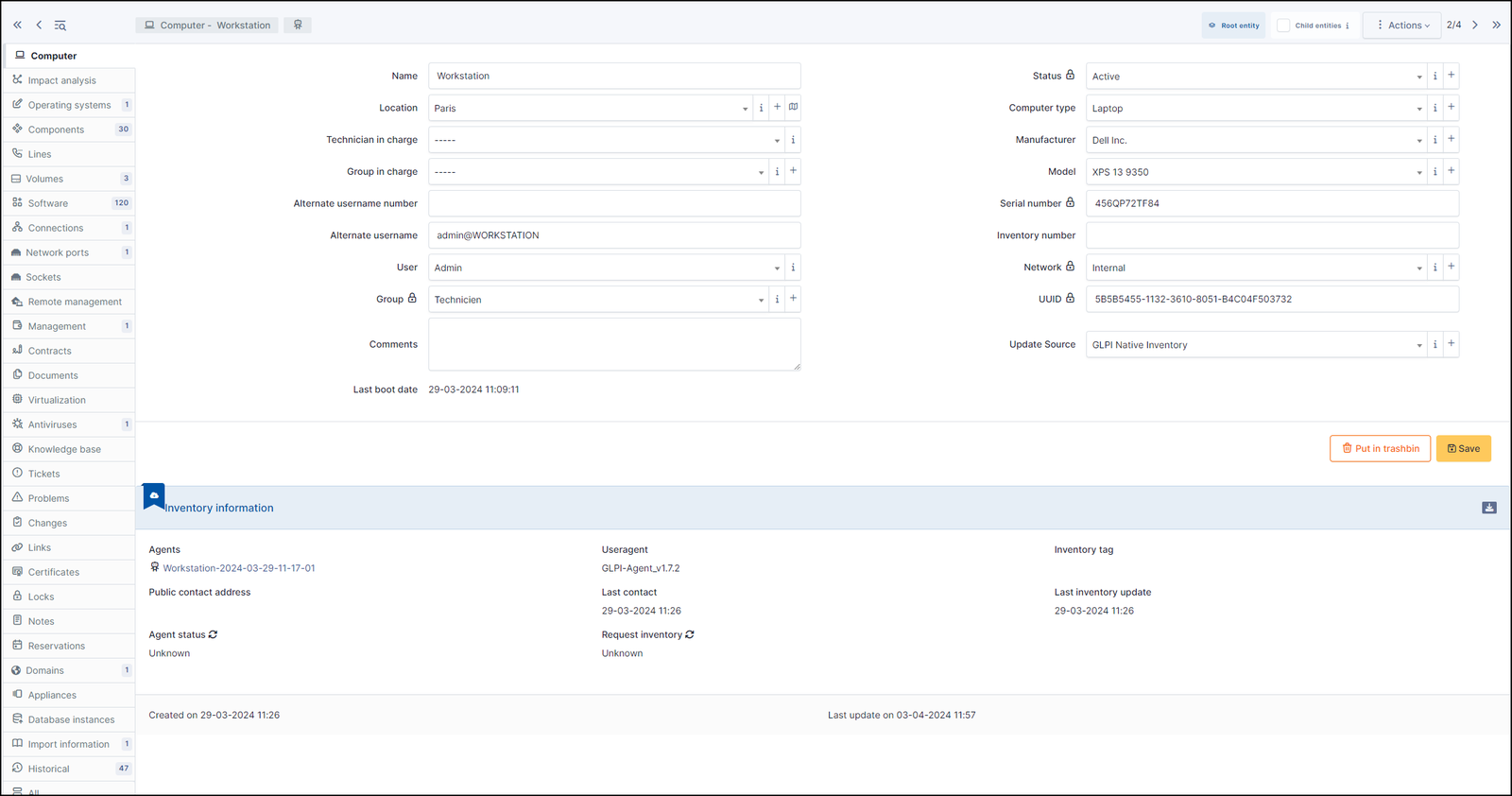
What that team gets. The GLPI Agent is the successor to the FusionInventory agent. Installed on endpoints, it collects hardware and software details and sends them to the GLPI server; it can also discover network devices, inventory ESX hosts and run agentless inventory through its remote inventory task. On the server, GLPI keeps records for computers, monitors, software and licenses, network equipment, printers, phones, cartridges, racks and data centers, and links them to users and locations. Because tickets live in the same database, a technician sees the machine next to the problem.
- you can host and patch a PHP and MySQL app and want inventory, tickets and a CMDB without a license fee
- you manage several customer or office environments and want them separated inside one install
- nobody on the team can own a self-hosted server and you want the vendor to run it for a flat price
- you want a polished checkout-to-employee flow out of the box: it exists, but it's less guided than in Snipe-IT or BlueTally
- Users like
- easy to use and customizable open source, per G2 reviewers
- Users dislike
- reporting and plugin updates between versions, per G2 reviewers
- Source: G2, 42 reviews
How it works in practice
What that team misses. There's no free hosted version. Self-hosting means you patch PHP and MySQL yourself, and G2 reviewers report that plugins sometimes break between versions and that reporting and export need work. Support is community-only on the free edition. Teclib', the company behind GLPI, sells a hosted cloud from 19 euros per user per month excluding VAT, and self-hosted support subscriptions from 100 euros a month, in euros only on its pricing page.
- Starting price
- Free self-hosted (open source); Teclib' cloud from 19 € per user per month excl. VAT; self-hosted support subscriptions 100 € to 4,500 € per month; EUR only
- Free plan
- Self-hosted, no license fee
- SLA
- SLA and OLA with TTO and TTR
- Cloud
- 19 € per agent per month
Scan-based tools that find devices for you
The weakness of every manual list is the device nobody entered, of course. Scan-based tools turn that around: they report what's on the network, and you decide which of those records matter.
Lansweeper
Capterra reviews, checked October 19, 2026
The tool people name when the question is what's on our network that we don't know about, with a free tier that fits a small office.
The team it fits. Teams of 10 to a few hundred devices with a Windows or mixed network and no complete list, and MSPs auditing a new customer. The free tier covers 100 assets after a 14-day full trial, which is a real inventory for a small office.
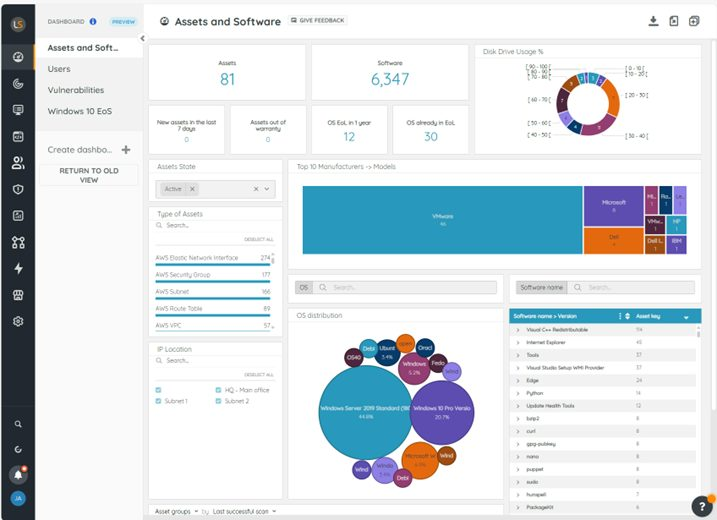
What that team gets. You install an IT sensor on a machine inside a subnet and connect it to a hub. The sensor sees devices as they communicate; once you've added discovery credentials and an IP range, it scans for the operating system, hardware, installed software and users. Without credentials it's limited to fingerprinting for manufacturer, model and OS. A separate IT Agent covers Windows, macOS and Linux laptops that rarely join the office network, and connections to AWS, Azure and Google Cloud bring in cloud assets. Records are matched on MAC address, serial number and hostname, never on IP address, so a laptop that changes address stays one record.
- you don't know what is on the network and want it found by scanning rather than typed in
- you run Windows, macOS, Linux, printers and network gear and want one inventory of all of it
- you need check-out to employees and return tracking: the sources we read show discovery and inventory, not a check-out workflow
- you are under about 2,000 assets and price-sensitive: paid plans start at 2,000 assets and reviewers report sharp price rises
- Users like
- network scanning and asset discovery that work out of the box, per Capterra reviewers
- Users dislike
- price, a steep learning curve and a dated interface, per Capterra reviewers
- Source: Capterra, 75 reviews
How it works in practice
What that team misses. It's built for finding and describing assets, not for handing a laptop to a person: the sources we read show discovery and inventory, with no check-out workflow. A rescan can overwrite manual edits unless the field is locked, and an asset you delete reappears the next time it's scanned. Starter, from 270 euros a month billed annually with 2,000 assets included, only offers service desk ticket enrichment integrations; all integrations and the lifecycle insights need Pro, from 474 euros a month, and full API access needs Enterprise. We saw euro prices only. Capterra reviewers praise discovery and criticize price rises, a dated interface and a steep learning curve.
- Starting price
- Free up to 100 assets; Starter from EUR 270 per month and Pro from EUR 474 per month, billed annually with 2,000 assets included (the page showed euro prices only)
- Discovery
- Sensor scans, agent, cloud APIs
- Free tier
- 14-day trial, then up to 100 assets
- Plan gate
- All integrations need Pro
ManageEngine AssetExplorer
Capterra reviews, checked October 19, 2026
Scan-based inventory that also holds purchase orders, contracts and warranty dates, sold at a price you can read before you talk to sales.
The team it fits. Teams of 25 to 500 devices that want scans and the paperwork around a device (purchase order, vendor, contract, renewal) in one tool, and that would rather read a price than request a quote.
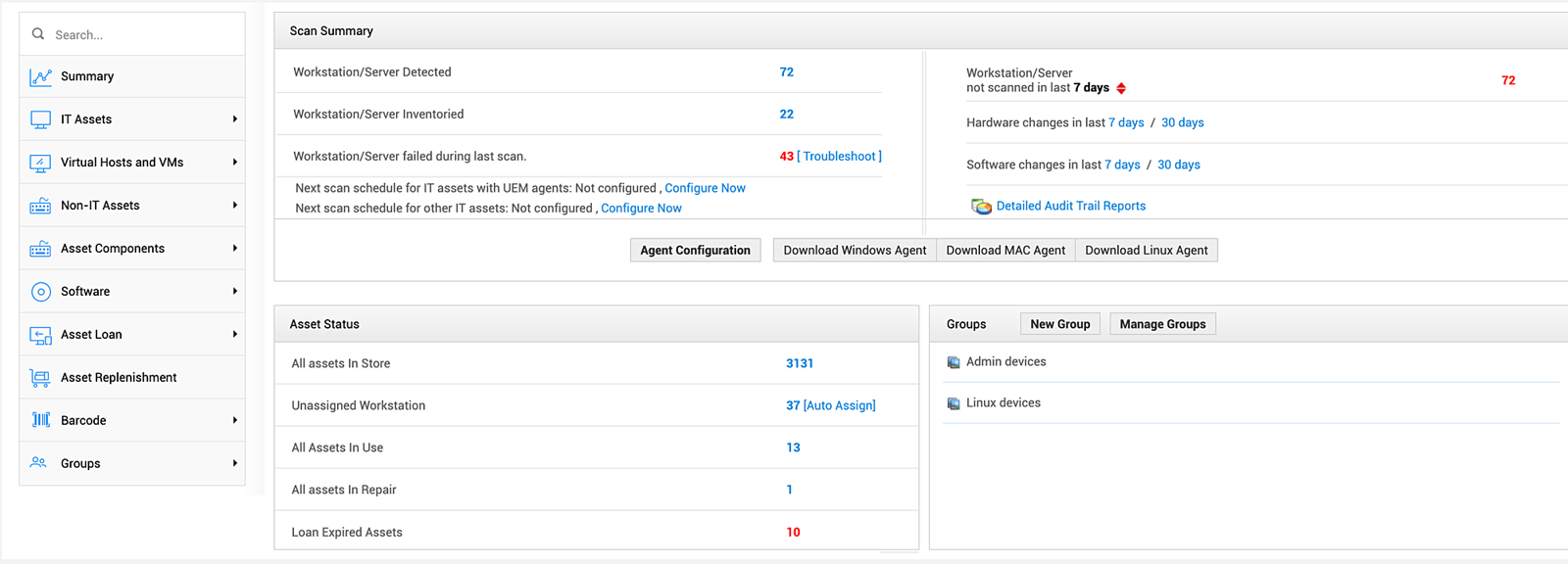
What that team gets. Assets arrive through scans: the UEM agent on Windows, Mac and Linux, agentless network or domain scans, or standalone audit scripts that run on machines outside the domain and push an XML file to the server. The Asset Summary page shows how many workstations and servers were detected, inventoried and failed in the last scan, how many weren't scanned in the last seven days, and hardware and software changes over 7 and 30 days. Assets carry states such as in store, in use and in repair, and unassigned workstations can be auto-assigned to the last logged-in user.
- you want scheduled scans plus purchase orders, contracts and warranty dates in one asset tool
- you want a per-asset price that is published, with a cloud and an on-premises option
- you want a big review base to lean on: Capterra shows only 13 reviews
- you have many machines outside the main subnet or on external VMs: reviewers say those sometimes need manual work
- Users like
- audit preparation and agentless discovery, per Capterra reviewers
- Users dislike
- limited report customization and manual work for off-subnet machines, per Capterra reviewers
- Source: Capterra, 13 reviews
How it works in practice
What that team misses. The product is sold on its own pricing page, not as ServiceDesk Plus. The cloud edition is priced in packs of IT assets, from $1,245 a year for 250; on-premises starts at $955 a year, and the free edition covers 50 nodes in the cloud or 25 on premises. Remote control is a paid add-on at $315 per concurrent session per year. Capterra reviewers, only 13 of them, say machines on external VMs or outside the main subnet sometimes need manual work, and that reporting customization is limited.
- Starting price
- Cloud from $1,245 per year for 250 assets; on premises from $955 per year; a free edition covers 50 nodes in the cloud and 25 on premises
- Discovery
- Agent, agentless and standalone audit scripts
- Pricing unit
- Per pack of IT assets
- Free option
- 25 nodes
Tools that track who holds what
A scan tells you a device exists, but it won't tell you who has it. These three answer the question that follows: who has it, and what happens when that person leaves. They get their data from an MDM, a phone camera or an RMM agent.
BlueTally
Capterra reviews, checked October 19, 2026
Takes the device list from Intune or Jamf and attaches each device to an employee, so the inventory follows your MDM instead of a person's memory.
The team it fits. Companies of 30 to 500 people that already manage laptops in Intune or Jamf and want the inventory to match without data entry. Reviewers on Capterra are mostly IT managers at 51 to 500 person organizations.
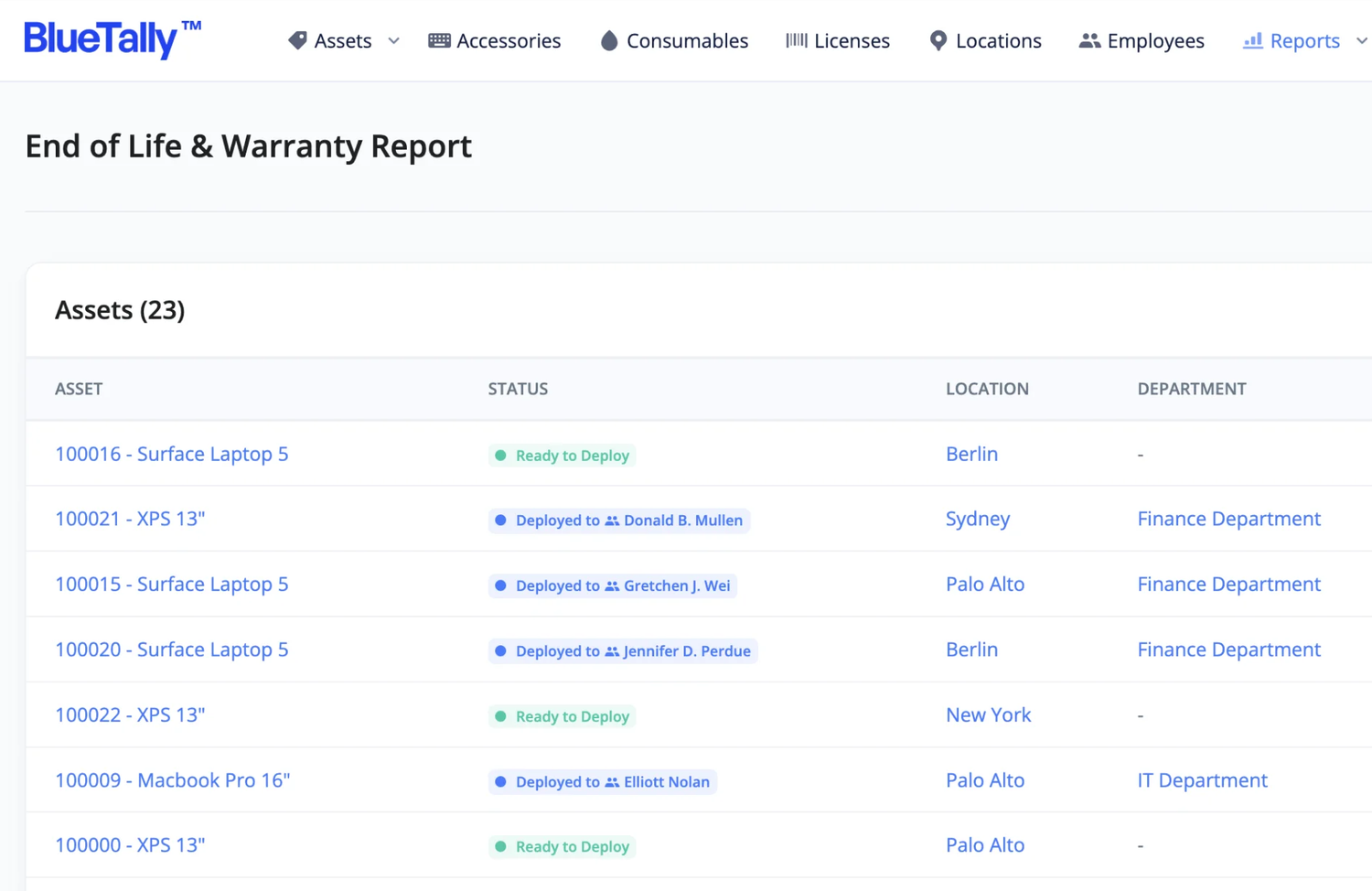
What that team gets. You connect Intune with an OAuth setup, run a connection test, choose the device scope (company, personal or both) and map the asset ID, ideally the serial number, plus an employee field. After that the integration syncs every 10 minutes, with the first sync taking up to 40 minutes. BlueTally creates one product per model and one asset per device, and can check a device out to the matching employee automatically when that person exists in BlueTally by email, usually through SCIM from Entra ID or Okta. Manually added assets merge with synced devices on the asset ID. Check-out supports an expected return date, reminders and digital signatures.
- you run Intune or Jamf and want every managed device assigned to an employee without retyping it
- you want a flat monthly price with unlimited users and a free tier to start
- you need SSO or an API: both start on the Business plan
- you have more than 250 assets or want a native mobile app: Core stops at 250 and Capterra reviewers mention no native mobile app
- Users like
- ease of use and quick MDM setup, per Capterra reviewers
- Users dislike
- price and features gated by plan, per Capterra reviewers
- Source: Capterra, 80 reviews
How it works in practice
What that team misses. The sync is one way, from Intune into BlueTally, and it can't bring in Linux devices. The recommended ceiling is 5,000 devices, and location and department aren't pulled from Intune. Core costs $199 to $232 a month depending on billing term, with 250 assets; SSO, the REST API and the Jira integration need Business at $299 to $348. The first 50 assets are free. Capterra reviewers praise setup speed and MDM integrations and complain about price, plan gating and picky bulk import.
- Starting price
- Free for the first 50 assets; Core $199 to $232 per month for 250 assets and Business $299 to $348 per month for unlimited assets, depending on billing term; flat per account with unlimited users
- Discovery
- MDM sync (Intune, Jamf) or Excel import
- Pricing unit
- Flat per account by asset cap
- Free option
- First 50 assets
Asset Panda
Capterra reviews, checked October 19, 2026
A configurable tracker with a phone app that scans barcodes, so a physical stock count is a walk with a phone rather than a clipboard.
The team it fits. Offices where the inventory covers more than laptops: chairs, projectors, test devices, tools. It also suits teams that audit by hand every quarter and want the result in the system immediately.
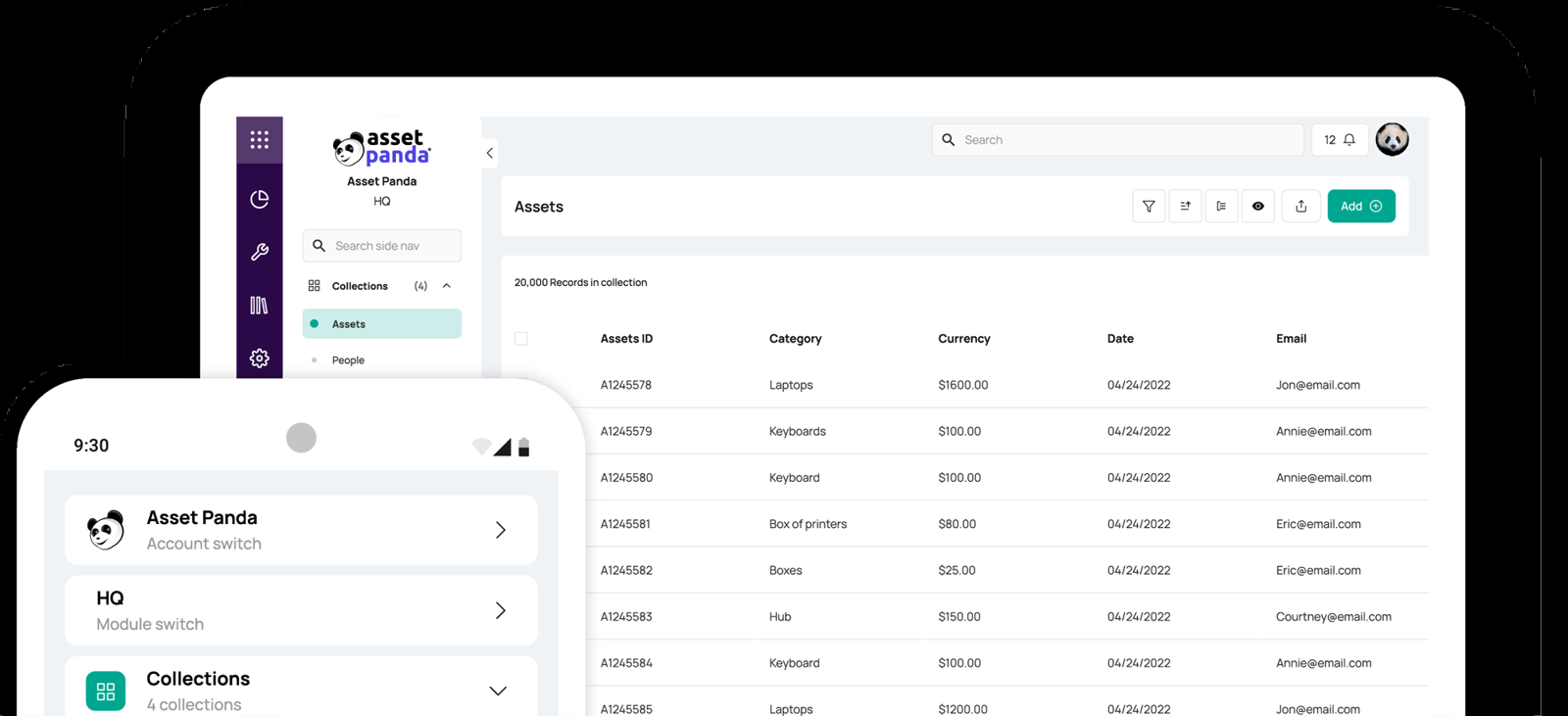
What that team gets. Assets are added by spreadsheet import, by duplicating an existing record or by hand in the web or mobile app. Custom fields and forms define each asset type. You generate or print barcode tags, scan them with the app's camera, which reads 1D and 2D formats, and run audits that an admin can assign and schedule. Shared reservations let people book equipment, and maintenance and repair tracking sits in the same record. Integrations listed include Intune, Jamf Pro, Entra ID, Okta, ServiceNow, Freshservice and Zapier.
- you track more than laptops, such as equipment, vehicles or leased gear, and want fields you define yourself
- you audit with a phone camera and barcode tags instead of a network scanner
- you need a published price: Asset Panda is quote only and a Capterra reviewer calls it expensive for smaller businesses
- you want discovery: the sources we read describe no network scanning, so assets come from import, MDM integrations or manual entry
- Users like
- customizable fields and workflows, easy reporting and mobile access, per Capterra reviewers
- Users dislike
- a clunky interface with a learning curve, per Capterra reviewers
- Source: Capterra, 1,370 reviews
How it works in practice
What that team misses. There's no public price: the vendor's pricing page leads to a quote form, with a 7-day trial after the quote, although third-party comparison sites quote starting prices that we couldn't confirm. The sources we read describe no network scanning, and the integrations page doesn't mention a public API. Capterra has the largest review sample in this list, 1,370 reviews at 4.6, but many reviewers aren't in IT; complaints are a clunky interface, a learning curve, lag and cost.
- Starting price
- Quote only; a 7-day trial follows the quote
- Discovery
- None described; import or MDM integrations
- Pricing
- Quote only
- Mobile
- iOS and Android barcode scanning
NinjaOne
Gartner Peer Insights and G2, checked October 19, 2026
If an MSP or IT team already patches endpoints with NinjaOne, the inventory exists the moment the agent is installed.
The team it fits. MSPs and internal teams of 5 to 50 technicians who manage endpoints in NinjaOne and want printers, switches and routers in the same list.
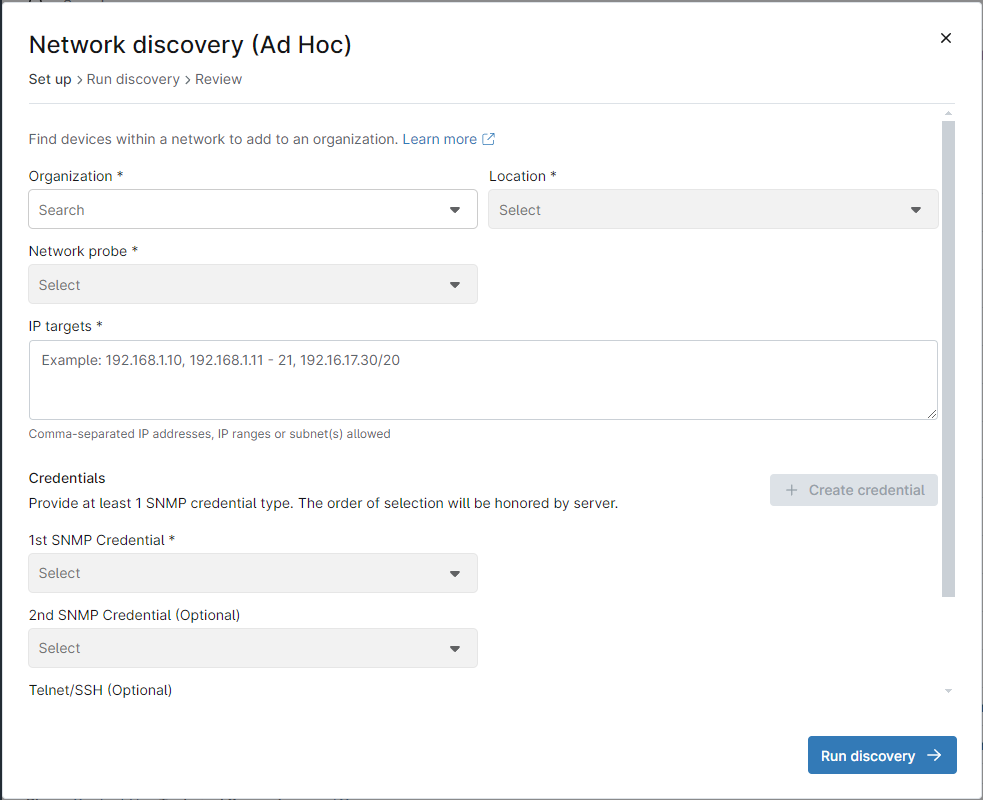
What that team gets. The agent on each endpoint reports hardware and software. For devices that can't run an agent, an admin runs network discovery: choose the organization and location, pick a Windows machine with the agent as the network probe, enter IP ranges and SNMP credentials and run it. After a few minutes you select the devices found, name them, assign roles and add them. Warranty status refreshes automatically for Dell, HP, Lenovo, Toshiba and Microsoft hardware, and expiring warranties can be reported and alerted on.
- you already manage endpoints with NinjaOne, or an MSP wants asset data per client in the console you patch from
- you want warranty status for Dell, HP, Lenovo, Toshiba and Microsoft devices refreshed automatically
- you need to hand laptops to people and track returns: we found no documented check-out workflow
- you want asset management without buying an RMM: it comes with the platform and the pricing page doesn't list a standalone plan
- Users like
- ease of use, per G2 and Gartner reviewers (the rating covers the whole platform)
- Users dislike
- missing or limited features, per G2 reviewers
- Source: Gartner Peer Insights, 484 reviews
How it works in practice
What that team misses. The documentation we read describes no check-out or employee assignment workflow, so the view is monitoring-led rather than a borrow and return system. The pricing page gives $1.50 to $3.75 per device per month, falling with volume, and doesn't say which plan includes asset management, so ask before you budget. Agents can't be installed on network devices, which rely on ICMP, SNMP, SSH or Telnet. The 4.7 Gartner Peer Insights score from 484 ratings covers the whole RMM platform.
- Starting price
- Quote based; the pricing page gives $1.50 to $3.75 per device per month and doesn't say which plan includes asset management
- Discovery
- Agent plus SNMP network discovery
- Warranty lookup
- Dell, HP, Lenovo, Toshiba, Microsoft
- Pricing
- Quote based
What IT inventory software costs for a small team
Small teams meet several price units in this category, so a quick comparison of the headline numbers misleads. Snipe-IT charges a flat fee per account, BlueTally a flat fee by asset cap, AssetExplorer a pack of assets, NinjaOne a device, GLPI's cloud a user, and Lansweeper bills by assets starting at 2,000. Asset Panda doesn't publish a price.
Yearly USD list prices from each vendor's pricing page, read October 18 to 22, 2026. BlueTally uses the lower of its two published monthly prices times twelve. Self-hosted Snipe-IT and GLPI are free to license, and Lansweeper is free to 100 assets, but you pay for servers and admin time. GLPI cloud and Lansweeper are priced in euros, and NinjaOne and Asset Panda are quote based, so they aren't in the slider.
Keeping the count right: a quarterly inventory audit
Any of these tools drifts if nobody checks it against reality, even the ones that scan, and it's the quarterly check that keeps it honest. A short routine each quarter catches most of the drift, whichever tool you pick.
- IT leadExport the inventory and the device list from your MDM, directory or RMM week 1
- IT adminCompare the two lists and flag devices in one but not the other week 1
- Office or team leadsConfirm laptops, phones and peripherals for their people, and spare stock in storage week 2
- IT adminFix records: assign, retire, add missing devices, correct statuses week 3
- IT leadSave the final export with the date and note what changed week 4
Tools with barcode or audit features shorten the second step. Snipe-IT sends upcoming audit emails, Asset Panda runs scheduled audits from the phone, and BlueTally offers employee self-audits on its top Corporate plan.
What inventory tools don't answer: who owns your service accounts
An inventory lists devices and software, and it can't tell you who is responsible for the accounts that run on them. A scan finds the server, and nobody in the scan result owns the service account a nightly job runs as. When an auditor asks who owns it and why it still exists, the answer is often a guess. Our service account inventory template shows what to record for each one.
The IT Lead covers that one question: it imports service accounts from a CSV, asks the nominated owner to confirm ownership and purpose by email, and keeps the review trail. It doesn't scan, track devices or licenses, rotate passwords or disable anything, and it reads from CSV today, not from live directory connections.
Which tool to pick
Shortlist two tools and try both with your own data, because you'll learn more from one imported spreadsheet than from any feature list, on a free tier or trial before you pay; the rows overlap, and the right one often depends on your MDM more than on features.
- Free, with check-out to named people and peripherals trackedSnipe-IT, self-hosted, or hosted from $39.99 a month
- Free, with tickets and a CMDB in the same installGLPI, if someone can host and patch it
- Find every device on the network without typing anything inLansweeper, starting on the free tier
- Scans plus purchase orders, contracts and warranties at a published priceManageEngine AssetExplorer
- Intune or Jamf devices assigned to employees automaticallyBlueTally
- Barcode audits of equipment beyond ITAsset Panda, after a quote
- An MSP already patching with NinjaOneNinjaOne's built-in inventory and SNMP discovery
FAQ
What is IT inventory software?
An IT inventory tool keeps a current list of the hardware, peripherals, network gear and software a team owns, with serial numbers, owners and status. It isn't stock inventory software, which tracks goods for sale or parts in a warehouse.
What is the best free IT inventory software?
Snipe-IT and GLPI are free to self-host, so you pay in server and admin time. Lansweeper is free for up to 100 assets after a 14-day trial, BlueTally is free for the first 50 assets, and ManageEngine AssetExplorer has a free edition for 50 nodes in the cloud or 25 on premises.
Can I track IT inventory in Excel?
Excel works for a small team with one person doing the handoffs. Use an asset tag, serial number, status, assigned person and warranty date as columns so the sheet imports into a tool later. Move to software when several people edit it or an audit needs a history.
Does Snipe-IT find devices automatically?
No. Snipe-IT doesn't scan the network. Inventory comes from manual entry, CSV import, the API or its sync adapters for MDM tools such as Jamf and Microsoft Intune.
Which IT inventory software works with Intune or Jamf?
BlueTally syncs Intune and Jamf devices and checks them out to the matching employee. Snipe-IT and Asset Panda list Intune and Jamf integrations, and Lansweeper can import from Intune.