Data loss prevention (DLP) software finds sensitive information such as customer records, card numbers, health data and source code, watches where it moves, and applies a rule when it heads somewhere it shouldn't: log it, warn the person, or block the transfer. For a small IT team the useful question isn't which product has the longest feature list. It's where the tool can actually step in: inside Microsoft 365 or Google Workspace, on the laptop with an agent, inside SaaS apps through their APIs, or across the whole network.
That's how this comparison is organized. If you already pay for Microsoft 365 Business Premium or E3, you own email and file DLP today and can start there. Endpoint tools such as Safetica, Endpoint Protector and ManageEngine Endpoint DLP Plus cover USB drives, printing and browser uploads. Nightfall AI watches Slack, GitHub and AI prompts. Four of the nine tools don't publish a price, and the tables say so instead of guessing.
Our picks by situation
 Best if you already pay for Microsoft 365Microsoft Purview DLPEmail and file DLP is in Business Premium and E3; endpoint and Teams DLP cost a $10 or $12 per user add-on.
 Best endpoint DLP with a published priceSafeticaFrom $72 per user per year, cloud-managed, with one policy list for USB, email, uploads, print and AI tools.
 Best for mixed Windows, macOS and Linux fleetsEndpoint ProtectorDevice control and content rules on all three systems, enforced even when laptops leave the network.
 Lowest published price for Windows-only fleetsManageEngine Endpoint DLP Plus$795 a year for 100 workstations, on a server you run yourself.
 Best for Slack, GitHub and AI toolsNightfall AIScans SaaS apps through their APIs and catches secrets pasted into AI prompts.
 Best for MSPs already on AcronisAcronis Advanced DLPLearns each client's normal data flows before it blocks anything, managed per tenant.
Data loss prevention software compared
| Tool | Type | Where it steps in | Price (USD unless noted) | Rating |
|---|---|---|---|---|
| Microsoft Purview DLP | Suite-native DLP (Microsoft 365) | Exchange, SharePoint, OneDrive; Teams and devices with E5-level licenses | Email and file DLP included in Microsoft 365 Business Premium ($22 per user per month, yearly) and E3 ($39); endpoint and Teams DLP need the Purview Suite add-on ($10 on Business Premium, $12 on E3) or E5 ($60) | 4.2 (Gartner Peer Insights, 64) |
 Google Workspace DLP Google Workspace DLP | Suite-native DLP (Google) | Drive, Gmail and Chat; Chrome with an add-on | Included in Enterprise editions (quote only), not in Business Starter, Standard or Plus ($7 to $22 per user per month); Chrome browser DLP needs Chrome Enterprise Premium at $6 per user per month | 4.7 (Capterra, 17,742) |
| Endpoint Protector | Endpoint DLP and device control | Agent on Windows, macOS and Linux | Quote only (licensed per protected computer); SaaS, virtual appliance or your own AWS, Azure or GCP | 4.5 (Gartner Peer Insights, 77) |
| Safetica | Endpoint DLP and insider risk | Agent on Windows and macOS, plus Microsoft 365 and Google Drive APIs | From $72 per user per year (Standard), $96 (Premium), $144 (Enterprise); On-Prem by quote | 4.7 (Capterra, 141) |
| ManageEngine Endpoint DLP Plus | Endpoint DLP (Windows) | Agent on Windows only | $795 per year for 100 workstations, $1,595 for 250 (annual subscription); perpetual license also sold | 4.8 (Gartner Peer Insights, 5) |
 Teramind Teramind | Insider risk and endpoint DLP | Monitoring agent with content rules | DLP tier EUR 28 per seat per month billed yearly (EUR 30 monthly), 5-seat minimum; the pricing page showed euro prices only to us | 4.7 (Capterra, 107) |
| Nightfall AI | Cloud and SaaS DLP | SaaS app APIs, browser extension, macOS and Windows agent | Quote only, per user per year; no free tier, 7-day proof of value | 4.6 (98) |
| Acronis Advanced DLP | MSP-delivered endpoint DLP | Acronis agent, per client tenant | Sold through MSPs per workload per month; no current public list price (last public partner list, July 2023: $3.25 per workload per month MSP cost) | 4.1 (Capterra, 78) |
 Forcepoint DLP Forcepoint DLP | Enterprise DLP suite | Endpoint, email, web, network and cloud apps | Quote only from Forcepoint; endpoint coverage is a separate DLP Endpoint subscription | 4.5 (Capterra, 17) |
 The IT Lead Our product The IT Lead Our product | Service account ownership reviews | Collects owner attestations for service accounts and keeps the review trail | Access code | No reviews yet |
Prices come from each vendor's pricing page or, for Forcepoint and Endpoint Protector, the fact that none is published, read on October 20, 2026. Teramind showed euro prices only. Ratings name their source: Capterra, Gartner Peer Insights or G2. Review counts for Google Workspace and Acronis cover the whole product, not only DLP.
What data loss prevention software does
Data loss prevention software identifies sensitive information, monitors where it goes, and enforces a policy when it's about to leave through a channel you don't allow. The products differ in reach, but every one of them runs the same four-step loop.
- Discover and classify. The tool recognizes sensitive data with detectors: patterns such as card numbers checked with a checksum, keyword lists, regular expressions, fingerprints of specific documents and, in some tools, OCR for text in images.
- Monitor. The tool watches data in use (copy, paste, print), in motion (email, uploads, file transfers) or at rest (files sitting in shares and cloud drives).
- Enforce. The tool logs the event, shows the person a warning or policy tip, asks for a business reason, or blocks the action.
- Report. Matches become alerts or incidents that someone on your team has to review.
The type of DLP decides which channels the tool can see. Buyers often get this wrong: a tool that's excellent in one place can be blind in another.
| DLP type | Where it runs | What it sees | What it misses | Tools in this list |
|---|---|---|---|---|
| Suite-native DLP | Inside Microsoft 365 or Google Workspace | Email, file sharing and chat inside the suite | USB drives, printing and other SaaS apps, unless you add endpoint or browser licenses | Microsoft Purview DLP, Google Workspace DLP |
| Endpoint DLP | An agent on each laptop or desktop | USB, print, clipboard, browser uploads, desktop email clients | Devices without the agent, such as personal phones | Endpoint Protector, Safetica, ManageEngine Endpoint DLP Plus, Teramind, Acronis Advanced DLP |
| Cloud API DLP | Connections to SaaS apps through their APIs | Messages and files already stored in Slack, Drive, GitHub or Jira | Anything that never reaches a connected app | Nightfall AI |
| Network and multi-channel DLP | Email gateways, web proxies and agents under one policy engine | Traffic that passes the inspection point, plus endpoints with agents | Traffic that bypasses it | Forcepoint DLP |
How we chose these tools
We chose these tools for IT teams of roughly 1 to 15 people and for MSPs that run security for small clients. Every fact comes from the vendor's pricing, product or documentation pages, or from the review site named in the entry. Each tool was judged on six points.
- Where it enforces. Inside a suite, on the endpoint, through SaaS APIs, or across the network. This decides which leaks it can stop at all.
- Detection out of the box. Predefined detectors and templates for card numbers, Social Security numbers, health data and source code, so you aren't writing regular expressions on day one.
- A test mode. Simulation, audit-only or observation modes that show what a policy would catch before anyone is blocked.
- Operating systems. Whether macOS and Linux get the same controls as Windows.
- Licensing and price. What the vendor publishes, the unit it counts (user, seat, workstation or workload) and which plan unlocks DLP.
- Effort to run. Whether you host a server, how many alerts land on you and who tunes the rules.
Symantec, Trellix and Proofpoint are capable products too. However, they're aimed at enterprises with dedicated DLP staff, so Forcepoint stands in for that class here.
Where data leaves, and which tool covers it
Data leaves most companies through one of four doors. Each tool below is shown at the door it's mostly bought for, even where it reaches further.
- Door 1Email and file sharing in your suite
- Microsoft Purview DLP
- Google Workspace DLP
Breaks when USB drives, printing and SaaS apps outside the suite stay open without extra licenses - Door 2The laptop: USB, print, clipboard, uploads
- Endpoint Protector
- Safetica
- ManageEngine Endpoint DLP Plus
- Teramind
- Acronis Advanced DLP
Breaks when devices without the agent, and personal phones, are invisible - Door 3SaaS apps and AI prompts
- Nightfall AI
Breaks when each app needs its own API connector, and coverage differs per app - Door 4Every channel under one policy
- Forcepoint DLP
Breaks when needs servers, licenses per channel and someone who owns the rules
DLP that's already in your productivity suite
Start here if most of your sensitive data lives in Microsoft 365 or Google Workspace. There's no agent to roll out for email and file sharing, and you may already be paying for it, although device control costs extra.
Microsoft Purview DLP
Microsoft Purview Data Loss Prevention applies policies built from sensitive information types and labels to Exchange, SharePoint, OneDrive, Teams and onboarded Windows and macOS devices, with a simulation mode before enforcement.
Microsoft 365 Business Premium and E3 already include DLP for Exchange, SharePoint and OneDrive. The deciding question is whether you need it on the laptop too, because that's a separate license.
Policies live in the Microsoft Purview portal, and you don't need a separate console. You start from a template (financial, medical and health, or privacy data by country) or build conditions yourself from sensitive information types, which combine keywords, regular expressions, checksum validation and nearby supporting evidence, plus sensitivity labels and machine-learning classifiers. You then pick the locations, such as Exchange, SharePoint, OneDrive, Teams or devices, and scope the policy to users, groups or administrative units.
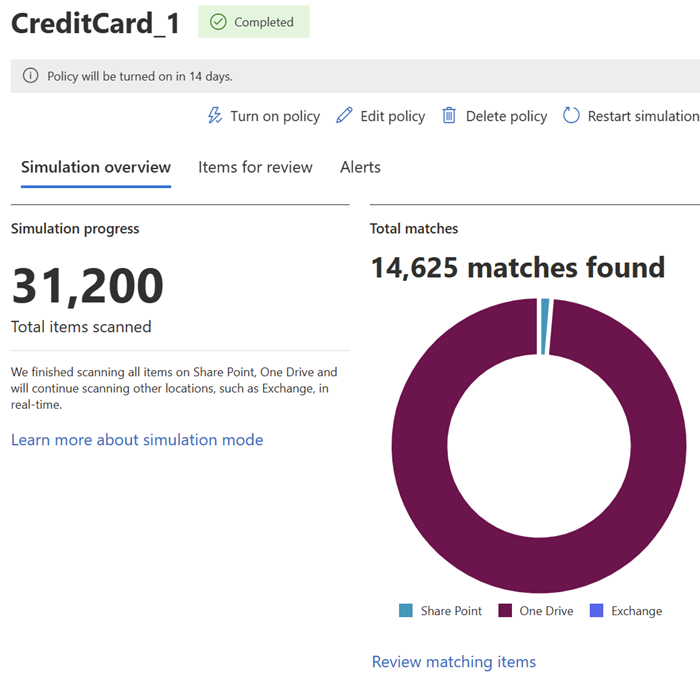
Every policy runs in one of three states. Simulation mode enforces nothing and shows a simulation overview with items scanned and matches per location. Simulation with policy tips lets users see the warning without being blocked. On enforces the actions: audit, a policy tip that warns, block with override and a business justification, or block. Microsoft documents a staged rollout through these states, and a policy takes effect about an hour after you turn it on.
- you already pay for Microsoft 365 Business Premium or E3 and want to start with email and file DLP at no extra cost
- your laptops are Windows or macOS and already onboarded to Defender for Endpoint
- you need USB, print and clipboard control but won't add the Purview Suite or move to E5: endpoint DLP isn't in Business Premium or E3
- most of your data lives outside Microsoft 365: connectors for Box, Dropbox, Google Workspace and Salesforce are still in preview
- Users like
- coverage across many workloads and locations, from endpoints to Exchange, SharePoint and OneDrive, per Gartner Peer Insights reviewers
- Users dislike
- unclear policy outcomes across Microsoft products and uneven support, per Gartner Peer Insights reviewers
- Source: Gartner Peer Insights, 64 reviews
How it works in practice
Endpoint DLP is where the licensing bites. On Windows 10, Windows 11, Windows Server 2019 and later, and the three latest macOS versions, it can block, warn or audit copies to USB drives, network shares, printing, the clipboard, uploads to restricted cloud domains and transfers over Bluetooth or RDP. Devices already onboarded to Microsoft Defender for Endpoint appear once device monitoring is on; others are onboarded with a local script for up to 10 machines, Group Policy, Configuration Manager or Intune. Endpoint and Teams DLP aren't in Business Premium or E3: you need the Microsoft Purview Suite add-on or E5 (prices in the licensing section below).
Matches land in the DLP alerts dashboard, which keeps them for 30 days, and in the Microsoft Defender portal for six months. Connectors for Box, Dropbox, Google Workspace and Salesforce are still in preview, so treat Purview as Microsoft-first.
Gartner Peer Insights shows 4.2 out of 5 from 64 ratings. Reviewers credit the breadth of locations it covers and complain that policy outcomes across Microsoft products are hard to predict.
- Starting price
- Email and file DLP included in Microsoft 365 Business Premium ($22 per user per month, yearly) and E3 ($39); endpoint and Teams DLP need the Purview Suite add-on ($10 on Business Premium, $12 on E3) or E5 ($60)
- Enforces
- Inside Microsoft 365, plus Windows and macOS devices
- Actions
- Audit, policy tip, block with override, block
- Test mode
- Simulation mode
Google Workspace DLP
Google Workspace DLP lets admins write rules in the Admin console that audit, warn or block sharing of sensitive content in Drive, Gmail and Chat, and in Chrome with Chrome Enterprise Premium.
Rules written in the Admin console stop sensitive files from being shared outside the company and sensitive mail from leaving, with no agent to install. The catch is the edition: no Business plan includes it.
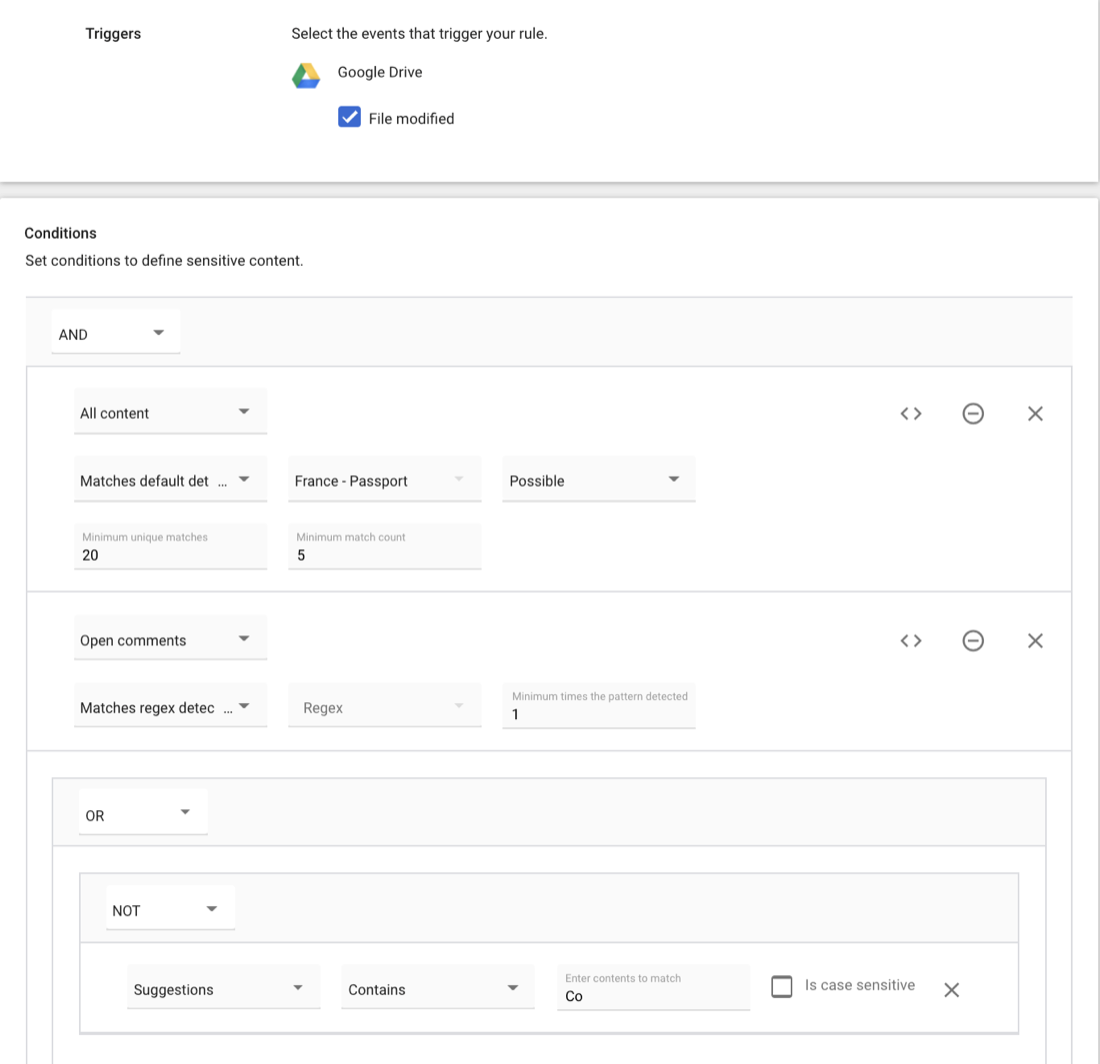
An admin goes to Security, then Access and data control, then Data protection, and adds a rule. The rule names the apps and triggers (Drive file changes, Gmail messages sent or received, Chat messages, Chrome events), the action, an alert severity and the scope: the whole domain, organizational units or groups. Conditions use predefined detectors with a likelihood setting and minimum match counts, word lists, regular expressions or file names, nested with AND, OR and NOT. Saving a rule as audit only is the documented way to test it first.
In Drive, actions can block external sharing or disable download, print and copy for viewers. In Gmail, outgoing mail can be blocked, warned about or quarantined, and classification labels can be applied in both directions.
- you already run Google Workspace Enterprise and mostly worry about Drive sharing and Gmail
- you want DLP with no agent to deploy
- you are on a Business plan: none of them include DLP
- you need USB, print or desktop app control: it stops at Google apps and Chrome
- Users like
- smooth integration across Gmail, Drive, Docs and Meet, per Capterra reviewers of the whole suite
- Users dislike
- admin and security controls locked behind higher tiers, per Capterra reviewers of the whole suite
- Source: Capterra, 17,742 reviews
How it works in practice
Google's US pricing page lists Business Starter at $7, Business Standard at $14 and Business Plus at $22 per user per month on an annual plan, each capped at 300 users, and none of them lists DLP. DLP appears on the Enterprise card, which is priced by quote. Admin Help also lists Frontline, Education and Enterprise Essentials Plus editions for Drive DLP. DLP in the Chrome browser, covering uploads, downloads, paste and print on Windows, Mac, Linux and ChromeOS, needs Chrome Enterprise Premium at $6 per user per month.
It's simple to start, but know the limits before you rely on it. Rule changes can take up to 24 hours to apply, alerts are capped at 50 per rule per day, OCR is best-effort, and password-protected Gmail attachments aren't scanned. There's no agent, so USB drives and desktop apps are outside its reach.
Capterra rates Google Workspace 4.7 out of 5 from 17,742 reviews, a score for the whole suite. Reviewers praise how Gmail, Drive and Docs fit together and complain that admin and security controls sit behind higher tiers.
- Starting price
- Included in Enterprise editions (quote only), not in Business Starter, Standard or Plus ($7 to $22 per user per month); Chrome browser DLP needs Chrome Enterprise Premium at $6 per user per month
- Enforces
- Inside Drive, Gmail, Chat; Chrome with add-on
- Actions
- Audit, warn, block, quarantine (Gmail)
- Plan gate
- Enterprise, Frontline, Education editions
Endpoint DLP you deploy on every laptop
An agent on the device is the only way to control USB drives, printing and the clipboard. These four differ mainly in operating system coverage, hosting and how much they watch the person, not just the data.
Endpoint Protector
Endpoint Protector by Netwrix combines device control, content-aware DLP, eDiscovery for data at rest and enforced USB encryption, with agents for Windows, macOS and Linux.
The same device and content rules on Windows, macOS and Linux, and they keep working when a laptop leaves the office network.
Endpoint Protector, now sold by Netwrix, has four modules: Device Control for USB and peripheral ports, Content Aware Protection for data in motion, eDiscovery for data at rest, and Enforced Encryption for USB drives. Device Control starts with global rights per device type, such as allow, deny or read-only for USB storage, and you refine them per group, computer, user or a specific device identified by vendor ID, product ID and serial number.
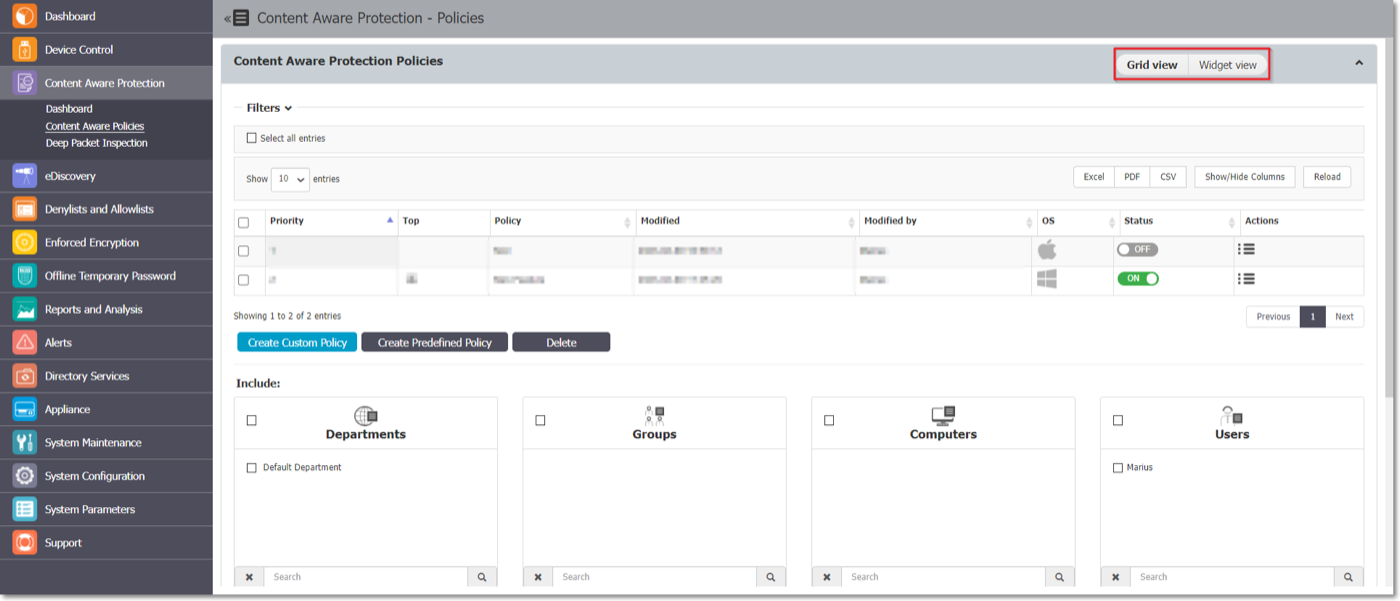
A content policy is built per operating system. You pick the action (report only, block and report, block only, or block and remediate, where the user can override with a justification), the exit points to watch (browsers, email clients, messaging apps, cloud sync clients, storage devices, the clipboard and printers), and what counts as sensitive: file types, source code, predefined personal data such as Social Security, passport and card numbers, regular expressions and custom keywords, with OCR for images.
- you run a mixed Windows, macOS and Linux fleet and want the same USB and content rules on all three
- laptops leave the office and the rules must keep working off the network
- you need a published price before a sales call: it's quote only
- you manage several client tenants as an MSP: we found no multi-tenant console in the docs
- Users like
- cross-platform coverage and granular per-user and per-device policies, per Capterra reviewers
- Users dislike
- false positives, especially with source-code rules, and a console with many tabs, per Capterra reviewers
- Source: Gartner Peer Insights, 77 reviews
How it works in practice
Thresholds keep the noise down. The manual's own example uses a threshold of 4, so an upload with four or more Social Security numbers is blocked and one with one to three goes through. A server holds up to 48 content policies. The manual recommends starting in report-only mode.
You can run it as vendor-hosted SaaS, as a virtual appliance, or in your own AWS, Azure or Google Cloud account. Agents can be deployed through Group Policy, Intune or Jamf. There's no published price, though: the buy page is a request form, and licenses count the computers you protect. We didn't find a multi-tenant console for MSPs in the documentation we read.
Gartner Peer Insights shows 4.5 out of 5 from 77 ratings. On Capterra, where only 9 reviews exist, users praise the cross-platform coverage and per-user policies, and complain about false positives, especially with source-code rules, and a console spread over many tabs.
- Starting price
- Quote only (licensed per protected computer); SaaS, virtual appliance or your own AWS, Azure or GCP
- Enforces
- Endpoint agent (Windows, macOS, Linux)
- Actions
- Report only, block, block with justification
- Limit
- Up to 48 content policies
Safetica
Safetica is a cloud-managed DLP and insider-risk platform with a Windows and macOS client and API connections to Microsoft 365 and Google Drive, licensed per active user.
Cloud-managed DLP with a price you can read on the website, built around a single policy list that covers about fifteen channels.
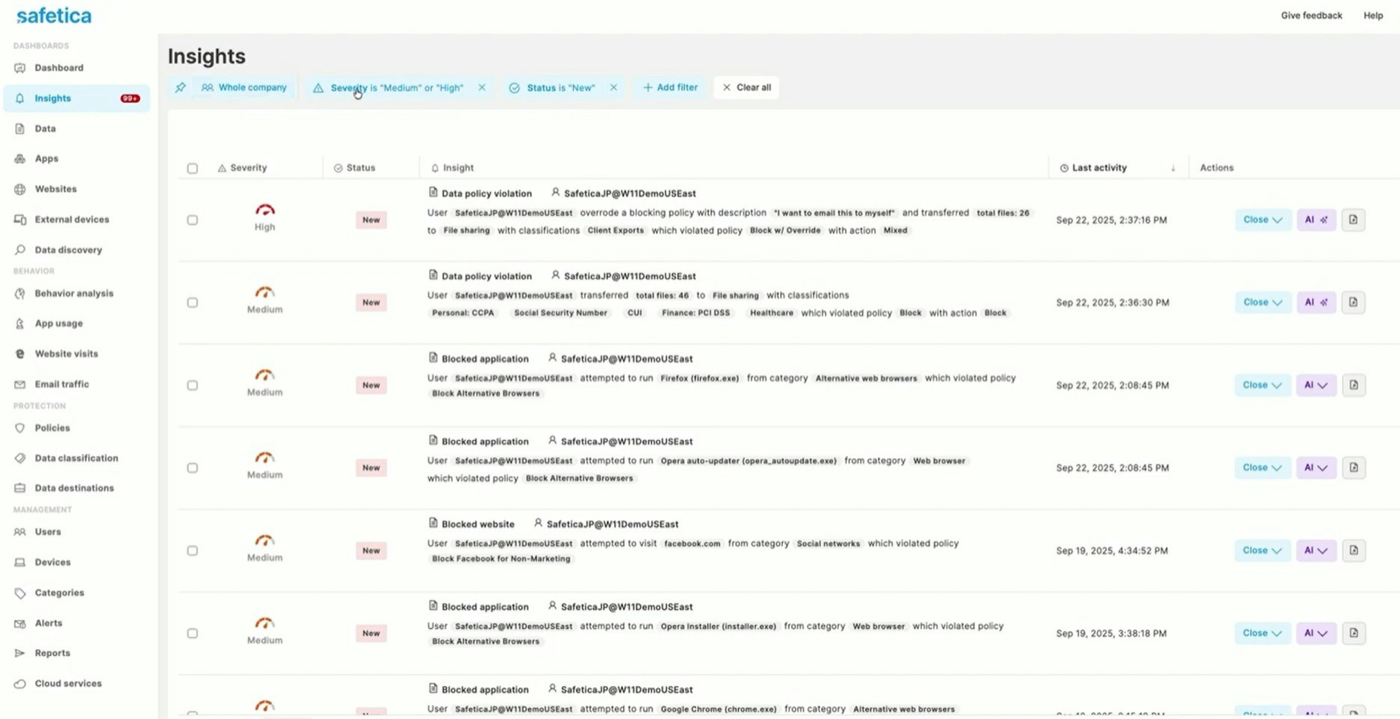
The Safetica client runs on Windows and macOS and reports to a cloud console, so there's no server to maintain. You define data classifications (content rules, file origin, templates, user tags or AI classification) and destinations, then add policies that combine classifications, destination types, users or teams, and one action: allow, log, notify, block, or block with override, where the user has to give a reason. Destination types include email, web and cloud drive uploads, USB storage, network shares, print, RDP, instant messaging, git push, the clipboard and screen capture.
Policies are evaluated from the top and the first match wins, and every section of a policy has to match before it applies. New policies start disabled at the top of the list, which makes it easy to stage them. Microsoft 365 and Google Drive connect through their APIs, so email and sharing in the cloud are covered even without the client.
- you want endpoint DLP with a published per-user price and no server to run
- you need one policy list across USB, email, web and cloud uploads, print and AI tools
- most of your fleet is macOS: block with override, clipboard, screen capture and git controls are Windows-only
- you run Arm-based Windows laptops: they aren't supported
- Users like
- granular DLP across USB, email, cloud apps and printers at a budget price, per Capterra reviewers
- Users dislike
- setup takes time and expertise, plus endpoint slowdowns and bugs after major updates, per Capterra reviewers
- Source: Capterra, 141 reviews
How it works in practice
The published prices are from $72 per user per year for Standard, $96 for Premium and $144 for Enterprise, with Safetica On-Prem by quote. Licenses count active user accounts, and an account inactive for three days stops counting. The tiers cap reports, admin accounts and data retention: Standard allows 5 admins and 12 months of history.
Windows gets the full feature set, but macOS doesn't. Block with override, clipboard, screen capture, git, virtual print and RDP controls are Windows-only, and Arm-based Windows isn't supported. There's a channel partner program, but we found no documented multi-tenant console.
Capterra shows 4.7 out of 5 from 141 reviews. Reviewers like granular DLP at a budget price and say setup takes time, the console isn't intuitive, and major updates have brought endpoint slowdowns and bugs. Many reviews are from 2022 and 2023, so some of that may describe the older product.
- Starting price
- From $72 per user per year (Standard), $96 (Premium), $144 (Enterprise); On-Prem by quote
- Enforces
- Endpoint client plus Microsoft 365 and Google Drive APIs
- Actions
- Log, notify, block, block with override
- Licensed by
- Active user account
ManageEngine Endpoint DLP Plus
ManageEngine Endpoint DLP Plus is an on-premises DLP server with Windows agents that classifies files with templates and sets each leak channel to audit, trusted-only or block.
A self-hosted server, Windows agents and a price list you can read: the most predictable option if your fleet is all Windows.
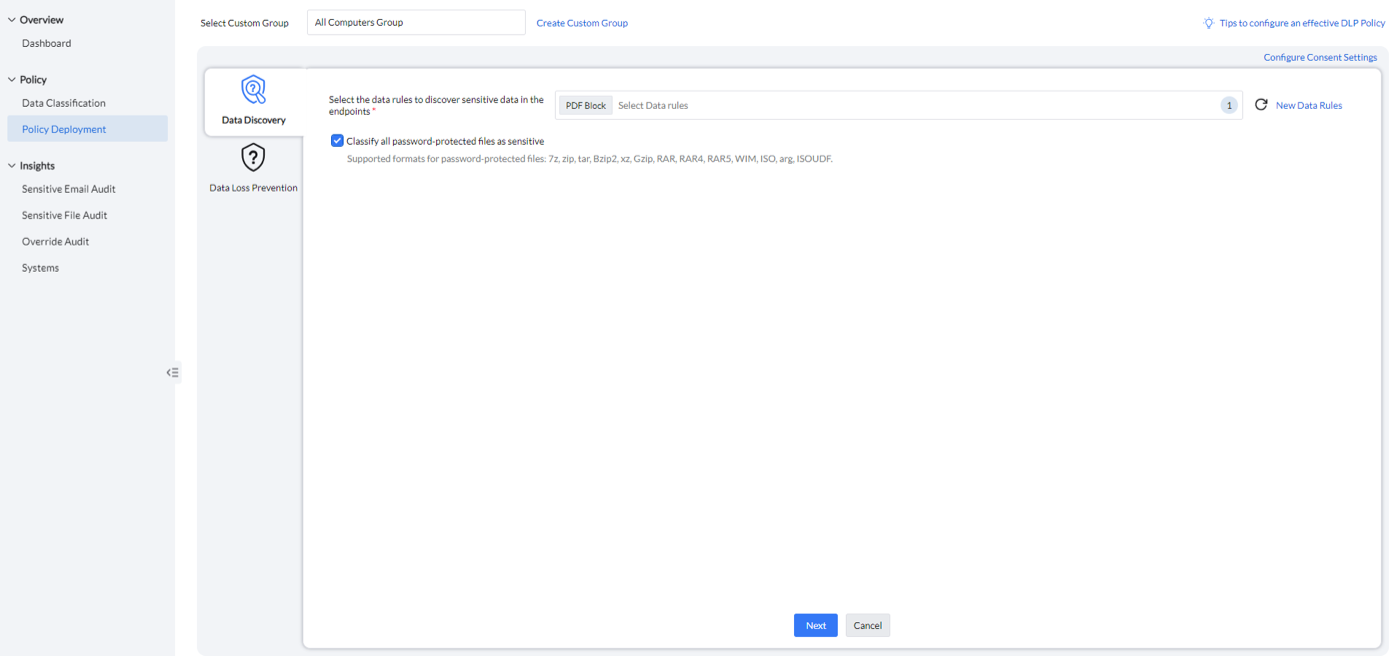
You install the server on Windows with a PostgreSQL or Microsoft SQL database and push agents to Windows 8 through 11 and Windows Server 2012 through 2022. Agents stay dormant until a policy arrives. Under Data Classification you build data rules from predefined templates for personal data, PCI DSS, HIPAA, finance and source code, with country-specific rules such as IBAN formats, or from your own regular expressions, keyword lists, document matching and file extensions. OCR covers image-based documents, and every password-protected archive can be marked as sensitive.
Under Policy Deployment you pick computer groups and set each channel to audit only, allow only to trusted destinations, or block: application access, Outlook email, USB storage, printers, Bluetooth, web and cloud uploads, screen capture and the clipboard. Users can override a block with a business reason or report a false positive, and both are logged.
- your fleet is Windows and you want a published price for 100 machines
- you prefer an on-premises server and audit-only mode before you block anything
- you have macOS or Linux endpoints: agents are Windows-only
- your users mostly send mail from webmail: email rules cover desktop Outlook only
- Users like
- granular policy settings and clear visibility into data movement, per Gartner Peer Insights reviewers
- Users dislike
- advanced features need tuning, per a Gartner Peer Insights review title (only 5 ratings)
- Source: Gartner Peer Insights, 5 reviews
How it works in practice
The annual subscription is $795 for 100 workstations, $1,595 for 250, $2,795 for 500 and $4,995 for 1,000, support included. A perpetual license is also sold, from $1,987 plus $398 a year in maintenance for 100 workstations. There's a 30-day full trial without a credit card.
It's cheap, but ManageEngine's own FAQ is clear about the limits. Email rules work only in desktop Outlook, not in webmail. Upload blocking depends on a browser extension and doesn't apply in private or guest windows. You can allow-list trusted apps and domains but not block-list them. Policy changes reach agents on a 90-minute cycle unless you push them. We didn't find a macOS or Linux agent or an MSP edition.
Gartner Peer Insights shows 4.8 out of 5, but from only 5 ratings, praising granular policies and visibility into data movement, while one review title says the advanced features need tuning.
- Starting price
- $795 per year for 100 workstations, $1,595 for 250 (annual subscription); perpetual license also sold
- Enforces
- Windows agent
- Actions
- Audit only, allow within trusted, block
- Free trial
- 30 days, full features
Teramind
Teramind is a user activity monitoring and insider-risk platform whose DLP tier adds content-based rules for clipboard, file transfers, email and chat, with screen recording around each incident.
DLP built on top of full user activity monitoring: when a rule fires, you can replay what the person was doing around it.
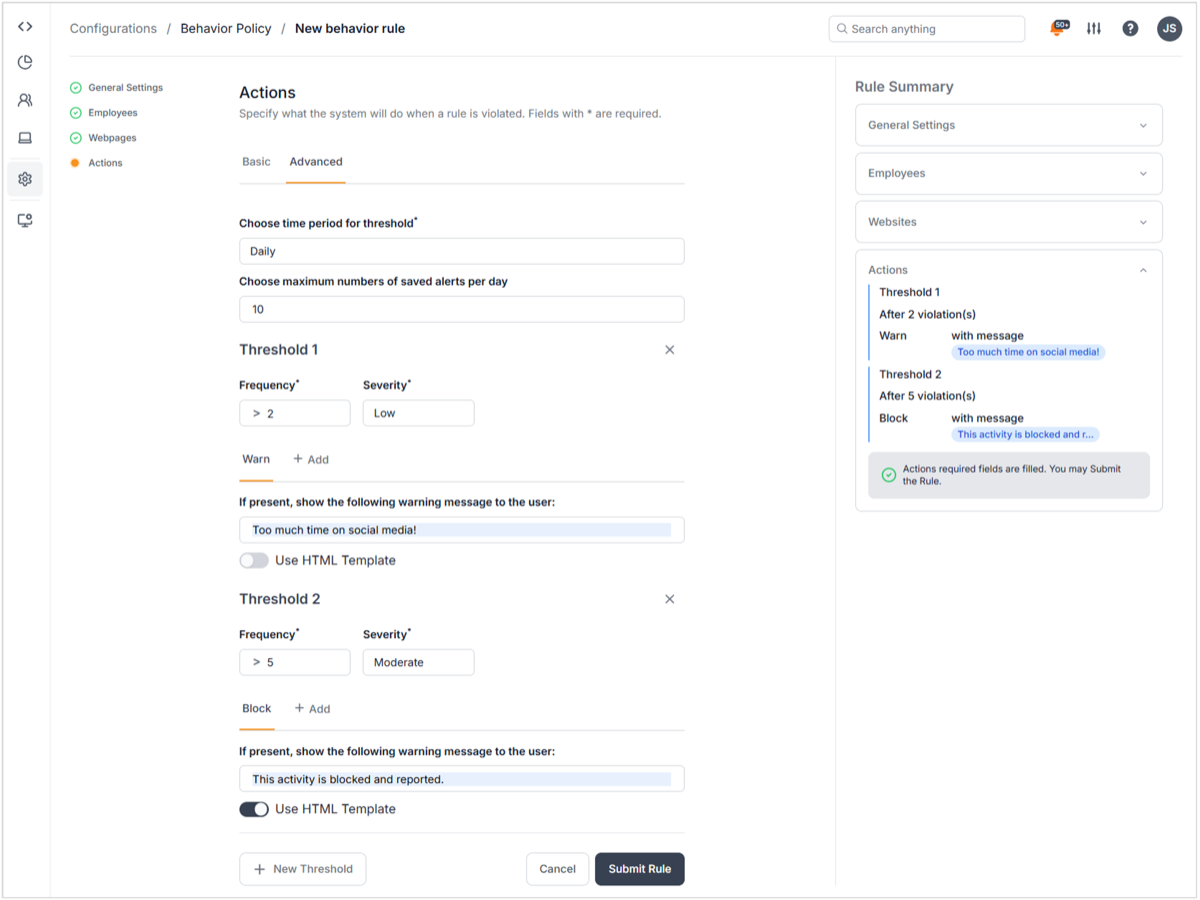
An agent on Windows, macOS or Linux streams activity to the Teramind console, cloud-hosted or self-hosted. You classify sensitive data with predefined categories (personal, financial and health data, source code) or your own keywords, regular expressions and shared lists, then build behavior rules. Activity rules cover things like uploads to personal cloud drives, content-sharing rules cover the clipboard, file transfers, email and chat, and schedule rules cover off-hours logins.
Each rule has thresholds with their own severity and actions: warn with a custom message, notify, block, lock the session, record the screen, redirect, run a command or switch task. A typical setup warns after two violations and blocks after five. Incidents land in a behavior alerts dashboard and open in a session player.
- you need to investigate what a person did around an incident, with screen recordings, not just a log line
- you want a self-serve trial and a published per-seat price for a small team
- you don't want to record employees' screens and keystrokes: monitoring is the core of the product and raises legal and trust questions
- you need scanning of stored files: it inspects data in motion only
- Users like
- deep monitoring with screen recording, live view and flexible alerts that help investigations, per Capterra reviewers
- Users dislike
- price, a learning curve and a dated interface, plus macOS issues and agent disconnects, per Capterra reviewers
- Source: Capterra, 107 reviews
How it works in practice
Pricing is per seat with a 5-seat minimum and a free trial. Content-based DLP rules start at the DLP tier, which the pricing page showed us at EUR 28 per seat per month billed yearly (EUR 30 monthly); the Starter and UAM tiers don't include them, and the OCR engine is reserved for Enterprise. It inspects data in motion only, not files at rest, and its knowledge base lists content-sharing rules for Windows.
Still, decide on the monitoring question first. Screen recording and keystroke logging are core features, and there's a stealth agent option, which raises legal and trust issues for employee monitoring. The standard agent shows employees a notice they have to acknowledge.
Capterra shows 4.7 out of 5 from 107 reviews. Reviewers value the screen recordings and alerts for investigations and audit evidence, and complain about price, a learning curve, a dated interface, macOS issues and agents that disconnect.
- Starting price
- DLP tier EUR 28 per seat per month billed yearly (EUR 30 monthly), 5-seat minimum; the pricing page showed euro prices only to us
- Enforces
- Endpoint agent (Windows, macOS, Linux)
- Actions
- Warn, notify, block, lock session, record
- DLP from
- DLP tier (Starter and UAM lack content rules)
DLP for SaaS apps and AI tools
If your sensitive data mostly lives in chat, code repositories and ticket systems, an endpoint agent sees too little of it, however well it's tuned.
Nightfall AI
Nightfall AI scans SaaS apps such as Slack, Google Drive, GitHub and Microsoft 365 through their APIs and adds a macOS and Windows agent and browser extensions for exfiltration and AI prompts.
Connects to SaaS apps through their APIs and scans what people post there, then adds an agent and browser extensions for uploads and AI prompts.
You connect apps such as Slack, GitHub, Google Drive, Gmail, Confluence, Jira, OneDrive, Teams, Salesforce, Zendesk and Notion as integrations, with no network changes. Detection is built in layers. Detectors (Nightfall's pretrained ones, or your own regular expressions, dictionaries, file types, fingerprints or Microsoft Purview labels) are grouped into a detection rule, where each gets a scope, a minimum confidence and a minimum number of findings. You test the rule in a playground, then add it to a policy for one integration with its alert recipients and automatic actions.
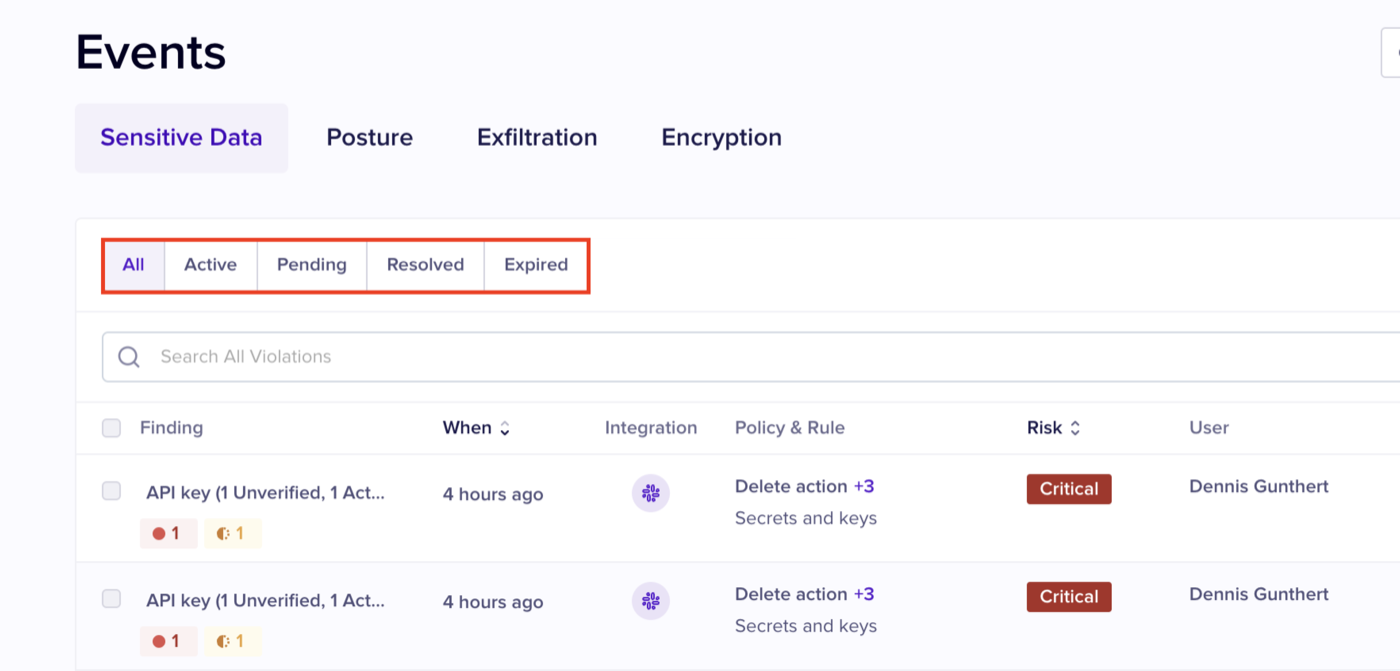
Violations appear as events. Depending on the app, admins can notify the user in Slack, Teams or email, redact, quarantine, remove access, delete a message or open a Jira ticket.
- your sensitive data lives in Slack, Google Drive, GitHub or Jira rather than on file servers
- you need to stop secrets and customer data from being pasted into AI tools
- you are a team of a few dozen people: the pricing page names buyers with 250 to 100,000+ users
- you need Linux endpoint coverage: the agent is macOS and Windows only
- Users like
- quick rollout, configurable policies and a simple admin console, per G2's review summary
- Users dislike
- limited reporting dashboards and alert customization, and slower support, per G2's review summary
- Source: G2, 98 reviews
How it works in practice
The endpoint agent runs on macOS and Windows and is deployed by hand or through Jamf, JumpCloud, Kandji, Mosyle, Intune and other MDM tools, with browser extensions for Chrome, Firefox, Safari and Edge. It covers browser uploads, prompts pasted into AI tools, personal cloud sync, USB transfers and personal code repositories, and it can block, coach or redact. Actions vary by app: on Slack Pro and Business+ the only automatic actions are deleting the message or file. Violations nobody acts on expire after 30 days.
Pricing is per user per year by quote. There's a 7-day proof of value, but no free tier. The pricing page describes buyers from 250 to more than 100,000 users, so a 20-person company should ask about minimums early.
G2 shows 4.6 out of 5 from 98 reviews. G2's review summary credits quick rollout, configurable policies and a simple console, and lists limited reporting, few alert customization options and slower support as the complaints.
- Starting price
- Quote only, per user per year; no free tier, 7-day proof of value
- Enforces
- SaaS APIs, macOS and Windows agent, browser extension
- Actions
- Notify, redact, quarantine, delete, block or coach
- Trial
- 7-day proof of value
DLP for MSPs and for large, regulated teams
The last two sit at opposite ends: one is switched on by your MSP per client, the other needs a team to run it.
Acronis Advanced DLP
Acronis Advanced Data Loss Prevention is an add-on pack for Acronis Cyber Protect Cloud that MSPs switch on per client, learns a baseline policy from observed transfers and then enforces it.
An add-on to Acronis Cyber Protect Cloud that writes the first policy for you by watching how each client's data actually moves.
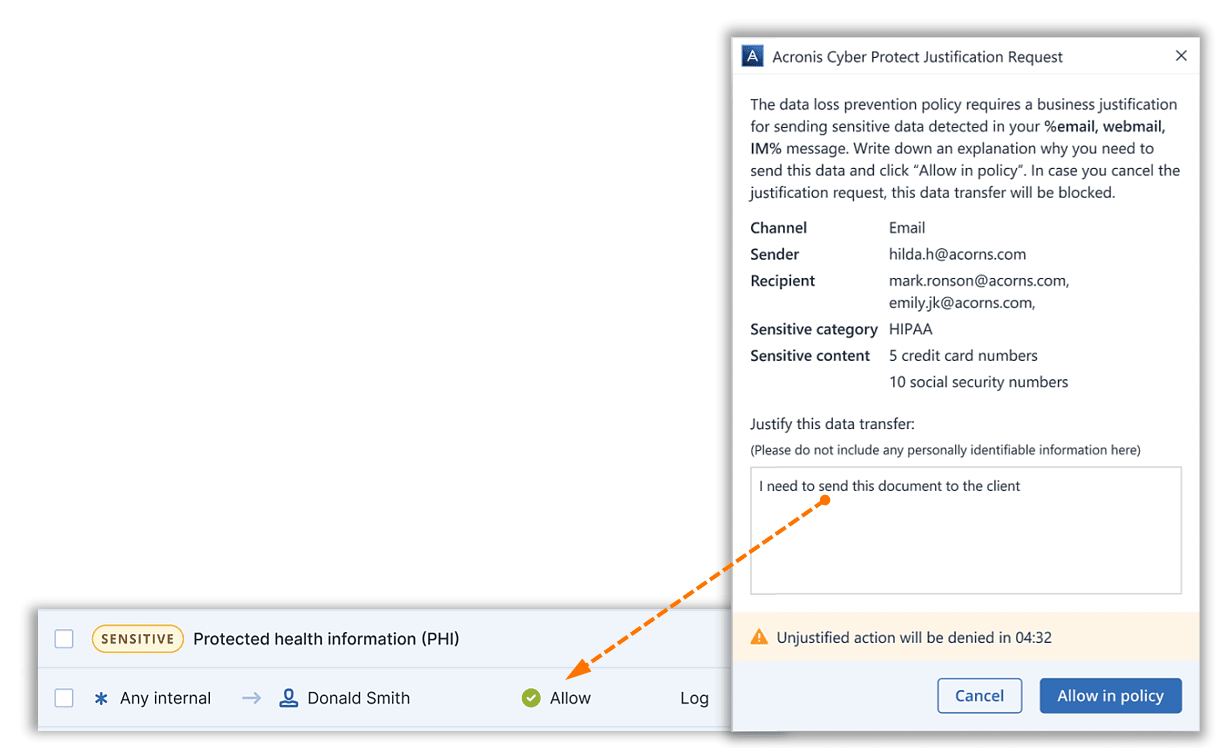
The MSP enables the Advanced Data Loss Prevention pack for a client tenant and adds DLP to a protection plan in observation mode. The agent watches outgoing transfers, classifies their sensitivity with built-in categories for personal data, health data, payment card data and documents marked confidential, notes sender and recipient, and builds a data flow policy from what it sees. Nothing's blocked during observation, though. You can allow everything, ask users for a one-time justification on every unmatched transfer, or allow internal transfers and ask for a reason on external ones.
After the observation period, which Acronis puts at about a month in the docs and one to two months in the product FAQ, the admin reviews the learned rules and switches to strict enforcement or adaptive enforcement, which keeps adding newly seen legitimate flows.
- you are an MSP already running Acronis Cyber Protect Cloud for backup and security
- you don't know your clients' data flows well enough to write rules from scratch
- you are an in-house IT team without an Acronis partner: it's sold only through service providers
- you need protection on day one: nothing is blocked during the one-month observation period
- Users like
- one agent and one multi-tenant console for backup, security and patching, per Capterra reviewers of Cyber Protect Cloud
- Users dislike
- a busy console, vague alerts, uneven support and complicated per-workload licensing, per Capterra reviewers of Cyber Protect Cloud
- Source: Capterra, 78 reviews
How it works in practice
Channels include removable storage, printers, the clipboard, SMTP and Outlook email, webmail, instant messengers, file sharing services, network shares, HTTP and HTTPS, and FTP. On newer processors with CET support, such as 11th-generation Intel Core, Acronis disables some channels, including printers and the redirected clipboard. The documentation we read describes Windows channels and doesn't confirm macOS support.
It's sold only through service providers, billed per workload per month, so an in-house team can't buy it directly. The current pricing page sends you to a calculator. Acronis's last public partner price list, from July 2023, showed $3.25 per workload per month as the MSP's cost, not the end customer's price.
Capterra shows 4.1 out of 5 from 78 reviews of Acronis Cyber Protect Cloud as a whole, mostly about backup. Reviewers like one agent and one multi-tenant console, and complain about a busy console, vague alerts, uneven support and complicated per-workload licensing.
- Starting price
- Sold through MSPs per workload per month; no current public list price (last public partner list, July 2023: $3.25 per workload per month MSP cost)
- Enforces
- Endpoint agent, per client tenant
- Policy
- Learned in observation mode
- Modes
- Strict or adaptive enforcement
Forcepoint DLP
Forcepoint DLP applies one set of policies to endpoints, email, web, network and cloud apps, with predefined policies per industry and region, fingerprinting and risk-adaptive protection.
The enterprise reference point: one policy engine across endpoint, email, web, network and cloud apps, with predefined policies for many regulations.
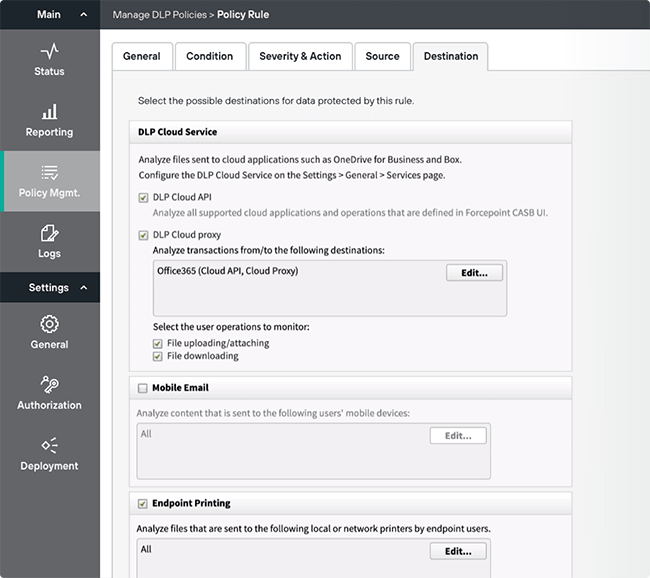
In the on-premises product you open the Data Security module of Forcepoint Security Manager and either switch on a predefined policy for your industry and region, configure a quick policy for a single channel (email, web or mobile), or run the policy wizard: general settings, condition (classifiers such as patterns and phrases, file properties or fingerprints of files and database fields), severity and action, source, destination, then deploy. Destinations include network and endpoint email, Office 365 and Box through the cloud API or proxy, web traffic, endpoint printing, the clipboard in applications and removable media. Even so, the documentation recommends starting with a permissive action and tightening after monitoring.
- you have compliance requirements across several countries and want predefined policies for them
- you need one policy engine for endpoint, email, web and cloud apps, and a team to run it
- you are a small IT team without a DLP specialist: on-premises it needs a Windows management server and Microsoft SQL Server
- you need a price before a sales cycle: it's quote only
- Users like
- flexible rules, fingerprinting and pre-built rule sets as a starting point, per Capterra reviewers
- Users dislike
- cost for small companies, a console that isn't intuitive and hard agent rollout, per Capterra reviewers
- Source: Capterra, 17 reviews
How it works in practice
Forcepoint claims more than 2,000 policy and classifier templates covering regulations in over 90 countries, plus risk-adaptive protection that adjusts enforcement to a user's risk score. Those are vendor claims, and we haven't tested them. It runs as SaaS, on-premises or hybrid. On-premises needs a Windows Server management server and Microsoft SQL Server; the free SQL Express edition is only for evaluations or small setups. Endpoint channels need a separate Forcepoint DLP Endpoint subscription, and a customized copy of a predefined policy stops receiving Forcepoint's updates.
Forcepoint doesn't publish prices; the product page has a request form.
Capterra shows 4.5 out of 5 from 17 reviews, mostly from 2019 to 2023. Reviewers praise flexible rules, fingerprinting and pre-built rule sets, and complain that it's expensive for small companies, the console isn't intuitive and rolling out agents is hard.
- Starting price
- Quote only from Forcepoint; endpoint coverage is a separate DLP Endpoint subscription
- Enforces
- Endpoint, email, web, network, cloud apps
- Deployment
- On-premises, SaaS or hybrid
- Policies
- Predefined per industry and region
Is Microsoft DLP included in your license?
Microsoft DLP is partly included in your license, so check before you buy anything else. Microsoft 365 Business Premium and E3 include DLP for email and files in Exchange, SharePoint and OneDrive. DLP for Teams chats, for Windows and macOS devices and for Copilot needs the Microsoft Purview Suite add-on or E5. Google Workspace works differently, because no Business plan includes DLP at all.
| Plan | Price per user per month (yearly) | DLP you get |
|---|---|---|
| Microsoft 365 Business Premium (up to 300 users) | $22 | Email and files: Exchange, SharePoint, OneDrive |
| Purview Suite add-on for Business Premium (up to 300 seats) | $10 on top | Adds Teams, endpoint, Edge browser and Copilot DLP |
| Microsoft 365 E3 | $39 | Email and files: Exchange, SharePoint, OneDrive |
| Microsoft Purview Suite, formerly E5 Compliance (needs E3) | $12 on top | Adds Teams, endpoint, browser and network inline and Copilot DLP |
| Microsoft 365 E5 | $60 | Full Purview DLP |
| Google Workspace Business Starter, Standard, Plus (up to 300 users) | $7, $14, $22 | None |
| Google Workspace Enterprise editions | Quote | Drive, Gmail and Chat DLP |
| Chrome Enterprise Premium | $6 on top | DLP in the Chrome browser |
Microsoft prices are from Microsoft's US plan pages and the plan gates from the Purview service description, both read on October 20, 2026. Microsoft also offers a 90-day Purview Suite trial with 25 licenses, but its eligibility page names Microsoft 365 E3, or Office 365 E3 with Enterprise Mobility and Security E3, so a Business Premium tenant doesn't qualify. Some inline browser and network DLP scenarios are billed pay-as-you-go on top of the license.
What DLP software costs for a small team
The headline prices look comparable, but they aren't, because each vendor counts something different.
| Tool | What the price counts | Published price (USD unless noted) |
|---|---|---|
| Microsoft Purview DLP | Users, as part of Microsoft 365 | Included for email and files; endpoint from $10 per user per month on top |
| Google Workspace DLP | Users, Enterprise editions | Quote; Chrome browser DLP $6 per user per month |
| Safetica | Active users | From $72 per user per year |
| ManageEngine Endpoint DLP Plus | Workstations, in slabs | $795 a year for 100 |
| Teramind | Seats, 5 minimum | EUR 28 per seat per month for the DLP tier |
| Acronis Advanced DLP | Workloads, through an MSP | Set by your MSP |
| Endpoint Protector, Nightfall AI, Forcepoint DLP | Quote only | No public price |
For the tools with a published USD price per user or per device, the yearly cost at your size works out like this.
Yearly list prices in USD from each vendor's pricing page, read on October 20, 2026. Purview Suite for Business Premium is $10 per user per month and Chrome Enterprise Premium $6, both shown as yearly totals. Quote-only tools, Teramind (euro prices only) and Acronis (priced by your MSP) aren't in the slider.
Rolling out DLP without drowning in alerts
Most of the tools here document a test mode for a reason: a new DLP policy that blocks on day one will block legitimate work, but one that never leaves test mode protects nothing. This is a sequence a small team can run, using the mode names from the vendors' own documentation.
Pick one data type and one door
Start with the data that would hurt most if it left, such as customer card numbers or health records, and the channel it most likely leaves through, such as external email or USB drives. One policy, not twenty.
Run it in a mode that doesn't block
Purview calls it simulation mode, Google audit only, Endpoint Protector report only, ManageEngine audit only and Acronis observation mode. Let it run for a few weeks of normal work.
Tune before you enforce
Read the matches. Raise thresholds where single hits are noise, add exceptions for teams that legitimately send this data, and remove detectors that only produce false positives.
Warn before you block
Switch to policy tips, warnings or block with override, so people have to give a business reason. The reasons tell you which rules are wrong.
Block the clear cases and keep a reviewer
Block only what nobody should ever do, such as bulk uploads of card numbers to personal cloud storage, and name the person who reviews alerts every week.
What DLP won't tell you: who owns the accounts that touch the data
DLP won't tell you who owns the accounts that touch the data, because it watches content as it moves. It doesn't name who is responsible for the non-human accounts that move it every night, such as the service account a backup job runs as or the app registration that syncs files to another system. When an auditor asks who owns that account and why it still has access to the customer share, a DLP alert log has no answer. The same gap shows up in our guide to privileged access management software, where vaulting a service account still doesn't name its owner, and an IT asset inventory doesn't list them either.
The IT Lead covers that one question: it imports service accounts from a CSV, asks each nominated owner to confirm ownership and purpose by email, and keeps the review trail. It doesn't inspect data, block transfers or change accounts. It reads from CSV today, not from live directory connections.
Which tool to pick
The rows overlap, so shortlist two and run both in test mode against your own data before you pay.
- Already on Microsoft 365 Business Premium or E3, email and files firstMicrosoft Purview DLP, then the Purview Suite add-on if you need devices
- Google Workspace Enterprise, worried about Drive sharingGoogle Workspace DLP, plus Chrome Enterprise Premium for the browser
- USB, print and uploads on Windows and macOS with a published priceSafetica
- Windows, macOS and Linux with the same rulesEndpoint Protector
- Windows-only fleet, self-hosted, lowest published priceManageEngine Endpoint DLP Plus
- Investigations that need screen recordings around an incidentTeramind, after a legal check on employee monitoring
- Secrets and customer data in Slack, GitHub and AI promptsNightfall AI, if you meet its buyer size
- An MSP already running Acronis for clientsAcronis Advanced DLP in observation mode
- Several regulations, every channel, and a DLP owner on staffForcepoint DLP
FAQ
What does data loss prevention software do?
DLP software identifies sensitive information such as card numbers, health records or source code, monitors where it moves, and applies a policy when it's about to leave through a channel you don't allow. Depending on the policy it logs the event, warns the user, asks for a business reason or blocks the transfer.
Is Microsoft DLP free?
Microsoft DLP isn't sold as a separate product, but you may already have it. Microsoft 365 Business Premium and E3 include DLP for Exchange, SharePoint and OneDrive. Endpoint and Teams DLP need the Purview Suite add-on, $10 per user per month on Business Premium or $12 on E3, or Microsoft 365 E5. A 90-day Purview Suite trial with 25 licenses is open to E3 tenants.
What is the best DLP software for a small business?
Start with what you already pay for: Microsoft 365 Business Premium includes email and file DLP. For USB, print and upload control, Safetica publishes prices from $72 per user per year, ManageEngine Endpoint DLP Plus costs $795 a year for 100 Windows workstations, and Endpoint Protector covers Windows, macOS and Linux.
Is DLP obsolete?
DLP isn't obsolete, but where it runs has changed. Rules on the email gateway miss data in SaaS apps and AI prompts, so current tools add API connectors and browser controls. Nightfall AI scans Slack and GitHub, and Purview, Safetica and Teramind add controls for AI tools.
What is the difference between data loss prevention and data leak prevention?
In practice the two terms describe the same category: tools that stop sensitive data from leaving through channels you don't allow. Data loss prevention is the established product name. Recovering data after deletion or ransomware is a different job, handled by backup.