
Vulnerability management software finds weaknesses in your servers, laptops and exposed services, ranks them by how likely they are to hurt you, and tracks each one until someone fixes it. This page compares seven tools for IT teams of roughly 3 to 50 people and MSPs with 100 to 1,000 assets and no dedicated security analyst, and it follows one finding through each tool, from scan to a confirmed fix. Patch deployment tools and EDR are related jobs that this page doesn't rank. Where a vulnerability tool also deploys patches, the entry says so.
The choice usually comes down to three questions: whether you want agents on every device or a scanner you point at networks, who turns a finding into a ticket and a fix, and whether you can live with a quote instead of a price. Five of the seven tools publish a price you can budget from, one lists a starting price without a unit, and one is quote only. Three have a free tier or edition that scans, and the free Nessus license isn't one of them, because Tenable limits it to non-commercial use. The tables below keep the price unit next to every number, because per asset, per user and per scanner licenses don't add up the same way.
- vulnerability management tools compared
- 7
- tool with no public price at all, Rapid7 InsightVM
- 1
- offer a free tier or edition that scans (Intruder, Qualys, Greenbone)
- 3
- can deploy the patch themselves (Qualys with an add-on or higher tier, ManageEngine Enterprise)
- 2
Answer, picks and compare table
 Best known scanner with a published priceTenableNessus Professional is $4,790 per scanner license for one year, and Tenable Vulnerability Management lists $3,500 to $3,700 per year for 100 assets. Findings are ranked with CVSS v4, EPSS and Tenable's own priority rating.
 Best for agents everywhere, with a free edition to testQualys VMDRCloud Agents, a TruRisk ranking and Jira and ServiceNow connectors. The Small Business page starts at $2,195 without stating the unit.
 Best for tracked remediation projectsRapid7 InsightVMRemediation projects assign owners and due dates, and the next scan closes the item or reopens it. Quote only, and production use needs scan engines.
 Best if you already license Defender for Endpoint Plan 2Microsoft Defender Vulnerability ManagementCore features come with Plan 2, and the add-on is $2 per user per month. There is no scan schedule to run, and fixes go out through Intune.
 Best for finding and patching in one toolManageEngine Vulnerability Manager PlusFrom $695 per year for 100 computers on premises, with patch deployment in the Enterprise edition and a scan that finds vulnerabilities and missing patches together.
 Best for external exposure and small cloud estatesIntruderA free plan, then EUR 2,497 per year for Cloud. Results come with plain-English fix steps, and internal agents start on Pro.
 Best free scanner if you can run it yourselfGreenbone OpenVASOpenVAS Community Edition is open source and free, with community support and a smaller test feed. Paid editions add the Enterprise Feed and support.
| Tool | Type | How it scans | Starting price | Rating |
|---|---|---|---|---|
| Tenable | Network scanner and cloud vulnerability management | Scanner you run (Nessus) or cloud console (Tenable VM) | Nessus Professional $4,790 per license for one year; Tenable Vulnerability Management $3,500 to $3,700 per year for 100 assets (online purchase up to 250 assets, larger counts quoted) | 4.5 (320) |
| Qualys VMDR | Cloud agent and scanner platform | Cloud Agents, scanner appliances, passive sensors | Small Business page lists VMDR TruRisk from $2,195, FixIT (adds patching) from $2,995 and ProtectIT from $4,645, with unit and term not stated; a free Community Edition and a 30-day trial exist | No reviews yet |
| Rapid7 InsightVM | Console and scan engine platform | Scan engines plus an optional Insight Agent | No public price: InsightVM is sold inside Exposure Command Essentials by quote | 4.4 (81) |
| Microsoft Defender Vulnerability Management | Vulnerability management inside Microsoft Defender | Defender sensor plus agentless scanning | Add-on $2.00 per user per month with an annual commitment, on top of Defender for Endpoint Plan 2; core features are included in Plan 2 | 4.4 (34) |
| ManageEngine Vulnerability Manager Plus | Agent-based scanning with built-in patching | Agent on Windows, Linux and Mac; network devices agentless | Professional $895 per year in the cloud or $695 on premises for 100 computers and one technician; Enterprise $1,545 cloud or $1,195 on premises; dollar figures as listed, no currency code shown | No reviews yet |
| Intruder | Cloud scanner for external and internal targets | External targets; internal agents from the Pro plan | Free plan; Cloud from EUR 208 per month or EUR 2,497 per year; Pro from EUR 347 per month or EUR 4,168 per year; euro prices excluding VAT, base fee plus a fee per target | 4.8 (223) |
| Greenbone OpenVAS | Open source scanner with paid appliances | Network scans from your own scanner; no agents yet | OpenVAS Community Edition and OPENVAS FREE are free; OPENVAS BASIC is about EUR 2,450 to 2,524 per year depending on the page; appliances and the Cloud Service have no public price | 4.4 (32) |
Ratings are G2 scores read on November 1, 2026. Tenable's score is for Nessus only, and Greenbone's is G2's OpenVAS listing. We couldn't read a rating for Qualys VMDR or ManageEngine Vulnerability Manager Plus. Intruder and Greenbone list euro prices.
Here's how to read the table. Nessus is licensed per scanner, Tenable Vulnerability Management per asset, ManageEngine per computer with servers and technicians priced separately, Defender per user, and Intruder as a base fee plus a fee per target. The cost section later puts 100 and 500 assets on one scale where the prices allow it.
A price and a scan method don't tell you what happens after the scan. This second table follows a finding to the person who has to fix it, using each vendor's own documentation.
| Tool | Ranks findings with | Hands them off through | Confirms the fix |
|---|---|---|---|
| Tenable | CVSS v4, EPSS and Vulnerability Priority Rating | Jira or ServiceNow tickets from the Findings view, created by hand | Not covered in the pages we read |
| Qualys VMDR | TruRisk score and Qualys Detection Score | Jira and ServiceNow connectors with assignment rules; patching is an add-on | Not covered in the pages we read |
| Rapid7 InsightVM | Active Risk score from 0 to 1000 | Remediation projects with owners, due dates and optional tickets | Awaiting Verification, then the next scan closes or reopens the item |
| Defender Vulnerability Management | Threat, breach likelihood and business value, with EPSS in the exposure score | Remediation request that creates an Intune security task | Closes on system confirmation or manual completion |
| ManageEngine Vulnerability Manager Plus | CVSS, EPSS, threat intelligence, age and patch availability | Patch deployment tasks from the same console (Enterprise) | Follow-up scan after each patch install |
| Intruder | CVSS, CISA's exploited list and EPSS | Jira, GitHub, GitLab, Azure DevOps, Linear and ServiceNow | Remediation scan or Scan now |
| Greenbone OpenVAS | CVSS severity and Quality of Detection | Alerts by email or syslog; ticketing depends on the edition | Delta reports between two scans |
What vulnerability management software does and what it doesn't
Vulnerability management is the repeating cycle of finding your assets, scanning them for known weaknesses, ranking what turns up, fixing or reducing the worst items and confirming the fix worked. The software automates the scanning and the ranking and keeps the list of open findings. A finding is usually a CVE, a numbered public record for a specific flaw in a specific product, matched to an asset on your network. A CVE tracker is the same idea in its simplest form: the CVE list filtered down to the products you run.
Three scores do most of the ranking. CVSS rates how severe a flaw is in technical terms. EPSS, published by FIRST, estimates the probability that a published CVE will be exploited in the wild in the next 30 days. CISA's Known Exploited Vulnerabilities catalog lists flaws with confirmed exploitation, and its release dated October 30, 2026 held 1,766 entries. A tool that sorts only by CVSS hands you a long list, and most of it won't be urgent. A tool that mixes in EPSS or the exploited list puts the flaws attackers actually use at the top, which matters when one admin has a week to work through it.
How a tool scans decides what it can see. An agent runs on the device and reports from anywhere, which suits laptops that leave the office, especially remote staff. A network scanner reaches servers, printers and network gear that can't run an agent. An external scanner tests what the internet sees of your domains and public IPs. A credentialed scan logs in to a host to read installed software and patch levels, while an unauthenticated scan only sees what the network exposes. Most small teams end up with one agent or credentialed method for the inside and an external scan for the edge.
What these tools don't do. Finding a flaw isn't fixing it. A few tools in this list can deploy a patch, and the rest hand the work to Intune, a ticket or your patching tool. Our guide to patch management software covers the tools that install the fix. For the wider picture of managing laptops, desktops and servers, see our guide to endpoint management software. Penetration testing, application code scanning and cloud posture suites are different products and aren't ranked here.
How we chose these tools
We picked tools a small IT team can run without a security analyst, then checked five things for each: how it scans, how it ranks findings, how a finding reaches the person who fixes it, how the fix is confirmed, and what the price counts. Each entry follows one finding from detection to a closed item, so you can compare the steps and see where a tool leaves a gap.
Prices were read from vendor pages on November 1, 2026. Intruder and Greenbone list euro prices, so we give euros. Ratings come from G2 pages we opened on November 1, 2026, and where a rating or a review theme couldn't be read, the entry says so instead of filling the gap. No tool vendor paid for a place here, and we don't link to vendor sites.
We left out tools aimed at larger security teams or other jobs: CrowdStrike and SentinelOne exposure modules, Wiz and other cloud posture suites, Acunetix and Burp Suite for web application testing, and CyCognito for attack surface management. We also left out Action1, because we could not verify its current product details. Patch-first tools such as Automox and Patch Manager Plus are in our patch management guide.
Scanner-first platforms
These three exist mainly to scan and rank. They cost more and ask more of the admin than the tools later in the list, and they go furthest on prioritization and reporting.
Tenable
Pricing, product and docs pages read November 1, 2026
Two products under one name: Nessus Professional is a scanner you run yourself, and Tenable Vulnerability Management is the cloud subscription priced by asset.
One finding, start to finish. In Nessus Professional you pick a scan template (host discovery, vulnerability or compliance), run it on demand or on a repeating schedule, and read the findings in a local console. Each finding carries CVSS v4, EPSS and Tenable's Vulnerability Priority Rating. In Tenable Vulnerability Management the findings sit in a cloud Findings view. You select them, choose Take Action and create a Jira or ServiceNow ticket, either one per finding or as subtasks. The docs page we read describes ticket creation as manual, and Tenable sells Patch Management as a separate product, so someone still has to push the fix. Data leaves as scheduled CSV or JSON exports, and formatted summaries come as reports.
What each license includes. Tenable says Nessus Professional and Expert include unlimited IT vulnerability assessments plus configuration and compliance audits, with more than 450 pre-configured templates and CIS benchmark audits. Web application scanning and attack surface scanning need Nessus Expert at $6,790 for one year. Agent scans need Nessus Manager, not Professional. The free Nessus Essentials license is 30 days, covers up to 5 IPs and is limited to personal, educational and non-commercial use, so a company can't use it as a free version.
- you want the best-known scanner engine and a published price, and one admin can run scans from a console
- you need configuration and compliance audits against CIS benchmarks, not only missing patches
- you want agents on every laptop from the entry license, because Nessus Professional has no agent scanning and agents need Nessus Manager
- you need patch deployment, which Tenable sells as a separate product
- Users like
- Vulnerability detection, Automated scanning, Ease of use
- Users dislike
- Slow scanning, Price, Complexity, False positives
- Source: G2, 320 reviews

How it works in practice
What users report. G2 shows 4.5 of 5 from 320 reviews for Nessus (read November 1, 2026). Its summary lists vulnerability detection, automated scanning and ease of use as the recurring strengths, and slow scanning, price, complexity and false positives as the recurring complaints. We found no G2 rating for Tenable Vulnerability Management itself.
Check the price. Tenable's Nessus page lists $4,790 for one year and labels the prices as including VAT, so confirm the US figure at checkout. The buy page shows $3,700 in one place and $3,500 in the purchase window for 100 assets for one year, and online purchase stops at 250 assets. G2 still lists an older Nessus Professional price of $3,390.
- Starting price
- Nessus Professional $4,790 per license for one year; Tenable Vulnerability Management $3,500 to $3,700 per year for 100 assets (online purchase up to 250 assets, larger counts quoted)
- Nessus Professional
- $4,790 per license, 1 year
- Cloud product
- Tenable Vulnerability Management, per asset
- Prioritization
- CVSS v4, EPSS, VPR
- Agent scans
- Not in Nessus Professional
Qualys VMDR
Pricing, product and docs pages read November 1, 2026
Qualys builds its subscription on Cloud Agents and says unlimited agents, virtual scanners and passive sensors are included.
One finding, start to finish. Cloud Agents on the endpoints assess continuously, while scanner appliances and passive sensors cover what can't run an agent. Detections are matched to missing patches, because Patch Detection is part of VMDR, and then ranked in a Prioritization report with the TruRisk score and the Qualys Detection Score. Tickets reach ServiceNow or Jira through rule-based connectors, and QFlow, a no-code workflow builder, is included. The Jira connector needs API access, a Jira admin user and an API token. Patch deployment can start from the Prioritization report, but it needs a Patch Management subscription, which the FixIT and ProtectIT small business tiers bundle.
Free edition. Qualys Community Edition is free and covers asset discovery, vulnerability scans of IT infrastructure and web apps, dashboards and reports. The page we read doesn't state its asset, IP or agent limits, so test it before you plan around it. VMDR itself has a 30 day free trial.
- you want agents on every endpoint and one cloud console for scanning, prioritization and ticketing
- you want a free Community Edition to test the scanner before paying
- you need a price you can budget from the website, because the unit, term and minimum asset count aren't stated
- you want patch deployment included, which needs the FixIT tier or a Patch Management add-on

How it works in practice
Price. The Small Business page lists VMDR TruRisk from $2,195, FixIT from $2,995 and ProtectIT from $4,645. It doesn't say whether that is per asset, per IP or per account, how long the term is or how many assets are the minimum, so treat each figure as the start of a quote.
What users report. We could not verify a G2 or Capterra rating or review themes for Qualys, so we don't quote any. Claims such as fewer critical vulnerabilities after adoption come from Qualys itself, and we didn't test them.
- Starting price
- Small Business page lists VMDR TruRisk from $2,195, FixIT (adds patching) from $2,995 and ProtectIT from $4,645, with unit and term not stated; a free Community Edition and a 30-day trial exist
- Entry price
- $2,195 (unit not stated)
- Free option
- Community Edition
- Trial
- 30 days
- Patching
- Add-on or FixIT tier
Rapid7 InsightVM
Pricing page, product page and docs read November 1, 2026
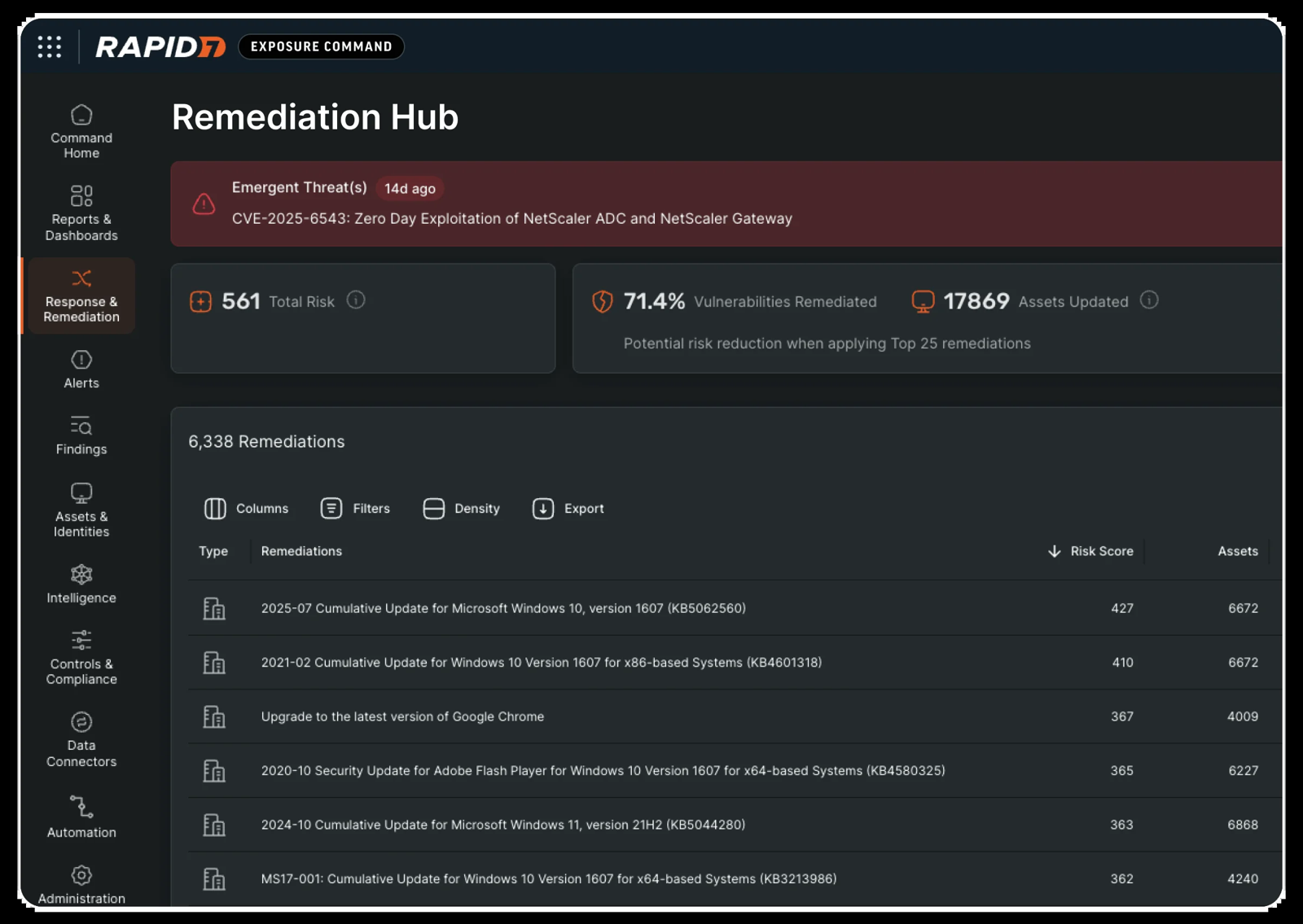
InsightVM is the one tool here where remediation is a tracked project with an owner, a due date and a verification step.
One finding, start to finish. A Security Console and one or more scan engines run the scans, and the optional Insight Agent assesses devices from the inside. Scans use built-in or custom templates, can be scheduled, and credentialed scans support SSH keys, Kerberos, CyberArk and database credentials. The console merges agent and engine results for the same asset. Findings are scored by Active Risk on a scale of 0 to 1000, built from CVSS, Metasploit and ExploitDB data, exploited-in-the-wild feeds including CISA's catalog, and the asset tags you set. You then build a remediation project, static or dynamic, assign users, set a due date and optionally connect Jira or ServiceNow so tickets open automatically. The assignee marks an item Awaiting Verification, and the next scan moves it to Closed or back to Open.
Limits. Rapid7's docs call distributed scan engines necessary for a production deployment, so you run the console and engines yourself. Only global administrators can create dynamic projects, and switching to Active Risk can't be undone.
- you want built-in remediation projects with assigned owners, due dates and a rescan that verifies the fix
- you have an admin who can run a console and scan engines
- you want to see a price before talking to sales, because none is published
- you want a lightweight cloud-only setup, since production use needs distributed scan engines
- Users like
- Automation that cuts remediation effort, Real-time detection, Asset tagging and clear risk scoring
- Users dislike
- Setup and maintenance complexity, Cost, Scan and dashboard performance at scale, Slow support
- Source: G2, 81 reviews
How it works in practice
Price. Rapid7 publishes none. InsightVM now sits inside Exposure Command Essentials, which bundles it with attack surface management, and the pricing page offers a demo request only. G2 shows a vendor-provided per-asset figure that Rapid7's own pages don't back, so we don't use it.
What users report. G2 shows 4.4 of 5 from 81 reviews (read November 1, 2026). Reviewers praise automation that cuts remediation effort, real-time detection, asset tagging and clear risk scoring. They complain about setup and maintenance complexity, cost, scan and dashboard performance at scale and slow support.
- Starting price
- No public price: InsightVM is sold inside Exposure Command Essentials by quote
- Price
- Quote only
- Risk score
- Active Risk, 0 to 1000
- Components
- Security Console, scan engines, Insight Agent
- Ticketing
- Jira and ServiceNow
Tools that tie findings to the endpoints you already manage
These two start from the endpoint, not from a network scan. They suit teams that already run the vendor's agent or want detection and the fix in one console.
Microsoft Defender Vulnerability Management
Pricing page and Microsoft Learn docs read November 1, 2026
If your laptops already run Defender for Endpoint, vulnerability data is a view of what the sensor already collects, with no scan jobs to schedule.
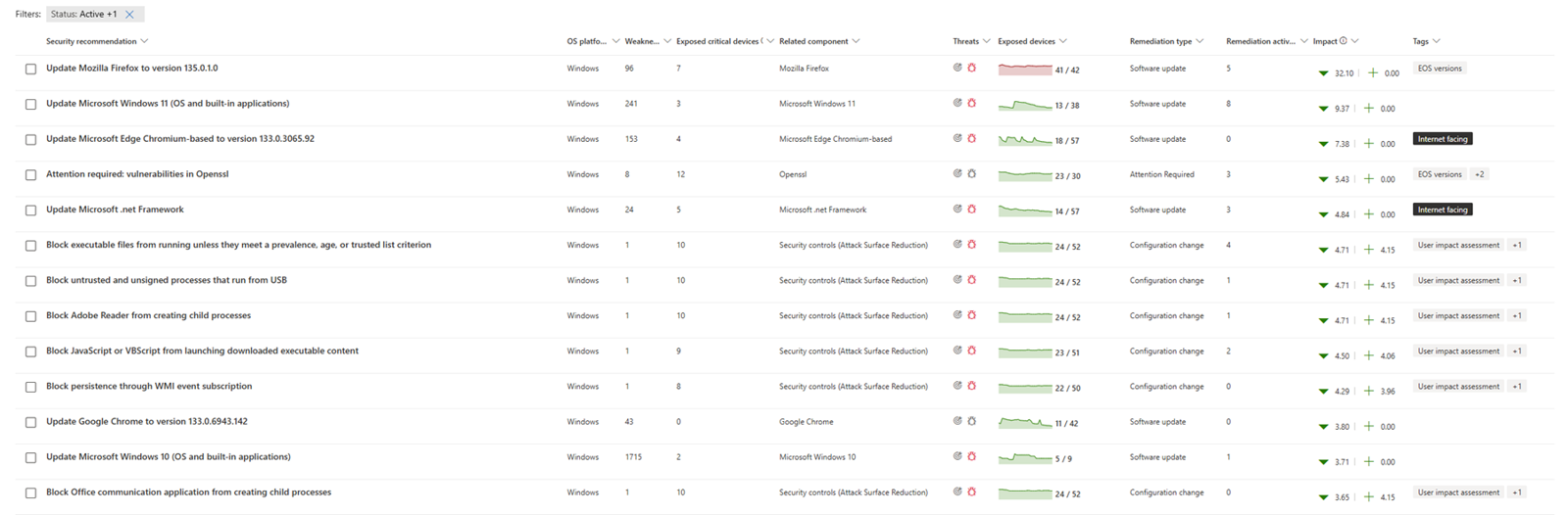
One finding, start to finish. Devices onboarded to Defender for Endpoint are inventoried and assessed continuously by the built-in sensor and agentless scanners. Findings become security recommendations, ranked by threat, breach likelihood and business value, and the exposure score now includes EPSS and context such as whether an asset faces the internet. A security admin picks a recommendation and chooses Request remediation with a priority and due date, or files an exception. If the Intune connection is on, that creates an Intune security task. Submitting the request doesn't patch anything: an IT admin has to approve the task in Intune and deploy the fix, and Configuration Manager is also named. The Remediation page tracks progress, an activity closes on system confirmation or manual completion, and the exposure score recalculates within about 24 hours.
Plans. Microsoft says Defender for Endpoint Plan 2 includes the core features: device discovery, inventory, vulnerability and configuration assessment, risk-based prioritization and remediation tracking. The $2 per user per month add-on adds security baselines, blocking vulnerable applications, browser extension and certificate assessment, network share analysis and firmware assessment. A standalone license works with any EDR.
- you already license Defender for Endpoint Plan 2 or Microsoft 365 E5 and manage devices in Intune
- you want continuous assessment with no scan jobs to schedule
- most of your estate isn't Windows or managed by Microsoft, because coverage depends on the Defender sensor
- you need a Jira or ServiceNow connector, which we didn't find on the pages we read
How it works in practice
Limits. Software changes take about 2 hours to show in the portal and configuration changes 4 to 24 hours. The Windows authenticated scan is no longer supported, so unmanaged devices and network gear are weaker than with a network scanner. We found no Jira or ServiceNow connector on the pages we read, only APIs and email notifications. Microsoft's capabilities page says the product isn't available to Defender for Business customers, while the Defender for Business docs describe a vulnerability dashboard, so check your license before you plan.
Price. The add-on is $2.00 per user per month with an annual commitment. One user license covers up to 5 devices, and servers are licensed separately. The pricing page doesn't list a price for Plan 2 itself.
What users report. G2 shows 4.4 of 5 from 34 reviews (read November 1, 2026). We couldn't read the review text, so we have no review themes to share.
- Starting price
- Add-on $2.00 per user per month with an annual commitment, on top of Defender for Endpoint Plan 2; core features are included in Plan 2
- Add-on price
- $2.00 per user per month, annual
- Scanning
- Sensor and agentless, no schedule
- Fix path
- Intune security task
- Data lag
- About 2 hours for software changes
ManageEngine Vulnerability Manager Plus
Pricing, product page and docs read November 1, 2026
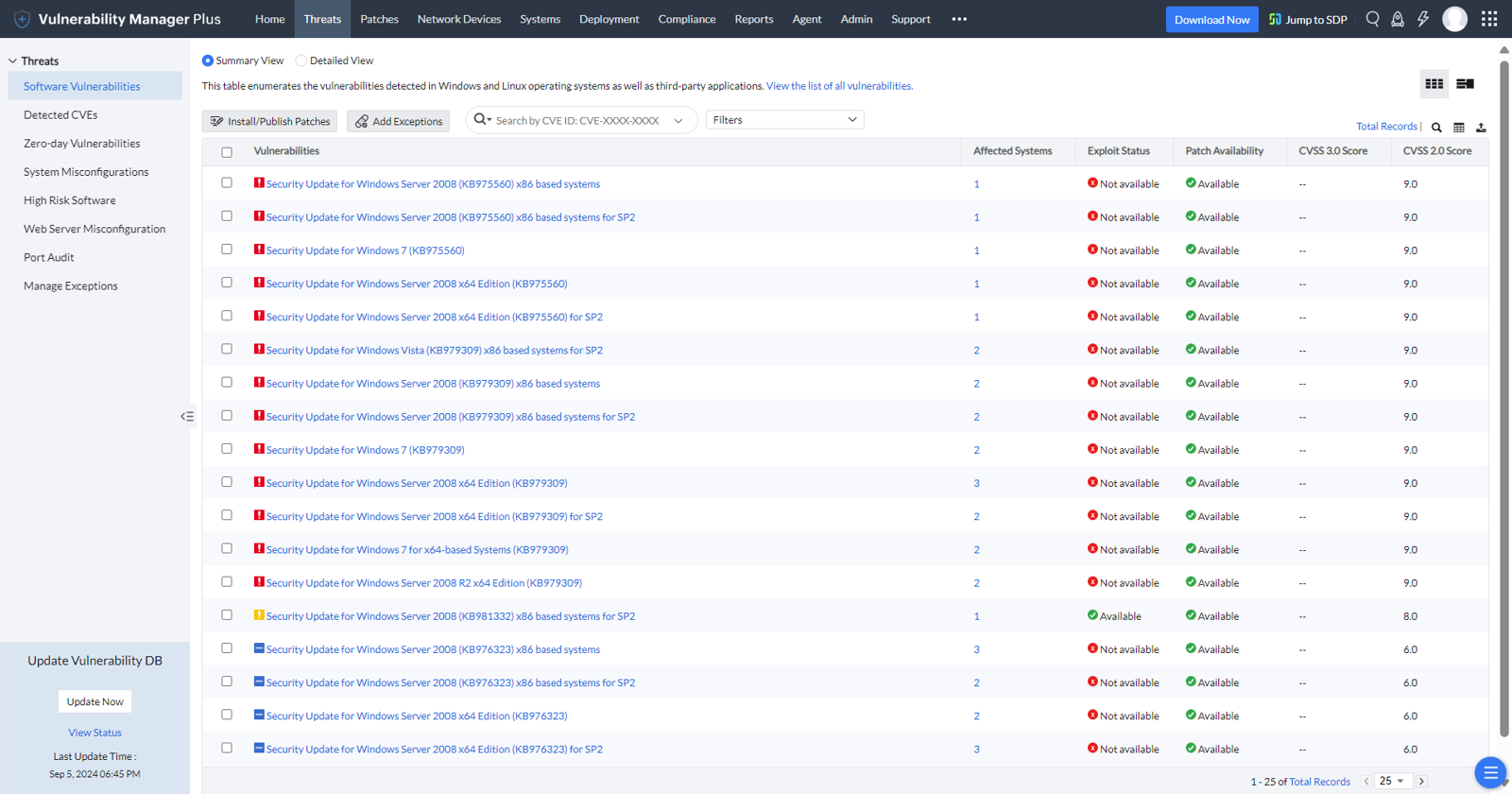
ManageEngine scans for vulnerabilities and missing patches in the same pass, and its Enterprise edition deploys the fix from the same console.
One finding, start to finish. A lightweight agent on each Windows, Linux or Mac endpoint checks in with a server that you host on a Windows machine. There is no scan schedule to set: a scan runs after the daily vulnerability database sync, after a patch install, after a required reboot or on request, and a Windows scan typically takes 12 to 18 minutes. Findings are ranked by CVSS, EPSS, threat intelligence, age, number of affected systems and whether a patch exists. You fix them with manual or automated patch deployment tasks, secure configuration changes, uninstalling high-risk software, or pre-built scripts that mitigate a zero-day before a vendor patch exists. A follow-up scan after each install refreshes the status, and reports can be scheduled.
What the edition decides. Built-in patching, zero-day mitigation, compliance audits against CIS benchmarks and network device scanning are listed under Enterprise. The Professional edition scans, detects misconfigurations and high-risk software and generates reports. Only supported applications are detected as missing patches, and the product page cites patching for more than 1,100 third-party applications.
- you want detection and patching in one tool at a published price per computer
- you have between 100 and 1,000 endpoints and a Windows machine to host the server
- you need built-in patching on the entry edition, because deployment sits in Enterprise
- you want a rating to lean on, since we couldn't read any review site for this product
How it works in practice
Price. The pricing page lists dollars without a currency code. For 100 computers and one technician, Professional is $695 per year on premises or $895 in the cloud, and Enterprise is $1,195 or $1,545. At 500 computers Professional is $2,445 or $3,195 and Enterprise is $4,205 or $5,445. Servers are priced in blocks of 10, and extra technicians cost $195 to $245 per year each. Cloud monthly billing starts at $90 for 100 computers on Professional.
What users report. We could not verify a rating or review themes for this product on G2, Capterra or Software Advice, so we have none to share.
- Starting price
- Professional $895 per year in the cloud or $695 on premises for 100 computers and one technician; Enterprise $1,545 cloud or $1,195 on premises; dollar figures as listed, no currency code shown
- Entry price
- $695/yr, 100 computers, on premises
- Cloud entry
- $895/yr, 100 computers
- Scan trigger
- After the daily database sync, patch installs or on demand
- Windows scan time
- Typically 12 to 18 minutes
Free and low-cost scanners
These two are the answer when the budget is small. One is aimed at the edge of your network, the other at the admin who will run the scanner.
Intruder
Pricing page, platform page and help center read November 1, 2026
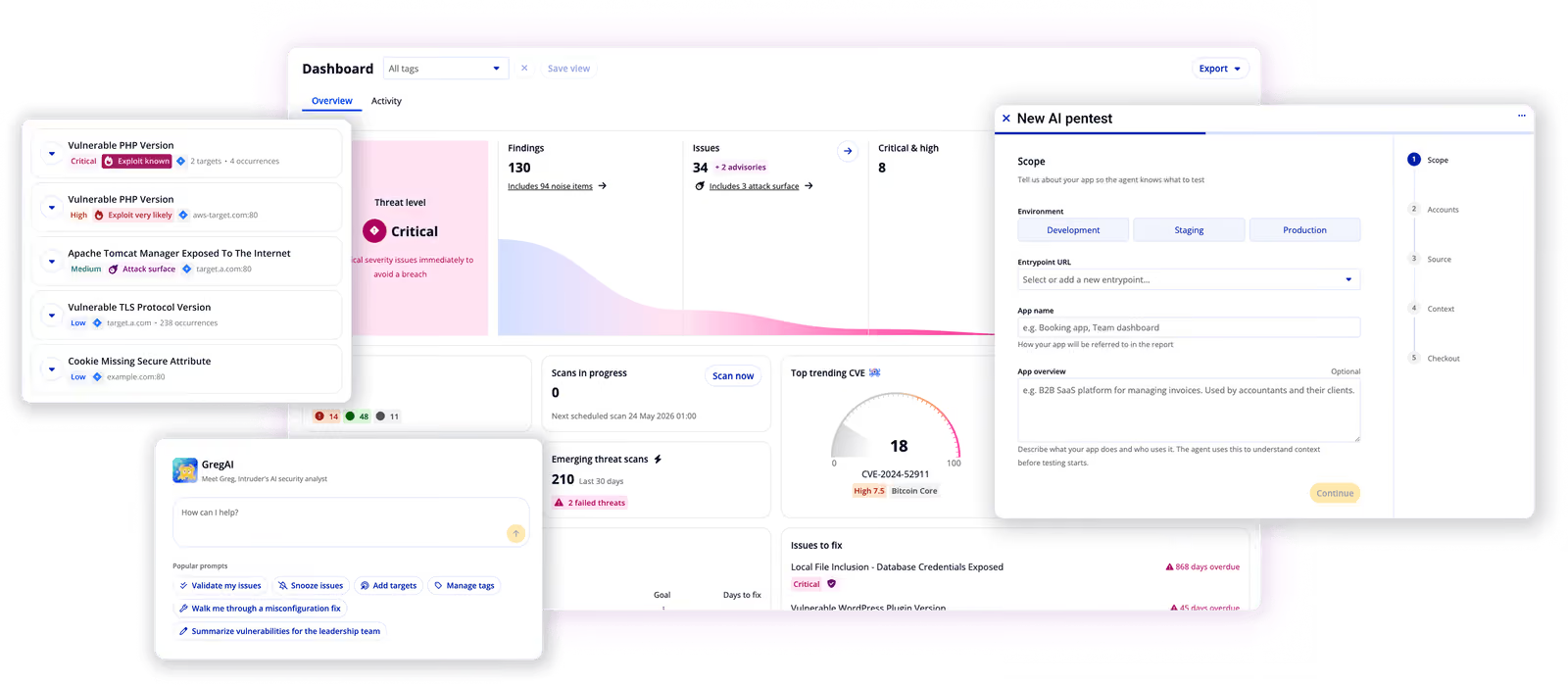
Intruder is the easiest of the seven to start with: the free plan runs weekly external scans, and results arrive with plain-English fix steps.
One finding, start to finish. You add external IPs and domains, cloud accounts, web apps and APIs, or install an agent on internal machines, and each target uses a license. Scans run on a schedule (quarterly, monthly or weekly, daily on Enterprise) or on demand, usually finishing in 15 minutes to a few hours. Findings land on a Current issues page ranked with CVSS, CISA's exploited list and EPSS, each with remediation steps. Issues can be pushed to Jira, GitHub, GitLab, Azure DevOps, Linear or ServiceNow, and alerts go to Slack or Teams. After the fix you run a remediation scan to confirm it, and false positives or accepted risks can be snoozed.
What the plan decides. The Free and Cloud plans scan external targets only. Agent-based scanning of internal servers and employee devices starts on Pro, which uses Tenable's Nessus engine, while Cloud uses OpenVAS and Nuclei. Emerging threat scans start automatically for new external flaws and can't be started by hand. Web application scanning is an add-on that needs separate application licenses.
- you run web servers, cloud accounts and public IPs and want results a non-specialist can act on
- you need scan evidence for SOC 2, ISO 27001 or Cyber Essentials
- you mainly need to scan internal laptops and servers on the cheapest plan, because internal agents start on Pro
- you need predictable cost, since the price is a base fee plus a fee per scanned target
- Users like
- Ease of use and quick setup, Clear prioritized results, Fast support
- Users dislike
- Cost from add-ons and per-target fees, Slow scanning, Licensing problems
- Source: G2, 223 reviews
How it works in practice
Price. The page shows euros and excludes VAT. Free is EUR 0, Cloud is EUR 208 per month or EUR 2,497 per year, and Pro is EUR 347 per month or EUR 4,168 per year. Both paid plans are a base fee plus a fee per target, and the page doesn't state a minimum target count, so the number you pay depends on your target list. A 14 day trial includes five targets.
What users report. G2 shows 4.8 of 5 from 223 reviews (read November 1, 2026). The recurring strengths are ease of use and quick setup, clear prioritized results and fast support. The recurring complaints are cost from add-ons and per-target fees, slow scanning and licensing problems.
- Starting price
- Free plan; Cloud from EUR 208 per month or EUR 2,497 per year; Pro from EUR 347 per month or EUR 4,168 per year; euro prices excluding VAT, base fee plus a fee per target
- Free plan
- Weekly external scans, ports 80 and 443
- Internal scanning
- Agent, Pro plan and above
- Engines
- OpenVAS and Nuclei on Cloud, Nessus on Pro
- Trial
- 14 days, 5 targets
Greenbone OpenVAS
Order page, product page and the GOS 22.04 manual read November 1, 2026
Greenbone develops OpenVAS, the open source scanner that other products build on, and the Community Edition costs nothing.
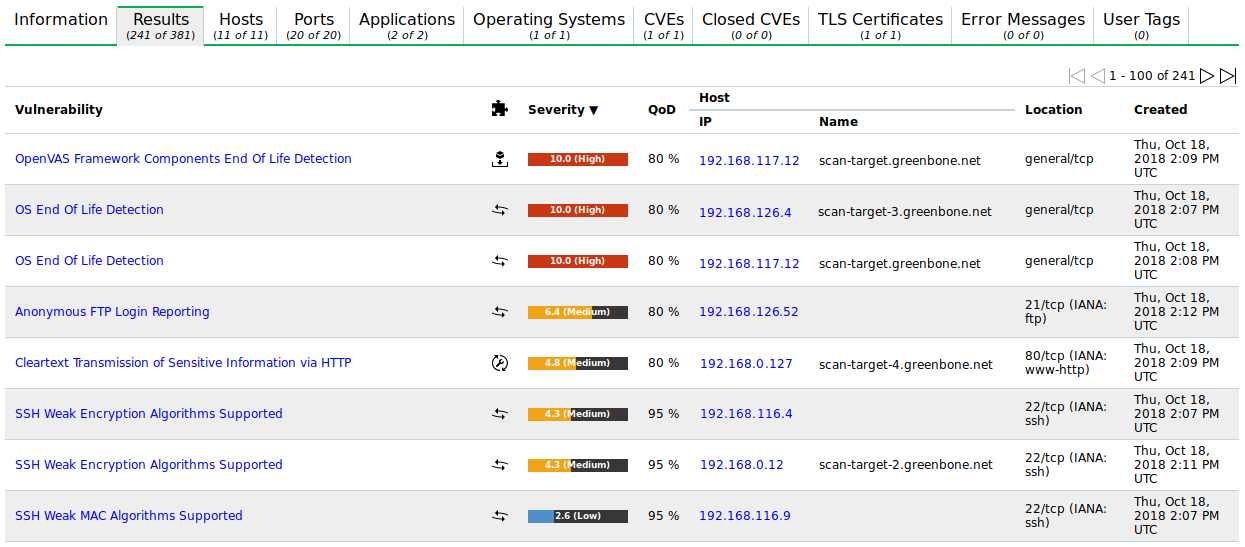
One finding, start to finish. You define a target (IPs, hostnames, ranges or CIDR) and, for authenticated checks, credentials for SSH, SMB, ESXi or SNMP. A task ties together the target, a scanner, a scan configuration and an optional schedule and alert. Results carry a CVSS severity and a Quality of Detection score, and the default view hides anything below 70% QoD. A false positive or a severity change is handled with an override, which can be time-limited. Delta reports compare two scans and mark each result New, Gone, Same or Changed, so you can see what a fix changed. Reports export as HTML, PDF or XML, and PDFs stop at the first 500 results per host.
What the edition decides. The Community Edition is self-installed with community support and a smaller feed that lacks tests for enterprise products and CIS benchmark guidelines. The Enterprise Feed, which Greenbone says holds over 100,000 vulnerability tests, comes with the paid appliances and the Cloud Service. Agent-based scanning is listed as upcoming, so laptops that leave the network are a blind spot.
- you have a Linux admin who can install and tune a scanner and you want a free network scan
- you want delta reports that show what is new, gone or changed between two scans
- you want agents on laptops, because agent-based scanning is listed as upcoming
- you need vendor support or a ticketing integration without paying, since the free edition has community support only
How it works in practice
Price. OpenVAS Community Edition and OPENVAS FREE cost nothing. OPENVAS BASIC is EUR 2,524 per year on the order page and EUR 2,450 on the product page, and the two pages also disagree on the asset limit (fewer than 150 assets against up to 200 IP addresses in 24 hours). The appliances and the Cloud Service have no public price. BASIC doesn't include sensors, API access or remediation tickets.
What users report. G2 lists the product as OpenVAS with 4.4 of 5 from 32 reviews (read November 1, 2026). The page showed no review text, so we can't report themes.
- Starting price
- OpenVAS Community Edition and OPENVAS FREE are free; OPENVAS BASIC is about EUR 2,450 to 2,524 per year depending on the page; appliances and the Cloud Service have no public price
- Community Edition
- Free, self-installed, community support
- Enterprise Feed
- Over 100,000 vulnerability tests
- Agents
- Not yet, listed as upcoming
- Report limit
- PDF capped at 500 results per host
What 100 and 500 assets cost
Prices count different things here: scanners, assets, computers, users and targets. This table puts 100 and 500 assets on one scale for the tools that publish enough to do it, and says what each number covers.
| Tool | 100 assets per year | 500 assets per year | What the number covers |
|---|---|---|---|
| Greenbone Community Edition | $0 | $0 | Free, self-installed, community support only |
| Greenbone OPENVAS BASIC | EUR 2,450 to 2,524 | Quote | Entry edition, up to roughly 150 to 200 assets |
| Intruder Cloud | From EUR 2,497 | Depends on targets | Base fee plus a fee per target, excludes VAT |
| ManageEngine VMP Professional | $695 on premises, $895 cloud | $2,445 on premises, $3,195 cloud | One technician; servers and extra technicians cost more |
| ManageEngine VMP Enterprise | $1,195 on premises, $1,545 cloud | $4,205 on premises, $5,445 cloud | Adds patching, compliance audits and network devices |
| Tenable Vulnerability Management | $3,500 to $3,700 | Quote | Online purchase stops at 250 assets |
| Nessus Professional | $4,790 | $4,790 | One scanner license for one year; the limit is what that scanner can reach |
| Defender add-on | $2,400 for 100 users | $12,000 for 500 users | $2 per user per month; needs Defender for Endpoint Plan 2, priced separately |
| Qualys VMDR | From $2,195 | Quote | Unit and term not stated |
| Rapid7 InsightVM | Quote | Quote | No public price |
A weekly triage routine for one admin
Any of these tools works better with a short routine. The tool finds and ranks, and a person decides what gets fixed this week, who owns the fix and when an exception expires. CISA suggests using its known-exploited catalog as an input to prioritization, so the sequence starts there, and it assumes one admin with a few hours a week.
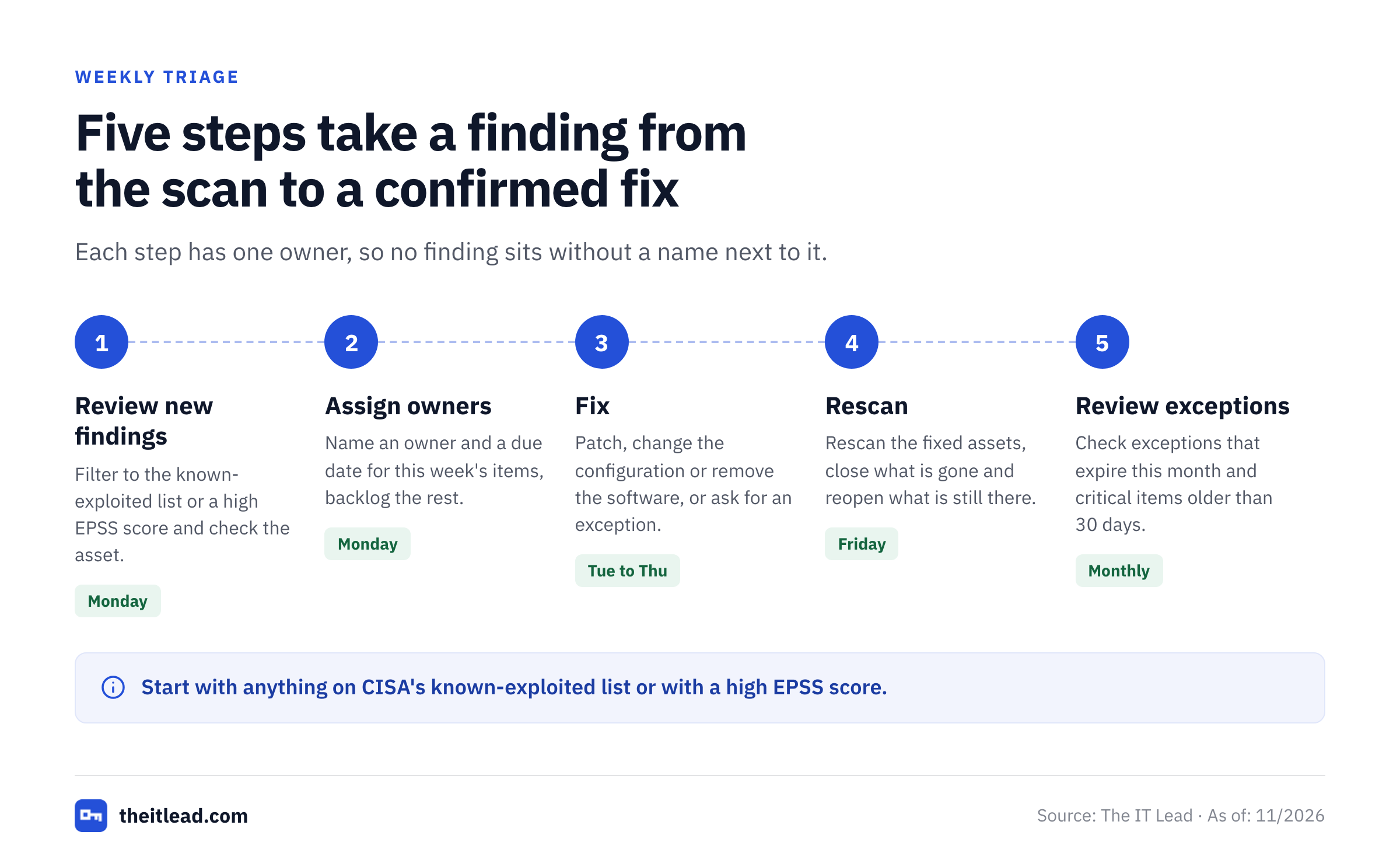
- IT adminOpen the new findings, filter to anything on CISA's exploited list or with a high EPSS score, and check each against the asset it sits on Monday
- IT leadName an owner and a due date for each item you will fix this week, and put the rest in the backlog with a review date Monday
- Asset ownerPatch, change the configuration or remove the software, and mark the item as fixed or ask for an exception Tuesday to Thursday
- IT adminRescan the fixed assets and confirm the finding is gone; reopen anything the scan still sees Friday
- IT leadReview exceptions that expire this month and report open critical items older than 30 days First week of the month
Run the first cycle on a small group before you point the tool at everything, and keep the exceptions list short. A finding that has no owner is the one that stays open, and a scan that nobody reads is only a cost.
Which tool fits which team
- Under 100 assets, no budget, a Linux admin who can run itGreenbone OpenVAS Community Edition
- Public websites, cloud accounts and a handful of serversIntruder, starting with the free plan
- Microsoft 365 E5 or Defender for Endpoint Plan 2 already paid forDefender Vulnerability Management, with Intune for the fix
- 100 to 1,000 endpoints and you want detection and patching in one consoleManageEngine Vulnerability Manager Plus Enterprise
- Agents on every endpoint and ticket rules into ServiceNow or JiraQualys VMDR, after you get a quote with the unit stated
- A security-minded IT lead who wants a tracked, owned remediation listRapid7 InsightVM
- A standard scanner for internal networks plus compliance auditsTenable Nessus Professional, or Tenable Vulnerability Management if you want a cloud console
Shortlist two tools and run both against the same ten assets, including a laptop that's usually offline, an old server and a public web host. Vulnerability tools look the same in a demo, but they behave differently on your own assets. The difference really shows up in how many findings are real, how many tickets you have to write by hand and whether the scan confirms a fix without you asking.
What these tools don't answer: who owns the account
A finding names an asset, and a fix needs a person. When the asset is a server that runs jobs under a service account, the question after the scan is who owns that account and why it still exists. Our service account inventory template shows what to record, and the service account audit checklist covers the review.
The IT Lead covers that question. It imports service accounts from a CSV, asks the nominated owner to confirm ownership and purpose by email, and keeps the review trail. It doesn't scan for vulnerabilities, patch devices or disable accounts, and today it reads from CSV, not from live directory connections.
Vulnerability management software FAQ
What is vulnerability management software?
It's software that finds known weaknesses in your computers, servers and exposed services, ranks them by risk and tracks each one until it's fixed. The better tools mix a severity score such as CVSS with exploit data such as EPSS and CISA's exploited list, so the most dangerous items come first.
Is there a free version of Nessus?
Tenable offers Nessus Essentials free, but it's a 30 day license for up to 5 IPs and is limited to personal, educational and non-commercial use. Nessus Essentials Plus costs $199 per year under the same non-commercial limits. A company uses Nessus Professional at $4,790 per year, or a free scanner such as the OpenVAS Community Edition.
What is a CVE tracker?
A CVE tracker is a list of published CVE records filtered to the products you run. Vulnerability management software builds that list for you by matching CVEs against its inventory of your assets, then ranks the matches.
What is the difference between vulnerability scanning and vulnerability management?
Scanning is the act of checking assets for known flaws. Vulnerability management adds the rest of the cycle: keeping an asset inventory, ranking findings, assigning owners, fixing and confirming the fix, and reporting. Every tool here scans, and they differ in how much of the rest they handle.
What is the cheapest vulnerability management software?
The cheapest is the OpenVAS Community Edition from Greenbone, which is free and self-installed, with community support only. Intruder has a free plan with weekly external scans, and ManageEngine Vulnerability Manager Plus Professional starts at $695 per year on premises for 100 computers.
Do I need vulnerability management if I already patch every month?
You usually still need vulnerability management if you patch every month. Patching covers the updates your tool knows about. A vulnerability scan also finds software the patch tool doesn't manage, exposed services, weak configurations and flaws that have no patch yet.