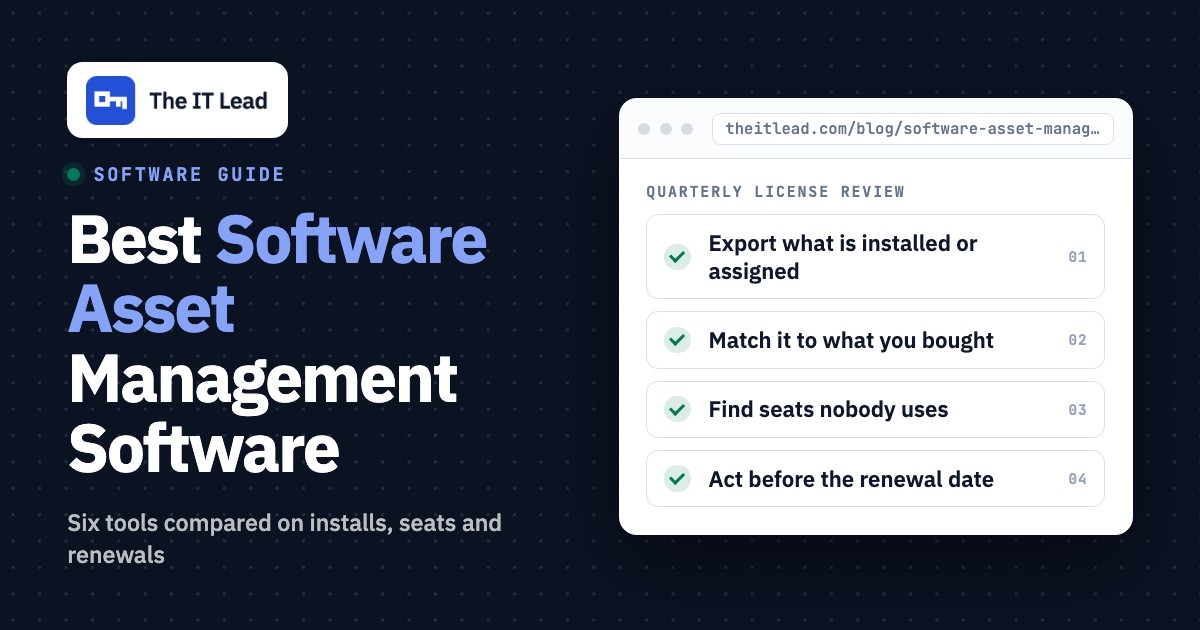
Software asset management software shows which applications are installed or assigned, compares that with the licenses you bought, and warns you before a renewal or an audit. This page compares six tools for IT teams of roughly 3 to 50 people and MSPs. Physical asset management, enterprise suites aimed at large license estates and pure hardware trackers solve different problems and aren't ranked here.
The six tools do three different jobs. Some read what is installed on laptops and servers (Lansweeper, NinjaOne), some give you a record to keep licenses in and leave detection to you (Snipe-IT, Freshservice), and some work on SaaS seats and renewals (Zluri, Torii). The choice usually comes down to where your install data comes from and whether the licenses you worry about are desktop software or cloud apps. Every price below is a list price with its unit named, read on the vendor's page on the dates shown, because per asset, per device and per agent don't add up the same way.
- software asset management tools compared
- 6
- have a free option (Lansweeper up to 100 assets, self-hosted Snipe-IT)
- 2
- publish no price at all (Zluri and Torii)
- 2
- Freshservice software license management is only for accounts created after this date
- Mar 31, 2026
Best software asset management software at a glance
The short answer: pick the tool that matches where your license data comes from. Lansweeper and NinjaOne read installs by scanning and compare them with the licenses you enter, Snipe-IT and Freshservice give you a license record with seats and expiry dates, and Zluri and Torii find unused SaaS seats.
 Best for finding what is installed on Windows machinesLansweeperCompares detected installs with purchased licenses and prices the gap. A free plan covers up to 100 assets, and the compliance docs we read cover Windows only.
 Best if you already patch with NinjaOneNinjaOneLicense records with per-device assignment, a dashboard flag when assignments exceed purchases and renewal alerts, inside the console you manage endpoints from.
 Best low-cost license registerSnipe-ITSeats, expiry dates and check-out to people or devices for free if you self-host, or from $39.99 per month hosted. It does not scan for installs.
 Best if licenses live next to ticketsFreshserviceSoftware inventory from a discovery job for Windows and Linux, license models, contracts and renewals inside a service desk. New accounts only.
 Best for SaaS seats and renewal remindersZluriFlags unused, unassigned and overused SaaS licenses, asks users by Slack or email whether they still need a seat and tracks contract renewals. Quote only.
 Best for workflows that reclaim seats with approvalsToriiReclaims seats after a set period of inactivity and can ask a manager for approval in Slack first. Quote only, and Freshworks has agreed to acquire it.
| Tool | Type | Price (as listed) | Install data | Renewal tracking | Rating |
|---|---|---|---|---|---|
| Lansweeper | Network discovery and inventory | Free to 100 assets; from EUR 270 per month billed yearly (2,000 assets) | Sensor scans, agent, cloud APIs | Contract flag and expiration date on the license item | 4.5 (Capterra, 75) |
| NinjaOne | RMM with built-in inventory | Quote; platform range $1.50 to $3.75 per device per month | Agent on managed devices, SNMP discovery | Expiration date with alert or automatic renewal | 4.7 (Gartner Peer Insights, 484) |
| Snipe-IT | Open source asset tracker | Free self-hosted; hosted from $39.99 per month, flat | None built in (CSV, API or MDM sync) | Expiration and termination dates, expired report | 4.4 (Capterra, 23) |
| Freshservice | Service desk with a discovery agent | From $49 per agent per month (Growth), billed yearly | Discovery job with software scanning, Windows and Linux | Contracts and renewals in software license management | 4.6 (1,383) |
| Zluri | SaaS management and identity governance | No public price, demo request | SSO, finance data and other connectors (SaaS) | Contracts module with reminders | 4.6 (177) |
| Torii | SaaS management and identity governance | Quote; Vendr buyer data median about $32,000 per year | Browser extension, SSO, finance data, 200+ integrations (SaaS) | Not read on the pages we checked | 4.5 (325) |
Prices are list prices in the currency the vendor shows, read on vendor pages between October 18 and November 4, 2026. Ratings are G2 scores for Freshservice, Zluri and Torii, Capterra scores for Lansweeper and Snipe-IT, and a Gartner Peer Insights score for NinjaOne that covers the whole platform; the review count is shown in each entry.
Read the price column with its unit in mind. Lansweeper charges per asset pack, NinjaOne per device, Snipe-IT a flat fee, Freshservice per agent, and Zluri and Torii by quote, so a team of 25 people with 60 devices pays a different multiple on each.
What software asset management software does and where it stops
Software asset management software gives an IT team one answer to the question "do we own the licenses for what we run, and are we paying for what nobody uses?" In practice it does four jobs, and each tool in this list covers a different share of them.
- Find: list the software installed on devices or assigned to users, including SaaS apps.
- Match: compare that list with the licenses and seats you bought.
- Watch: track contract and expiry dates so a renewal doesn't arrive as a surprise.
- Reclaim: spot seats that nobody uses and take them back before the next renewal.
Three neighboring categories are easy to confuse with it. IT asset management tracks devices and their life cycle, as covered in our guides to IT asset management software and IT inventory software. SaaS management focuses on cloud apps, covered in SaaS management software. Endpoint management tools such as those in endpoint management software install and patch software but rarely say whether you are licensed for it. The six tools here each take on at least one of the four jobs for software licenses.
How we compared the tools
We judged each tool on five things a small team feels in the first quarter, and we kept price and review data in the same place for every tool. The five criteria follow.
- Where install data comes from: a scan, an agent, an import or a connector to SaaS apps, because that decides how much typing you do.
- License record: which fields exist (quantity, type, cost, expiry, key) and whether seats are assigned to people or devices.
- Installed against purchased: whether the tool shows a gap between what it finds and what you entered.
- Renewals and reclaiming: expiry alerts, and whether unused seats are flagged or reclaimed.
- Price and plan gates: the unit, what a free plan covers and which plan unlocks the license features.
We read each vendor's pricing page, a product page, a docs or help page for the license feature, and the tool's review page. We didn't run the tools hands-on, and where a page was not available, the entry says so. Vendors are named in plain text and not linked.
Tools that read installed software: Lansweeper and NinjaOne
Lansweeper and NinjaOne start from the machines. They collect the software list themselves, and you tell them what you bought. Each entry traces the same audit question through the tool, namely the machines that have a specific app installed, the number of licenses bought and the date the contract ends.
Lansweeper
Docs read November 4, 2026, pricing and reviews read October 19, 2026
A team that doesn't know what is installed across Windows, macOS, Linux and network gear and wants it found by scanning, with license counts compared on Windows.
The audit question. In Lansweeper Classic you open Software, then Windows, then Edit Purchased Licenses, and create a license item from a package that scans have already found. You can group several packages into one item, and a % wildcard in the version column tracks all versions of the product. The Information tab takes the price per license and the license type, and a license contract box with an expiration date marks a subscription. The Orders tab holds the number of licenses and price per order, with an optional license key, and the Docs tab stores purchase documents. The License report then lists detected installations, licenses purchased and missing licenses, estimates the cost of closing the gap from your price per license, and exports to Excel.
What it covers. The doc we read, updated June 29, 2026, says the license tracking is for Windows computers. Older answers from Lansweeper staff in the community forum say the compliance check counts installations by software name and version, and ignores the license type such as per user or per computer. We couldn't confirm whether that still holds, so it's worth testing with one product you license per user before relying on the gap number.
- you don't know what is on the network and want it found by scanning rather than typed in
- you run Windows, macOS, Linux, printers and network gear and want one inventory of all of it
- you need check-out to employees and return tracking: the sources we read show discovery and inventory, not a check-out workflow
- you are under about 2,000 assets and price-sensitive: paid plans start at 2,000 assets and reviewers report sharp price rises
- Users like
- network scanning and asset discovery that work out of the box, per Capterra reviewers
- Users dislike
- price, a steep learning curve and a dated interface, per Capterra reviewers
- Source: Capterra, 75 reviews
How it works in practice
What that team misses. The compliance report is a count of installs against a count you typed in. A wildcard row combined with explicit version rows for the same software counts installs twice, and the doc warns about it. Paid plans start at 2,000 assets (Starter from EUR 270 per month billed yearly, Pro from EUR 474), the pricing page lists euro prices only, and every integration needs Pro. Capterra reviewers rate it 4.5 from 75 reviews and praise network scanning and asset discovery that work out of the box. Their most common complaints are price, a steep learning curve and a dated interface.
- Starting price
- Free up to 100 assets; Starter from EUR 270 per month and Pro from EUR 474 per month, billed annually with 2,000 assets included (listed in euros only)
- Discovery
- Sensor scans, agent, cloud APIs
- Free tier
- 14-day trial, then up to 100 assets
- Plan gate
- All integrations need Pro
NinjaOne
Docs read November 4, 2026, pricing and reviews read October 19, 2026
A team or MSP that already manages endpoints with NinjaOne and wants license counts next to the devices it patches.
The audit question. You open License management in the sidebar and add a software license with a name, type, publisher, vendor, scope, purchased quantity, purchase date and cost. An expiration toggle adds either automatic renewal or an alert. Assignment can be per device or per user, manual or automatic. Automatic per-device assignment uses device groups or installed-software filters, and matching by normalized software name needs the Vulnerability Management feature. NinjaOne counts the assignments, shows a tooltip when they exceed the purchased quantity, and its dashboard flags insufficient licensing and upcoming expirations.
Usage and limits. For per-device licenses you can add the executable for Windows or macOS, and the Licensed devices tab then shows first found and last used, refreshed every 60 seconds. Usage history appears only for custom licenses, and automatic billing needs NinjaOne Billing. Technicians other than system administrators need the Software Licenses permission to see any of it.
- you already manage endpoints with NinjaOne, or an MSP wants asset data per client in the console you patch from
- you want warranty status for Dell, HP, Lenovo, Toshiba and Microsoft devices refreshed automatically
- you need to hand laptops to people and track returns: we found no documented check-out workflow
- you want asset management without buying an RMM: it comes with the platform and the pricing page doesn't list a standalone plan
- Users like
- ease of use, per G2 and Gartner reviewers (the rating covers the whole platform)
- Users dislike
- missing or limited features, per G2 reviewers
- Source: Gartner Peer Insights, 484 reviews
How it works in practice
What that team misses. The license feature is part of the platform, and the pricing page gives a range of $1.50 to $3.75 per device per month without saying which plan includes IT asset management, so you can't price it alone. Per-device usage data exists only for software NinjaOne can monitor through the binary you configure. The 4.7 rating from 484 Gartner Peer Insights reviews covers the whole platform, and reviewers praise ease of use and cite missing or limited features as the main weakness.
- Starting price
- Quote based; the pricing page gives $1.50 to $3.75 per device per month and doesn't say which plan includes asset management
- Discovery
- Agent plus SNMP network discovery
- Warranty lookup
- Dell, HP, Lenovo, Toshiba, Microsoft
- Pricing
- Quote based
Tools where you record the licenses: Snipe-IT and Freshservice
Snipe-IT and Freshservice give each license a proper record. Snipe-IT leaves detection to you, and Freshservice can fill the software list from a discovery job. The audit question is the same as before.
Snipe-IT
Docs and API reference read November 4, 2026, pricing and reviews read October 19, 2026
A team that wants a cheap, honest register of licenses, seats and renewal dates and can type or import the inventory itself.
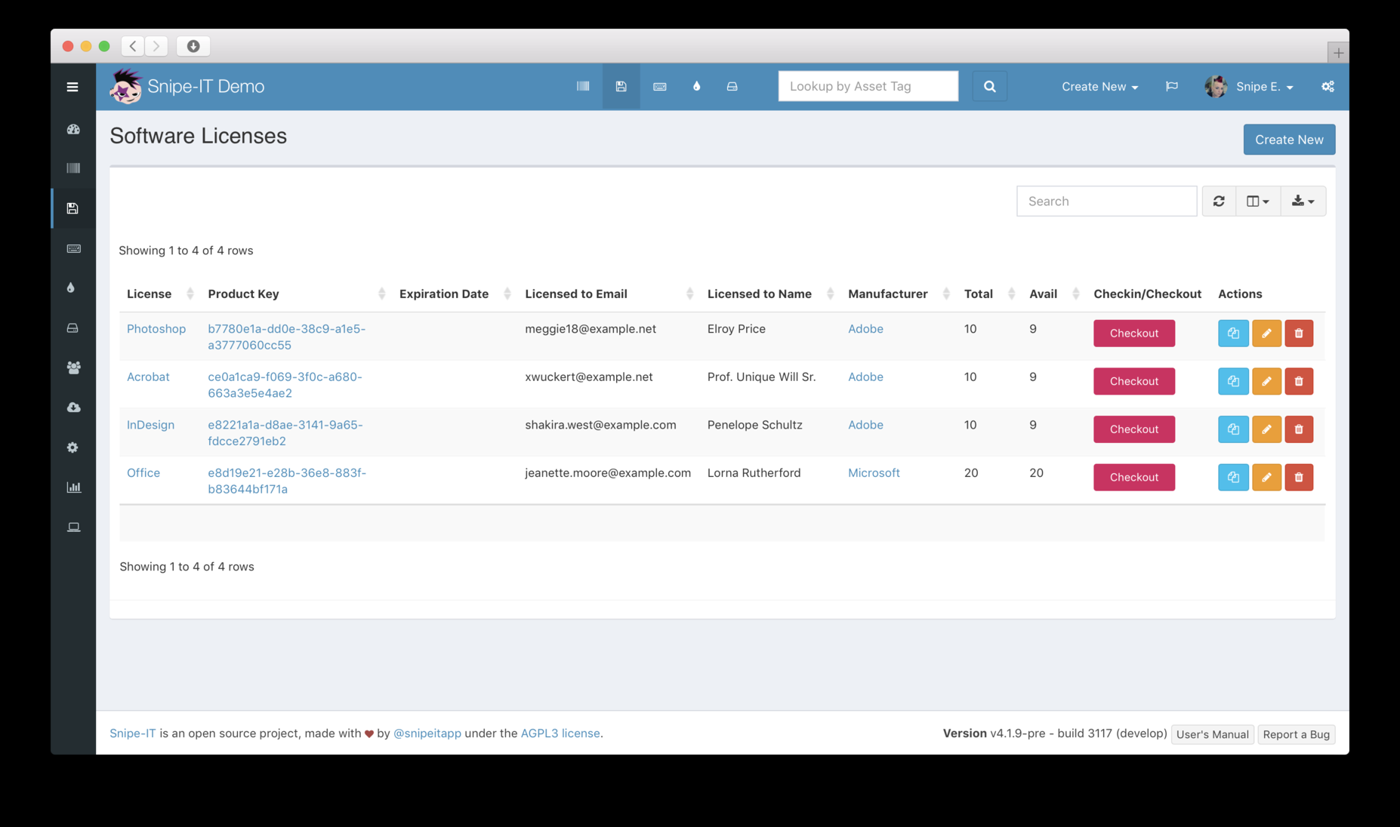
The audit question. Each Snipe-IT license has a seat count, and the API shows the free seats left, an expiration date and the product key. Seats are checked out to people or to devices, and a license can be flagged reassignable, so a pooled license can pass between users while a per-user license keeps its history. The license record also holds a termination date for a cancelled subscription, and the docs describe console commands that check a license out to every user who lacks a seat. An expired license shows in a report, with optional email alerts.
What it doesn't do. Snipe-IT doesn't scan the network or read installed software, so the answer to which machines have the app comes from your own check-outs, a CSV import, the API or an MDM sync. The compliance gap exists only if you keep the check-outs current, which is a chore that grows with every new hire.
- you want laptops, phones and licenses checked out to named people and can host a small server, or pay a flat hosted fee
- you want a published flat price with no per-asset or per-user charge
- you need the tool to find devices on its own: Snipe-IT doesn't scan the network, so inventory comes from CSV, the API or an MDM sync
- nobody wants to maintain a self-hosted server and you need phone support, which only comes with the Enterprise Support plan
- Users like
- free, flexible and easy to use once it is running, per Capterra reviewers
- Users dislike
- hard self-hosted setup and upgrades, and no automatic network scans, per Capterra reviewers
- Source: Capterra, 23 reviews
How it works in practice
What that team misses. Nobody tells you that a laptop has an unlicensed copy of an app, because nothing reads the laptop, and that's the trade for the low price. Self-hosting is free and costs you upgrades and a server, and phone support comes only with the Enterprise Support plan. Hosted plans start at $39.99 per month ($399.99 per year), flat per account. Capterra reviewers rate it 4.4 from 23 reviews and praise that it is free, flexible and easy to use once it runs. Their complaints are the hard self-hosted setup and upgrades and the lack of automatic network scans.
- Starting price
- Free self-hosted; hosted plans from $39.99 per month ($399.99 per year), flat per account
- Discovery
- None built in; CSV, API or MDM sync
- Hosting
- Self-hosted or Grokability-hosted
- Free option
- Yes, self-hosted
Freshservice
Docs read November 4, 2026, pricing read October 19, 2026, reviews read November 3, 2026
A team that already runs or plans to run a service desk and wants software installs, license models and renewals next to the tickets.
The audit question. Under IT asset management, then Software, Freshservice tracks software models, active installations, end-of-life and end-of-support dates and license models. The list fills only after you turn on Discover Software in an autodiscovery job, and the help article says the feature covers Windows and Linux machines. The article says the point is to track compliance, manage renewals and identify unauthorized installations, and it links to separate guides on software license contracts, licenses for SaaS applications and contract management setup. How the compliance status itself is calculated is not confirmed.
Plan and account gate. The help article carries a note that software license management is available only for new signups after the March 31, 2026 release, and older accounts follow the existing IT asset management docs. Asset management starts on the Growth plan at $49 per agent per month billed yearly with 100 asset units, and the pricing page put contracts and software asset management in a higher IT asset management tier.
- you also need a service desk and want assets, relationships and tickets in one place
- your team values fast adoption and a clean interface over deep configuration
- you only want asset tracking: the Starter plan has no asset units and Growth starts at $49 per agent
- you need contracts and software asset management: those sit in the ITAM Pro tier
- Users like
- ease of use and automation, per G2 reviewers
- Users dislike
- missing and limited features, per G2 reviewers
- Source: G2, 1,383 reviews
How it works in practice
What that team misses. macOS isn't named in the software license article, so a Mac-heavy team should ask before buying. Asset units count each server as 4 and each desktop as 1, so a mixed estate burns through the 100 included units faster than the device count suggests. G2 reviewers rate it 4.6 from 1,383 reviews and praise ease of use and automation. The most common complaint theme is missing and limited features.
- Starting price
- Asset management from the Growth plan at $49 per agent per month billed annually, with 100 Asset Units included; standalone ITAM plans are quote only
- Discovery
- Discovery Agent and Discovery Probe
- Asset metering
- Asset Units; a server counts 4, a desktop 1
- Plan gate
- Not on Starter
- Incident plans
- Incident management on all plans; SLA and on-call management from Growth ($49); major incident management from Pro ($99), per agent per month billed annually
Tools for SaaS licenses: Zluri and Torii
Zluri and Torii work on cloud apps. They don't read desktop installs, they read sign-ins, finance data and connectors, and they act on seats. The audit question changes to the people who hold a seat in a specific SaaS app, the ones who haven't used it and the date the contract renews.
Zluri
Help center and blog read November 4, 2026, reviews read November 2, 2026
A team with many SaaS apps that wants unused seats found, users asked whether they need them and renewal dates tracked.
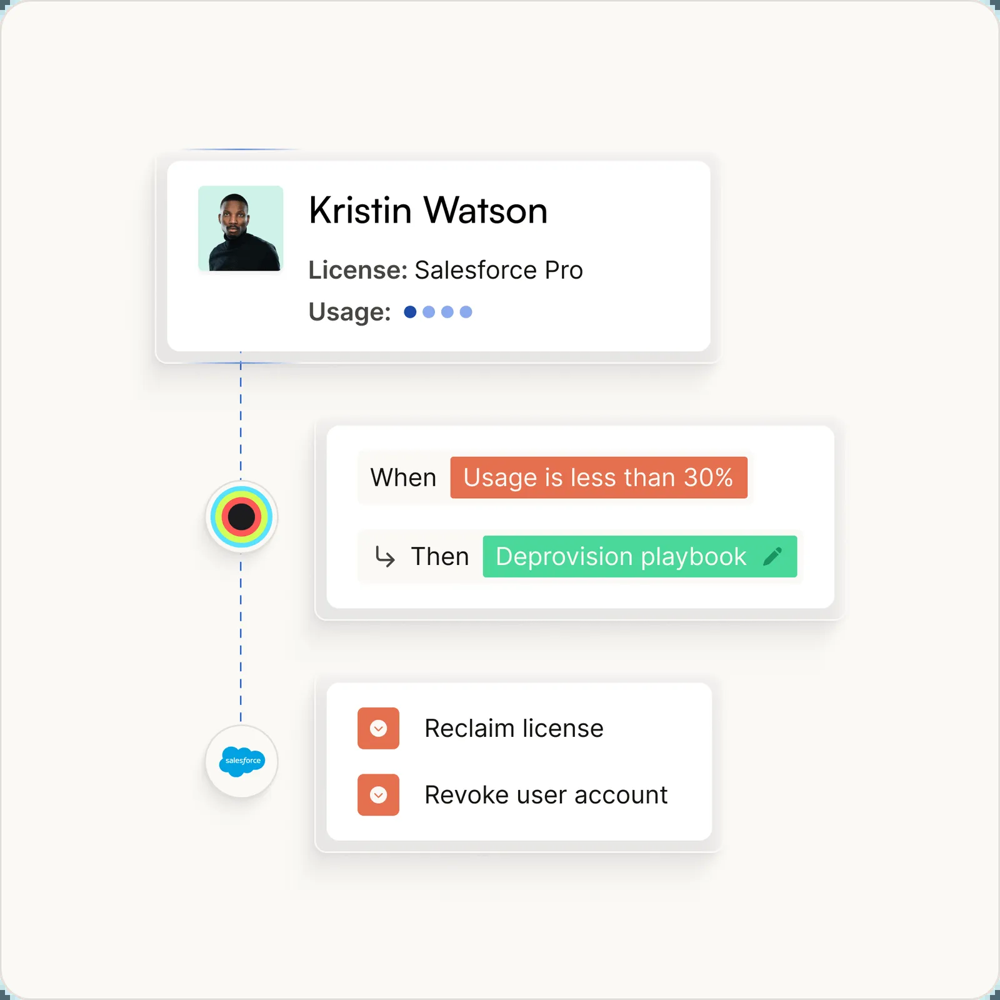
The audit question. Zluri sorts license waste into four groups: unassigned, undeprovisioned (still attached to someone marked inactive in SSO), unused (no activity over a set window) and underused (below a usage threshold). The help center sets the unused check at 30 days of inactivity. A Request to Forego workflow asks the user by Slack or email whether the seat is still needed, and revokes or downgrades it if they decline or don't answer within a cooldown. The Contracts module records agreement type, payment terms, seat counts and start, end and renewal dates, and flags a license as overused when usage passes the purchased quantity.
Renewal reminders. The help center lists default reminders at 7, 15 and 30 days before a contract renewal, sent to app, IT and finance owners. A Zluri blog post describes 60, 30, 15 and 1 days instead, so check the schedule in your own tenant.
- you want the widest discovery sources (SSO, finance, MDM, CASB, browser and desktop agents) and automatic license reclamation on a schedule
- you also need access reviews and a service account and API token inventory in the same tool
- you want to see a price before talking to sales: there is no pricing page
- you need highly customized workflows or hourly data: reviewers cite limited customization and a 24 hour refresh
- Users like
- ease of use (12 mentions) and automation (12)
- Users dislike
- limited integrations (8) and limited features (7)
- Source: G2, 177 reviews
How it works in practice
What that team misses. There's no pricing page and no free plan, only a demo request. Reviewers cite limited integrations and a 24-hour data refresh, and the product is built around SaaS apps, not installed desktop software. The tool database shows Infotech acquired Zluri in October 2026, which may change plans. G2 reviewers rate it 4.6 from 177 reviews and praise ease of use (12 mentions) and automation (12). The top complaint themes are limited integrations (8) and limited features (7).
- Starting price
- No public pricing, demo request only
- Discovery
- SSO, finance, MDM, CASB, agents
- Non-human IDs
- Service accounts, keys, tokens, bots
- Owner
- Infotech (acquired October 2026)
Torii
Workflow and support pages read November 4, 2026, reviews read October 21, 2026
A team that wants SaaS seats reclaimed by rules, with a manager's approval where it matters.
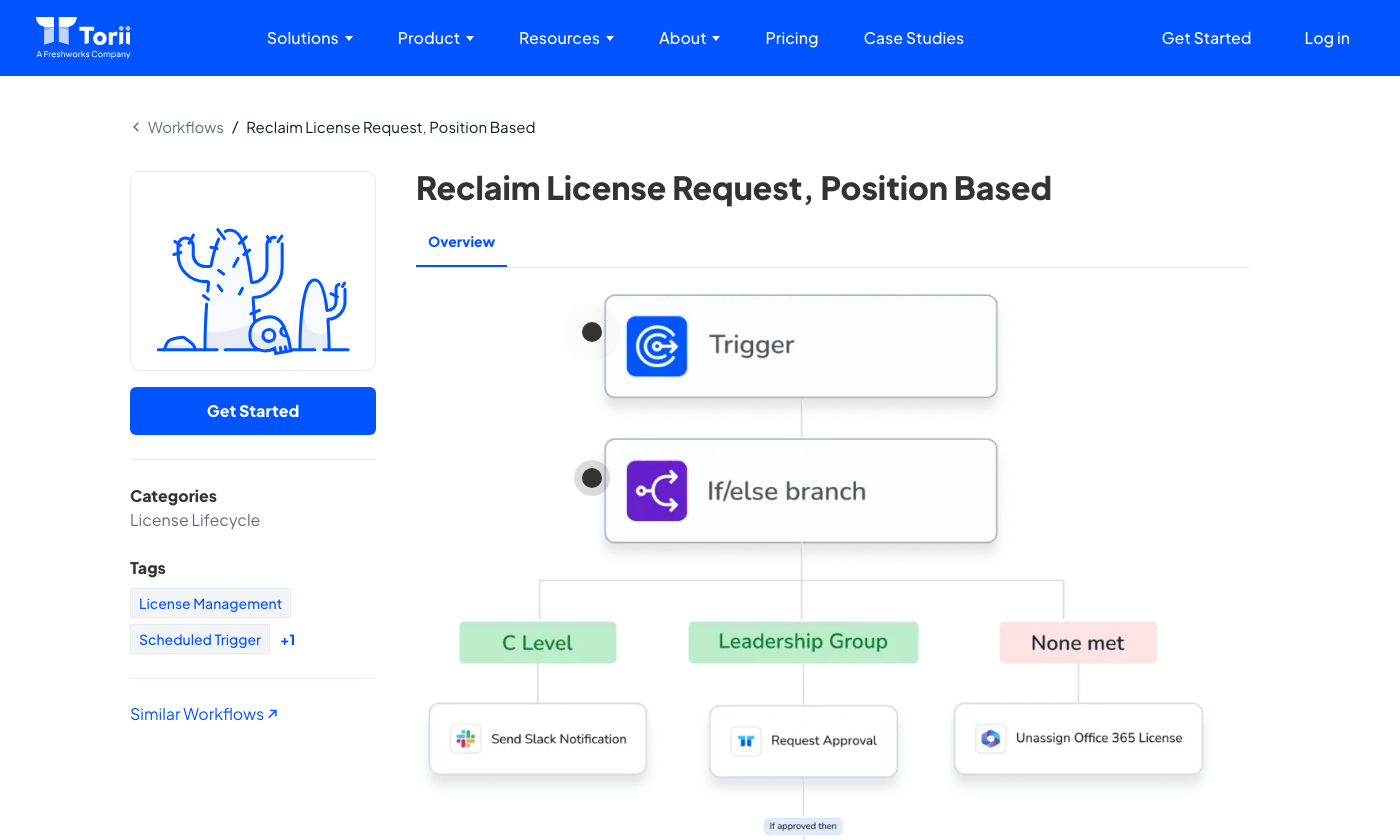
The audit question. Torii runs license reclamation as a workflow. Its example flow starts from a scheduled trigger, branches by role such as C level or leadership group, sends a Slack notification or an approval request, and unassigns an Office 365 license if no branch applies. A reclamation can fire after a set period of inactivity, for example 30 days, and a denied approval stops the flow and tells IT. Torii's support docs say it can show inactive or unassigned licenses that can usually be reclaimed, and note that usage signals are weaker for apps where SSO only reports logins. Torii also describes a ledger of every license, assignment and change that can serve as audit evidence.
Renewals. The published vendor pages describe reclamation, right-sizing and approvals and link to a separate contract and renewal management page that we didn't read, so we can't say how renewal dates are tracked.
- you want browser-extension discovery that catches apps your IdP never sees
- you want offboarding workflows that revoke access and reclaim seats in one place
- you need a published price or a budget under roughly $15,000 per year
- you want certainty about the product's direction: Freshworks has agreed to acquire Torii
- Users like
- ease of use and automation that make SaaS usage visible, per G2 reviewers
- Users dislike
- missing features and weak reporting are the most cited cons on G2
- Source: G2, 325 reviews
How it works in practice
What that team misses. The price is by quote only, and Vendr buyer data shows a median of about $32,000 per year, which is out of range for a small team with a handful of paid apps. Freshworks has agreed to acquire Torii, announced in October 2026, which may change plans and packaging. G2 reviewers rate it 4.5 from 325 reviews and praise ease of use and automation. The most cited cons are missing features and weak reporting.
- Starting price
- Quote only; Vendr buyer data shows a median of about $32,000 per year
- Discovery
- Browser extension, SSO, finance, 200+ integrations
- Non-human IDs
- Service accounts, API keys, AI agents
- Owner
- Freshworks deal signed October 12, 2026
A quarterly license review routine
Software license management comes down to four steps repeated each quarter, and each one breaks in a predictable way. The routine below shouldn't take more than half a day for a team with a few dozen licensed products.
- Step 1Export what is installed or assigned
- Lansweeper
- NinjaOne
- Freshservice
What breaks an app is installed under a name that doesn't match the license list - Step 2Match it to what you bought
- Lansweeper
- NinjaOne
- Snipe-IT
What breaks a per-user license is counted per device - Step 3Find seats nobody uses
- Zluri
- Torii
What breaks SSO shows logins but not real use - Step 4Act before the renewal date
- Freshservice
- Snipe-IT
- Zluri
What breaks the renewal notice goes to a mailbox nobody reads
- Export the install or assignment list for your ten most expensive products and name the owner of each product.
- Compare the count with the licenses and seats in your register, and write down every gap with the product, the count and the cost per license.
- List seats with no activity in the last 30 to 90 days and ask each user whether they still need the seat.
- Put every renewal and expiry date in a calendar with an owner and a notice period, and decide on the change at least one notice period before the date.
- You want installs on Windows machines compared with purchased license countsLansweeper
- You already patch and monitor devices with NinjaOne and want licenses in the same consoleNinjaOne
- You need a free or cheap license register and can import the inventory yourselfSnipe-IT
- Licenses, contracts and tickets should live in one service deskFreshservice
- Most of your spend is SaaS and you want unused seats asked about and removedZluri
- You want rule-based seat reclamation with a manager's approval in SlackTorii
What these tools don't answer
All six tools answer questions about software and seats. None of them tells you who owns the service accounts and API credentials that those applications use, or when someone last confirmed that those accounts should still exist. That gap is where review work lands after a license cleanup.
FAQ
What is software asset management software?
Software asset management software tracks the applications installed or assigned in your organization, compares them with the licenses you bought and warns you about renewals and unused seats. The tools in this list cover different parts of that job: Lansweeper and NinjaOne read installs, Snipe-IT and Freshservice hold license records, and Zluri and Torii work on SaaS seats.
Is software asset management the same as IT asset management?
No. IT asset management tracks devices and their life cycle, such as laptops, servers and warranties. Software asset management tracks what runs on them and what you are licensed to run. Several tools here, including Lansweeper, NinjaOne and Freshservice, offer both, and Snipe-IT tracks hardware and licenses together.
Is there free software asset management software?
Two of the six tools have a free option. Lansweeper is free up to 100 assets, and Snipe-IT is free if you host it yourself, with hosted plans from $39.99 per month. Freshservice, NinjaOne, Zluri and Torii have no free plan for license management on the published vendor pages.
Can these tools track SaaS licenses as well as installed software?
Zluri and Torii are built for SaaS seats and read sign-ins, finance data and integrations, not desktop installs. Freshservice links to a guide on licenses for SaaS applications. Lansweeper's compliance doc covers Windows computers, so a Microsoft 365 seat count would need a different tool or manual entry.
Does a small IT team need a dedicated software asset management tool?
A small IT team often doesn't need a dedicated tool at first, since a spreadsheet works longer than most vendors admit. A team with a few dozen licensed products can start with a register such as Snipe-IT or a spreadsheet and run the quarterly routine above. A scanning tool starts to pay off when machines change often or a vendor audit is likely, and a SaaS tool when seat spend is large enough to justify a quote-only price.