Microsoft Entra ID is a compelling identity and access management platform for IT teams already running Microsoft 365, Azure, or a hybrid Active Directory environment. Its strongest combination is centralized sign-in, Conditional Access, and Microsoft-native administration. Its biggest buying risks are licensing complexity, policy misconfiguration, and assuming that advanced governance is included in the core identity license.
This Microsoft Entra ID review evaluates the product from an IT lead's perspective: what it actually controls, which subscription unlocks each capability, how difficult it is to operate, and when a different identity provider may be a better fit. The assessment is based on current vendor documentation and independent user-review evidence, not a hands-on lab test.
- Best fit: Microsoft-centric organizations that want workforce SSO, MFA, hybrid identity and centralized access policy.
- Strongest paid capability: Conditional Access in P1, with risk-based protection and PIM in P2.
- Published US list prices: P1 $7 and P2 $10 per user monthly, paid yearly; existing Microsoft bundles may already include them.
- Watch-outs: advanced governance licensing, complex policy troubleshooting, and extra work for unusual non-Microsoft applications.
- Verdict: shortlist Entra first if your Microsoft licenses and operating model already fit, but don't commit until you've proven your critical app and audit workflows.
Is Microsoft Entra ID good for business identity management?
Yes, especially when Microsoft already supplies the workforce directory, productivity suite, or cloud infrastructure. Entra brings sign-in, access policy, and hybrid identity into one place, but that value depends on the capabilities your organization is licensed and staffed to operate.
It does far more than show a login screen. An IT lead can use it to standardize workforce authentication, connect enterprise applications, restrict access under defined conditions, and investigate identity risk. Microsoft also documents synchronization between on-premises Active Directory and Entra, so a company doesn't have to move every legacy system to the cloud before improving cloud sign-in.
The practical test is whether centralizing reduces risk or leaves you with a policy estate nobody can manage. It's worth settling before you buy. A mature deployment has named owners for applications, privileged roles, exceptions, and recovery procedures. An immature deployment can have sophisticated controls but there's no reliable way to explain why a user was denied access or why an account retained privileges after a transfer.
| Evaluation area | Assessment | What to verify in your environment |
|---|---|---|
| Microsoft integration | Strong fit for Microsoft-centric estates | Existing tenant, subscriptions, identity source, and administrators |
| Workforce SSO and MFA | Broad baseline capability | Every critical application's sign-in method and recovery path |
| Adaptive access | Useful, but configuration-sensitive | Licensing, device signals, exclusions, and report-only rollout |
| Privileged access | Stronger in higher tiers | Role activation, approval, break-glass access, and audit exports |
| Identity governance | Capable, but licensing is nuanced | Access-review scope, entitlement management, and lifecycle workflows |
| Mixed-vendor operations | Feasible, with integration work | Non-gallery apps, legacy protocols, provisioning, and support ownership |
Our verdict: Entra is certainly a sensible default for an IT team with substantial Microsoft investment. It isn't automatically the simplest or cheapest choice for a company whose applications, directory, and security workflows are mostly elsewhere.
What are the main Microsoft Entra ID pros and cons?
Entra's strengths are Microsoft integration, centralized identity policy, and a path from basic sign-in to risk-aware controls. Its weaknesses are licensing boundaries, configuration effort, and the need to test integrations rather than assume all applications behave the same way.
| Pros | Cons |
|---|---|
| One identity control plane across many Microsoft services | A large, changing administration surface can be hard to navigate |
| Free directory and basic authentication capabilities with Microsoft cloud subscriptions | Free security defaults aren't the same as paid Conditional Access |
| P1 supports Conditional Access and advanced identity management | Mis-scoped access policies can disrupt legitimate sign-ins |
| P2 supports Identity Protection and Privileged Identity Management | P2 doesn't automatically include every advanced governance workflow |
| Hybrid identity and standards-based SSO options | Nonstandard and legacy apps may need custom work you won't see on the price list |
| Some Microsoft 365 subscriptions include the required identity tier | Duplicate purchases are possible without a license-entitlement audit |
The pros and cons above are an editorial synthesis of product documentation and user feedback, not the result of a proprietary benchmark. On Software Advice, reviewers praise Microsoft-service integration and centralized access. Other Software Advice reviewers flag confusing plan boundaries and difficult troubleshooting. That combination matches the main operational trade-off: Entra can consolidate controls, but administrators need the skills and time to maintain them.
The clearest red flag is a purchase that's justified only by a list of features. Ask an administrator to show a policy decision, a failed sign-in investigation, a departing employee's app removal, and a privileged-role activation. If those scenarios can't be demonstrated in your tenant, the feature list isn't yet a business outcome.
What does Microsoft Entra ID actually do?
Entra ID handles cloud identity, sign-in, application access, and related security policy. The capabilities you'll care about most as an IT lead are SSO, MFA, Conditional Access, hybrid synchronization, risk detection, and privileged-role management, with different license requirements across them.
Single sign-on and application access
Entra supports SSO for cloud applications using standards such as OpenID Connect and SAML, as well as other supported sign-in methods. Microsoft recommends matching the method to the application, because SSO connections aren't interchangeable. For a modern application, you'll want a standards-based integration, not a fragile workaround built around a shared password.
The operational test is practical. Connect a representative finance application, a collaboration tool, and a difficult legacy application. Check initial access, group-based assignment, logout behavior, certificate ownership, and what happens when the user is disabled. SSO only reduces support work when application owners maintain their side of the connection, and that's not something Entra can do for them.
A common mistake is measuring the number of connected apps without checking the lifecycle. Sign-in and provisioning aren't the same problem. A user may lose access to an Entra-managed sign-in while still retaining an application-local account or API token. Make deprovisioning part of the acceptance test, since that's where leftovers hide and sign-in success says nothing about them.
Multifactor authentication and passwordless sign-in
Microsoft Entra ID Free includes security defaults and basic MFA capabilities with Microsoft cloud subscriptions. Microsoft Authenticator also supports notifications, verification codes, and passkeys. Paid Conditional Access gives administrators more granular ways to decide when and how stronger authentication is required.
That distinction matters for a small organization, and it's easy to overlook. The free baseline can be useful, but it isn't a substitute for a documented conditional-access policy that differentiates privileged users, sensitive applications, and device conditions. Don't buy a paid plan just because a sales deck says you need MFA. Define the control you actually need first, then see what it takes.
When you roll out, document a recovery path for lost devices, unavailable authenticators, and users who can't complete the preferred method. Keep emergency access separate from everyday admin accounts, and test it before broad policy enforcement. You'll thank yourself later.
Conditional Access and identity risk
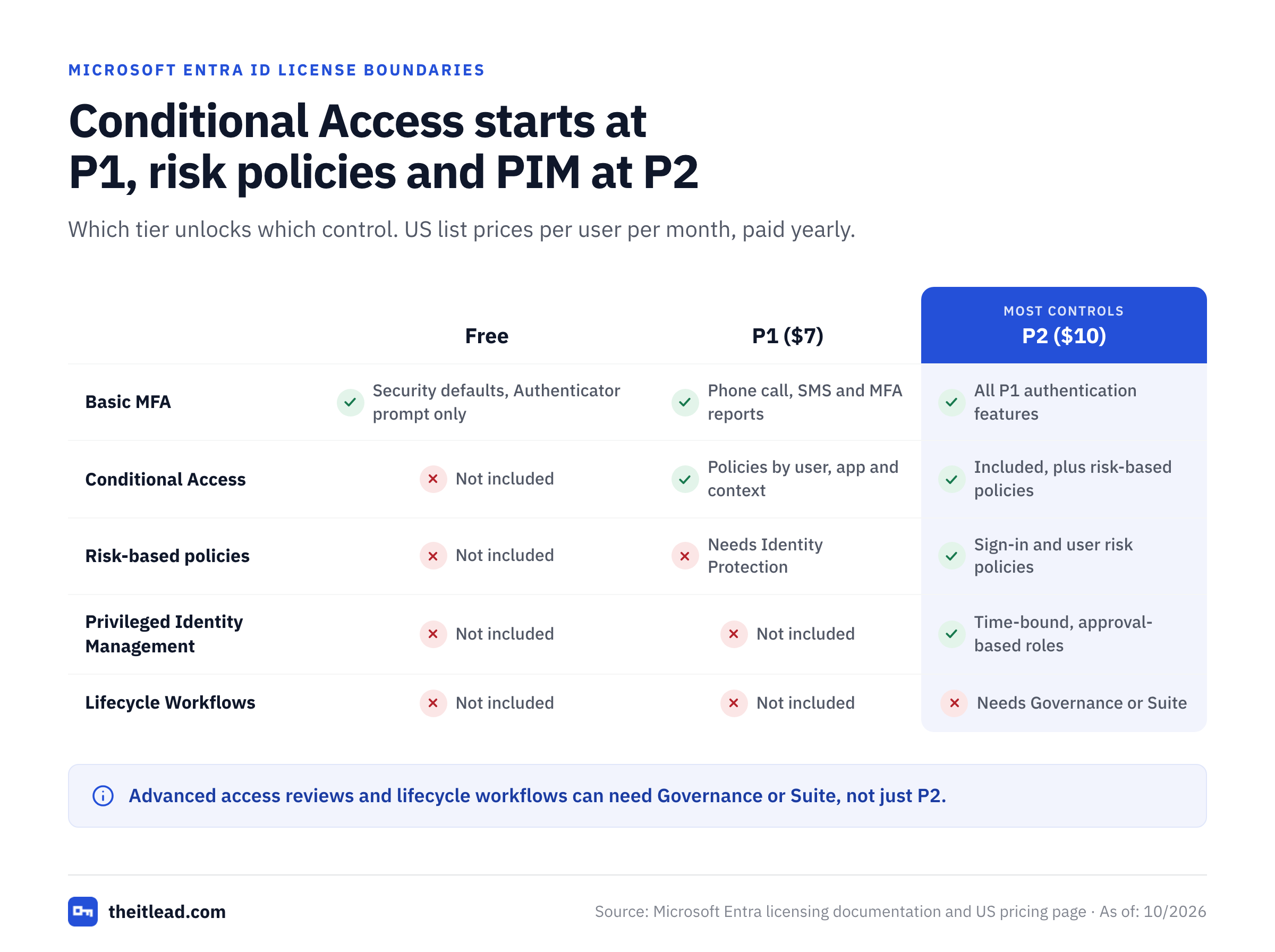
Conditional Access evaluates sign-in context and applies access controls. Microsoft documents that P1 is required for Conditional Access and P2 for risk-based policies that rely on Identity Protection. This is clearly the most important license boundary for many security teams.
A good policy design starts with a threat scenario: a privileged sign-in from an unmanaged device, an attempted legacy authentication, or access to sensitive data from an unusual context. Build the smallest policy that addresses that scenario, assess its impact, and then expand deliberately. Don't start with a broad rule. Broad rules written without exclusions and testing can lock out users who are doing legitimate work.
Identity Protection adds risk detection and investigation, including reporting around risky users and sign-ins. That's valuable for incident response, but it doesn't replace a person or process that reviews alerts and decides when an account is safe to restore. The SIEM integration and incident workflow still need owners.
Hybrid identity and directory synchronization
Entra Cloud Sync can synchronize users, groups, and contacts between Active Directory and Entra using a cloud-managed service and lightweight agents. Microsoft also documents Entra Connect as an option for hybrid identity. Which approach fits depends on the forest layout, provisioning direction, and capabilities your environment needs.
Before you migrate, inventory identity sources and dependencies. Record where an account is created, which system owns each attribute, how password and account changes flow, and how the team detects sync failures. A directory sync that looks healthy in a dashboard can still produce wrong entitlements, and you won't see it until someone complains. Wrong source data or a poor group design is usually the cause.
For a hybrid organization, evaluate failure handling as carefully as the normal flow. Test a temporary outage, a renamed user, a moved organizational unit, and a termination that occurs while an agent is offline. The outcome should be predictable, and it shouldn't depend on one person's memory.
Privileged access and access reviews
Microsoft Entra Privileged Identity Management supports time-bound and approval-based privileged-role activation. Identity governance capabilities can also help reviewers recertify access to groups, applications, and roles. They're related, but they aren't identical products or license entitlements.
The nuance matters: P2 covers PIM and certain access-review capabilities, while the broader ID Governance offering or Entra Suite is needed for some advanced governance functions. Microsoft's licensing documentation explicitly distinguishes these cases. Don't assume that buying P2 gives you every lifecycle workflow, entitlement-management scenario, and review feature.
One useful test covers an administrative role request that needs approval, an expiring assignment, and an evidence export. A second test has a business owner review a former contractor's access. Both workflows should produce a decision, a timestamp, and a person accountable for the outcome.
- Sign in to a Microsoft app and a third-party app using the intended SSO method.
- Confirm MFA and account-recovery behavior for an ordinary user and a privileged user.
- Run a Conditional Access policy in a safe test scope before broad enforcement.
- Inspect a denied sign-in and identify the policy or condition responsible.
- Provision, transfer, disable, and remove a test user from a connected application.
- Activate and expire a privileged role, then export its audit evidence.
- Run an access review with a named business owner and record the decision.
How much does Microsoft Entra ID cost in the US?
Microsoft currently publishes P1 at $7 per user per month and P2 at $10 per user per month, both paid yearly with an annual commitment. The broader Entra Suite is listed at $12 per user per month, but it requires an existing P1 entitlement or an eligible package that includes P1. These are US public list prices checked on October 30, 2026, not a negotiated quote.
- Entra ID FreeIncluded with eligible Microsoft cloud subscriptions
- Directory and group management
- Basic SSO and MFA security defaults
- On-premises directory synchronization
- Entra ID P1$7 /user/month, paid yearly
- Conditional Access
- Advanced identity and group controls
- Also bundled in several Microsoft 365 plans
- Entra ID P2$10 /user/month, paid yearly
- P1 capabilities
- Identity Protection
- Privileged Identity Management
- Entra Suite$12 /user/month, paid yearly; P1 prerequisite
- Broader identity governance
- Internet and Private Access
- Identity protection and verification capabilities
US public pricing from Microsoft on October 30, 2026. Entra Suite requires a separate or bundled P1 entitlement. Confirm actual eligibility, taxes, channel pricing and contract terms.
The published prices can mislead if you ignore what you've already got. Microsoft says P1 is included with Microsoft 365 E3 and Business Premium, while P2 is included with Microsoft 365 E5. The licensing page lists additional eligible packages. Check assigned and available entitlements before you buy a standalone identity SKU. You may not need one.
Consider a hypothetical organization with 100 users who all need the same standalone tier. At the published monthly equivalents, P1 has an annual baseline of $8,400 and P2 has an annual baseline of $12,000. The difference is $3,600 per year. These are arithmetic examples, not Microsoft quotes; they exclude taxes, negotiated terms, add-ons, and any subscriptions that already include the license.
| Budget question | What to ask |
|---|---|
| Existing coverage | Which Microsoft 365, EMS, or security bundle licenses are already assigned? |
| Conditional Access | Does every benefiting user have the required P1 or equivalent entitlement? |
| Risk-based policies and PIM | Which users need P2 features, and how is coverage licensed? |
| Governance | Do the planned access reviews or lifecycle workflows require Governance or Suite? |
| Suite | Is P1 already owned, and what's the actual incremental Suite price? |
| Operations | What is the staff time for policy design, integration, troubleshooting, and audit evidence? |
Don't treat the Entra Suite price as an all-inclusive replacement for the P1 prerequisite. Likewise, don't add the P1 list price when a qualifying Microsoft bundle already supplies it. Model the actual entitlement gap. It's the only number that matters for the budget. For a deeper tier-by-tier breakdown, see our Microsoft Entra ID pricing guide.
Is Microsoft Entra ID easy to deploy and administer?
Entra is relatively familiar to an experienced Microsoft administrator, but it isn't a zero-configuration security product. Deployment difficulty depends on directory health, application diversity, conditional-access design, and the team's ability to troubleshoot authentication and provisioning failures.
Start with a limited pilot. A company-wide cutover hides recovery gaps that a pilot exposes, so don't skip it. Choose representative users, devices, and applications, including one awkward legacy system that's likely to misbehave. Document who approves the rollout, who owns each integration, and who can reverse a change. Prove both the happy path and the recovery path.
Inventory identities and licenses
Map user sources, existing Microsoft entitlements, applications, and privileged roles.
Choose a limited pilot group
Include normal users, administrators, remote devices, and an application with a difficult sign-in path.
Configure sign-in and recovery
Test SSO, MFA registration, account recovery, and emergency administrator access.
Evaluate Conditional Access safely
Use a limited scope and review sign-in outcomes before enforcement.
Prove the joiner-to-leaver lifecycle
Create, move, disable, and remove users; inspect downstream app accounts and tokens.
Capture operational evidence
Export sign-in, role, and review records and assign owners for exceptions and recurring checks.
Software Advice reviewers describe useful Microsoft integration but also note that higher-tier controls and troubleshooting can be difficult to learn. That's a signal to budget training and process design, not proof that every tenant will be hard to operate. A well-governed small deployment can be easier than a poorly documented enterprise tenant, so don't read too much into size.
Don't treat an SSO success as proof that a deployment is complete. The real workload often sits in app owners' certificate renewals, helpdesk recovery cases, stale group memberships, and policy exceptions. Keep a small runbook for each of those areas, and review it after incidents so it doesn't turn into a shelf document.
What do real Microsoft Entra ID users say?
Software Advice reviews reinforce the same pattern: strong centralized identity controls and Microsoft integration, paired with licensing and administrative complexity. Treat those observations as qualitative buyer evidence, not as a substitute for a controlled trial in your own environment.
Software Advice's review page includes praise for SSO, Microsoft-service integration, and centralized administration. Its negative feedback includes confusing pricing tiers and add-ons, difficult troubleshooting and Conditional Access policies that are complex to design. Treat them as questions your pilot team should investigate.
The review sites don't establish that a particular security configuration is effective. Reviewers have different tenants, license tiers, responsibilities, and levels of experience. A glowing comment about everyday sign-in says little about PIM approval workflows, and a complaint about a legacy integration won't necessarily apply to a cloud-native application portfolio.
How to use this feedback: ask your own administrator to score policy troubleshooting, documentation clarity, app onboarding, and the license-management experience after the pilot. Ask business users whether the sign-in flow interrupts them when it doesn't need to. Record the evidence alongside any third-party review themes, rather than copying an aggregate star rating into a purchasing decision.
How does Microsoft Entra ID compare with Okta and JumpCloud?
Microsoft Entra ID is strongest when the buyer wants identity controls aligned with Microsoft services and existing subscriptions. Okta is worth evaluating when the main concern is a heterogeneous SaaS application estate, while JumpCloud is worth evaluating when directory, device, and cross-platform operations need to be considered together.
| Buyer requirement | Entra ID | Okta | JumpCloud |
|---|---|---|---|
| Microsoft 365 and Azure alignment | Natural first shortlist | Evaluate integration effort | Evaluate integration effort |
| Broad SaaS identity strategy | Test your app catalog | Test as a primary contender | Test app and directory coverage |
| Hybrid Active Directory | Microsoft-documented sync options | Validate your connector and provisioning design | Validate directory and device workflows |
| Privileged Microsoft roles | Evaluate P2/PIM | Evaluate Microsoft-role integration | Evaluate Microsoft-role integration |
| Cross-platform device operations | Assess alongside your device-management stack | Pair with device-management tools as needed | Evaluate integrated directory/device approach |
| Buying decision | Audit existing Microsoft licenses | Request a feature-matched quote | Request a workflow-matched quote |
The table is a buyer-fit comparison, not a claim that any vendor wins every technical category. Ask each supplier to demonstrate the same workflows and quote the same covered users. Don't accept a different scope per vendor. Otherwise, a cheap-looking identity SKU can hide required add-ons or integration work, while a more expensive product may solve a specific administrative problem more cleanly.
Our Okta vs Microsoft Entra ID comparison is useful when a team is deciding between the identity providers. For a broader hybrid-device evaluation, compare JumpCloud's actual device and directory workflow with your existing endpoint-management approach before deciding that an identity-only price comparison is meaningful.
What should IT leaders test before buying Entra ID?
Test the controls that would fail an audit, interrupt a user, or delay incident response. A successful pilot should prove access policy, application lifecycle, privileged-role governance, recovery, and license coverage with real evidence, not merely screenshots of available menu items.
- Microsoft 365 or Azure identity is already centralShortlist Entra and audit included P1/P2 entitlements before buying anything.
- Conditional Access for workforce appsEvaluate P1 or an eligible bundle; test safe rollout and exclusions.
- Risk-based sign-in policies and PIMEvaluate P2, including incident and privileged-role workflows.
- Recurring advanced access reviews and lifecycle governanceMap exact Governance or Suite licensing, not just the P2 label.
- Mostly non-Microsoft SaaS and a separate directory strategyCompare Entra with Okta using identical app and lifecycle tests.
- Identity plus cross-platform device administrationCompare the full device and directory operating model, including JumpCloud.
Use a pilot scorecard that's shared by a business owner, an IT owner, a security owner, and a support owner. The business owner confirms that access matches job responsibilities. IT confirms provisioning and recovery. Security confirms policy behavior and evidence. Support confirms that ordinary problems can be diagnosed without escalation to the original implementer.
A useful failure scenario is an employee who changes teams. Check that the old app assignment disappears, that the new one arrives, and that you can prove both changes. Repeat the exercise for a contractor leaving unexpectedly and for an administrator who needs temporary elevated access. If the result depends on a spreadsheet or a chat message, write that gap down. It's a finding, not an embarrassment.
Also check what Entra doesn't promise. A central identity provider doesn't automatically inventory every non-human identity, rotate every service-account secret, or prove that every external application deleted its local user record. Those tasks will probably require other tools and an ownership process. A service account inventory template can help make those boundaries visible.
What do IT teams often get wrong with Entra ID licensing?
Microsoft's licensing page spells out three details that are easy to miss until something breaks, and they're worth knowing before you sign.
First, security defaults on the Free tier use Microsoft Authenticator for the MFA prompt. If you can't be sure the app is installed on every user's personal phone, that's a real limitation, and it's one reason a company might need a paid tier sooner than it expected.
Second, an expired license doesn't instantly switch Conditional Access off. Microsoft says existing policies aren't automatically disabled or deleted, so you can migrate away without a sudden change in posture. You can still view and delete them, but you can't update them. That's helpful, though it also means a lapsed license can quietly leave a stale policy in force, so you'll want a renewal calendar.
Third, PIM is different. If the P2 or Governance license behind it expires, PIM features disappear and eligible role assignments are removed, since users can no longer activate roles. Permanent assignments stay as they are. Don't let that renewal lapse, and put the renewal date in the runbook next to the break-glass procedure.
Is Microsoft Entra ID worth the money?
Entra ID is worth shortlisting when your organization already has Microsoft identity infrastructure and can reuse licensed capabilities. Its value gets harder to see when you've got to purchase additional tiers, build many custom app connections, or dedicate substantial support time to a policy estate that nobody owns.
The right economic comparison isn't simply P1 versus a rival's entry price. Compare the annual cost of all required entitlements, the engineering effort for the initial rollout, the ongoing support burden, and the cost of gaps that still need a separate solution. Make the business case from workflows and evidence, not vendor marketing language.
A team that needs only basic workforce sign-in probably has a sufficient Microsoft baseline. A team with a security program centered on adaptive access and privileged roles has a stronger case for paid capabilities. A team that needs sophisticated identity governance should verify the exact Governance and Suite feature boundaries before making a budget commitment.
Final recommendation: start with an entitlement audit and a tightly scoped pilot. Buy the lowest license tier that supports the controls you've demonstrated. Expand only after the organization can operate those controls and explain them. That's the real test.
Is Microsoft Entra ID the same as Azure Active Directory?
Microsoft Entra ID is the current name for the cloud identity service formerly known as Azure Active Directory. It's not a replacement for every on-premises Active Directory function.
Is Microsoft Entra ID free?
A Free tier is included with eligible Microsoft cloud subscriptions. Paid features such as Conditional Access and Identity Protection have additional license requirements.
Does Microsoft Entra ID P1 include Conditional Access?
Yes. Microsoft's licensing documentation requires P1 or an eligible equivalent entitlement for Conditional Access. Risk-based policies using Identity Protection require P2.
Does Microsoft Entra ID P2 include Privileged Identity Management?
P2 supports PIM. Some broader identity-governance features require Entra ID Governance or Entra Suite, so check the precise workflow.
Is Microsoft Entra ID included with Microsoft 365?
Some Microsoft 365 subscriptions include paid Entra entitlements. Microsoft lists P1 with E3 and Business Premium and P2 with E5, among other packages. Check what you've actually been assigned.
Should a company choose Entra ID over Okta?
Entra's a strong starting point for Microsoft-centric environments. Compare Okta using your exact app integrations, provisioning workflows, policy needs, and total licensing cost.