A service account password rotation policy defines which machine credentials must change, who owns the change, how often it happens and how the team proves that dependent workloads still work. A useful policy also explains when passwords should be replaced with managed identities, how to handle a suspected leak and who can approve a time-limited exception.
The policy below is written for IT and security teams managing Windows services, scheduled tasks, databases, cloud workloads and SaaS integrations. Copy the sample language, then adapt its example deadlines to your environment. You'll need your own risk review. The policy isn't a claim that every standard requires passwords to expire after the same number of days.
- Inventory the identity, credential type, named owner, every consumer and the vault reference before scheduling a change.
- Prefer managed identities, gMSAs or short-lived credentials where the workload supports them.
- Set rotation intervals by risk and platform guidance; the 30/60/90-day bands below are examples, not a universal compliance mandate.
- Rotate the credential and update every consumer, then verify authentication and revoke the old credential.
- Record evidence, exceptions and emergency changes without storing secret values in the inventory.
What should a service account password rotation policy cover?
A service account password rotation policy is an operational standard for changing and retiring credentials used by non-human identities. It should govern the entire change, not just the password reset. Resetting a directory password while a scheduled task still uses the old value can turn a security improvement into an outage. That's the failure a good policy prevents.
Include traditional Active Directory service users, local service users, database application users, cloud service principals with client secrets, API tokens and user-managed service account keys. These are different authenticator types, and they're not interchangeable. Don't call a Google Cloud service account key a password or assume an OAuth token can be changed through an AD password reset.
A workable policy states seven things: what is in scope, how often credentials change, who can authorize the change, what triggers it, which systems consume the credential, how the old credential is invalidated and which evidence proves the change worked. The owner should be a named person who can explain the service's business purpose, supported by a technical custodian who's able to perform the rotation.
Start with the service account inventory template if your account list is incomplete. Use the service account ownership matrix to separate business accountability from technical custody.
How often should service account passwords be rotated?
No single interval is safe for every service account and credential type. Use the platform's requirements, the privilege and exposure of the identity, the ability to automate rotation and your organization's approved risk standard. For static secrets, shorter lifetimes can limit the time a stolen credential remains useful, but only if the rotation process is reliable and consumers actually pick up the new value.
The table is a sample internal policy, not a statement of what NIST, CIS or every cloud provider mandates. Treat the intervals as starting points for an architecture and risk review.
| Credential class | Illustrative policy target | Change trigger | Safer default where available |
|---|---|---|---|
| High-privilege static service password | Every 30 days | Suspected exposure, unauthorized access or owner change affecting trust | Managed service identity or automated PAM rotation |
| Standard static service password | Every 60 days | Exposure, dependency compromise or significant privilege change | Vault-managed rotation with consumer testing |
| Lower-risk static integration secret | Every 90 days | Exposure, vendor revocation or integration ownership change | Short-lived token or federated workload identity |
| Windows gMSA password | Platform-managed interval | Host trust or account compromise | Keep automatic management enabled |
| Google Cloud user-managed service account key | Follow Google's at-least-90-day recommendation | Suspected compromise immediately | Avoid user-managed keys when possible |
| Short-lived workload credential | Provider-managed expiry | Compromise or trust-policy change | Continue using workload identity, not a manual password calendar |
The three static-password targets are examples chosen for this template. A critical application with one fragile credential may need a migration plan before it's safe to meet a short rotation target. Don't silently mark an overdue credential compliant. Record an exception with compensating controls, an owner and an expiry date.
Google Cloud recommends rotating user-managed service account keys at least every 90 days and immediately when compromise is suspected. Its documented process creates a new key, updates consumers, disables the old key, monitors the applications and deletes the replaced key. That recommendation is specific to Google Cloud and the keys you manage there, not an industry-wide 90-day rule for every service password.
For Windows, Microsoft documents that group Managed Service Accounts (gMSAs) have domain-controller-managed passwords. The default interval is 30 days, and the interval is chosen when the account is created. A gMSA shouldn't be put on a separate manual reset calendar that conflicts with its managed lifecycle.
Copyable service account password rotation policy language
Use the following language as a starting document. Replace every bracketed field, approve the schedule through your security governance process and publish the policy alongside the service account inventory. This is sample policy wording, not legal advice or a preapproved regulatory requirement.
> Policy owner: [IT Security Lead]. Effective date: [YYYY-MM-DD]. Review frequency: [at least annually and after a material incident]. Applies to: production and nonproduction non-human identities, including Windows service accounts, database application credentials, service principals, integration users, API keys and user-managed service account keys. > > Authentication preference: Use a platform-managed identity, gMSA, workload federation or short-lived credential where supported. A long-lived password or key requires an identified owner and an approved operational reason. > > Inventory requirement: Before issuance, record the identity ID, system, purpose, business owner, technical custodian, credential type, privilege scope, consumers, secret store reference, last rotation, next due date and recovery runbook. Never record the secret value in the inventory. > > Rotation requirement: Apply the approved risk-tier schedule in [Policy Appendix A]. Rotate immediately after credible compromise, exposure or unauthorized use. Follow stricter platform or contractual requirements where applicable. > > Execution: Changes require a mapped consumer list, change ticket, authorized executor, validation steps and rollback or recovery method. Update every dependent consumer, confirm service health and revoke the old credential. > > Evidence: Retain the change ticket, identity reference, timestamp, rotation mechanism, outcome, service-health checks, old-credential invalidation evidence and reviewer sign-off in [approved evidence repository]. Do not include plaintext secrets or private keys. > > Exceptions: Any missed target requires a named risk owner, reason, compensating controls, remediation milestone and expiration date. Security reviews exceptions at [defined cadence]. > > Retirement: Disable and revoke credentials when the business purpose ends, after a controlled dependency check. Preserve an audit record of the decision.
The strongest policy is short enough to use during an incident and specific enough to audit. Attach the actual rotation schedule, RACI and runbook as appendices rather than hiding them in a broad corporate password policy written for employees.
What must the service account inventory record?
The inventory is the control plane for accountability, not a password vault. It's a register, and the vault stays elsewhere. A directory export can identify account objects, but it doesn't usually explain which scripts, scheduled tasks, app pools or third-party integrations consume a particular secret. That dependency information has to be gathered from service configuration, workload owners and observed authentication paths.
Copy this header into a spreadsheet or ticket system. Use one row per identity plus credential, so a service principal with two active certificates or a database account with an overlapping rotation window stays traceable.
identity_id,credential_id,platform,environment,business_service,owner,technical_custodian,credential_type,privilege_tier,consumer_inventory_uri,vault_reference,last_rotated_at,next_due_at,rotation_method,change_ticket,validation_runbook,exception_id,exception_expires_at,last_reviewed_at,evidence_uriExample row, with fictional identifiers and no secrets:
svc-report-export,cred-primary,Active Directory,production,Monthly finance export,Finance systems lead,Windows operations,generic_password,high,https://internal.example/consumers/42,vault://finance/report-export,2026-10-01,2026-10-31,managed_rotation,CHG-1042,RUNBOOK-19,,,2026-10-15,https://internal.example/evidence/1042Never paste a live password into a CSV, support ticket, screenshot or AI chat. It's the quickest way to create a new exposure. A vault reference is sufficient. For a shared credential, record every known consumer rather than listing only the application that originally requested the account. When the owner isn't known, mark UNCONFIRMED and create an investigation task.
CIS Controls Safeguard 5.5 calls for a service account inventory with at least a department owner, review date and purpose, plus authorization reviews at least quarterly for the safeguard's applicable implementation groups. This is an account authorization review requirement, not a statement that all service passwords must be changed every quarter. The service account audit checklist can help you separate those evidence trails.
Who approves and performs a password rotation?
Give each rotation a business decision-maker, an executor and an independent verifier. Avoid making the security team the assumed business owner of every identity. It can't judge every workload's business need. A person can approve a workload's continued need without holding permission to reset its credential.
| Activity | Service owner | Platform custodian | Security team | Change manager |
|---|---|---|---|---|
| Confirm business need and dependency | Accountable | Responsible | Consulted | Informed |
| Approve risk tier and interval | Consulted | Consulted | Accountable | Informed |
| Plan maintenance and rollback | Consulted | Responsible | Consulted | Accountable |
| Perform rotation and update consumers | Informed | Responsible | Consulted | Accountable |
| Validate authorization and logs | Consulted | Consulted | Responsible | Accountable |
| Approve exception and expiry | Responsible | Consulted | Accountable | Informed |
The table above is a sample responsibility split. A small organization may combine roles, but a privileged account still needs an independent review of the completed change. Someone other than the executor should sign off. A change ticket should identify the actual person acting in each role rather than relying only on a team alias.
How do you rotate a service account password without an outage?
The safe sequence is discover, plan, stage, update, test, revoke and document. The order of credential creation and activation depends on whether the platform supports two valid credentials at once. Where it doesn't, use an approved maintenance window and a recovery plan that doesn't depend on an already revoked password.
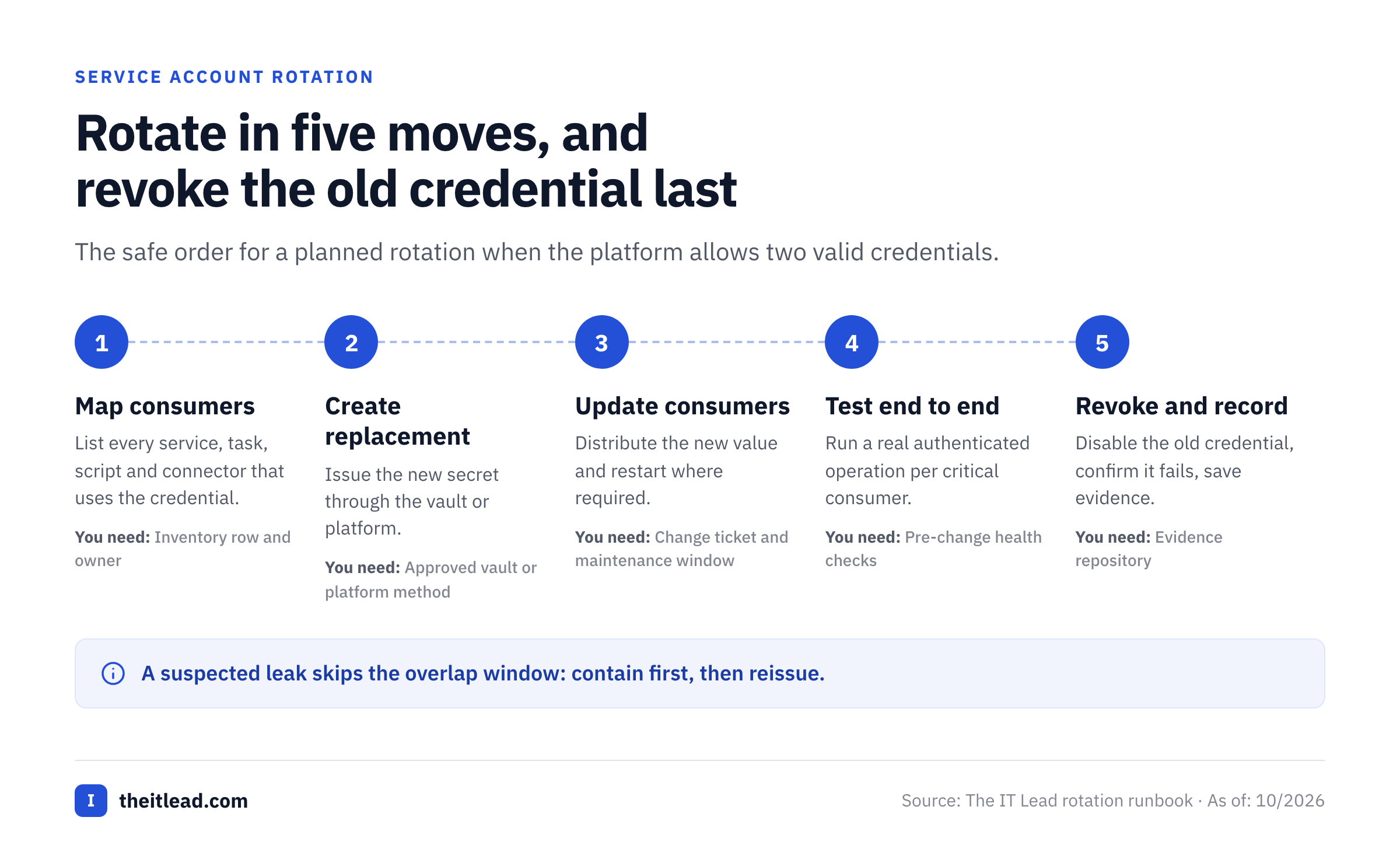
Confirm the identity and authorization
Match the account to its source-system object ID, named owner, business purpose and approved change ticket. Confirm it's still needed.
Map every consumer and copy
Identify Windows services, tasks, app pools, scripts, database pools, CI jobs, SaaS connectors and secret-store references. Check for copied or cached values.
Choose the platform-specific rotation method
Prefer managed identity or native automatic rotation. If using a static credential, confirm whether the target supports overlapping old and new credentials.
Prepare a test and recovery plan
Record pre-change health checks, maintenance window, escalation contact, known good configuration and a safe way to restore service without exposing secrets.
Create and distribute the replacement securely
Generate the new secret through the approved platform or vault, update every consumer and handle cached credentials or required service restarts.
Test the new credential end to end
Run an actual authenticated operation for each critical consumer, not just a vault write or a successful password reset. Watch errors and business output.
Invalidate the old credential
Disable or revoke the old credential after the approved overlap window and confirm that it no longer authenticates. Treat failed revocation as an open incident or change issue. It isn't done until the old credential fails.
Close the evidence and schedule the next review
Record the timestamps, executor, outcome, validation evidence, revocation result and next due date. Have the assigned reviewer sign off.
A green automation job doesn't prove that every downstream integration works. For example, a report export may authenticate successfully while a separate nightly task still holds a cached old password. Your acceptance tests shouldn't stop at an immediate smoke test; they should include the next scheduled execution.
Rollback isn't always restoring the old password. Once an exposed credential is revoked, reactivating it may recreate the incident. That's why the recovery plan can't rely on the old value. The recovery plan should instead describe how to reissue a new credential, restore the dependent configuration and revalidate access under incident-response authority.
Which rotation method works for each platform?
Traditional Active Directory service users
A standard AD user configured to run a service or scheduled task generally needs coordinated password management. Before resetting it, enumerate the services and tasks that use the identity, identify any stored credentials on other hosts and plan the service restart or credential refresh. Prefer a gMSA when the service supports one; it's the simplest fix. Microsoft documents that a gMSA's password is managed by the domain controller and retrieved by authorized hosts, which removes the need for administrators to synchronize a manually chosen password across servers.
Don't assume every legacy app supports gMSA. Test the application in a nonproduction environment and record exceptions for unsupported authentication methods. The purpose of the policy isn't to demand a disruptive conversion on a date without dependency testing.
AWS application and database secrets
AWS Secrets Manager supports scheduled rotation with a defined window. AWS documentation says schedules can be as frequent as every four hours; this is a platform capability, not a recommended interval for all applications. Supported AWS database services offer managed rotation for certain credentials, while other secrets may require a rotation function and application-specific testing.
For database connections, verify both the stored secret and the target database credential were changed. A vault value alone can't prove that the database accepts the new password. Choose single-user or alternating-user rotation based on application availability and the service's supported strategy. Test connection reuse and recovery before enabling the schedule for production.
Microsoft Entra application credentials
A service principal can authenticate using a client secret or a client certificate. Microsoft recommends certificates over client secrets where possible. For a secret-based integration, record the app registration, consuming application, credential expiration and approved renewal method. If the app supports overlapping credentials, add the replacement, deploy it, validate sign-in and remove the old credential. If it doesn't, plan the maintenance window.
A managed identity can eliminate the need for an application to manage its own long-lived secret in supported Azure scenarios. That's a better architectural outcome than indefinitely adding password resets to a calendar. Don't assume that every external SaaS connector supports managed identity or certificate authentication.
Google Cloud user-managed service account keys
Google Cloud's key-rotation guidance recommends replacing user-managed keys at least every 90 days and rotating immediately after suspected compromise. The recommended process includes disabling the replaced key, monitoring dependent applications and deleting it. Google also advises choosing more secure alternatives to service account keys whenever possible.
A Google Cloud service account normally authenticates with keys or workload identity mechanisms, not a traditional AD-style password. Classify it correctly in your inventory and choose the platform's key lifecycle rather than sending a password-reset instruction to the owner.
SaaS integration tokens and API keys
A SaaS integration may expose a token revocation API, a single active key or a key overlap period. Those differences determine whether zero-downtime rotation is feasible. Verify the vendor's documented behavior before setting the schedule. If no safe overlap exists, coordinate the application owner and maintenance window and capture a specific functional test.
What happens when a rotation fails or a credential is exposed?
Treat a routine failure and a suspected compromise as different events, because they aren't handled the same way. A routine failure may allow a short, approved recovery window while the old credential's still valid. A suspected compromise requires incident-response handling and prompt invalidation based on risk, even if service continuity becomes harder.
For a routine failure, the technical custodian should capture the failed step, affected consumers, error evidence, attempted recovery and next action. The business owner should confirm the service's impact. Security should decide whether the failed change increases the identity's exposure. Keep the status FAILED or EXCEPTION, not COMPLETED, until the new credential is active and the old one's invalidated.
For a suspected leak, look for exposed repositories, shared configuration, unexpected sign-ins and reused credentials. Rotate or revoke the affected credential, examine access logs and reduce privileges as appropriate. Preserve evidence without copying the secret into the incident record. A successful rotation doesn't establish that an attacker never used the credential before revocation.
Time-limited exception record
Use an exception only when a target can't be met safely today. An exception needs an actual owner, compensating controls, a remediation plan and an expiry date. Examples include a vendor integration that supports only one active key or a legacy service whose dependencies aren't yet mapped.
| Field | Example entry |
|---|---|
| Identity | svc-legacy-billing |
| Reason | Third-party connector accepts one active credential |
| Risk owner | Billing systems director |
| Compensating controls | Restricted network path, monitored sign-ins, reduced privilege |
| Remediation | Vendor-supported dual-key migration evaluation |
| Expiration | 2026-12-15 (illustrative) |
| Approval evidence | RISK-207 |
A permanent exception isn't a substitute for an owner. Reassess it when the vendor adds new authentication options or when the service's business purpose changes.
What evidence proves the policy is working?
A policy PDF isn't evidence that passwords rotate. Sample the actual identity inventory, rotation events and service checks. A reviewer shouldn't need a guide to follow one account from its owner and schedule to the executed change and the old credential's revocation.
- The in-scope service account inventory is reconciled with source-system exports.
- Each credential has a current business owner and technical custodian.
- Credential types and platform-managed exceptions are classified correctly.
- Every static secret has a risk tier, approved target and next due date.
- Each rotation ticket lists consumers, maintenance plan and validation tests.
- The replacement secret is stored only in an approved system, not in the inventory.
- Evidence shows both successful consumer authentication and old-credential revocation.
- Failed rotations have an owner, incident or exception status and next action.
- Exceptions have approval, compensating controls and an expiry date.
- Quarterly authorization reviews are tracked separately from credential changes.
Here's what to track. Rotation coverage is completed eligible rotations divided by rotations due during the measurement period. Track overdue exposure as the count of active static credentials past their approved deadline, grouped by privilege tier. Track post-rotation incidents as service-impacting failures linked to rotation changes. These are proposed management metrics, not published industry benchmarks.
Don't inflate completion by counting platform-managed credentials as manual rotations. Report them separately as managed, not applicable, due, completed, failed or approved exception. An unknown credential age is a data-quality issue, not proof you're compliant.
How should an IT team roll out this policy in 30 days?
Week 1: Inventory and ownership. Export the major identity stores, reconcile duplicates and assign named owners. Don't wait for a perfect list. Start with privileged production services. They're where a mistake costs most. Document missing consumers instead of inventing a dependency list.
Week 2: Classification and controls. Classify credentials by type, privilege, exposure and rotation mechanism. Identify gMSA and managed-identity candidates. Approve your own risk bands only after checking platform guidance and business constraints.
Week 3: Controlled pilot. Pick a small set of well-understood noncritical identities, document before-and-after checks and rehearse recovery. Don't begin with an undocumented domain-wide service user supporting several production systems.
Week 4: Evidence and operating cadence. Review pilot incidents, assign recurring schedules, publish the exception register and add rotation status to your regular identity review. Connect the work to the non-human identity lifecycle so the policy also covers retirement.
The outcome isn't simply a higher percentage of recently changed passwords. It's a maintained list of identities with clear accountability, safer authentication methods and rotation changes that don't surprise the application owners.
Frequently asked questions
Does NIST require service account passwords to change every 90 days?
NIST's subscriber-password guidance doesn't create a universal 90-day requirement. Set machine-credential rules using the relevant control, platform documentation and risk assessment. Google Cloud's 90-day recommendation applies to user-managed service account keys specifically.
Is rotating a service account password the same as reviewing the account?
No. Rotation replaces an authenticator; an access review confirms the account remains authorized and appropriately privileged. CIS Safeguard 5.5 addresses the inventory and quarterly authorization review, not a universal password rotation interval.
Should gMSA passwords be rotated manually?
Normally no. Windows manages gMSA passwords through the domain controller. Use the platform's managed lifecycle and investigate any service that doesn't support gMSA before creating a manual exception.
What should we do if we don't know which systems use an account?
Don't reset it blindly. Identify the owner, map dependencies and run a controlled change with validation and recovery. If the credential may be compromised, escalate to incident response and balance containment with service continuity.
Can the inventory contain a password or private key?
No. Record a safe vault or platform reference, owner, credential type, timestamps and evidence links. Keep the secret itself in an approved secret-management system, because an inventory isn't a vault.
What is the difference between automatic rotation and managed identity?
Automatic rotation changes a stored credential on a schedule. A managed or federated workload identity can remove the need for an application-owned long-lived password or key. Prefer eliminating static secrets where the platform supports it. That's the stronger fix.